Welcome Guest ( Log In | Register )

Bump Topic Topic Closed RSS Feed
7 Pages  1 2 3 > » Bottom

Outline · [ Standard ] · Linear+

Unifi Official TM UniFi High Speed Broadband Thread V35, READ 1ST PAGE FOR TURBO SPEED INFO!

views
     
soonwai
post Sep 18 2018, 12:32 AM


********
All Stars
11,458 posts

Joined: Oct 2007
From: KL


QUOTE(StuartLee2015 @ Sep 17 2018, 05:38 PM)
yea, that's why i am baffled and i ask around .

Oh yes, should i set 40 , or 80Mhz for 5Ghz?
*
Hard to say why but I think in time you'll figure it out.

For 5Ghz, set to 80Mhz channel width for max speed.
soonwai
post Sep 18 2018, 02:59 AM


********
All Stars
11,458 posts

Joined: Oct 2007
From: KL


QUOTE(cannavaro @ Sep 18 2018, 12:56 AM)
Yesterday I tested the speed on 4x Unifi 800Mbps account (all at the same building but different floors)
I use UGREEN USB3 to gigabit ethernet adapter (link here on lazada) since my laptop only comes with fast ethernet.
the relevant laptop specs;
i5 4210
8GB ddr3l ram
240gb ssd

Router used, yes for all 4 accounts
Draytek Vigor 2130n (it's a product released in 2010 or so)

Cable used to test on my laptop: Unitek CAT6 20m

However on all 4 accounts, the max speed that I could get was around 720Mbps
I'm wondering if this is due to using the ugreen adapter, or the dated Vigor 2130n or just the line being not stable since it's the so called pilot phase
I notice during each speedtests it would hit past 500Mbps quickly before slowing a bit.
Had to try a few times to get that max figure, but the speed never dipped below 500Mbps.
Unfortunately for now I have no other device to test with  sweat.gif

or could it be the cable being too long?  hmm.gif
*
Looks like router limitation. See here. Max routing speed is around 700Mbps.
https://www.smallnetbuilder.com/wireless/wi...howall=&start=3

The USB3-Gigabit adaptor should be OK, maybe a little bit of effect on speed. I'm using the cheapest one I found on Shopee with my MacBook Pro.
Speeds I can get are:

mbpr:~ $ iperf3 -c 10.0.1.80 -R -i 4 -t 30
Connecting to host 10.0.1.80, port 5201
Reverse mode, remote host 10.0.1.80 is sending
[ 5] local 10.0.1.5 port 63287 connected to 10.0.1.80 port 5201
[ ID] Interval Transfer Bitrate
[ 5] 0.00-4.00 sec 446 MBytes 934 Mbits/sec
[ 5] 4.00-8.00 sec 446 MBytes 934 Mbits/sec
[ 5] 8.00-12.00 sec 446 MBytes 934 Mbits/sec
[ 5] 12.00-16.00 sec 446 MBytes 934 Mbits/sec
[ 5] 16.00-20.00 sec 446 MBytes 934 Mbits/sec
[ 5] 20.00-24.00 sec 446 MBytes 934 Mbits/sec
[ 5] 24.00-28.00 sec 446 MBytes 934 Mbits/sec
[ 5] 28.00-30.00 sec 223 MBytes 934 Mbits/sec
- - - - - - - - - - - - - - - - - - - - - - - - -
[ ID] Interval Transfer Bitrate Retr
[ 5] 0.00-30.00 sec 3.27 GBytes 935 Mbits/sec 0 sender
[ 5] 0.00-30.00 sec 3.26 GBytes 934 Mbits/sec receiver

This post has been edited by soonwai: Sep 18 2018, 03:00 AM

soonwai
post Sep 18 2018, 02:01 PM


********
All Stars
11,458 posts

Joined: Oct 2007
From: KL


QUOTE(MGM @ Sep 18 2018, 08:43 AM)
Tot the max speed achievable for CAT5 is 100Mbps but how come when using Cat5 cable from HG8240w to TPlink c1200,  can still get 200Mbps on phone-Wifi?
*
Must be good Cat5. Looks like it's linking at 1Gbps. I have a Cat5 cable which also links at 1Gbps but the max speed I can get out of it is 350Mbps.

Conversely I have a lousy Cat5e cable which links at 1Gbps and then drops to 100Mbps a minute or 2 later. After that it'll go up and down periodically.
soonwai
post Sep 18 2018, 02:10 PM


********
All Stars
11,458 posts

Joined: Oct 2007
From: KL


QUOTE(cannavaro @ Sep 18 2018, 10:08 AM)
CPU bottleneck, referring to meltdown and spectre vulnerabilities yes?
...
Oh I see.. the speed sounds about right, similar to the test on smallnetbuilder  sweat.gif

BTW how cheap is your USB3-gigabit adaptor?
*
Bought at RM26. A bit cheaper now. https://shopee.com.my/product/28053243/377998272/
But it doesn't have USB ports like yours.

What chipset is the Ugreen? Mine is a Realtek. Product ID: 0x8153 so I think should be RTL8153.

This post has been edited by soonwai: Sep 18 2018, 02:13 PM
soonwai
post Sep 18 2018, 09:06 PM


********
All Stars
11,458 posts

Joined: Oct 2007
From: KL


QUOTE(SilentVampire @ Sep 18 2018, 06:11 PM)
I know. I put the blame squarely on TM shoulders. They should have a booklet or something for any users who install Unifi, and that will definitely help solve 98% of problems.
*
They did have a printed booklet. I remember getting it when VIP5 was installed. I guess they don't print it anymore. There's also a PDF version online.
soonwai
post Sep 18 2018, 09:14 PM


********
All Stars
11,458 posts

Joined: Oct 2007
From: KL


QUOTE(ks1230 @ Sep 18 2018, 03:12 PM)
hi, guys..does your btu pots light normally lit up?my unifi landline is down and the btu pots had no light at all..  hmm.gif
*
Yes for my Huawei BTU. The "TEL 1" light is always lit. It'll start flashing when I pick up the phone to make a call.
soonwai
post Sep 18 2018, 11:42 PM


********
All Stars
11,458 posts

Joined: Oct 2007
From: KL


QUOTE(nikrizal @ Sep 18 2018, 10:22 PM)
Good news for iPhone users. Newly launched iPhone XS, XR & XMax now equipped with 4x4 MIMO
*
Awesome, for LTE. Not for wifi. WiFi still 2x2.
soonwai
post Sep 18 2018, 11:52 PM


********
All Stars
11,458 posts

Joined: Oct 2007
From: KL


QUOTE(dickybird @ Sep 18 2018, 10:34 PM)
So when is the mass rollout?
*
From all my correspondence with TM on the same matter, they made it very clear that it'll be at the end of the pilot phase. smile.gif
soonwai
post Sep 19 2018, 12:31 AM


********
All Stars
11,458 posts

Joined: Oct 2007
From: KL


QUOTE(biloxee @ Sep 18 2018, 10:54 PM)
Yup, I just tested using two very old 1.5 Meter CAT 5 cables. Both sync @ 1Gbps but maxes out at about 400Mbps constant...
*
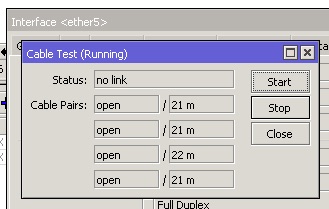
Mine is 20m. Not bad for 350Mbps for Cat 5 at that length, I guess.
user posted image
I hand measured it at 20m but I think the Mikrotik is more accurate.

This post has been edited by soonwai: Sep 19 2018, 12:38 AM
soonwai
post Sep 19 2018, 12:36 AM


********
All Stars
11,458 posts

Joined: Oct 2007
From: KL


QUOTE(nikrizal @ Sep 19 2018, 12:04 AM)
Thanks guys for the clarification. Bad move by Apple then!
*
Steve Jobs says you don't need so high speed for wifi. That's why. Also probably a power consumption problem, maybe no space for 2 more antennas.
soonwai
post Sep 19 2018, 12:43 AM


********
All Stars
11,458 posts

Joined: Oct 2007
From: KL


QUOTE(go626201 @ Sep 19 2018, 12:35 AM)
Why your cable pair showing thing?
mine is empty...
*
RB750Gr3 doesn't support the cable test feature. It's a feature of the switch chip which is a Mediatek in the RB750Gr3. The QCA switch chips support it. I tested using hAP AC and hAP AC Lite.
soonwai
post Sep 19 2018, 12:45 AM


********
All Stars
11,458 posts

Joined: Oct 2007
From: KL


QUOTE(SilentVampire @ Sep 19 2018, 12:43 AM)
Update what?
That really sucks. Samsung has 4x4 already.
*
That's OK, I have a Samsung also but mine probably not 4x4.
soonwai
post Sep 19 2018, 12:50 AM


********
All Stars
11,458 posts

Joined: Oct 2007
From: KL


QUOTE(imalmighty @ Sep 19 2018, 12:46 AM)
You are in the most difficult situation, TM is adamant and reluctant on price reduction, they want maintain ARPU.
*
I just want my 800Mbps. Over the phone, I told them you can charge me RM329 for UniFi Advance Pro 100 but I want my Turbo 800 immediately. Actually managed to raise a ticket, that wasn't closed immediately, for that. In the end, also cannot. Received the same copypasta answer.
soonwai
post Sep 19 2018, 01:19 AM


********
All Stars
11,458 posts

Joined: Oct 2007
From: KL


QUOTE(JohnLai @ Sep 19 2018, 12:47 AM)
Guess macOS is going to be affected by one core maxing out as well.

I disabled HT for my Haswell I3-4330 after modding the latest microcode (0x25) into the BIOS binary and updated the mainboard + enabling SSBD for windows 7.
Reduction in responsiveness kinda......feelable. sad.gif

Latest microcode that mitigates foreshadows is mandatory if one wanna get full 1Gbps LAN transfer speed for those with low cpu clock! thumbsup.gif
Otherwise = disable all the mitigation.  dry.gif
Time to buy new system, too bad I don't earn enough since beginning of this year. Oh well....
*
user posted image

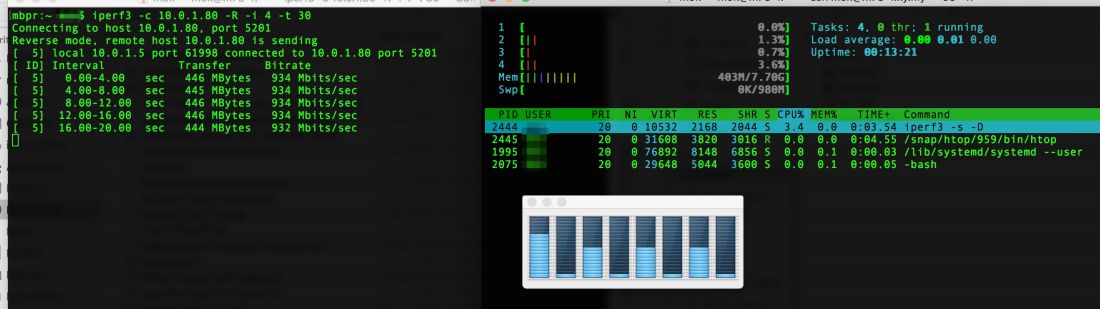
This is what I get during an iperf3 test. MacBook receiving.

MacBook is a Core i7-4850HQ, MacOS 10.13.6. Gigabit USB if that makes a difference.
Server is a Core i5-4570T. Ubuntu 18.0.4 LTS. All patches up to L1TF.

This post has been edited by soonwai: Sep 19 2018, 01:27 AM
soonwai
post Sep 19 2018, 01:26 AM


********
All Stars
11,458 posts

Joined: Oct 2007
From: KL


QUOTE(kwss @ Sep 19 2018, 01:07 AM)
Aww, I think you need to make it sounds like you want the RM129 first then only ask them to put a request to your upgrade?
Or maybe all the complain to get upgraded is just co-incidence? But the way I see how people get it by complaining made me think it is up to they want to do it or not.
*
Just trying some reverse psychology on them. Glad they didn't call my bluff on the RM329. I'm happy with RM189 for 800Mbps (when it arrives).

I think I'm being too civil with them. Others seem to have better luck when taking a different posture.
soonwai
post Sep 19 2018, 02:48 AM


********
All Stars
11,458 posts

Joined: Oct 2007
From: KL


QUOTE(lol0919 @ Sep 19 2018, 02:28 AM)
same here, i tried many times already they can create a ticket or complaint report for you and tell you that it will be assign to technical team to check or verify, but after 1 or 2 weeks, still getting the same  answer "currently pilot phase blah blah blah...." , and can't even tell us estimated date for the upgrade, keep saying they have no system to check, subject to network infrastructure....etc. we are like waiting for something uncertain.
*
At least we know exactly when the mass rollout will start.
» Click to show Spoiler - click again to hide... «

And we also know when the pilot phase will end.
» Click to show Spoiler - click again to hide... «

soonwai
post Sep 19 2018, 09:00 AM


********
All Stars
11,458 posts

Joined: Oct 2007
From: KL


QUOTE(Lupine101 @ Sep 19 2018, 08:56 AM)
Hey guys,

Just a quick question. My dad got the 300mb package and asked me to do a speed test on it. Well the speed has improved significantly from the usual 20mbps to 60~90 mbps.

However im still annoyed it couldn't break 100mbps yet. Or at least achieving 50% of the claimed speed. Need taikors here for some advice on how to fix this.

I'm using

Router: dir850l
Btu: huawei hg8240h

Oh ya I'm doing the test via wireless speed test. Could this be the reason why I'm losing so much speed?
*
Depends on the device you did the test with. For example, 60-90 can be considered good already for an iPhone 6s connecting 2.4ghz.
soonwai
post Sep 19 2018, 10:42 AM


********
All Stars
11,458 posts

Joined: Oct 2007
From: KL


QUOTE(wshoh @ Sep 13 2018, 02:09 PM)
rclxms.gif Must ask @soonwai also.
*
I don't charge anything lah. cos we sharing to increase speed. But with upcoming 800 and neighbour's 500, neither of us has got the upgrade yet, I will need to upgrade my main router.
soonwai
post Sep 19 2018, 10:45 AM


********
All Stars
11,458 posts

Joined: Oct 2007
From: KL


QUOTE(solsekuin44 @ Sep 19 2018, 10:02 AM)
The most I get now is 285Mbps, no point of 800Mbps turbo if they couldn't provide a capable router.
I have to fork out money again?? Come on
*
What router did TM give you? If current model, should be ok for 800Mbps on LAN. Wifi, likely your device is the bottleneck.
Check this thread for what wifi speeds to expect depending upon your phone's, laptop's or router's wifi capabilities.
Maximum WiFi Speeds

This post has been edited by soonwai: Sep 19 2018, 11:33 AM
soonwai
post Sep 19 2018, 12:02 PM


********
All Stars
11,458 posts

Joined: Oct 2007
From: KL


QUOTE(JohnLai @ Sep 19 2018, 11:18 AM)
Oh? Does Core i7-4850HQ MacOS have microcode version 0x1A installed?
Seem so because one of the CPU core utilization is around 60-70% in your screenshot while maintaining 1Gbps transfer speed.

Does Core i5-4570T also use version 0x25 too? nod.gif
*
4850HQ, no, only 0x19. Latest from Intel is as you've said, 0x1A.

CODE
mbpr:~ $ printf '0x%x\n' `sysctl -a | grep microcode | awk '{print $2}'`
0x19

Will be updating to MacOS Mojave later this month. Will check then if 0x1A is there.

4570T, yes, 0x25, latest as per Intel.

CODE
~$ dmesg | grep microcode
[    0.792392] microcode: sig=0x306c3, pf=0x2, revision=0x25
[    0.792431] microcode: Microcode Update Driver: v2.2.


This post has been edited by soonwai: Sep 19 2018, 12:06 PM

7 Pages  1 2 3 > » Top
Topic ClosedOptions
 

Change to:
| Lo-Fi Version
0.0277sec    0.68    7 queries    GZIP Disabled
Time is now: 10th December 2025 - 10:27 PM