QUOTE(IceBikers @ Nov 13 2023, 08:54 PM)
Hi, I am planning to get TPLINK Deco MESH for my home, running with ethernet backhaul.
I would like to know how would be the setup like?
is it A or B at below image?
also can each unit of mesh extend with additional switch © ?
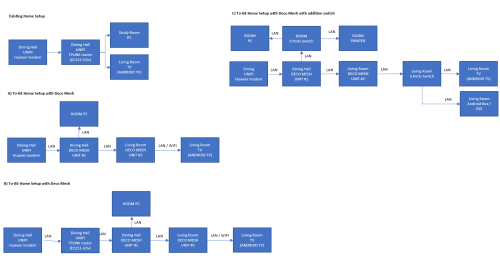
Deco mesh nodes only have 2 ethernet ports.
The premise of your diagram is wrong.
If you need the LAN cable to split into 3 (e.g. to Deco node #1, #2 and PC, you should put a switch instead.
Pull the backbone from router to a switch#1, which can then plug in PC#1 and node#1, THEN extend further downstream to switch#2, which can then plug in PC#2 and node#2, THEN extend further downstream to <ad copy infinitum>
Avoid connecting Deco through another Deco through another Deco, i.e. daisy chaining.
From CPU utilisation, it's waste because each Deco will need to examine each passing packet to determine whether to pass it downstream/upstream to another Deco, or put it on air to wifi client connected to that node. And you risk the mesh disrupted whenever you restart a Deco in the middle. The nodes do take time to determine the prior path is severed and need to recalculate.
Put a switch instead as you are less likely to need restart a switch, thus ensuring your wired backhaul is resilient. and switch is designed for passing packets at better "rpm" than a mesh node.
CODE
pc printer pc
| | |
router ---- switch ---- switch ---- switch ----
| | | |
meshroot mesh mesh mesh
This post has been edited by Oltromen Ripot: Nov 13 2023, 09:47 PM 

 Nov 12 2023, 03:26 PM


 Quote
Quote









 0.0277sec
 1.65
1.65
 6 queries
 GZIP Disabled