Welcome Guest ( Log In | Register )

302 Pages « < 266 267 268 269 270 > » Bottom

Outline · [ Standard ] · Linear+

Home Networking WiFi Router Discussion Thread, Updated for 2023

views
     
1234_4321
post Nov 30 2023, 11:43 AM

Casual
***
Junior Member
328 posts

Joined: Dec 2007


QUOTE(blacktubi @ Sep 17 2018, 05:08 PM)
Why 5Ghz signal is weaker than 2.4Ghz?
The high the frequency, the weaker the penetration. 5Ghz is operating at a higher frequency than 2.4Ghz. The shorter wavelength means it cannot penetrate solid objects like concrete wall that well.

Why 2.4Ghz is unstable and slower?
The 2.4Ghz band is used by a ton of devices such as dect phones, bluetooh, microwave oven and many other IoT devices. The interference is worst if you stay at a condo which really impact the maximum performance you can get.

Put it in layman terms, 2.4Ghz is like talking to a friend with 100 other people in the room, you have to talk slower so your friend can hear you better.

2020 Update: TNB just announced their smart meter is going to operate on the 2.4Ghz. Expect worst performance.
Why my WiFi speed is slow even after using a good WiFi router?
Please make sure you use a good WiFi adapter. Realistically, an AC1300 WiFi adapter can deliver up to around 500Mbps at very good signal.

The speed will be slower as the distance is further, a good router will have better interference mitigation so the long distance speed can be better.

Before you complain any further, use an Ethernet LAN cable to test the speed to determine where is the bottleneck is.
*
May I know for my router to enable both 2.4Ghz and 5Ghz, is it better to seperate as different SSID, or leave it the same and let the device to choose the best it can connect to?
sicklad77
post Nov 30 2023, 04:26 PM

On my way
****
Junior Member
532 posts

Joined: Aug 2010

» Click to show Spoiler - click again to hide... «


For me personally, since I have a mesh upstairs(backhaul Ethernet) and my modem downstairs. I just maintain one same name and let the devices in my household figure it out.

Couldn’t be bothered with two different SSID to be choosing and connecting and most of the time I will get full speed even if I’m upstairs. And I even have at least 20+ smart switches, 3 tv connecting & same time laptop running p2p and I don’t see a difference in speed throttling imo

This post has been edited by sicklad77: Nov 30 2023, 04:28 PM
jasontanky
post Dec 1 2023, 08:15 AM

Casual
***
Junior Member
451 posts

Joined: Nov 2015


After scrolling through some of the discussion, I just came across some of the EIRP information on the TPLink and Mercusys websites. Most of them seem to have a transmission power of 23 dBm, or 200 mW on the UNII-1 and UNIII-2/2-Extended bands. May I know if that means that those WiFi routers are not capable of leveraging the 30dBm transmission power limit in Malaysia ?

This post has been edited by jasontanky: Dec 1 2023, 08:16 AM
netken
post Dec 6 2023, 08:31 AM

Regular
******
Senior Member
1,298 posts

Joined: May 2005
From: HamuHamu Chan DeKukuMalu
Appreciate advice on direction of upgrading for the setup below.

House: Double Storey Terrace.
Home Office: Double Storey Terrace.
Both Houses are back to back (separated by backlane) using Maxis Fibre.

Before Setup:
Modem > Kaon Router (DECT Phone) > Asus GT AC5300 > 5 units Asus AX Mini Mesh XD4 (3 in house and 2 in home office)
Maxis Home Fibre Speed - 500 MB / 100 MB
Problem faces - since upgrading beyond 300MB, the max speed obtainable is only 200MB upload and above if nearer to the GT AC5300
AX Mini Mesh XD4 most of the time gives about 100MB or more when away from the GT AC6300


Current Setup:
Maxis Home Fibre Speed - 800 MB / 200 MB (due to recent package adjustment)
Still facing same problem - GT AC5300 is still maxed out about 200MB and AX Mini Mesh XD4 about 100MB although upload speed has increased due to 800/200mb.


Request:
Time to upgrade entire setup to utilise maxis fibre plan of 800/200mb in both houses back to back.
Will still connect using Modem > Kaon Router (DECT Phone) > Replacement Setup (is Deco X95 okay?) located in house > 1 more Deco X95 located in home office?
Possible may upgrade to 1GB in future, so reading the front page of this topic, Deco X95 is ideal but will 2 pack be sufficient to reach 2x double story houses back to back?

Appreciate advice or suggestion for setup or hardware needed, not very IT saavy so need something off the shelf - Asus seems abit pricey hence looking at TP Link.

Many Thanks!

This post has been edited by netken: Dec 6 2023, 08:40 AM
MyProLife
post Dec 6 2023, 02:23 PM

I bully wumao & MPKL
*******
Senior Member
2,075 posts

Joined: Sep 2021
From: nowhere

QUOTE(jasontanky @ Dec 1 2023, 08:15 AM)
After scrolling through some of the discussion, I just came across some of the EIRP information on the TPLink and Mercusys websites. Most of them seem to have a transmission power of 23 dBm, or 200 mW on the UNII-1 and UNIII-2/2-Extended bands. May I know if that means that those WiFi routers are not capable of leveraging the 30dBm transmission power limit in Malaysia ?
*
For EU version yes.

Most TP link branded sold in Malaysia officially (via my auth distro) are US version. For mercusys is otherwise mostly EU version
jasontanky
post Dec 7 2023, 07:15 AM

Casual
***
Junior Member
451 posts

Joined: Nov 2015


QUOTE(MyProLife @ Dec 6 2023, 02:23 PM)
For EU version yes.

Most TP link branded sold in Malaysia officially (via my auth distro) are US version. For mercusys is otherwise mostly EU version
*
Therefore I could assume that the TPLINK AX53 will have better wireless performance than Mercusys MR80X due to the factor as mentioned by you?
MyProLife
post Dec 7 2023, 11:29 AM

I bully wumao & MPKL
*******
Senior Member
2,075 posts

Joined: Sep 2021
From: nowhere

QUOTE(jasontanky @ Dec 7 2023, 07:15 AM)
Therefore I could assume that the TPLINK AX53 will have better wireless performance than Mercusys MR80X due to the factor as mentioned by you?
*
Should be
hasmidzul_jojo
post Dec 11 2023, 09:20 AM

Getting Started
**
Junior Member
203 posts

Joined: Feb 2008
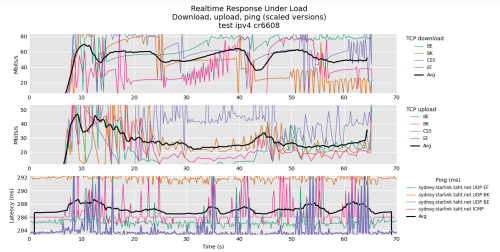
Been playing around with openwrt, cr6608, firmware 23.05.02.
Services running wireguard, dns over https, ddns.
Performance test on flent RRUL compete mixed ipv4 ipv6 test against sydney server.
Unifi 500Mbps


user posted image


hasmidzul_jojo
post Dec 11 2023, 09:26 AM

Getting Started
**
Junior Member
203 posts

Joined: Feb 2008
corection ... not RRUL compete ipv4 ipv6 test.ONLY RRUL test
ckh83
post Dec 14 2023, 08:11 AM

Getting Started
**
Junior Member
176 posts

Joined: Jan 2003
Hi, anyone using deco x60 v3.2?
Connect to mesh note (using wireless backhaul) speed can reach 500mbps? Since it upgrade from ax3000 to ax5400?
puttagunta_h
post Dec 15 2023, 04:26 PM

New Member
*
Junior Member
30 posts

Joined: Oct 2004
From: Puchong


I just got Xiaomi AX3000 mesh set of 2 and I am going to connect them with a wired backhaul. Any tips on the configuration that i need to keep in mind before I start the setup?
Omochao
post Dec 15 2023, 04:29 PM

Enthusiast
*****
Junior Member
835 posts

Joined: Nov 2007
From: Land of Forgotten
Thought I got a good deal during 12.12 sales, but ended up with a misleading device by Mercusys (TP-link), now I fully understand why there aren't many reviews in the market about Mercusys mesh system!

Bought a 2-pack Halo H70x mesh to try out, when set up with just only main node first, and immediately do speed test, can't even reach 400mbps on my current 500Mbps package.

This is tested on solely 5GHZ wifi 6 and also even on LAN CAT 5 E ethernet cables.

Turned on QOS and set bandwidth limit to 1000 Mbps also no use, or even 500 for that matter. Running on latest firmware!

Turned off UPNP, SLIG and use even cloudflare dns, nothing helps at all, will never be able to reach more than 400 Mbps.

anyone got any idea on configuring this devices?

There is no mode for me to change except turning on/off 2.4Ghz/5Ghz and not even setting MHZ options!
» Click to show Spoiler - click again to hide... «


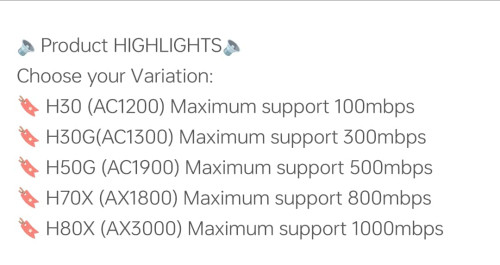
Funnily, one shopee seller advertise this device can go up to 800Mbps no issues.

user posted image

This post has been edited by Omochao: Dec 15 2023, 04:36 PM
Alert_RaZO
post Dec 15 2023, 10:16 PM

On my way
****
Junior Member
601 posts

Joined: May 2013


Dear Guys,

Can recommend which mesh wifi is gooding?
Is it better to buy same brand with router?

I live 3 story landed house.

This post has been edited by Alert_RaZO: Dec 15 2023, 10:17 PM
MyProLife
post Dec 16 2023, 01:16 AM

I bully wumao & MPKL
*******
Senior Member
2,075 posts

Joined: Sep 2021
From: nowhere

QUOTE(Omochao @ Dec 15 2023, 04:29 PM)
Thought I got a good deal during 12.12 sales, but ended up with a misleading device by Mercusys (TP-link), now I fully understand why there aren't many reviews in the market about Mercusys mesh system!

Bought a 2-pack Halo H70x mesh to try out, when set up with just only main node first, and immediately do speed test, can't even reach 400mbps on my current 500Mbps package.

This is tested on solely 5GHZ wifi 6 and also even on LAN CAT 5 E ethernet cables.

Turned on QOS and set bandwidth limit to 1000 Mbps also no use, or even 500 for that matter. Running on latest firmware!

Turned off UPNP, SLIG and use even cloudflare dns, nothing helps at all, will never be able to reach more than 400 Mbps.

anyone got any idea on configuring this devices?

There is no mode for me to change except turning on/off 2.4Ghz/5Ghz and not even setting MHZ options!
» Click to show Spoiler - click again to hide... «


Funnily, one shopee seller advertise this device can go up to 800Mbps no issues.

user posted image
*
Perhaps more to clients limitations especially on WiFi 5 clients or phones
Omochao
post Dec 16 2023, 08:24 AM

Enthusiast
*****
Junior Member
835 posts

Joined: Nov 2007
From: Land of Forgotten
QUOTE(Alert_RaZO @ Dec 15 2023, 10:16 PM)
Dear Guys,

Can recommend which mesh wifi is gooding?
Is it better to buy same brand with router?

I live 3 story landed house.
*
If you dont mind, I can sell you mine, Mercusys H70x, bought it for 399 during 12.12 sales, retail price around 450.

But if your subscription speed is more than 300mbps, I wouldn't suggest you to use it as I'm facing problem for speeds over 300mbps


QUOTE(MyProLife @ Dec 16 2023, 01:16 AM)
Perhaps more to clients limitations especially on WiFi 5 clients or phones
*
I was on Fiberhome ax3000 router, no such speed issues compared to this Ax1800 mesh.

This post has been edited by Omochao: Dec 16 2023, 08:58 AM
MyProLife
post Dec 16 2023, 10:58 AM

I bully wumao & MPKL
*******
Senior Member
2,075 posts

Joined: Sep 2021
From: nowhere

QUOTE(Omochao @ Dec 16 2023, 08:24 AM)
If you dont mind, I can sell you mine, Mercusys H70x, bought it for 399 during 12.12 sales, retail price around 450.

But if your subscription speed is more than 300mbps, I wouldn't suggest you to use it as I'm facing problem for speeds over 300mbps
I was on Fiberhome ax3000 router, no such speed issues compared to this Ax1800 mesh.
*
AX1800 is not enough for speed more than 500 actually. Of course the soc and chipsets used also may be the limit
H70x might be using same older dual core mtk chip as some AC/WiFi 5 router chip, or maybe just firmware issues
MyProLife
post Dec 16 2023, 11:12 AM

I bully wumao & MPKL
*******
Senior Member
2,075 posts

Joined: Sep 2021
From: nowhere

QUOTE(MyProLife @ Dec 16 2023, 10:58 AM)
AX1800 is not enough for speed more than 500 actually. Of course the soc and chipsets used also may be the limit
H70x might be using same older dual core mtk chip as some AC/WiFi 5 router chip, or maybe just firmware issues
*


200m subscription only reach around 70mbps, something is wrong lo
Alert_RaZO
post Dec 16 2023, 01:01 PM

On my way
****
Junior Member
601 posts

Joined: May 2013


QUOTE(Omochao @ Dec 16 2023, 08:24 AM)
If you dont mind, I can sell you mine, Mercusys H70x, bought it for 399 during 12.12 sales, retail price around 450.

But if your subscription speed is more than 300mbps, I wouldn't suggest you to use it as I'm facing problem for speeds over 300mbps
*
Mine is 300mbps

TSblacktubi
post Dec 16 2023, 10:48 PM

-
Group Icon
Elite
8,418 posts

Joined: Jul 2008

QUOTE(Omochao @ Dec 15 2023, 04:29 PM)
Thought I got a good deal during 12.12 sales, but ended up with a misleading device by Mercusys (TP-link), now I fully understand why there aren't many reviews in the market about Mercusys mesh system!

Bought a 2-pack Halo H70x mesh to try out, when set up with just only main node first, and immediately do speed test, can't even reach 400mbps on my current 500Mbps package.

This is tested on solely 5GHZ wifi 6 and also even on LAN CAT 5 E ethernet cables.

Turned on QOS and set bandwidth limit to 1000 Mbps also no use, or even 500 for that matter. Running on latest firmware!

Turned off UPNP, SLIG and use even cloudflare dns, nothing helps at all, will never be able to reach more than 400 Mbps.

anyone got any idea on configuring this devices?

There is no mode for me to change except turning on/off 2.4Ghz/5Ghz and not even setting MHZ options!
» Click to show Spoiler - click again to hide... «


Funnily, one shopee seller advertise this device can go up to 800Mbps no issues.

user posted image
*
Are you testing on the main unit?

If you are referring to wireless backhaul mesh node performance, you'll need at least AX6600 tri-band to reach 500Mbps reliably.

You should be able to get at least 500Mbps on the main unit effortlessly.
ckh83
post Dec 17 2023, 07:52 AM

Getting Started
**
Junior Member
176 posts

Joined: Jan 2003
QUOTE(blacktubi @ Dec 16 2023, 10:48 PM)
Are you testing on the main unit?

If you are referring to wireless backhaul mesh node performance, you'll need at least AX6600 tri-band to reach 500Mbps reliably.

You should be able to get at least 500Mbps on the main unit effortlessly.
*
How about deco x60 v3.2 ax5400?
Able to get 500mbps at mesh node?

302 Pages « < 266 267 268 269 270 > » Top
 

Change to:
| Lo-Fi Version
0.0272sec    0.89    6 queries    GZIP Disabled
Time is now: 16th December 2025 - 12:12 PM