Welcome Guest ( Log In | Register )

302 Pages « < 263 264 265 266 267 > » Bottom

Outline · [ Standard ] · Linear+

Home Networking WiFi Router Discussion Thread, Updated for 2023

views
     
pokchik
post Nov 7 2023, 02:26 PM

I'm getting too old for this sh*t
******
Senior Member
1,304 posts

Joined: Mar 2010


Dear sifus & readers,

I would like to get some feedback for my current issue.

TLDR;

- 1x RT-AC86U spoilt, considering a replacement or a total revamp of my network devices.

Streamyx History:

- I spent some hundreds RM to have a stable Streamyx/DSL wifi/modem.
- Changed high-dB antennas and whatnot.. but still shaky performance.
- I won the RT-AC86U from AsusMY contest back in 2018 and used it, paired with the blue wired DSL modem by TM (the older one).
- The performance was TOP NOTCH. 10/10, all my complaints about Streamyx being slow suddenly were solved with this router.

Unifi History:

- My Taman started its Unifi infra and I quickly converted to 100Mbps (later 300Mbps).
- Bought another RT-AC86U to utilize its AiMesh (1x unit place on 1st Floor (Main), 1x unit placed on Ground Floor (Mesh))
Note: I didn't do anything like add additional fans or anything, but I do clean it up once in a while from dust.
- Again, the performance is TOP NOTCH. 10/10.

SWU3.0 Story:

- Re-contracted with SWU3.0, currently with 300Mbps (500Mbps upgrade now).
- RT-AC86U started showing problems after 5yrs of usage, particularly the Mesh node.
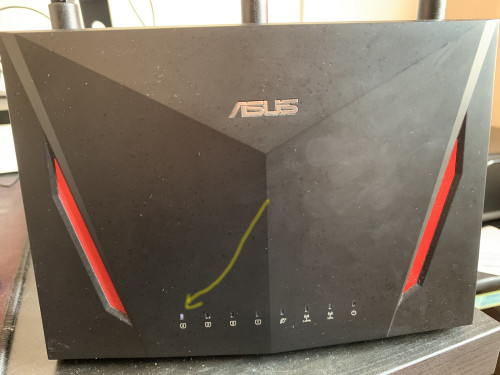
- The mesh node finally died on me - when I switch it on, only Eth4 LED turns on but nothing else. Nada.
user posted image

- The Main node still is surviving.
- I even tried for a week with TM's Dlink 3060Z, it performs well on the first day but after a week, my connection is laggy,
on-off devices disconnected, my voice conferences got cut-off, etc. - WTS TM Mesh Router pair.


What I would like to do:

- I wanted to enforce again my home network, with a few options :

1. Purchase another RT-AC86U

Pros Cons
- Plug & play - Old tech
- Relatively cheap - Possibility of refurbished hardware
- My old trusty network again! - Unreliable? (heard that more people had problematic units), surprised that I managed to survive up to 5yrs

2. Purchase RT-AX86U Pro

Pros Cons
- Plug & play - Price (RM1.5k)
- Successor of RT-AC86U

When I talk about Price as cons - it's not that I can't afford it, I just thought what if I go for..

3. Purchase Deco XE75

Pros Cons
- WIFI 6E kononnya future-proof - Will it be as reliable as my old RT-AC86U mesh network stability?
- Tri-band Mesh - I've read in a global forum about some unreliability

4. Try out TPLink Omada

Pros Cons
- A whole new ballgame - Price will shoot up to RM3-5k I guess
- I assume that it's semi-enterprise grade reliable - Overdo things since I'm not an IT guy, though I like to fiddle, particularly PCs and home networks
- On the long run, I might want to expand further with CCTVs and DVRs


Any feedbacks/inputs are very well appreciated.

This post has been edited by pokchik: Nov 7 2023, 02:32 PM
BOTAK_WAI
post Nov 7 2023, 04:31 PM

Blow Water First Class
*******
Senior Member
4,157 posts

Joined: Jan 2003
From: Cheras, KL


QUOTE(pokchik @ Nov 7 2023, 02:26 PM)
Dear sifus & readers,

I would like to get some feedback for my current issue.

TLDR;

- 1x RT-AC86U spoilt, considering a replacement or a total revamp of my network devices.

Streamyx History:

- I spent some hundreds RM to have a stable Streamyx/DSL wifi/modem.
- Changed high-dB antennas and whatnot.. but still shaky performance.
- I won the RT-AC86U from AsusMY contest back in 2018 and used it, paired with the blue wired DSL modem by TM (the older one).
- The performance was TOP NOTCH. 10/10, all my complaints about Streamyx being slow suddenly were solved with this router.

Unifi History:

- My Taman started its Unifi infra and I quickly converted to 100Mbps (later 300Mbps).
- Bought another RT-AC86U to utilize its AiMesh (1x unit place on 1st Floor (Main), 1x unit placed on Ground Floor (Mesh))
Note: I didn't do anything like add additional fans or anything, but I do clean it up once in a while from dust.
- Again, the performance is TOP NOTCH. 10/10.

SWU3.0 Story:

- Re-contracted with SWU3.0, currently with 300Mbps (500Mbps upgrade now).
- RT-AC86U started showing problems after 5yrs of usage, particularly the Mesh node.
- The mesh node finally died on me - when I switch it on, only Eth4 LED turns on but nothing else. Nada.

user posted image

- The Main node still is surviving.
- I even tried for a week with TM's Dlink 3060Z, it performs well on the first day but after a week, my connection is laggy,
on-off devices disconnected, my voice conferences got cut-off, etc. - WTS TM Mesh Router pair.
What I would like to do:

- I wanted to enforce again my home network, with a few options :

1. Purchase another RT-AC86U

Pros Cons
- Plug & play - Old tech
- Relatively cheap - Possibility of refurbished hardware
- My old trusty network again! - Unreliable? (heard that more people had problematic units), surprised that I managed to survive up to 5yrs

2. Purchase RT-AX86U Pro

Pros Cons
- Plug & play - Price (RM1.5k)
- Successor of RT-AC86U  

When I talk about Price as cons - it's not that I can't afford it, I just thought what if I go for..

3. Purchase Deco XE75

Pros Cons
- WIFI 6E kononnya future-proof - Will it be as reliable as my old RT-AC86U mesh network stability?
- Tri-band Mesh - I've read in a global forum about some unreliability

4. Try out TPLink Omada

Pros Cons
- A whole new ballgame - Price will shoot up to RM3-5k I guess
- I assume that it's semi-enterprise grade reliable - Overdo things since I'm not an IT guy, though I like to fiddle, particularly PCs and home networks
- On the long run, I might want to expand further with CCTVs and DVRs
Any feedbacks/inputs are very well appreciated.
*
since u are using asus router…why not just replace it TUF-AX4200 and settle with it.

got extra budget just run lan cable all over your house.

This post has been edited by BOTAK_WAI: Nov 7 2023, 04:33 PM
pokchik
post Nov 7 2023, 06:17 PM

I'm getting too old for this sh*t
******
Senior Member
1,304 posts

Joined: Mar 2010


QUOTE(BOTAK_WAI @ Nov 7 2023, 04:31 PM)
since u are using asus router…why not just replace it TUF-AX4200 and settle with it.

got extra budget just run lan cable all over your house.
*
you know what - that is a good proposal.. how come I totally missed out this router?

from specs, it's almost comparable with the trusty RT-AC86U as wel..
alright, will be assessing it a bit..

This post has been edited by pokchik: Nov 7 2023, 06:17 PM
tdled
post Nov 7 2023, 06:37 PM

Getting Started
**
Junior Member
61 posts

Joined: Aug 2008
Can someone advise me please, I'm looking to buy the router below to use with Yoodoo unlimited sim. Is it a good choice? will it be suitable for good coverage in my 2000sqft unit?
Thanks

WiFi Router Sim Card Modem 5G/4G Pro CPE LTE Cat12 Up To 600Mbps 2.4G 5G 4G AC1200 Router


Attached thumbnail(s)
Attached Image
puawk1
post Nov 8 2023, 10:22 AM

New Member
*
Newbie
27 posts

Joined: Dec 2015
QUOTE(MyProLife @ Nov 6 2023, 02:29 PM)
Same limitations applies for CDM Asus routers. Newer CDM Asus routers may have no effect even change region to somewhere like Australia
*
Hi: just try to understand a bit more on how the limitations is being applied to the CDM Asus routers, is it controlled by hardware or at software/firmware level? Thank you.
greyshadow
post Nov 8 2023, 10:23 AM

I bleed it out, Diggin' deeper just to throw it away!
******
Senior Member
1,844 posts

Joined: Jan 2003
From: Kingdom of Sarawak


Just gotten my Unifi upgraded to 500Mbps few weeks back, but my old TP-Link AX50 (3 years old) can only achieve 300Mbps+, be it on 5G wireless or LAN

swapped it out with TM's Fiberhome mesh wifi and can get 500Mbps without any issue

Any idea what's wrong with the AX50? hmm.gif
played around with all QOS settings but still the same

This post has been edited by greyshadow: Nov 8 2023, 01:16 PM
Oltromen Ripot
post Nov 8 2023, 11:08 AM

👍 999999 person Likes this member
*******
Senior Member
4,034 posts

Joined: Dec 2019
QUOTE(greyshadow @ Nov 8 2023, 10:23 AM)
Just gotten my Unifi upgraded to 500Mbps few weeks back, but my old TP-Link AX50 (3 years old) can only achieve 300Mbps+, be it on 5G wireless or LAN

swapped it out with TM's Fiberhome mesh wifi and can get 500Mbps without any issue

Any idea what's wrong with the AX50? hmm.gif
played around with all QOL settings but still the same
*
QOS, bandwidth rate limiter.
SUSMyProLife
post Nov 8 2023, 12:32 PM

I bully wumao & MPKL
*******
Senior Member
2,075 posts

Joined: Sep 2021
From: nowhere

QUOTE(puawk1 @ Nov 8 2023, 10:22 AM)
Hi: just try to understand a bit more on how the limitations is being applied to the CDM Asus routers, is it controlled by hardware or at software/firmware level? Thank you.
*
Region code is Hardcoded in the bootloader
eclectice
post Nov 8 2023, 02:17 PM

Look at all my stars!!
*******
Senior Member
2,734 posts

Joined: Mar 2008
QUOTE(Oltromen Ripot @ Oct 21 2023, 09:56 AM)
from reading complaints about aimesh in here, it gives impression that • cobbling different models together at start is error prone and need patience, and • continued use after initial set up is unstable.
*
AI Mesh rules are simple: When setting up a mesh network, it's best to use the same model and technology for all routers and nodes. Mixing different models and technologies can cause compatibility issues and affect performance.

If possible, it's recommended to use routers and nodes with the same Wi-Fi technology. For example, using AX and AC technology is not ideal as it can affect network speed/bandwidth.

Although using a wired backhaul is the optimal choice for better performance, it could be expensive as it requires investing in cables and/or switches. Alternatively, using wireless backhaul is a more affordable option, but it may not provide the same level of performance. Additionally, finding the best location to place the mesh nodes can also be challenging.


Max
post Nov 8 2023, 04:34 PM

Regular
******
Senior Member
1,705 posts

Joined: Jan 2003
From: Sepang - Putrajaya - Cyberjaya


QUOTE(greyshadow @ Nov 8 2023, 10:23 AM)
Just gotten my Unifi upgraded to 500Mbps few weeks back, but my old TP-Link AX50 (3 years old) can only achieve 300Mbps+, be it on 5G wireless or LAN

swapped it out with TM's Fiberhome mesh wifi and can get 500Mbps without any issue

Any idea what's wrong with the AX50? hmm.gif
played around with all QOS settings but still the same
*
im using Archer AX50 also. bought 2nd actually.
upgraded to 500mb. can achieve with LAN.. but wifi might be limited by my devices capabilities.. 2xx ~ 300mb can achieve
SwarmTroll
post Nov 8 2023, 07:31 PM

Regular
******
Senior Member
1,401 posts

Joined: Apr 2012
Question guys, is it necessary for these three functions to be turned on? OFDMA, TWT, and MU-MIMO? I'm using AX73. I've been going through older posts and it seems these functions are detrimental to performance? Or perhaps now at 2023 it is different now?

This post has been edited by SwarmTroll: Nov 8 2023, 07:33 PM
pokchik
post Nov 8 2023, 07:59 PM

I'm getting too old for this sh*t
******
Senior Member
1,304 posts

Joined: Mar 2010


QUOTE(eclectice @ Nov 8 2023, 02:17 PM)
AI Mesh rules are simple: When setting up a mesh network, it's best to use the same model and technology for all routers and nodes. Mixing different models and technologies can cause compatibility issues and affect performance.
*
aw man.. thanks for the heads-up, i would guess as much..
greyshadow
post Nov 8 2023, 08:03 PM

I bleed it out, Diggin' deeper just to throw it away!
******
Senior Member
1,844 posts

Joined: Jan 2003
From: Kingdom of Sarawak


QUOTE(Max @ Nov 8 2023, 04:34 PM)
im using Archer AX50 also. bought 2nd actually.
upgraded to 500mb. can achieve with LAN.. but wifi might be limited by my devices capabilities.. 2xx ~ 300mb can achieve
*
my phone can get 500Mbps on the Homefiber, tested LAN on it also can get 500Mbps

just the AX50, same devices same cables all maxed at 300Mbps hmm.gif

QoS also already set to 999Mbps max, and there's no way to turn it off
Max
post Nov 8 2023, 11:50 PM

Regular
******
Senior Member
1,705 posts

Joined: Jan 2003
From: Sepang - Putrajaya - Cyberjaya


QUOTE(greyshadow @ Nov 8 2023, 08:03 PM)
my phone can get 500Mbps on the Homefiber, tested LAN on it also can get 500Mbps

just the AX50, same devices same cables all maxed at 300Mbps  hmm.gif

QoS also already set to 999Mbps max, and there's no way to turn it off
*
I see.
Not aure about that
I turn off all other option (av, parental, qos is on standard mode, no up/down set)
Omochao
post Nov 11 2023, 08:24 AM

Enthusiast
*****
Junior Member
835 posts

Joined: Nov 2007
From: Land of Forgotten
QUOTE(greyshadow @ Nov 8 2023, 08:03 PM)
my phone can get 500Mbps on the Homefiber, tested LAN on it also can get 500Mbps

just the AX50, same devices same cables all maxed at 300Mbps  hmm.gif

QoS also already set to 999Mbps max, and there's no way to turn it off
*
Saw some comments on FB page community for TP link devices, all remarked same, maybe you might want to hard reset and reconfigure from start.

user posted image

This user using same model as your TP-link, maybe you can try to check out on their post, also same issue, no QOS button, but other users suggested to leave it as it is without setting the speed, and the other devices turn off Priority, I do not own a AX50, but hopefully you can figure it out soon.
https://www.facebook.com/groups/tplinkmy/pe...mibextid=zDhOQc


EDIT: seems like you might have to forego using WiFi6 if what he said is the real solution in getting back your full bandwidth speed. Hopefully TP link will update its firmware to get it ironed out.
user posted image

This post has been edited by Omochao: Nov 11 2023, 09:03 AM
SUSMyProLife
post Nov 11 2023, 09:45 AM

I bully wumao & MPKL
*******
Senior Member
2,075 posts

Joined: Sep 2021
From: nowhere

QUOTE(Omochao @ Nov 11 2023, 08:24 AM)
Snip
*
AX50 is dead end model already and i doubt tp link will provide any further updates for firmware

Blame intel, they sold home router chip to maxlinear

Tp link expect you to buy their replacement model instead (ax53/ax55)

alip_11
post Nov 12 2023, 02:37 PM

Getting Started
**
Junior Member
232 posts

Joined: Nov 2006
From: Brissy


House type: Landed
Size of house: 2500sqf. 2 storey
Features required: coverage to all part of house with almost same speed near main router.
Number of devices connected to WiFi: 5-6
Internet Speed: 400-500mbps (yes flexi 5g). Using 5g router brand xyzel
Budget: rm200-300.
SUSMyProLife
post Nov 12 2023, 02:57 PM

I bully wumao & MPKL
*******
Senior Member
2,075 posts

Joined: Sep 2021
From: nowhere

QUOTE(alip_11 @ Nov 12 2023, 02:37 PM)
House type: Landed
Size of house: 2500sqf. 2 storey
Features required: coverage to all part of house with almost same speed near main router. 
Number of devices connected to WiFi: 5-6
Internet Speed: 400-500mbps (yes flexi 5g). Using 5g router brand xyzel
Budget: rm200-300.
*
Too low budget

300 below can get ax3000 class with mediocre range for double storey, suggest up budget get mesh system instead
jibpek
post Nov 12 2023, 03:03 PM

Enthusiast
*****
Junior Member
708 posts

Joined: Jul 2012
Why nobody talk about WIFI 7, 802.11be?

Planning to buy RT-BE96U
alip_11
post Nov 12 2023, 03:05 PM

Getting Started
**
Junior Member
232 posts

Joined: Nov 2006
From: Brissy


QUOTE(MyProLife @ Nov 12 2023, 02:57 PM)
Too low budget

300 below can get ax3000 class with mediocre range for double storey, suggest up budget get mesh system instead
*
Mesh system how ya? I’m not familiar with it. Need to buy how many pcs? Just connect it my 5g router by wire? Wifi?

302 Pages « < 263 264 265 266 267 > » Top
 

Change to:
| Lo-Fi Version
0.0316sec    0.47    6 queries    GZIP Disabled
Time is now: 13th December 2025 - 11:52 AM