Welcome Guest ( Log In | Register )

Outline · [ Standard ] · Linear+

Home Networking WiFi Router Discussion Thread, Updated for 2023

views
     
puawk1
post Aug 8 2020, 11:52 AM

New Member
*
Newbie
27 posts

Joined: Dec 2015
Yesterday my 18 months old China unit Asus AC86U went off by itself, then resume working after power off and power on the power supply. Looks like it is giving sign......

I need to buy a spare unit, thinking of buying ASUS AC86U again as it serves me well. Any recommendation for other ASUS router at about the same price range as AC86U, and with better performance?

I would say this AC86U is a good router. It provides coverage for every corner of my 2 and a half story house. There is no dead spot, the download speed is 30+ Mbps at the weakest spot, and most time more than 60+ Mbps for other spots. My plan is only Unifi 100 Mbps.
puawk1
post Jan 7 2021, 02:36 PM

New Member
*
Newbie
27 posts

Joined: Dec 2015
Hi Sifus,

I would like to request for your advice. Currently I am using 1 unit of ASUS RT-AC86U for my 2 and a half story house, which the total built up area is approximately 3200 square feet. I have being using this Chinese version router for 1 year plus and I would say it serves me well.

I am subscribed to UNIFI 100 Mbps, the router is placed at the front part of Ground floor living room and the whole GF will get 60+ Mbps for most of the time. For First floor and the Second floor, (half story) most time can get 30+ Mbps or higher for all the rooms / corners; except a corner which I used to work.

I am thinking of getting another unit of RT-AC86U to increase the wifi signal at First floor. I have a LAN point near by my working place, which is connected to the existing router placed at Ground Floor.

My question: is it better to connect to second unit of router to the LAN point and configure it as Access Point? Or configure both the existing router nd the new router as Mesh?

Thank you.
puawk1
post Oct 17 2021, 12:02 PM

New Member
*
Newbie
27 posts

Joined: Dec 2015
QUOTE(kiwijuice @ Oct 13 2021, 03:31 PM)
Hi all sifu,

I am thinking to replace my wifi router as it is giving some connection issue these 2 months. I found that there is intermittent high ping when doing ping test to the router IP via WIFI.

some info:
- current wifi router: Asus RT-N14UHP. 1 router cover entire house
- double story around 38*45
- i am happy with the current coverage with just this 1 router. So i hope i can replace with another 1 that do the same. If possible, i will try to avoid doing mesh
- budget: around RM 500 - RM 800
- device connected to Wifi: Most of the time, maximum of 2 laptop and 5 mobile phone. TVBox currenting using Ethernet connection
- Unifi 300mbps

seeking advice for:
- which model i should replace my current RT-N14UHP to? I have tried to search in the lowyat price list, and found RT-AC86U and RT-AX3000 within the budget range.
- any advice about the different on these 2 model and which one i should go for? my main concern is about the coverage area should be as good as my current RT-N14UHP.
- if you have other brand/model to recommend, please do so.

Thank you very much : )
*
I used to have RT-N14U but I replaced it with Asus RT-AC86U more than 2 years ago. The RT-AC86U serves me well, with higher number of devices connecting to the router.
puawk1
post Nov 10 2021, 11:20 AM

New Member
*
Newbie
27 posts

Joined: Dec 2015
Hi All,

Currently I have a unit of RT-AC86U which serves me well for my 2 and a half story house but I am thinking of getting the Wifi6 AX86U router.

I am thinking of using the new AX86U as the main router, shall I use the existing AC86U as AP or convert it as mesh? May I know how can I best use the existing AC86U with the new AX86U?

Thank you very much!
puawk1
post Nov 11 2021, 10:46 AM

New Member
*
Newbie
27 posts

Joined: Dec 2015
QUOTE(zher4883 @ Nov 10 2021, 02:54 PM)
Definitely set up as Mesh. You could use ethernet cable as backhaul for better performance.
*
Yes, I already have an Ethernet cable from living hall at ground floor (the main router) to 1st floor which I plan to put the second router.
Is it okay to pair a dual band router (AC86U) to the triband router (AX86U) to set up the mesh system?

Thank you.
puawk1
post Feb 21 2022, 02:01 PM

New Member
*
Newbie
27 posts

Joined: Dec 2015
QUOTE(Milo_O @ Feb 16 2022, 02:12 PM)
House type: Landed 2 storey
Size of house: Square feet 20x65 | 20x50 (built-up) and number of floor :2 floors
Features required: Stability is the priority
Number of devices connected to WiFi: 9devices at max, typically 6 devices
Internet Speed: Unifi100 Mbps (planning to upgrade to 300 Mbps in near future)
Budget: To be decided

Problem :
Currently having TP-Link Deco M4 (2 pack). 1st primary is located at 1st floor. 2nd slave Deco is located at the 2nd floor living hall (just after the staircase).

Both my wife and myself are working at the 2nd floor (myself working at the 2nd floor living hall which is nearby to the slave Deco while my wife is working in one of the room which is 12 feet away without any wall obstruction as she keeps the door open)
The problem is she is having frequent connection problems while running massive data processing from her company server with VPN. I myself is having frequent disconnection with VPN as well.

Just to check, what will be the best setup for stability performance ?
Am researching around and seems Asus AiMesh (RT-AX86U + RT-AX55U) is offering premium stability performance.

Any inputs are much appreciated.

Note :
1. Have try reset both Deco multiple times
2. Have try delete the Deco network and configuring again multiple times
3. 2nd floor do not have any ethernet port so the secondary mesh must be connected to primary wirelessly.
*
Just to share my humble opinion and experience, I am living in a 2 and half floor house and using 1 unit of ASUS RT-AC86U (China unit) since more than 2 years ago. The ASUS router is placed at Ground floor and there are around 20 (mobile phone, tablets, notebook computers and wifi CCTV) devices connecting to the wifi for most of the time. So far it works well for me. I used to worked at 1st floor living area during MCO and I have not have any bad experience. My son used to connect to online study from his room at 1st floor with the room door closed. It works well for all of us.
Even at the highest floor, youtube movie is playing smoothly as long as I let the room door open.

puawk1
post Mar 25 2022, 09:02 PM

New Member
*
Newbie
27 posts

Joined: Dec 2015
QUOTE(d100200 @ Mar 22 2022, 12:48 PM)
Hi All, need advice.

I am using Time Internet.
Huawei Modem + D-LINK AC1200.

I plan to buy TP-LINK ARHCER AX72 AX5400 to replace the existing router.

Question.

I plan to move to another place which only has Unifi Fibre Broadband.

For 100Mbps, probably I will get AC1200 Router. (No mesh support)
Question: Can I use the TP-Link AX72 setup as Wifi Extender?

For 300Mbps, probably I will get Certified Wifi 6 Router assuming Deco series. (with mesh support). Then I can set up the Mesh with AX72.
Question: What if TM provide other Wifi 6 brand, like D-Link, can I setup mesh with both D-link and TP-link ?

Please correct me whether the Router provided is correct or not.
Basically I want to buy a new router for my Time Internet for now and plan for future expansion with TM Unifi plan.

Thanks in advance.
*
I think you can consider to configure TP-Link AX72 as router and use the D-Link AC1200 as Access point. Check out if the D-Link AC1200 can be used as Access Point.

Recently I configured a TP-Link AC1200 given by TM as an Access Point and it works well for me. My main router is ASUS RT-AC86U.
puawk1
post Nov 6 2023, 11:11 AM

New Member
*
Newbie
27 posts

Joined: Dec 2015
QUOTE(blacktubi @ Nov 5 2023, 05:39 PM)
Don't buy China domestic market router, their 5GHz signal is very weak due to China regulation

They have strict limit on 5GHz transmit power due to their high population density at major cities, if everyone blasting their WiFi on 1000mW it will end up with a really noisy and unusable network

Their limit is 250mW and most of our routers here support close to 1000mW
*
How about Asus router selling by Taobao?

I bought the RT-AC86U 3 years ago and it is still working fine. I am thinking of getting the TUF AX5400 from Taobao or Tiamao.
puawk1
post Nov 8 2023, 10:22 AM

New Member
*
Newbie
27 posts

Joined: Dec 2015
QUOTE(MyProLife @ Nov 6 2023, 02:29 PM)
Same limitations applies for CDM Asus routers. Newer CDM Asus routers may have no effect even change region to somewhere like Australia
*
Hi: just try to understand a bit more on how the limitations is being applied to the CDM Asus routers, is it controlled by hardware or at software/firmware level? Thank you.
puawk1
post Nov 14 2023, 06:19 PM

New Member
*
Newbie
27 posts

Joined: Dec 2015
Sorry, posted wrongly.

This post has been edited by puawk1: Nov 15 2023, 12:33 PM
puawk1
post Nov 27 2023, 08:18 AM

New Member
*
Newbie
27 posts

Joined: Dec 2015
Hi Sifus: I would like to seek for advice.
I got an ASUS TUF-AX4200Q from China, I managed to got it connected to the internet but it seems like the wireless connection is not stable. For example, while my desktop computer connected via LAN cable can get 300 Mbps of test speed, my iPhone XR wireless connectivity seems like dropping from time to time and the spped test only gave me result of less than 10 Mbps. The other strange things is that my old IoT devices like the Xiaomi CCTVs are not able to connect to the wifi.

Appreciate you could advice. Attached are the screen shot of my router wireless setting.

Attached Image Attached Image
puawk1
post Nov 28 2023, 01:30 PM

New Member
*
Newbie
27 posts

Joined: Dec 2015
QUOTE(blacktubi @ Nov 27 2023, 08:22 PM)
Your RT-AC66U is probably more than 5 years old, it's time to move on. tongue.gif

TIME latest modem + router combo will perform worst than your RT-AC66U.

TUF-AX4200 is a good choice and a HUGE upgrade from RT-AC66U. Just don't get the China version like the guy below.

For a lower budget, the RT-AX57 is a good choice although I think the improvement is not that impressive from what you have now.
Already repeat many times don't buy China domestic market routers and people still won't listen laugh.gif

There's no solution due to the low Wi-Fi transmit power
*
Sorry, posted wrongly

This post has been edited by puawk1: Nov 28 2023, 01:45 PM
puawk1
post Nov 28 2023, 01:53 PM

New Member
*
Newbie
27 posts

Joined: Dec 2015
QUOTE(MyProLife @ Nov 27 2023, 12:55 PM)
Turn OFF agile multi band and try again
*
Thank you for your reply, I found out that the wifi issue was due to the Guest Network. Once I disabled the Guest Network, the wifi connectivity immediately back to normal and stable.

This morning I reset the router and configure the router from scratch, everything works as expected, including all old smart devices live cctv and lights connected to the router without any issue.

I also tested the wifi coverage for both the 2.4 Ghz and 5Ghz, it is almost the same as the older RT-AC86U, though the AC86U is slightly better. For example, AC86U 2.4Ghz available at approximately 20 meter from the router but the AX-4200 only up to 17 meter. Mine is Unifi 300 Mbps, the TM speed test showed 60+ Mbps download speed while I was 17 meter away from the router.

Regarding the Guest Network, as workaround, I only enable Guest Network-2
puawk1
post Nov 28 2023, 02:25 PM

New Member
*
Newbie
27 posts

Joined: Dec 2015
QUOTE(MyProLife @ Nov 28 2023, 02:13 PM)
rt ac86u is from china or local set? maybe the reason is below:

rt ac86u 2.4ghz is 3 streams (3x3)

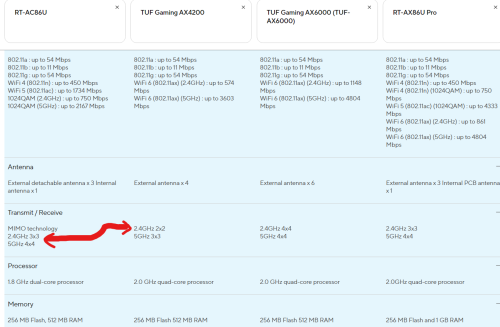
tuf ax4200 2.4ghz is 2 streams (2x2)

the more the antenna are the greater the range

same can be say for 5ghz
rt ac86u 4 streams (4x4)
tuf ax4200 3 streams (3x3)

user posted image

ultimately for range along going from ac86u to ax4200, expect some downgrade. you will need go for ax6000 or ax5700 models for similar range
*
My AC86U also from China, bought in 2020, so far I am very happy with it.
With the new AX4200, I will add the AC86U as Mesh node, will let the AX4200 run for few days to check the stability.


Change to:
| Lo-Fi Version
0.0254sec    0.41    7 queries    GZIP Disabled
Time is now: 15th December 2025 - 02:12 PM