

QUOTE(tomsulliven @ Mar 3 2021, 04:06 PM)
300mbps

How is big your house? And budget?
Do you use other special features?
Thanks
Home Networking WiFi Router Discussion Thread, Updated for 2023
|
|
 Mar 3 2021, 04:40 PM Mar 3 2021, 04:40 PM
Show posts by this member only | IPv6 | Post
#3341
|
 
Senior Member
3,836 posts Joined: Aug 2016 
|
QUOTE(tomsulliven @ Mar 3 2021, 04:06 PM) 300mbps How is big your house? And budget? Do you use other special features? Thanks |
|
|
|
|
|
Mar 4 2021, 12:43 AM
|

Junior Member
316 posts Joined: Nov 2014 
|
I need help! i just upgrade 100Mbps to 300Mbps, but the speed is still remain as 100Mbps.
Unifi there, i have call and ask them reset my port,but the speed is still remain. im using tenda router supporting 800Mbps speed. help! |
|
|
Mar 4 2021, 01:15 AM
|

All Stars
31,612 posts Joined: Aug 2010
|
QUOTE(nagasaran @ Mar 4 2021, 12:43 AM) I need help! i just upgrade 100Mbps to 300Mbps, but the speed is still remain as 100Mbps. did speedtest via lan cable or wifi?Unifi there, i have call and ask them reset my port,but the speed is still remain. im using tenda router supporting 800Mbps speed. help! |
|
|
Mar 4 2021, 10:36 AM
Show posts by this member only | IPv6 | Post
#3344
|

Junior Member
109 posts Joined: May 2016
|
Hi all sifu, I m new to fiber broadband and I have some question to ask.
Will router overheating causes performance drop? I plan to use the stock router for some time, should I buy a laptop fan to blow them? From by seeing the picture, what device will I be expecting? 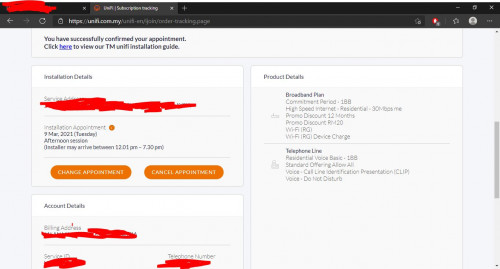 Poor wifi signal? Currently using unifi lite with DSL 2750E. In the living room, 1-3 bar of wifi signal. Is it worth to get a MESH or just using my old modem as a repeater? |
|
|
Mar 4 2021, 12:56 PM
Show posts by this member only | IPv6 | Post
#3345
|

Junior Member
292 posts Joined: Jun 2016
|
QUOTE(jerry123939 @ Mar 4 2021, 10:36 AM) Hi all sifu, I m new to fiber broadband and I have some question to ask. Not sure, but fans helps to prevent overheat....I DIY and put under mu modem and router.Will router overheating causes performance drop? I plan to use the stock router for some time, should I buy a laptop fan to blow them? From by seeing the picture, what device will I be expecting? Poor wifi signal? Currently using unifi lite with DSL 2750E. In the living room, 1-3 bar of wifi signal. Is it worth to get a MESH or just using my old modem as a repeater? |
|
|
Mar 4 2021, 01:20 PM
|

All Stars
13,494 posts Joined: Jan 2012
|
QUOTE(skzisghost @ Feb 19 2021, 11:09 AM) Guys think twice before buying TP-Link AX73 I didnt find your sale thread for AX73... I just installed unifi few days ago and the contractor tell me tp-link is so bad a lot customer say it has many problems, dlink is the best. I don't believe him because dlink is so old school. So i ordered AX73 from tplink online flagship store. I consider myself computer savvy and i have difficulty getting this router connect to internet, it won't connect even i put the correct PPPoE details, after some restart i finally managed to get it connect. So i started the speed and ping test. The surfing speed became like i am using mobile internet to tether, there is some frequent ping time out, some rare ping spike. Only positive is that speedtest can cap my unifi subscription speed. Things doesn't end here, after i switch off and on the power switch of router, the 5G wifi SSID become the same as the 2G wifi SSID (5G being renamed to _2G). Then the internet won't connect, i have to manually go to 192.168.0.1 to click on button to recheck the internet (takes about 1 minute waiting for the software to check connection) each time i restart the power switch in order to connect to internet. I did swap between unifi stock router in between to make sure it is not my fibre line problem, also both using same DNS. At this point i really WTF already, i can't believe i just spend RM400 for this shit, resale also out of the question, how am i going to sell product this shit to someone, even as a individual i feel shame if i wanted to sell this shit to someone. I think if i sell RM200 in garage sales also nobody want to take it after reading my post. I don't think such company will refund me, so my money is gone case. This is when i am using AX73 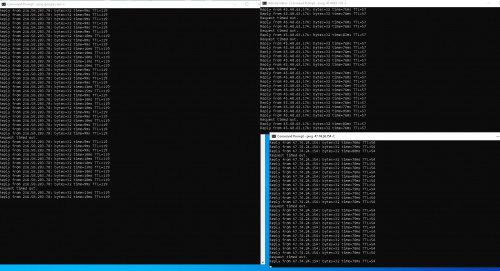 This is after i use unifi stock router 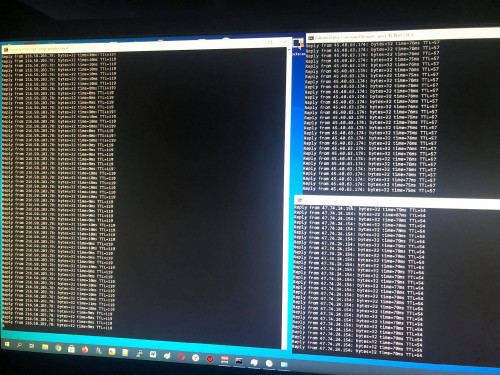  |
|
|
|
|
|
Mar 4 2021, 01:29 PM
|
|
All Stars
13,494 posts Joined: Jan 2012
|
QUOTE(nagasaran @ Mar 4 2021, 12:43 AM) I need help! i just upgrade 100Mbps to 300Mbps, but the speed is still remain as 100Mbps. Tenda got router support 800Mbps?? AFAIK, Tenda highest end router is AC18. I had a AC18 which I bought during MCO1.0 and it did boost my parents house Unifi to 200Mbps from 100Mbps (Huawei WS880). However it cant reach 300Mbps (I only tested WiFi, never test LAN). I already bought AX50 but havent tried it for my parents house to see if it would boost their Unifi speed. Unifi there, i have call and ask them reset my port,but the speed is still remain. im using tenda router supporting 800Mbps speed. help! Lately I picked up another 2 pcs of used AC18 cheaply on Carousell. I already downgrade my home from AX50 to AC18 because I tried to implement smart home in my house which mostly connected to 2.4Ghz WiFi and it seem to struggle on AX50 which only had 2T2R on 2.4Ghz WiFi. I already done testing and indeed AC18 provided much better signal and speed on 2.4Ghz (my tapo cctv were lagging by 3-5seconds on AX50 whereas AC18 almost no lag). Next up will try AX50 in my parents house to see if the 500Mbps claim is true. I think my parents house Unifi package is 300Mbps but nobody knows for sure. It used to be 100Mbps IIRC because we used my sister OKU card to get RM20 discount. Nobody knows the real upgraded speed but will test it this weekend to find out. chungf1 liked this post
|
|
|
Mar 4 2021, 01:54 PM
|
 
Elite
8,427 posts Joined: Jul 2008 
|
QUOTE(andrekua2 @ Mar 4 2021, 01:29 PM) Tenda got router support 800Mbps?? AFAIK, Tenda highest end router is AC18. I had a AC18 which I bought during MCO1.0 and it did boost my parents house Unifi to 200Mbps from 100Mbps (Huawei WS880). However it cant reach 300Mbps (I only tested WiFi, never test LAN). I already bought AX50 but havent tried it for my parents house to see if it would boost their Unifi speed. I suggest disabling WiFi 6 mode on 2.4Ghz band irregardless of the brand of router.Lately I picked up another 2 pcs of used AC18 cheaply on Carousell. I already downgrade my home from AX50 to AC18 because I tried to implement smart home in my house which mostly connected to 2.4Ghz WiFi and it seem to struggle on AX50 which only had 2T2R on 2.4Ghz WiFi. I already done testing and indeed AC18 provided much better signal and speed on 2.4Ghz (my tapo cctv were lagging by 3-5seconds on AX50 whereas AC18 almost no lag). Next up will try AX50 in my parents house to see if the 500Mbps claim is true. I think my parents house Unifi package is 300Mbps but nobody knows for sure. It used to be 100Mbps IIRC because we used my sister OKU card to get RM20 discount. Nobody knows the real upgraded speed but will test it this weekend to find out. On WiFi 6, 2.4Ghz will run at 1024QAM for slightly faster speed but it will result in a much weaker and noisier signal. Old 2.4Ghz devices do not benefit from 1024QAM. Disabling WiFi 6 will revert it to 64QAM which will allow the router to provide a stronger 2.4Ghz signal for old devices. 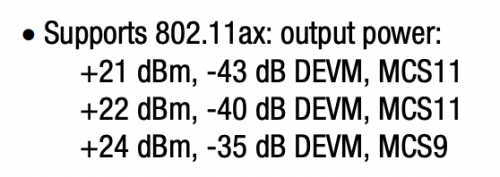 Image taken from the datasheet of a WiFi 6 product. Notice higher TX rate at MCS9 compare to MCS11 (1024QAM). |
|
|
Mar 4 2021, 02:11 PM
Show posts by this member only | IPv6 | Post
#3349
|

Junior Member
242 posts Joined: Jan 2003
|
Make use of your old router as AP for 2.4Ghz. Monthly power consumption for this AP is negligible compared to the convenience.
|
|
|
Mar 4 2021, 04:22 PM
|
|
All Stars
13,494 posts Joined: Jan 2012
|
QUOTE(blacktubi @ Mar 4 2021, 01:54 PM) I suggest disabling WiFi 6 mode on 2.4Ghz band irregardless of the brand of router. I'll double check on this. I'm pretty sure I had it on BGN.On WiFi 6, 2.4Ghz will run at 1024QAM for slightly faster speed but it will result in a much weaker and noisier signal. Old 2.4Ghz devices do not benefit from 1024QAM. Disabling WiFi 6 will revert it to 64QAM which will allow the router to provide a stronger 2.4Ghz signal for old devices. Image taken from the datasheet of a WiFi 6 product. Notice higher TX rate at MCS9 compare to MCS11 (1024QAM). Thanks you for the heads up. This post has been edited by andrekua2: Mar 4 2021, 04:23 PM |
|
|
Mar 4 2021, 07:51 PM
Show posts by this member only | IPv6 | Post
#3351
|
|
Junior Member
292 posts Joined: Jun 2016
|
QUOTE(nagasaran @ Mar 4 2021, 12:43 AM) I need help! i just upgrade 100Mbps to 300Mbps, but the speed is still remain as 100Mbps. have you checked your BTU/Modem can support more than 100Mbps or not ?Unifi there, i have call and ask them reset my port,but the speed is still remain. im using tenda router supporting 800Mbps speed. help! |
|
|
Mar 5 2021, 10:40 AM
|

Senior Member
3,102 posts Joined: May 2005 From: Penang *̡͌l̡*̡̡
|
QUOTE(ckimsem @ Mar 2 2021, 08:23 PM) I’ll be connecting the M4 wirelessly, wired backhaul is not possible. Old house here. You wont able connect AX50 to M4 wirelessly, so you need cable between AX50 & M4.In fact, AX50 coverage is enough for my house except the kitchen part which no one sit there. But, just want to know if there’s any benefit for using M4 other than larger WiFi coverage. I haven’t got the Deco M4 2-packs yet. TM just call me yesterday (01/03) for the offers, and today (02/03) my plan already upgraded, unifi 300Mbps - Loyalty Super Value (Broadband + MESH WiFi M4) Previous plan was Try Me Broadband 100mbps. Then M4 need to set as AP. Then AX50 & M4 if set same SSID, you will having issue(when moving around) as both is not Mesh system, so I dont see benefit you using both together. If really want to try, using M4 as router then put another M4 to extend the coverage. |
|
|
Mar 5 2021, 04:09 PM
Show posts by this member only | IPv6 | Post
#3353
|
|
Junior Member
224 posts Joined: Nov 2006
|
Hi guys, could anyone please share their opinion on this. Currently staying in a double-storey house and currently subscribing unifi 300mbps. I previously tried with a friend's deco m9 plus unit (2 units, placed ground floor and 1st floor) and found that my speed was consistent and close to 300mbps (using wifi).
Hence, now i'm thinking to buy the same unit but at the same time I came across deco m5 tripack. Unfortunately I dunno if it would give the same result, but thought the tri-pack is cheaper and can cover more bases. What would you guys recommend? This post has been edited by hamsterr88: Mar 5 2021, 04:16 PM |
|
|
|
|
|
Mar 5 2021, 07:39 PM
|

Junior Member
346 posts Joined: Jul 2012
|
QUOTE(hamsterr88 @ Mar 5 2021, 04:09 PM) Hi guys, could anyone please share their opinion on this. Currently staying in a double-storey house and currently subscribing unifi 300mbps. I previously tried with a friend's deco m9 plus unit (2 units, placed ground floor and 1st floor) and found that my speed was consistent and close to 300mbps (using wifi). Deco m9 plus is using dedicated secondary 5GHz for wireless backhaul to communicate with other deco node, which m5 don't have, if you plan to wired both deco then it's a different story. I think it's better to purchase something already working for you instead of buying something else and regret later, just my 2 cents Hence, now i'm thinking to buy the same unit but at the same time I came across deco m5 tripack. Unfortunately I dunno if it would give the same result, but thought the tri-pack is cheaper and can cover more bases. What would you guys recommend?  . https://www.tp-link.com/my/support/faq/2423/ . https://www.tp-link.com/my/support/faq/2423/ hamsterr88 liked this post
|
|
|
Mar 5 2021, 08:58 PM
|

Senior Member
1,132 posts Joined: Jun 2011 From: Perak.
|
QUOTE(tachlio @ Mar 5 2021, 11:40 AM) You wont able connect AX50 to M4 wirelessly, so you need cable between AX50 & M4. I don’t know much about mesh wifi. So, I though it needs to connect to router first. Then M4 need to set as AP. Then AX50 & M4 if set same SSID, you will having issue(when moving around) as both is not Mesh system, so I dont see benefit you using both together. If really want to try, using M4 as router then put another M4 to extend the coverage.   After checking some YouTube clips, I knew that M4 could be used as the way you mentioned (bold words by me). So, I would like to know any advantage of using M4, since they are wifi5 only, instead of AX50. I think I better try them myself when the M4 arrived. Anyway, thanks for your response.  |
|
|
Mar 6 2021, 02:33 AM
Show posts by this member only | IPv6 | Post
#3356
|
|
Junior Member
224 posts Joined: Nov 2006
|
QUOTE(wirelessbuyer @ Mar 5 2021, 07:39 PM) Deco m9 plus is using dedicated secondary 5GHz for wireless backhaul to communicate with other deco node, which m5 don't have, if you plan to wired both deco then it's a different story. I think it's better to purchase something already working for you instead of buying something else and regret later, just my 2 cents Thank you for this.. makes alot of sense! . https://www.tp-link.com/my/support/faq/2423/ |
|
|
Mar 7 2021, 10:10 AM
|

Junior Member
22 posts Joined: Apr 2009
|
hi all sifu, im currently looking for routers with vpn client capabilities so that all my devices at home connected to vpn. can suggest the recommended routers available on market now? my budget within below rm500. also, any mesh wifi routers support vpn client? thanks in advance sifu
|
|
|
Mar 7 2021, 01:46 PM
|
|
Junior Member
346 posts Joined: Jul 2012
|
QUOTE(gx_azam @ Mar 7 2021, 10:10 AM) hi all sifu, im currently looking for routers with vpn client capabilities so that all my devices at home connected to vpn. can suggest the recommended routers available on market now? my budget within below rm500. also, any mesh wifi routers support vpn client? thanks in advance sifu I think for consumer routers, only Asus have vpn client (l2pt, openvpn, pptp) feature built-in on stock firmware, I might be wrong though  . E.g. rt-ax55, rt-ax56u, rt-ax3000 . E.g. rt-ax55, rt-ax56u, rt-ax3000 |
|
|
Mar 8 2021, 07:01 AM
Show posts by this member only | IPv6 | Post
#3359
|

Junior Member
566 posts Joined: Jun 2005 From: Somewhere over the rainbow
|
QUOTE(gx_azam @ Mar 7 2021, 10:10 AM) hi all sifu, im currently looking for routers with vpn client capabilities so that all my devices at home connected to vpn. can suggest the recommended routers available on market now? my budget within below rm500. also, any mesh wifi routers support vpn client? thanks in advance sifu Check out Merlin's firmware for supported Asus routers https://www.snbforums.com/threads/about-asu...s-routers.7846/ . There are also some add-ins available to assist with vpn setup & management. |
|
|
Mar 8 2021, 01:42 PM
Show posts by this member only | IPv6 | Post
#3360
|

Senior Member
1,289 posts Joined: Apr 2012
|
Sifus,
Need recommendation for router. Thinking to try mesh router, since it provide the better coverage and stability House type: Semi D Landed Size of house: 4000sqf/Double storey Features required: Full coverage for 5Ghz connection Number of devices connected to WiFi: 20 Internet Speed: Maxis Fibre 300mbps Budget: 1k |
| Change to: |  0.0306sec 0.0306sec
 0.98 0.98
 6 queries 6 queries
 GZIP Disabled GZIP Disabled
Time is now: 23rd December 2025 - 09:30 PM |
 Quote
Quote