Welcome Guest ( Log In | Register )

302 Pages « < 165 166 167 168 169 > » Bottom

Outline · [ Standard ] · Linear+

Home Networking WiFi Router Discussion Thread, Updated for 2023

views
     
Ichibanichi
post Mar 1 2021, 05:21 PM

Casual
***
Junior Member
327 posts

Joined: Nov 2008


QUOTE(Softufo @ Mar 1 2021, 05:11 PM)
House type: Landed
Size of house: 2 storey
Features required: Anything works
Number of devices connected to WiFi: 12 including 5 wifi 6 devices
Internet Speed: 300mbps maxis
Budget: below RM400

Currently using the wifi 6 router provided by maxis. It was not the black router advertised by maxis. The reception is quite bad and 2.4ghz doesnt reach 300mbps. Only close to 80-100mbps.
*
wifi 2.4ghz max dl 100mbps is fine due to its standard which is half duplex transmission.
If you want to test max dl speed, please use LAN cable to test.
Else disable 2.4ghz and fully use 5ghz with MIMO function enable.
Get mesh if you suffer coverage issue.
Softufo P
post Mar 1 2021, 05:25 PM

New Member
*
Probation
9 posts

Joined: Oct 2020
QUOTE(Ichibanichi @ Mar 1 2021, 05:21 PM)
wifi 2.4ghz max dl 100mbps is fine due to its standard which is half duplex transmission.
If you want to test max dl speed, please use LAN cable to test.
Else disable 2.4ghz and fully use 5ghz with MIMO function enable.
Get mesh if you suffer coverage issue.
*
Can suggest any cheap mesh units tht supports wifi 6
jpong1
post Mar 1 2021, 05:54 PM

Getting Started
**
Junior Member
292 posts

Joined: Jun 2016
QUOTE(Softufo @ Mar 1 2021, 05:11 PM)
House type: Landed
Size of house: 2 storey
Features required: Anything works
Number of devices connected to WiFi: 12 including 5 wifi 6 devices
Internet Speed: 300mbps maxis
Budget: below RM400

Currently using the wifi 6 router provided by maxis. It was not the black router advertised by maxis. The reception is quite bad and 2.4ghz doesnt reach 300mbps. Only close to 80-100mbps.
*
May we know what brand and model ? thanks

Softufo P
post Mar 1 2021, 06:13 PM

New Member
*
Probation
9 posts

Joined: Oct 2020
QUOTE(jpong1 @ Mar 1 2021, 05:54 PM)
May we know what brand and model ? thanks
*
user posted image
user posted image
user posted image

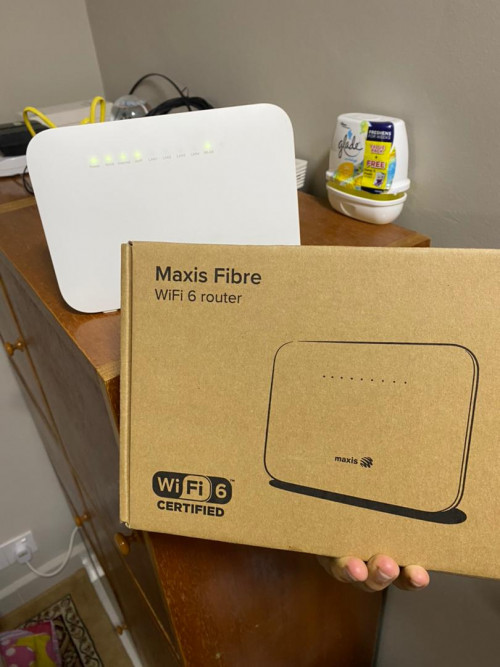
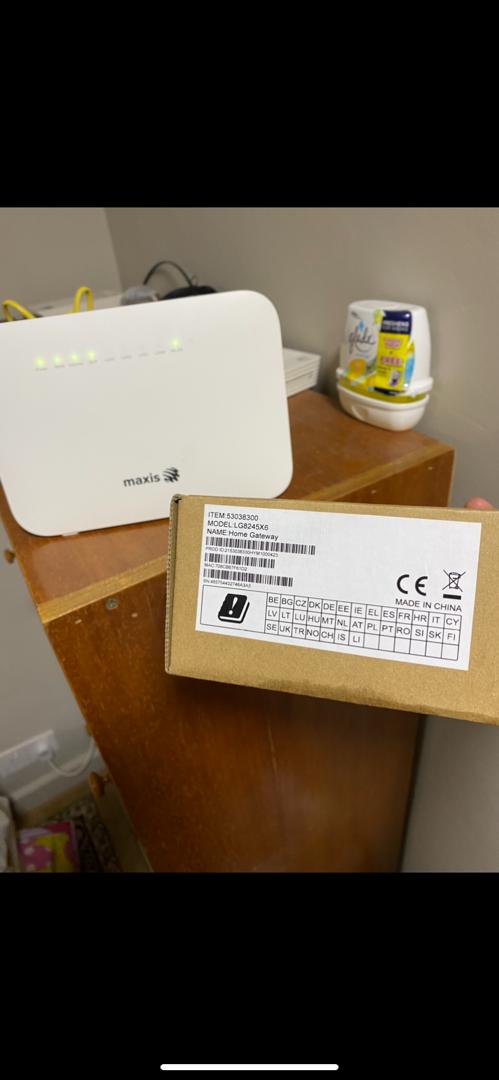
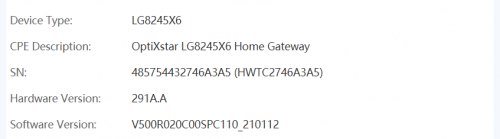
I hope the picture can help to identify the router. From what the technician told me, it is huawei. No model name no specs or anything.
TSblacktubi
post Mar 1 2021, 06:56 PM

-
Group Icon
Elite
8,424 posts

Joined: Jul 2008

QUOTE(Softufo @ Mar 1 2021, 06:13 PM)
» Click to show Spoiler - click again to hide... «


I hope the picture can help to identify the router. From what the technician told me, it is huawei. No model name no specs or anything.
*
Yes, it is a Huawei model

It is an enhanced version of the famous HG8245 with WiFi 6 hence the model code LG8245X6. But, the performance is kinda poor.

How's your experience using it?
ckimsem
post Mar 1 2021, 08:32 PM

Regular
******
Senior Member
1,132 posts

Joined: Jun 2011
From: Perak.


Currently, I'm using TP Link AX50 which is a WiFi6 router. The TP Link Deco M4 mesh listed as AC1200, which given by TM for upgrading to 300mbps.

My question is if I use the Deco m4, it seems like I may increase the WiFi coverage but downgrading back to WiFi5, am I correct?
Is it better to use AX50 if I don't have wifi coverage problem?
Thinking of selling the Deco M4 to offset the bill if not really needed/useful for my case.
Hope someone could clear up my queries, thanks.

This post has been edited by ckimsem: Mar 1 2021, 10:19 PM
jpong1
post Mar 2 2021, 10:26 AM

Getting Started
**
Junior Member
292 posts

Joined: Jun 2016
QUOTE(ckimsem @ Mar 1 2021, 08:32 PM)
Currently, I'm using TP Link AX50 which is a WiFi6 router. The TP Link Deco M4 mesh listed as AC1200, which given by TM for upgrading to 300mbps.

My question is if I use the Deco m4, it seems like I may increase the WiFi coverage but downgrading back to WiFi5, am I correct?
Is it better to use AX50 if I don't have wifi coverage problem?
Thinking of selling the Deco M4 to offset the bill if not really needed/useful for my case.
Hope someone could clear up my queries, thanks.
*
Yes
tachlio
post Mar 2 2021, 12:25 PM

de~sign "ing"
*******
Senior Member
3,102 posts

Joined: May 2005
From: Penang *̡͌l̡*̡̡
QUOTE(ckimsem @ Mar 1 2021, 08:32 PM)
Currently, I'm using TP Link AX50 which is a WiFi6 router. The TP Link Deco M4 mesh listed as AC1200, which given by TM for upgrading to 300mbps.

My question is if I use the Deco m4, it seems like I may increase the WiFi coverage but downgrading back to WiFi5, am I correct?
Is it better to use AX50 if I don't have wifi coverage problem?
Thinking of selling the Deco M4 to offset the bill if not really needed/useful for my case.
Hope someone could clear up my queries, thanks.
*
If your use case is need larger coverage M4 will be more suitable. (presume you able wire backhaul)
But if small area and AX50 able to cover, Wifi6 is better choice.


willleoho P
post Mar 2 2021, 02:03 PM

New Member
*
Probation
1 posts

Joined: Mar 2021


House Type: Condo
Size: 1,200 sq ft
Features required: Stable and fast connection speed
Number of devices connected to WiFi: 5~8 at a time
Internet Speed: 500mbps TIME
Budget: as long as not overkill


Need each sifus opinion here. I'm looking to purchase 2-pack deco x20 for my new condo unit. But have a few thoughts in mind:

1. To have 1 unit replace as router, with another unit installed at the corridor through wireless backhaul
2. To have 1 unit replace as router, with another unit in master bedroom plugged to the repeat point (RJ 45 outlet)
3. To purchase 2 routers (say Asus RT-AX55), and create an AIMesh system (1 at living room, 1 at master bedroom).
4. Just have 1 crazy good router at living room (suggestions needed for this).

Which options look to be the best? Layout attached.

https://pictr.com/images/2021/03/02/7KsPJq.md.png
wirelessbuyer
post Mar 2 2021, 03:33 PM

Casual
***
Junior Member
346 posts

Joined: Jul 2012
QUOTE(willleoho @ Mar 2 2021, 02:03 PM)
House Type: Condo
Size: 1,200 sq ft
Features required: Stable and fast connection speed
Number of devices connected to WiFi: 5~8 at a time
Internet Speed: 500mbps TIME
Budget: as long as not overkill
Need each sifus opinion here. I'm looking to purchase 2-pack deco x20 for my new condo unit. But have a few thoughts in mind:
1. To have 1 unit replace as router, with another unit installed at the corridor through wireless backhaul
2. To have 1 unit replace as router, with another unit in master bedroom plugged to the repeat point (RJ 45 outlet)
3. To purchase 2 routers (say Asus RT-AX55), and create an AIMesh system (1 at living room, 1 at master bedroom).
4. Just have 1 crazy good router at living room (suggestions needed for this).
Which options look to be the best? Layout attached.
<a href='https://pictr.com/images/2021/03/02/7KsPJq.md.png' target='_blank'>https://pictr.com/images/2021/03/02/7KsPJq.md.png </a>
*
I would pick option 2 or 3 as it will create mesh network using wired backhaul via your rj45 outlet, but please make sure that outlet do support gigabit connection, if it's just limited to 100Mbps, the wireless backhaul might be better and faster.

Choose option 3 if you need any features that only Asus offers (eg. vpn client, ovpn server with password connection, etc) and make sure you're running on the latest firmware that support AiMesh 2.0 or newer, otherwise option 2 is good too.
corad
post Mar 2 2021, 03:37 PM

Hard to see, the dark side is.
*******
Senior Member
2,403 posts

Joined: Jan 2003
From: Sarawak / United Kingdom

read and watched a few reviews but wondering if anyone has an opinion on Tenda AC23 ?

good enough to support 15 devices ? No need performance, just after stability.
ckimsem
post Mar 2 2021, 08:23 PM

Regular
******
Senior Member
1,132 posts

Joined: Jun 2011
From: Perak.


QUOTE(tachlio @ Mar 2 2021, 01:25 PM)
If your use case is need larger coverage M4 will be more suitable. (presume you able wire backhaul)
But if small area and AX50 able to cover, Wifi6 is better choice.
*
I’ll be connecting the M4 wirelessly, wired backhaul is not possible. Old house here.
In fact, AX50 coverage is enough for my house except the kitchen part which no one sit there.
But, just want to know if there’s any benefit for using M4 other than larger WiFi coverage. I haven’t got the Deco M4 2-packs yet.
TM just call me yesterday (01/03) for the offers, and today (02/03) my plan already upgraded, unifi 300Mbps - Loyalty Super Value (Broadband + MESH WiFi M4)
Previous plan was Try Me Broadband 100mbps.

This post has been edited by ckimsem: Mar 2 2021, 08:31 PM
Softufo P
post Mar 2 2021, 09:59 PM

New Member
*
Probation
9 posts

Joined: Oct 2020
QUOTE(blacktubi @ Mar 1 2021, 06:56 PM)
Yes, it is a Huawei model

It is an enhanced version of the famous HG8245 with WiFi 6 hence the model code LG8245X6. But, the performance is kinda poor.

How's your experience using it?
*
The router performance is indeed poor.
Thinking of getting TP-Link AX20 or AX73 I don't know which one is worthit for me.
billyboy
post Mar 2 2021, 10:46 PM

Look at all my stars!!
*******
Senior Member
2,220 posts

Joined: Apr 2006
Looking for help where is the shortfall in my Unifi speed (everything on cable).....all advice gratefully appreciated.... icon_idea.gif

Current subscription : 800mbps Unifi
Existing speed : 250mbps download / 150 mbps upload

Existing equipment : Router (DIR 850L) - provided by TM notworthy.gif
Modem : Echolife HG8240H (Apr 2018)

Cat 6 cable connects from Router to 8-Port Gigabit Desktop Switch (TL-SG 1008D)

Cat 6 connects Switch to PC.

could it be equipment degradation ? pls advice where i should check.... rclxub.gif


wirelessbuyer
post Mar 3 2021, 11:42 AM

Casual
***
Junior Member
346 posts

Joined: Jul 2012
QUOTE(billyboy @ Mar 2 2021, 10:46 PM)
Looking for help where is the shortfall in my Unifi speed (everything on cable).....all advice gratefully appreciated.... icon_idea.gif

Current subscription : 800mbps Unifi
Existing speed : 250mbps download / 150 mbps upload

Existing equipment : Router (DIR 850L) - provided by TM  notworthy.gif
Modem : Echolife HG8240H (Apr 2018)

Cat 6 cable connects from Router to 8-Port Gigabit Desktop Switch (TL-SG 1008D)

Cat 6 connects Switch to PC.

could it be equipment degradation ?  pls advice where i should check.... rclxub.gif
*
Did you enabled any qos setting on dir 850L?
joehann
post Mar 3 2021, 11:57 AM

Casual
***
Junior Member
430 posts

Joined: Jan 2012
QUOTE(joehann @ Feb 27 2021, 11:00 AM)
Hi sifu, I'm planing to change my current stock router provided by TM which is aztech ds244wsgv. My aim is for better coverage router. This one by TM can't even penetrate 1 wall sigh. Even beside 1 wall, connection seem to fluctuate and putus2 regardless 2.4 or 5ghz.

House type: apartment
Size of house: 1,000 sqft
Features required: n/a
Number of devices connected to WiFi: 7 devices
Internet Speed: 30mbps (planning to upgrade to 100mbps)
Budget : for better coverage only.
*
Since no one replying, I bought myself the Archer c80 router for RM175 from ookas + 3,700 shopee coin. Setting quite easy and straight forward. Manage to get the ppoe password through inspect html. Performance and coverage wise are way much better than the aztech ds244wsgv.
tomsulliven
post Mar 3 2021, 12:00 PM

Getting Started
**
Junior Member
85 posts

Joined: Dec 2008


Hi all sifu, I like to change my unifi orange netis router, is located in master bedroom on 2nd floor, can’t get stable contention at 1st floor dining room, do I go for ASUS RT-AX55 twin pack? Or TPlink AX73 with RE300 ?
billyboy
post Mar 3 2021, 12:12 PM

Look at all my stars!!
*******
Senior Member
2,220 posts

Joined: Apr 2006
good question. no qos setting at all...no prioritization so i guess all equal ?

QUOTE(wirelessbuyer @ Mar 3 2021, 11:42 AM)
Did you enabled any qos setting on dir 850L?
*
FusionXY
post Mar 3 2021, 12:40 PM

LAZZIE ON VACATION
*******
Senior Member
3,836 posts

Joined: Aug 2016

QUOTE(tomsulliven @ Mar 3 2021, 12:00 PM)
Hi all sifu, I like to change my unifi orange netis router, is located in master bedroom on 2nd floor, can’t get stable contention at 1st floor dining room, do I go for ASUS RT-AX55 twin pack? Or TPlink AX73 with RE300 ?
*
What's your plan speed?

Thanks
tomsulliven
post Mar 3 2021, 04:06 PM

Getting Started
**
Junior Member
85 posts

Joined: Dec 2008


QUOTE(FusionXY @ Mar 3 2021, 12:40 PM)
What's your plan speed?

Thanks
*
300mbps

302 Pages « < 165 166 167 168 169 > » Top
 

Change to:
| Lo-Fi Version
0.0288sec    2.23    6 queries    GZIP Disabled
Time is now: 23rd December 2025 - 10:51 AM