

QUOTE(wirelessbuyer @ Feb 28 2021, 11:23 AM)
Turn off OneMesh feature and see whether it is still there

Solved it, thanks 
Home Networking WiFi Router Discussion Thread, Updated for 2023
|
|
 Feb 28 2021, 12:41 PM Feb 28 2021, 12:41 PM
|
 
Junior Member
904 posts Joined: Mar 2018  
|
QUOTE(wirelessbuyer @ Feb 28 2021, 11:23 AM) Turn off OneMesh feature and see whether it is still there Solved it, thanks |
|
|
|
|
|
Feb 28 2021, 03:50 PM
|

Senior Member
2,354 posts Joined: Apr 2009 
|
My router has some issue, planning to buy a new 1.
Is it ok to buy a new 1 online? Because previously i tried update my router firmware and realize local router firmware need to be customize (so that you will have ISP selection for unifi, maxis etc.) So is it fine to buy from internet and still doing fine connecting to unifi? |
|
|
Feb 28 2021, 03:57 PM
Show posts by this member only | IPv6 | Post
#3303
|

Senior Member
3,836 posts Joined: Aug 2016
|
QUOTE(ragk @ Feb 28 2021, 03:50 PM) My router has some issue, planning to buy a new 1. What's your current router model? Is it ok to buy a new 1 online? Because previously i tried update my router firmware and realize local router firmware need to be customize (so that you will have ISP selection for unifi, maxis etc.) So is it fine to buy from internet and still doing fine connecting to unifi? You may order from trusted sellers like OOKAS or MONO Digital. Thanks |
|
|
Feb 28 2021, 07:45 PM
Show posts by this member only | IPv6 | Post
#3304
|

Newbie
10 posts Joined: Jan 2011
|
Hi people,
My current router (2016 - TP-Link AC1750)'s 2.4Mhz is wonky, and my other router (C1200), can't provide the speed that's comfortable for me. Currently looking for a new router. Is the Archer A6 the way to go? Thanks. House type: Landed Size of house: 2-stories Number of devices connected to WiFi: About 5 Internet Speed: Maxis 30Mbps Budget: 150 - 200 This post has been edited by Deravis: Feb 28 2021, 07:49 PM |
|
|
Feb 28 2021, 07:53 PM
Show posts by this member only | IPv6 | Post
#3305
|
|
Newbie
49 posts Joined: Feb 2009
|
QUOTE(blacktubi @ Feb 28 2021, 11:14 AM) Make sure you have the righe PPPOE username and password Finally managed to connect to the Internet haha. But I can only connect from the modem (which is at my door at condo), but I need to place the router in my living room (WAN port is connected to the building's LAN cable line). With this, I can't connect to the Internet already.Make sure your wiring is LAN1 from the TM modem to the WAN of your router Is there any settings that I should do with the Modem? I tried MAC address clone but still could not. |
|
|
Feb 28 2021, 07:53 PM
|

Junior Member
393 posts Joined: Apr 2006
|
QUOTE(Deravis @ Feb 28 2021, 07:45 PM) Hi people, I would go for AX20 instead..can get good deal around 200rm sometimesMy current router (2016 - TP-Link AC1750)'s 2.4Mhz is wonky, and my other router (C1200), can't provide the speed that's comfortable for me. Currently looking for a new router. Is the Archer A6 the way to go? Thanks. House type: Landed Size of house: 2-stories Number of devices connected to WiFi: About 5 Internet Speed: Maxis 30Mbps Budget: 150 - 200 Rm89 is standard price for 30mbps..maybe yours comes with Maxis call plan rm10 added on. |
|
|
|
|
|
Feb 28 2021, 07:56 PM
|
|
Senior Member
2,354 posts Joined: Apr 2009
|
QUOTE(FusionXY @ Feb 28 2021, 03:57 PM) What's your current router model? tenda ac6, so that's possible to order online with local firmware?You may order from trusted sellers like OOKAS or MONO Digital. Thanks |
|
|
Feb 28 2021, 07:57 PM
Show posts by this member only | IPv6 | Post
#3308
|
|
Newbie
10 posts Joined: Jan 2011
|
QUOTE(penew @ Feb 28 2021, 07:53 PM) I would go for AX20 instead..can get good deal around 200rm sometimes Thanks. But I haven't seen an AX20 for RM200. Most are going for RM250 ++.Rm89 is standard price for 30mbps..maybe yours comes with Maxis call plan rm10 added on. Yeah, there was an add-on for calls to the house. |
|
|
Feb 28 2021, 07:58 PM
|
 
Elite
8,430 posts Joined: Jul 2008 
|
QUOTE(mecheng @ Feb 28 2021, 07:53 PM) Finally managed to connect to the Internet haha. But I can only connect from the modem (which is at my door at condo), but I need to place the router in my living room (WAN port is connected to the building's LAN cable line). With this, I can't connect to the Internet already. Check whether the LAN cable at the living room is functioning properly.Is there any settings that I should do with the Modem? I tried MAC address clone but still could not. |
|
|
Feb 28 2021, 07:59 PM
Show posts by this member only | IPv6 | Post
#3310
|
|
Newbie
49 posts Joined: Feb 2009
|
QUOTE(blacktubi @ Feb 28 2021, 07:58 PM) Check whether the LAN cable at the living room is functioning properly. Yes it's functioning fine as it has no problem with my old router. |
|
|
Feb 28 2021, 08:00 PM
|
|
Junior Member
393 posts Joined: Apr 2006
|
QUOTE(mecheng @ Feb 28 2021, 07:53 PM) Finally managed to connect to the Internet haha. But I can only connect from the modem (which is at my door at condo), but I need to place the router in my living room (WAN port is connected to the building's LAN cable line). With this, I can't connect to the Internet already. Can snap pic of the modem and the building port?Is there any settings that I should do with the Modem? I tried MAC address clone but still could not. |
|
|
Feb 28 2021, 08:01 PM
|
|
Junior Member
393 posts Joined: Apr 2006
|
QUOTE(Deravis @ Feb 28 2021, 07:57 PM) Thanks. But I haven't seen an AX20 for RM200. Most are going for RM250 ++. You can get around rm200 sometimes during sale. Look for it.Yeah, there was an add-on for calls to the house. There's a newer model coming too (AX21), so AX20 price may reduced later. This post has been edited by penew: Feb 28 2021, 08:02 PM |
|
|
Feb 28 2021, 08:02 PM
Show posts by this member only | IPv6 | Post
#3313
|
|
Senior Member
3,836 posts Joined: Aug 2016
|
QUOTE(ragk @ Feb 28 2021, 07:56 PM) tenda ac6, so that's possible to order online with local firmware? Most routers online are using local firmware from local sellers.You may get it from OOKAS. There will be 3.3 sales later next month. Thanks. |
|
|
|
|
|
Feb 28 2021, 09:55 PM
Show posts by this member only | IPv6 | Post
#3314
|
|
Newbie
49 posts Joined: Feb 2009
|
QUOTE(penew @ Feb 28 2021, 08:00 PM) Can snap pic of the modem and the building port?  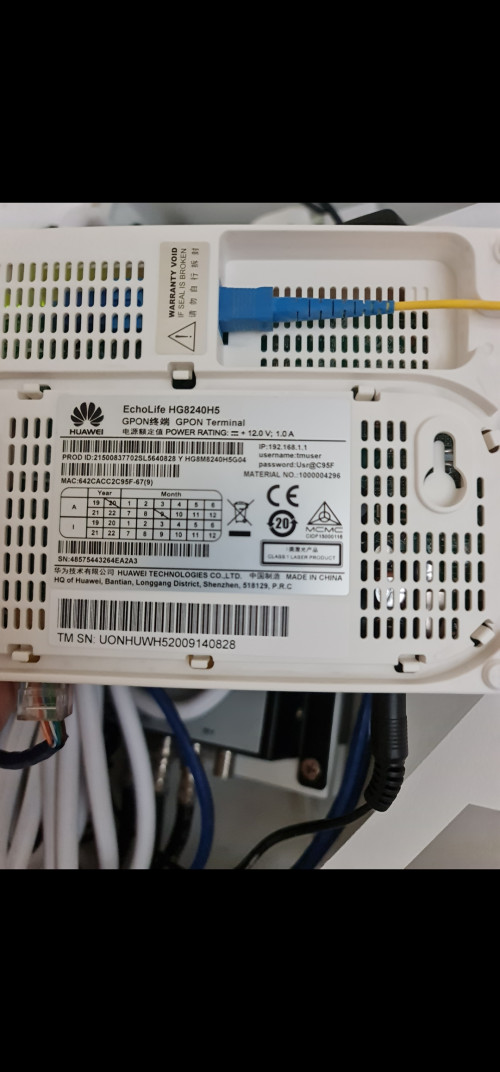 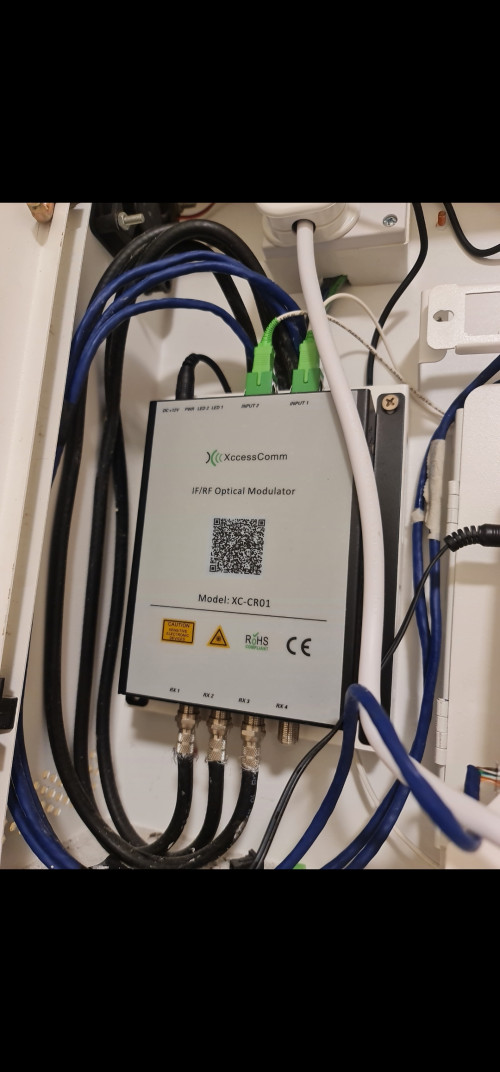 Hi bro here is it. Thanks for the help. Really headache haha. |
|
|
Feb 28 2021, 10:30 PM
|
|
Senior Member
2,354 posts Joined: Apr 2009
|
QUOTE(FusionXY @ Feb 28 2021, 08:02 PM) Most routers online are using local firmware from local sellers. Thanks for the info! You may get it from OOKAS. There will be 3.3 sales later next month. Thanks.  |
|
|
Mar 1 2021, 12:24 AM
|
|
Junior Member
10 posts Joined: Jan 2008
|
Hi need some recommendations
Should I get a single Asus Tuf AX3000, single Tp-link AX73 or dual Asus AX55 ? House is 4000sqft double storey. Internet speed : 300mbps Thanks This post has been edited by marky8102: Mar 1 2021, 12:24 AM |
|
|
Mar 1 2021, 01:00 AM
Show posts by this member only | IPv6 | Post
#3317
|

Junior Member
292 posts Joined: Jun 2016
|
QUOTE(marky8102 @ Mar 1 2021, 12:24 AM) Hi need some recommendations I am user of ASUS RT-AX3000, based on your house area , I suggest 1 RT-AX3000 + 1 RT-AX56U or 2 x Rt-AX56U.Should I get a single Asus Tuf AX3000, single Tp-link AX73 or dual Asus AX55 ? House is 4000sqft double storey. Internet speed : 300mbps Thanks |
|
|
Mar 1 2021, 09:44 AM
|
|
Junior Member
10 posts Joined: Jan 2008
|
QUOTE(jpong1 @ Mar 1 2021, 01:00 AM) I am user of ASUS RT-AX3000, based on your house area , I suggest 1 RT-AX3000 + 1 RT-AX56U or 2 x Rt-AX56U. Thanks |
|
|
Mar 1 2021, 01:50 PM
|

Senior Member
1,450 posts Joined: Oct 2019
|
Some advice about WIFI em- radiation .
 health effects are headache, cannot sleep to cancer due to cell breakdown . Please take ALL the necessary precautions to reduce this radiation exposure . dont buy high power routers . check the power specs. try to use the low power TX setting if possible . use wire LAN . optimize your wifi network . use wifi Analyzer to check disable the wifi band if not in use. from google.... DOES WIFI RADIATION DO ANYTHING TO MY BODY? ISN'T IT HARMLESS? WiFi routers and the energy they use to function may not come to mind as a "danger.” But research counters that reputation; it shows if we care about our health, we will re-think our exposure to WiFi and the location of the WiFi in our homes and living spaces. Wireless routers give off electromagnetic radiation (EMR) in the low-gigahertz frequency. This man made, artificial energy is considered potentially dangerous to people by the World Health Organization. CAN WIFI RADIATION REALLY MAKE PEOPLE SICK? The answer is yes, it can. Will it always make people sick? No. Dr. George Carlo explains that there is most definitely a biological response to what he calls Information Carrying Radio Waves (ICRW), energy fields come from all our wireless devices. When you're exposed to ICRW a process of adaptation and compensation occurs in your body. You actually change. Dr. Carlo has put together a great program to help people who are sensitive to EMF, better adapt to it. We'll have more information on that soon. Steps to Consider if you want to limit your exposure, the experts we spoke with identified some simple—though sometimes potentially inconvenient—steps. For example, Carpenter, at the University of Albany, says that he doesn’t shy away from having WiFi in his house—but the router is located away from where his family spends the most time. If you are concerned about the RF signals from your cell phone or WiFi or Bluetooth devices, here are some ways you can limit your exposure: When using your phone or tablet, consider keeping it away from your head and body. That is particularly true in areas where the cellular signal from towers is weak—when your phone has only one bar, for example—because phones may increase their power then to compensate. To do that, you could try texting or video-calling when possible, using the speaker phone on your device or a wired or Bluetooth headset, carrying your phone in a bag instead of stowing it in your pocket, and not resting your tablet on your body for a long period of time. When you go to bed, consider storing your phone away from where you sleep, switch it to airplane mode, or turn it off entirely. And when considering whether to use a smartwatch or other wearable device, some of which now connect through cellular signals, recognize that the device will be close to your body for extended periods, which in theory could increase the risks. If you’re concerned about exposure from your wireless internet connection, you could consider using a wired connection when possible, positioning your router away from rooms where you spend the most time, and turning it off at night. This post has been edited by Momo33: Mar 1 2021, 04:33 PM |
|
|
Mar 1 2021, 05:11 PM
Show posts by this member only | IPv6 | Post
#3320
|

Probation
9 posts Joined: Oct 2020
|
House type: Landed
Size of house: 2 storey Features required: Anything works Number of devices connected to WiFi: 12 including 5 wifi 6 devices Internet Speed: 300mbps maxis Budget: below RM400 Currently using the wifi 6 router provided by maxis. It was not the black router advertised by maxis. The reception is quite bad and 2.4ghz doesnt reach 300mbps. Only close to 80-100mbps. |
| Change to: |  0.0210sec 0.0210sec
 0.50 0.50
 6 queries 6 queries
 GZIP Disabled GZIP Disabled
Time is now: 24th December 2025 - 09:18 PM |
 Quote
Quote