Welcome Guest ( Log In | Register )

Outline · [ Standard ] · Linear+

Home Networking WiFi Router Discussion Thread, Updated for 2023

views
     
andrekua2
post Sep 26 2019, 11:02 AM

10k Club
********
All Stars
13,476 posts

Joined: Jan 2012


QUOTE(orangtua @ Sep 20 2019, 09:10 AM)
hi all, needs help deciding which router to go...

house: typical double storey 20x70
devices: 2 laptops (5ghz), 4 main mobile phones (always connected, 5ghz), 5-6 test phones (wife's job, connect occasionally, some 2.4ghz some 5 ghz), 1 cheap NAS (LAN), Astro decoder (5ghz), tvbox (5ghz), 5 cameras (2.4ghz), 6 light bulbs/switches (2.4 ghz)
internet plan: Maxis 30, but Time is coming so planning to get Time 100mbps (don't know when)
current router: Asus RT-AC1200+
problems: upstair kids room can't get stable wifi when playing mobile games. laptop connection occasionally drops, suspect the router has reached its limit.

I don't have big budget but if something can last me a good 3-5 years I am willing to spend around 800-1000. currently I am looking at Asus RT-AC86U and tp-link Archer C4000, both are similarly priced on lazada.

I just need stable wifi throughout my house and can support as many internet connected devices I am going to add in future (maybe another 10 to 20?)

which one should I go for? thanks!
*
Try to relocate the router.

First of all, many users tend to put their router in one corner of the house which is really bad idea. WiFi range works like a sphere. If you put it in a dead corner of your house, you are basically limiting yourself to 1/4 of the range. Try to position it in the center of the house. ie. a double storey should be somewhere around the ceiling of the ground floor, center point of the house. Then try again and see if you have connection issues. For those area which has low signal, try to use 2.4GHz. Dont always use 5GHz because even though it is faster (on paper), it has really bad wall penetration. Therefore it is better to have a working 2.4GHz than poorly connected 5GHz.
andrekua2
post Sep 27 2019, 09:55 AM

10k Club
********
All Stars
13,476 posts

Joined: Jan 2012


QUOTE(wheelhot @ Sep 26 2019, 02:25 PM)
So I got myself a DIR-2660

but why my Wifi Speed even right next to it or in the same room only 200mbps? I am on a 500mbps Unifi connection and when I tested with ethernet, I get 490mbps.

I've tested on the latest 11" iPad Pro, MBP and essentially new devices, but all seems to give 200mbps download. Oddly enough, I consistently get 100mbps upload.

Thoughts?
*
Why not test with fast.com instead? Speedtest result varied from one server to another.

Try turning off QoS.
andrekua2
post Mar 28 2020, 12:32 AM

10k Club
********
All Stars
13,476 posts

Joined: Jan 2012


QUOTE(jhleo1 @ Mar 27 2020, 10:31 PM)
Before saw your reply, I just bought Archer AX10 at RM271.50 (after Lazada discount vouchers) after read your website. Actually only my wife will use WiFi from 1st floor which directly on top of the living room which router put. The rest all usage in ground floor. I think Mesh wifi system maybe my future upgrade since now only use unifi 100mpbs.
*
Oh.. nice price... but how is your review on this router? All I saw was 2x2 which IMO is quite low. Plus I dont really have WiFi6 devices to take advantage of this.

I was considering A9 because it has 4x4 for 2.4GHz but was not sure I want to use Qualcomm chipset. In the end, I bought the Tenda AC18 because I was using Huawei WS880 and quite happy with its performance. I had RM50 voucher from Celcom which I redeemed using the unused credit left in my mom prepaid. Planning to replace the Huawei WS880 because it has been acting weirdly now... keep cutting internet for no reason. I even took it apart and added thermal paste and fan to ventilate it. Helps a bit but does not solve the problem completely.
andrekua2
post Apr 2 2020, 08:48 PM

10k Club
********
All Stars
13,476 posts

Joined: Jan 2012


QUOTE(jhleo1 @ Mar 28 2020, 01:17 AM)
Just bought yesterday from Lazada sales n not even send out. Lol Can't tell.... Should be better than Archer C5 that I used for few years.
*
Update me later ok?

I already received AC18 from Ookas and I'm quite surprised by the difference in performance to my older Huawei WS880. While 2.4GHz dont seem to improve much, 5GHz was night and day. 5GHz on WS880 with Merlin/Tomato only managed 100Mbps on fast.com but changing to AC18 double it to 210Mbps (Unifi 300mbps with S9+). WS880 5GHz couldn't reach the back of the house (same floor) but AC18 can, although the speed only left 20Mbps or so. Overall quite happy with it. Too bad I didn't have any 3x3 adapter to test the maximum performance.
andrekua2
post Apr 2 2020, 11:13 PM

10k Club
********
All Stars
13,476 posts

Joined: Jan 2012


QUOTE(blacktubi @ Apr 2 2020, 09:44 PM)
This is why I always say all routers are not built equal.

WS880, Tenda AC18 and ASUS RT-AC68U share the same CPU so they can be modified to run ASUSWRT.

However, the radio circuitry is what really decide on the performance and some people even said WS880 performs like a RT-AC68U.  doh.gif
*
Yeap... you can say I'm surprised too. Although I understood the difference in the wireless chipset as well, I thought the speed difference would be over certain range. I really didn't expect I'm standing beside the router and yet the difference is so much. I wonder if flashing to custom firmware affect the wireless performance.
andrekua2
post Jul 11 2020, 08:11 AM

10k Club
********
All Stars
13,476 posts

Joined: Jan 2012


QUOTE(RickJames09 @ Jul 10 2020, 10:24 PM)
What about the coverage? Ax20 or ax50 is better comparing to c2300?

I am currently looking for wifi 6 router to replace my c2300. I was a bit disappointed with c2300 because of the coverage is not really great. I live in a condo and it does not cover the whole house.
*
Condo is a nightmare for router with so many overlapping channel unless you are using 5GHz, However 5GHz has really poor wall penetration.
andrekua2
post Jul 12 2020, 01:27 AM

10k Club
********
All Stars
13,476 posts

Joined: Jan 2012


Was going to buy the newer AX but I'm not convinced yet. I do not have any wifi6 devices nor adapter. I don't think my usb wifi adapter support DFS as well.

Think I'm just gonna buy Archer C9 from Viewnet for RM209. Its 3x3 unlike these AX1500/1800/3000 which only has 2x2 with higher data transfer rate.
andrekua2
post Oct 17 2020, 01:14 PM

10k Club
********
All Stars
13,476 posts

Joined: Jan 2012


QUOTE(laksamana @ Oct 10 2020, 04:20 PM)
20 Mhz only for 2.4G
40 Mhz only for 5G, you can try to use 40/80 Mhz if the signal is strong enough

Basically, any neighbours that use 40 Mhz for 2.4G are idiots and are not being mindful of others
*
What???

LoL... using 40mhz for 2.4Ghz is pretty normal of your device can support it. Why should they refrain from using 40mhz when it could increase the bandwidth throughput? You're a class higher than those who cant afford high end router?
andrekua2
post Oct 17 2020, 02:22 PM

10k Club
********
All Stars
13,476 posts

Joined: Jan 2012


QUOTE(laksamana @ Oct 17 2020, 01:55 PM)
This is precisely what I'm talking about ...

The performance delta on 40 Mhz is negligible, and the main cause is congestion / interference on the 2.4 Ghz band
*
I have a different views on this. I dont think it made any significant interference because landed houses would be far apart enough to not make this a serious problem, whereas for condo/flat, you are doom because you will be surrounded by over 20 routers doing the same thing over 11 channels. Dual channel or not would not make much of a difference.

I think what is really needed is a soft switch within router firmware to switch off 2.4GHz network for 5GHz capable routers.
andrekua2
post Oct 17 2020, 04:12 PM

10k Club
********
All Stars
13,476 posts

Joined: Jan 2012


QUOTE(laksamana @ Oct 17 2020, 02:54 PM)
I live in a semi-d house mate, so there is obviously still interference, coming from several houses i.e not just the immediate next door neighbour

Most routers these days have a firmware option to completely switch off the wireless radio, whether 2.4 or 5 Ghz band, even both if you wish

So, unless you are living in a bungalow on a 1 acre land area, then I can understand why you're raving on about your wifi setup
*
Well, I dont live on a bungalow land. Its just that there is only one row of houses.

Bought a Tenda AC18 and I cant find the option to turn off 2,4GHz radio. I would love to turn it off since I dont use 2,4GHz anymore.

This post has been edited by andrekua2: Oct 17 2020, 04:14 PM
andrekua2
post Oct 25 2020, 04:11 PM

10k Club
********
All Stars
13,476 posts

Joined: Jan 2012


QUOTE(ckimsem @ Oct 24 2020, 09:10 PM)
blacktubi
House type: landed house
Size of house: 25'x70', single floor
Features required: don't know
Number of devices connected to WiFi: 8 or more
Internet Speed: 100Mbps unifi
Budget: Around RM400

I'm considering the TP Link AX20 or AX50, which one is better? About RM20 differences.
And wireless adapter is either TP Link TX3000E or Asus RT AX58BT? About RM50 differences.

Or could you recommend any better alternative, TQ?
*
Just bought a new AX50 from carousel for RM250. Seller letting go because he didn't think he needs it.

You can find AX50 slightly cheaper on Shopee for RM279 vs RM292 on Lazada.


andrekua2
post Oct 25 2020, 09:01 PM

10k Club
********
All Stars
13,476 posts

Joined: Jan 2012


QUOTE(ckimsem @ Oct 25 2020, 08:40 PM)
1) Which router did you get from TM?
2) How is the performance of the AX50?
3) Does it have significant or minor improvement?

I may get it on 11.11, hope it gets discount. smile.gif
*
I'm on Maxis though. Their Thompson router from 10 years ago was crap. Was using Huawei WS880 but it starts to show it's age. Keep freezing under load and also on hot day even though I already mod a hole on the case with a fan to cool it.

I think the overall 5ghz performance is better. Much stronger signal in some areas which were previously very weak or dead zone. Also every connected devices seem to have less problem with buffering.
andrekua2
post Nov 1 2020, 12:19 AM

10k Club
********
All Stars
13,476 posts

Joined: Jan 2012


Seems like AX50 will be going for RM249 on 11.11
andrekua2
post Mar 4 2021, 01:20 PM

10k Club
********
All Stars
13,476 posts

Joined: Jan 2012


QUOTE(skzisghost @ Feb 19 2021, 11:09 AM)
Guys think twice before buying TP-Link AX73

I just installed unifi few days ago and the contractor tell me tp-link is so bad a lot customer say it has many problems, dlink is the best. I don't believe him because dlink is so old school.

So i ordered AX73 from tplink online flagship store.

I consider myself computer savvy and i have difficulty getting this router connect to internet, it won't connect even i put the correct PPPoE details, after some restart i finally managed to get it connect.

So i started the speed and ping test.

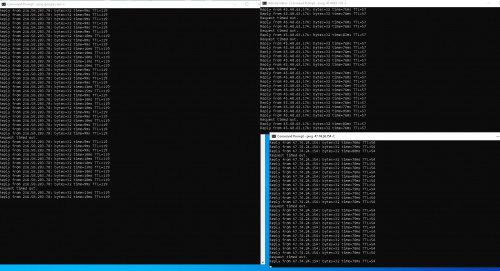
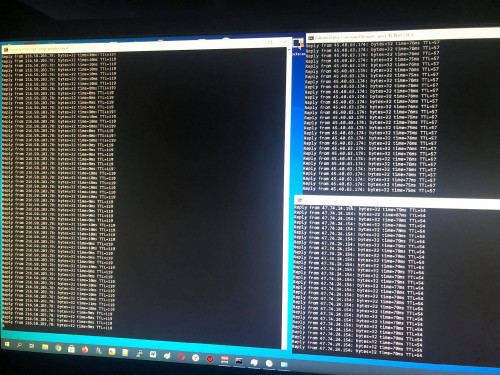
The surfing speed became like i am using mobile internet to tether, there is some frequent ping time out, some rare ping spike. Only positive is that speedtest can cap my unifi subscription speed.

Things doesn't end here, after i switch off and on the power switch of router, the 5G wifi SSID become the same as the 2G wifi SSID (5G being renamed to _2G).

Then the internet won't connect, i have to manually go to 192.168.0.1 to click on button to recheck the internet (takes about 1 minute waiting for the software to check connection) each time i restart the power switch in order to connect to internet.

I did swap between unifi stock router in between to make sure it is not my fibre line problem, also both using same DNS.

At this point i really WTF already, i can't believe i just spend RM400 for this shit, resale also out of the question, how am i going to sell product this shit to someone, even as a individual i feel shame if i wanted to sell this shit to someone. I think if i sell RM200 in garage sales also nobody want to take it after reading my post.

I don't think such company will refund me, so my money is gone case.

This is when i am using AX73

user posted image

This is after i use unifi stock router

user posted image
*
I didnt find your sale thread for AX73... laugh.gif

andrekua2
post Mar 4 2021, 01:29 PM

10k Club
********
All Stars
13,476 posts

Joined: Jan 2012


QUOTE(nagasaran @ Mar 4 2021, 12:43 AM)
I need help! i just upgrade 100Mbps to 300Mbps, but the speed is still remain as 100Mbps.

Unifi there, i have call and ask them reset my port,but the speed is still remain. im using tenda router supporting 800Mbps speed. help!
*
Tenda got router support 800Mbps?? AFAIK, Tenda highest end router is AC18. I had a AC18 which I bought during MCO1.0 and it did boost my parents house Unifi to 200Mbps from 100Mbps (Huawei WS880). However it cant reach 300Mbps (I only tested WiFi, never test LAN). I already bought AX50 but havent tried it for my parents house to see if it would boost their Unifi speed.

Lately I picked up another 2 pcs of used AC18 cheaply on Carousell. I already downgrade my home from AX50 to AC18 because I tried to implement smart home in my house which mostly connected to 2.4Ghz WiFi and it seem to struggle on AX50 which only had 2T2R on 2.4Ghz WiFi. I already done testing and indeed AC18 provided much better signal and speed on 2.4Ghz (my tapo cctv were lagging by 3-5seconds on AX50 whereas AC18 almost no lag).

Next up will try AX50 in my parents house to see if the 500Mbps claim is true. I think my parents house Unifi package is 300Mbps but nobody knows for sure. It used to be 100Mbps IIRC because we used my sister OKU card to get RM20 discount. Nobody knows the real upgraded speed but will test it this weekend to find out.
andrekua2
post Mar 4 2021, 04:22 PM

10k Club
********
All Stars
13,476 posts

Joined: Jan 2012


QUOTE(blacktubi @ Mar 4 2021, 01:54 PM)
I suggest disabling WiFi 6 mode on 2.4Ghz band irregardless of the brand of router.

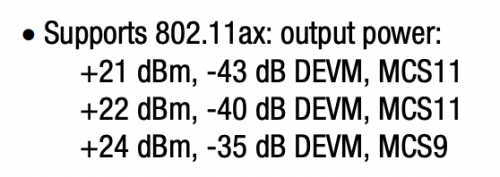
On WiFi 6, 2.4Ghz will run at 1024QAM for slightly faster speed but it will result in a much weaker and noisier signal. Old 2.4Ghz devices do not benefit from 1024QAM. Disabling WiFi 6 will revert it to 64QAM which will allow the router to provide a stronger 2.4Ghz signal for old devices.

user posted image
Image taken from the datasheet of a WiFi 6 product. Notice higher TX rate at MCS9 compare to MCS11 (1024QAM).
*
I'll double check on this. I'm pretty sure I had it on BGN.

Thanks you for the heads up.

This post has been edited by andrekua2: Mar 4 2021, 04:23 PM
andrekua2
post Mar 17 2021, 01:16 PM

10k Club
********
All Stars
13,476 posts

Joined: Jan 2012


QUOTE(blacktubi @ Mar 4 2021, 01:54 PM)
I suggest disabling WiFi 6 mode on 2.4Ghz band irregardless of the brand of router.

On WiFi 6, 2.4Ghz will run at 1024QAM for slightly faster speed but it will result in a much weaker and noisier signal. Old 2.4Ghz devices do not benefit from 1024QAM. Disabling WiFi 6 will revert it to 64QAM which will allow the router to provide a stronger 2.4Ghz signal for old devices.

user posted image
Image taken from the datasheet of a WiFi 6 product. Notice higher TX rate at MCS9 compare to MCS11 (1024QAM).
*
I just had time to replug everything yesterday and confirmed Im not even running AX.

Anyway, there is something strange with AX50. I suggest avoid at all cost if using older device. Yesterday tried setting up AX50 for my parents' house since they are on 300Mbps package. After setting up everything, the Tenda AC18 that I had as a repeater slow down to a crawl. I also disable AX mode and connect the AC18 to AX50 5GHz wifi but getting between 11~60Mbps which is shocking. I unplugged AX50 and put back the main AC18, and the repeater goes back to 100Mbps stable (via 5GHz). The only plus point of AX50 is the strong 5GHz signal which can reach where the AC18 cant. I dont even know what to do with it. Considering upgrading office wifi.
andrekua2
post Mar 31 2021, 04:18 PM

10k Club
********
All Stars
13,476 posts

Joined: Jan 2012


QUOTE(hammerjit @ Mar 29 2021, 03:24 PM)
ac86u and ac87u is a bit out of budget...any other recommendation below 250?
*
Im using this and it worked great for me. Instead of adding a another router (since you do not want another ssid), why not relocate the router. I placed my AC18 right at staircase wall, right where it reached 1st floor. Covers both floor nicely. Since you already had a LAN cable upstair, just plug the router upstair, along the stairs to try n see if there's improvements. Remember wifi coverage is a radius instead of straightline. It needs to be placed in the center of the house ideally.
andrekua2
post May 7 2021, 04:09 PM

10k Club
********
All Stars
13,476 posts

Joined: Jan 2012


QUOTE(terdit @ May 7 2021, 02:36 PM)
Hi Sifu,
Planning to move into WIFI 6, need your advise to get router that worth and suit my use.
Currently using TENDA AC18 AC190

House type: Condo
Size of house: 7th floor, 1100 sqf
Features required: Have NAS so prefer at least 4 LAN port, current modem have 4 port ( 3 usable as 1 for line in) seems not very enough). Good to have VPN but not a must.
Number of devices connected to WiFi: 1 NAS and 1 desktop on LAN, 2 - 3 laptop, more than 5 phone + tablet, tvbox, a few Xiaomi smart device
Internet Speed: TIMES 500mbps
Budget: RM200 - 300

no rush to buy now. maybe will wait next big sales (11.11 maybe).

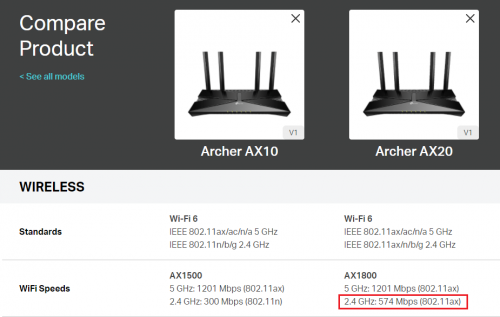
been looking at TP-Link Archer AX10 / Archer AX20
notice that the main different is as below:

user posted image

Would like to ask 802.11ax on 2.4 GHz is important?
*
If you need 2.4GHz then keep the AC18. I had a different model (AX50) and the 2.4GHz sucks.
andrekua2
post Sep 7 2021, 04:54 PM

10k Club
********
All Stars
13,476 posts

Joined: Jan 2012


QUOTE(claudetan @ Sep 6 2021, 07:26 PM)
how far u test it? any wall between?

i using 300 mbps, router on downstair, test from upstair, my room,1 floor + 1 wall.

btw, i using xs max, so 80mhz only.

Also, when i try to access 192.168.0.1, it always prompt me an error page on 1st try, have to key in second time and enter only can get into config, do you experience the same?
*
I'm quite baffled with iphone published wifi specification... how is it 80MHz when it only 2x2 MIMO...

This post has been edited by andrekua2: Sep 7 2021, 04:55 PM

2 Pages  1 2 >Top
 

Change to:
| Lo-Fi Version
0.0262sec    0.47    7 queries    GZIP Disabled
Time is now: 10th December 2025 - 10:07 AM