Welcome Guest ( Log In | Register )

Bump Topic Topic Closed RSS Feed
125 Pages « < 116 117 118 119 120 > » Bottom

Outline · [ Standard ] · Linear+

 Official LYN nVIDIA 8 series thread V2

views
     
kmarc
post Aug 27 2007, 11:05 PM

The future is here - Cryptocurrencies!
Group Icon
Elite
14,576 posts

Joined: May 2006
From: Sarawak


QUOTE(mADmAN @ Aug 27 2007, 10:57 PM)
yo kmarc...i read ur topic in the nvidia forums....

about the fan speed thingy....u can check out the first post. theres a link there to an 8800 fan speed guide.

i did it and it works....the steps are a little tedious...but it still works.
*
Ok, will check it.

If I'm not mistaken, you mean the fan speed will change according to the temperature right? I know about that way of setting as I was using it for my previous 7800GS. Will take a look later.

Anyway, I also emailed ASUS technical support. Let's see what they have to say regarding the 2D/3D settings.... smile.gif
8tvt
post Aug 28 2007, 09:24 AM

Peace Lover
*******
Senior Member
8,753 posts

Joined: Jan 2003
why don't u use the nvidia control panel?
setting up a new profile.. and load them with a set of rules..
try install ntune if the option is not available..
tanghm
post Aug 28 2007, 09:36 AM

SSRI Addict
******
Senior Member
1,972 posts

Joined: Jan 2003
From: Klang Valley

I come to conclusion that the load temperature depends on what 3D application you are running.

I was playing Company of Heroes yesterday my load temperature only 72'C, Stalker was 88'C, Lost Planet 91'C. All at 100% manual fan speed.

Hhmmm might wanna try kmarc's downclocking trick to save energy.

This post has been edited by tanghm: Aug 28 2007, 09:38 AM
kmarc
post Aug 28 2007, 10:51 AM

The future is here - Cryptocurrencies!
Group Icon
Elite
14,576 posts

Joined: May 2006
From: Sarawak


QUOTE(8tvt @ Aug 28 2007, 09:24 AM)
why don't u use the nvidia control panel?
setting up a new profile.. and load them with a set of rules..
try install ntune if the option is not available..
*
I prefer Rivatuner as it has all the functions.

Haiyaa.... no reply from ASUS yet....
tanghm
post Aug 28 2007, 10:56 AM

SSRI Addict
******
Senior Member
1,972 posts

Joined: Jan 2003
From: Klang Valley

Guess what.

I can manually set my fan using Rivatuner but I cant set the fan speed using nTune !! All options are grayed out under te fan options.

So I'm exactly opposite eh ?
SlayerXT
post Aug 28 2007, 11:08 AM

PRIDE!
*******
Senior Member
2,042 posts

Joined: Jan 2003
From: KL


Does rivatuner 2.3 have 2d like mode?
8tvt
post Aug 28 2007, 11:44 AM

Peace Lover
*******
Senior Member
8,753 posts

Joined: Jan 2003
what about the voltage? if we reduce the speed.. isn't that the core will overvoltage?
kmarc
post Aug 28 2007, 01:49 PM

The future is here - Cryptocurrencies!
Group Icon
Elite
14,576 posts

Joined: May 2006
From: Sarawak


QUOTE(8tvt @ Aug 28 2007, 11:44 AM)
what about the voltage? if we reduce the speed.. isn't that the core will overvoltage?
*
Probably not overvoltage. Just that it will be running at stock voltage at underclocked speed.

I have been wondering about this too, whether underclocking the card will cause any problems in the long run. Anyway, I have already posted a question in Nvidia's forum and also emailed ASUS. Still awaiting replies from them..... smile.gif
radmaszeal
post Aug 28 2007, 09:28 PM

boredom is caused by lack of ignorance
******
Senior Member
1,546 posts

Joined: Aug 2005
From: botfly heaven


hurm. just ran some benches with rig. 6.2k 3dmark06 (1024x768). cpu score will go lower if i oc cpu over 2.95ghz. lol. managed to hit 650/2000 without artifacts on my card. can go up to 680mhz core with minimal artifacts though. will post screenies later


edit: forgot to mention resolution for bench

This post has been edited by radmaszeal: Aug 28 2007, 10:06 PM
davidbilly87
post Aug 29 2007, 12:50 AM

On my way
****
Senior Member
513 posts

Joined: Jul 2007


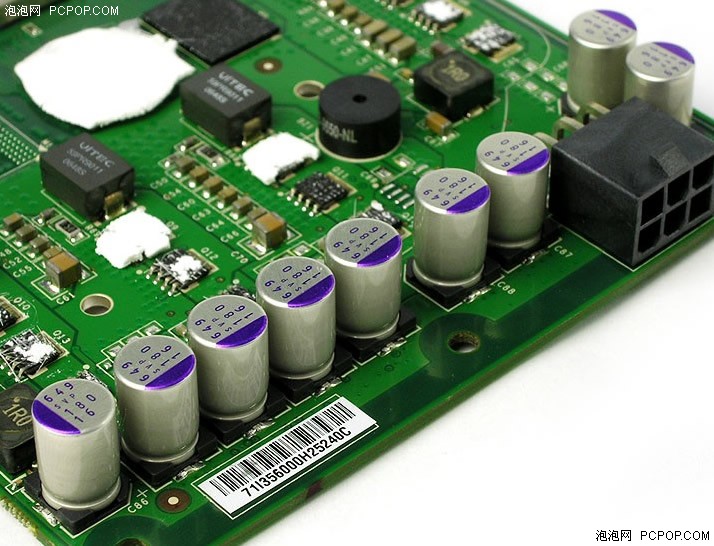
hi~guys...new 8800gts owner here , my gc is xfx8800gts.....btw got ppl sell the capaciter? that on 8800gts 1 .that purple colur

user posted image

This post has been edited by davidbilly87: Aug 29 2007, 01:05 AM
sniper69
post Aug 29 2007, 01:11 AM

.: One Shot One Kill :. .+|Level 9 Type Shit|+.
*******
Senior Member
7,173 posts

Joined: Jan 2003
From: PCH


welcome, but what's with the capacitor? unsure.gif

This post has been edited by sniper69: Aug 29 2007, 01:11 AM
SlayerXT
post Aug 29 2007, 01:39 AM

PRIDE!
*******
Senior Member
2,042 posts

Joined: Jan 2003
From: KL


Did ur capacitor already burn?
cstkl1
post Aug 29 2007, 02:43 AM

Look at all my stars!!
Group Icon
Elite
6,799 posts

Joined: Jan 2003

heck all of ure temps are freaking hot...

both of my sli idles at 60-65C and loads at 81C...

u guys need to do this first.. noticed a big difference.

1. Damn good cable management
2. Make sure u have one 12inch fan blowing towards the pcie powerinput front

like for me using stacker 830 i did a inver on the hdd and i have 12 inch fans sucking the fan to the cards... IE same as Ian Ho king Kong...

very big difference with this....
use ntune for nvidia mobos with rulez on temp control....
or http://www.guru3d.com/article/article/449/
but heck just run it 100% 24/7....

been doing that for years and no complains on any of the cards i had.
sniper69
post Aug 29 2007, 02:54 AM

.: One Shot One Kill :. .+|Level 9 Type Shit|+.
*******
Senior Member
7,173 posts

Joined: Jan 2003
From: PCH


QUOTE(cstkl1 @ Aug 29 2007, 02:43 AM)
heck all of ure temps are freaking hot...

both of my sli idles at 60-65C and loads at 81C...

u guys need to do this first.. noticed a big difference.

1. Damn good cable management
2. Make sure u have one 12inch fan blowing towards the pcie powerinput front

like for me using stacker 830 i did a inver on the hdd and i have 12 inch fans sucking the fan to the cards... IE same as Ian Ho king Kong...

very big difference with this....
use ntune for nvidia mobos with rulez on temp control....
or http://www.guru3d.com/article/article/449/
but heck just run it 100% 24/7....

been doing that for years and no complains on any of the cards i had.
*
ohmy.gif shocking.gif, 12" fan - damn big you know laugh.gif, it's 120mm icon_idea.gif
kmarc
post Aug 29 2007, 07:26 AM

The future is here - Cryptocurrencies!
Group Icon
Elite
14,576 posts

Joined: May 2006
From: Sarawak


QUOTE(cstkl1 @ Aug 29 2007, 02:43 AM)
heck all of ure temps are freaking hot...

both of my sli idles at 60-65C and loads at 81C...

u guys need to do this first.. noticed a big difference.

1. Damn good cable management
2. Make sure u have one 12inch fan blowing towards the pcie powerinput front

like for me using stacker 830 i did a inver on the hdd and i have 12 inch fans sucking the fan to the cards... IE same as Ian Ho king Kong...

very big difference with this....
use ntune for nvidia mobos with rulez on temp control....
or http://www.guru3d.com/article/article/449/
but heck just run it 100% 24/7....

been doing that for years and no complains on any of the cards i had.
*
True true. However, for my naked rig, the card is idling at 60-65'c at 50% fan speed, and load at 75-80'c at 80% fan speed.
I haven't run the fan at 100% as I don't want the fan to run so loud! nod.gif

Wished I had more fans. Now using 5 cooler master silent fans to blow on my rig..... rclxms.gif

This post has been edited by kmarc: Aug 29 2007, 07:26 AM
yahn
post Aug 29 2007, 09:12 AM

Getting Started
**
Junior Member
70 posts

Joined: Jun 2007
From: Kuching,Sarawak.


QUOTE(tanghm @ Aug 28 2007, 09:36 AM)
I come to conclusion that the load temperature depends on what 3D application you are running.

I was playing Company of Heroes yesterday my load temperature only 72'C, Stalker was 88'C, Lost Planet 91'C. All at 100% manual fan speed.

Hhmmm might wanna try kmarc's downclocking trick to save energy.
*
the more latest the 3D application you are running(Company of Heroes>Stalker>Lost Planet),the more heat u are bring to ur card... laugh.gif
davidbilly87
post Aug 29 2007, 02:34 PM

On my way
****
Senior Member
513 posts

Joined: Jul 2007


QUOTE(sniper69 @ Aug 29 2007, 02:11 AM)
welcome, but what's with the capacitor? unsure.gif
*
eh ...hard to say ...just my 1 of capacitor alredy losse....market can get those capacitor?
mADmAN
post Aug 29 2007, 02:49 PM

10k Club
********
All Stars
10,530 posts

Joined: Nov 2004
From: Petaling Jaya & Mid Valley


QUOTE(yahn @ Aug 29 2007, 09:12 AM)
the more latest the 3D application you are running(Company of Heroes>Stalker>Lost Planet),the more heat u are bring to ur card... laugh.gif
*
logically what u said is true.....

but believe it or not i get higher temps playing UT2004 than i do playing Quake 4 and even CoH laugh.gif
yahn
post Aug 29 2007, 05:40 PM

Getting Started
**
Junior Member
70 posts

Joined: Jun 2007
From: Kuching,Sarawak.


QUOTE(davidbilly87 @ Aug 29 2007, 02:34 PM)
eh ...hard to say ...just my 1 of capacitor alredy losse....market can get those capacitor?
*
capacitor losse... then ur card still can run ya... sweat.gif sweat.gif sweat.gif
ianho
post Aug 29 2007, 07:12 PM

Cucimangkoklife
Group Icon
VIP
15,705 posts

Joined: Mar 2005
From: Tg. Rambutan
QUOTE(tanghm @ Aug 28 2007, 09:36 AM)
I come to conclusion that the load temperature depends on what 3D application you are running.

I was playing Company of Heroes yesterday my load temperature only 72'C, Stalker was 88'C, Lost Planet 91'C. All at 100% manual fan speed.

Hhmmm might wanna try kmarc's downclocking trick to save energy.
*
My 8800GTX SLi goes up to 100C while playing Lost Planet! Hot day, no aircond. Must be coz I'm asking them to do so much work running Lost Planet in DX10 n 2560x1600 resolution. laugh.gif


QUOTE(davidbilly87 @ Aug 29 2007, 02:34 PM)
eh ...hard to say ...just my 1 of capacitor alredy losse....market can get those capacitor?
*
Capacitor loose then just solder it back. Easy oni wat. That's if u knocked it loose lar. If the card came like that brand new then u better RMA.

125 Pages « < 116 117 118 119 120 > » Top
Topic ClosedOptions
 

Change to:
| Lo-Fi Version
0.0219sec    0.53    6 queries    GZIP Disabled
Time is now: 12th December 2025 - 06:20 AM