Welcome Guest ( Log In | Register )

249 Pages « < 189 190 191 192 193 > » Bottom

Outline · [ Standard ] · Linear+

 TP-LINK Malaysia Official Thread, Technical Enquiries and Support

views
     
nick.remember.u
post Sep 4 2021, 05:25 PM

Getting Started
**
Junior Member
98 posts

Joined: Mar 2010
QUOTE(Candy12 @ Sep 4 2021, 05:11 PM)
You might want to consider purchasing an affordable router from TP-Link's value branded Mercusys:

Checkout this review:

Mercusys MR70X review: Affordable Wi-Fi 6!
https://www.digitalcitizen.life/mercusys-mr70x-review/

Quoted from the site:
*
Thanks for recommendation smile.gif
spideymung
post Sep 4 2021, 07:34 PM

Getting Started
**
Junior Member
63 posts

Joined: Oct 2004
Hi sifu sifu, I just upgraded to the ax73 and done setup. Everything works fine except my BluguardP2P alarm device which is wired. In my tether app, it does not recognize the device. My cctv is also wired and works fine. Anybody has encountered? I tried swapping ports and restarting everything. Also upgraded to latest firmware after I got the router. Any ideas?
blacktubi
post Sep 4 2021, 08:04 PM

-
Group Icon
Elite
8,420 posts

Joined: Jul 2008

QUOTE(spideymung @ Sep 4 2021, 07:34 PM)
Hi sifu sifu, I just upgraded to the ax73 and done setup. Everything works fine except my BluguardP2P alarm device which is wired. In my tether app, it does not recognize the device. My cctv is also wired and works fine. Anybody has encountered? I tried swapping ports and restarting everything. Also upgraded to latest firmware after I got the router. Any ideas?
*
If your alarm system is configured to static IP previously, you’ll need to make sure your AX73 is operating on the same IP range.

Oh ya, if you use Unifi, the Unifi default VLAN profile disables LAN1 and LAN4 for normal devices.

This post has been edited by blacktubi: Sep 4 2021, 08:04 PM
spideymung
post Sep 4 2021, 08:16 PM

Getting Started
**
Junior Member
63 posts

Joined: Oct 2004
QUOTE(blacktubi @ Sep 4 2021, 08:04 PM)
If your alarm system is configured to static IP previously, you’ll need to make sure your AX73 is operating on the same IP range.

Oh ya, if you use Unifi, the Unifi default VLAN profile disables LAN1 and LAN4 for normal devices.
*
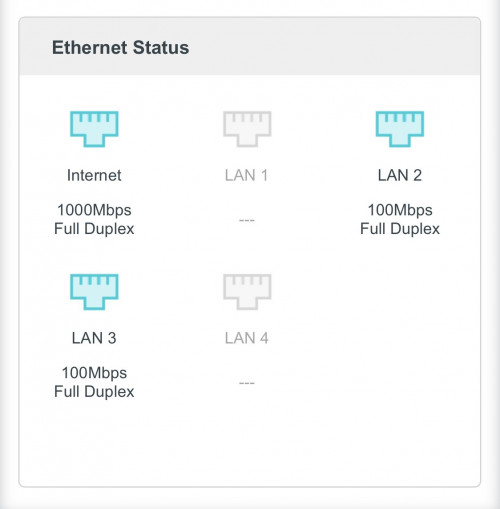
I used LAN2 and LAN3, it didn’t come on the tether app. But can see in advanced as per pic below. How do I check the static ip? I doubt that is the case, it was plug and play. Any firewall steps I can disable?

user posted image
blacktubi
post Sep 4 2021, 08:22 PM

-
Group Icon
Elite
8,420 posts

Joined: Jul 2008

QUOTE(spideymung @ Sep 4 2021, 08:16 PM)
I used LAN2 and LAN3, it didn’t come on the tether app. But can see in advanced as per pic below. How do I check the static ip? I doubt that is the case, it was plug and play. Any firewall steps I can disable?

user posted image
*
I think most alarm vendor will set them on a fixed IP so it's hard to know it unless you know the previous configuration.

Do you remember what's the IP previously? It should be something like 192.168.xx.xx
spideymung
post Sep 4 2021, 08:36 PM

Getting Started
**
Junior Member
63 posts

Joined: Oct 2004
QUOTE(blacktubi @ Sep 4 2021, 08:22 PM)
I think most alarm vendor will set them on a fixed IP so it's hard to know it unless you know the previous configuration.

Do you remember what's the IP previously? It should be something like 192.168.xx.xx
*
Haha they just plugged it in. I am not sure…maybe can call them?
spideymung
post Sep 4 2021, 08:43 PM

Getting Started
**
Junior Member
63 posts

Joined: Oct 2004
QUOTE(spideymung @ Sep 4 2021, 08:36 PM)
Haha they just plugged it in. I am not sure…maybe can call them?
*
The only difference is it was an asus ac1200 router and this is an ax73
blacktubi
post Sep 4 2021, 08:52 PM

-
Group Icon
Elite
8,420 posts

Joined: Jul 2008

QUOTE(spideymung @ Sep 4 2021, 08:36 PM)
Haha they just plugged it in. I am not sure…maybe can call them?
*
That's the best case scenario
spideymung
post Sep 5 2021, 10:55 AM

Getting Started
**
Junior Member
63 posts

Joined: Oct 2004
QUOTE(blacktubi @ Sep 4 2021, 08:04 PM)
If your alarm system is configured to static IP previously, you’ll need to make sure your AX73 is operating on the same IP range.

Oh ya, if you use Unifi, the Unifi default VLAN profile disables LAN1 and LAN4 for normal devices.
*
Anyways…is there a way to enable me to gain back access to LAN1 and LAN4? Since I don’t use hyyptv…seems to be a waste as I want to plug in my Apple TV and also smart tv or maybe an Xbox later down the road..
aniq8676
post Sep 6 2021, 12:53 PM

Regular
******
Senior Member
1,524 posts

Joined: Dec 2020
From: Perak


QUOTE(spideymung @ Sep 5 2021, 10:55 AM)
Anyways…is there a way to enable me to gain back access to LAN1 and LAN4? Since I don’t use hyyptv…seems to be a waste as I want to plug in my Apple TV and also smart tv or maybe an Xbox later down the road..
*
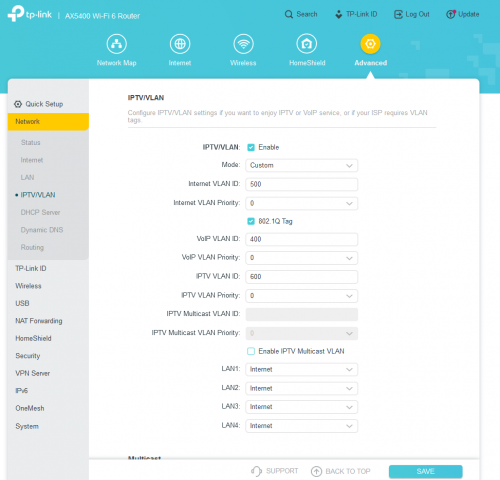
user posted image

Advanced > IPTV/VLAN

Mode: Custom

INTERNET VLAN ID: 500
Priority: 0
lung
post Sep 6 2021, 03:24 PM

Film & Computer Gaming Freak
******
Senior Member
1,187 posts

Joined: Jan 2003
QUOTE(jaxmarine @ Aug 3 2021, 05:06 PM)
bought this AX90 on July. Almost never had a day that's smooth with this router.
At first it seems to be randomly disconnecting. Then I noticed the router was disconnecting every 60 minutes.
Their engineer even remote access my PC since 2 weeks ago, installed "debug firmware". Up till now, couldn't solve anything.
From the system log can see PADI & PADT thing keep appearing after disconnecting. It's always "resending". Not even sure what that means. And it takes like 5 minutes or more for PPPOE to connect.
2021-08-03 16:52:58 PPP INFO [4344] pppoe send PADI Host-Uniq(10f8)
2021-08-03 16:52:58 PPP INFO [4344] pppoe send PADT due to(resending PADI)
2021-08-03 16:52:48 PPP INFO [4344] pppoe send PADI Host-Uniq(10f8)
2021-08-03 16:52:48 PPP INFO [4344] pppoe send PADT due to(resending PADI)
2021-08-03 16:52:43 PPP INFO [4344] pppoe send PADI Host-Uniq(10f8)
2021-08-03 16:52:43 PPP INFO [4344] pppoe send PADT due to(resending PADI)
2021-08-03 16:52:33 PPP INFO [3003] pppoe send PADI Host-Uniq(bbb)
2021-08-03 16:52:33 PPP INFO [3003] pppoe send PADT due to(resending PADI)
2021-08-03 16:52:23 PPP INFO [3003] pppoe send PADI Host-Uniq(bbb)
2021-08-03 16:52:23 PPP INFO [3003] pppoe send PADT due to(resending PADI)
2021-08-03 16:52:18 PPP INFO [3003] pppoe send PADI Host-Uniq(bbb)
2021-08-03 16:52:18 PPP INFO [3003] pppoe send PADT due to(resending PADI)
2021-08-03 16:52:07 PPP INFO [1538] pppoe send PADI Host-Uniq(602)
2021-08-03 16:52:07 PPP INFO [1538] pppoe send PADT due to(resending PADI)
2021-08-03 16:51:57 PPP INFO [1538] pppoe send PADI Host-Uniq(602)
2021-08-03 16:51:57 PPP INFO [1538] pppoe send PADT due to(resending PADI)
2021-08-03 16:51:52 PPP INFO [1538] pppoe send PADI Host-Uniq(602)
2021-08-03 16:51:52 PPP INFO [1538] pppoe send PADT due to(resending PADI)
2021-08-03 16:51:42 PPP INFO [32592] pppoe send PADI Host-Uniq(7f50)
2021-08-03 16:51:42 PPP INFO [32592] pppoe send PADT due to(resending PADI)
2021-08-03 16:51:32 PPP INFO [32592] pppoe send PADI Host-Uniq(7f50)
2021-08-03 16:51:32 PPP INFO [32592] pppoe send PADT due to(resending PADI)
2021-08-03 16:51:27 PPP INFO [32592] pppoe send PADI Host-Uniq(7f50)
2021-08-03 16:51:27 PPP INFO [32592] pppoe send PADT due to(resending PADI)
2021-08-03 16:51:17 PPP INFO [31067] pppoe send PADI Host-Uniq(795b)
2021-08-03 16:51:17 PPP INFO [31067] pppoe send PADT due to(resending PADI)
2021-08-03 16:51:07 PPP INFO [31067] pppoe send PADI Host-Uniq(795b)
2021-08-03 16:51:07 PPP INFO [31067] pppoe send PADT due to(resending PADI)
2021-08-03 16:51:02 PPP INFO [31067] pppoe send PADI Host-Uniq(795b)
2021-08-03 16:51:02 PPP INFO [31067] pppoe send PADT due to(resending PADI)

TP-link engineer was also clinging on this matter and told me to ask ISP why is the PADI & PADT not getting respond.
I think this point maxis customer service had given up on me. They never replied any call to me.
Pretty sure the ONU is fine. Maxis & TM technician came twice to check and all. Said fibre signal was strong & good (-17dB)

this router feels real shitty to me. Almost not 1 day my blood pressure didn't spike from the disconnection.
*
Were you able to isolate this issue? My router has been fine all the while and today suddenly seeing the same padt padi errors and now can’t connect to pppoe. Didn’t update firmware and didn’t touch the router at all. Asking unifi but they haven’t reply me. Wondering if this is their end or mine.

Steponlego
post Sep 7 2021, 04:36 AM

Enthusiast
*****
Junior Member
938 posts

Joined: Sep 2013
Use M9 Deco in router mode with unifi 800mbps. Wireless speed becomes erratic, fluctuates sometimes even went down to under 100mbps. Had to disconnect and reconnect my PC from the network again to get faster speed.

Internal speed test with the TP-link app shows that I can only get maximum of around 500-600mbps downstream. upstream was not affected at 200mbps. Homecare was disabled and tried disable QoS and tried set them to maximum.

Today I revert back to AP mode. Internal speed test with the app, I can get full speed at 850mbps. Wireless speed is now more stable.

Something is definitely not right with the M9 Deco. Mine is v2 with latest firmware.
tachlio
post Sep 10 2021, 12:55 PM

de~sign "ing"
*******
Senior Member
3,102 posts

Joined: May 2005
From: Penang *̡͌l̡*̡̡
QUOTE(Steponlego @ Sep 7 2021, 04:36 AM)
Use M9 Deco in router mode with unifi 800mbps. Wireless speed becomes erratic, fluctuates sometimes even went down to under 100mbps. Had to disconnect and reconnect my PC from the network again to get faster speed.

Internal speed test with the TP-link app shows that I can only get maximum of around 500-600mbps downstream. upstream was not affected at 200mbps. Homecare was disabled and tried disable QoS and tried set them to maximum.

Today I revert back to AP mode. Internal speed test with the app, I can get full speed at 850mbps. Wireless speed is now more stable.

Something is definitely not right with the M9 Deco. Mine is v2 with latest firmware.
*
Try full reset and config again
Steponlego
post Sep 10 2021, 02:12 PM

Enthusiast
*****
Junior Member
938 posts

Joined: Sep 2013
QUOTE(tachlio @ Sep 10 2021, 12:55 PM)
Try full reset and config again
*
Did that few times. Same result. I'm quite sure now that the M9 Deco can only handle max 500mbps connection.

Already bought AX20 for router. Don't want headache.
arava
post Sep 11 2021, 03:37 AM

When in doubt, Google.
******
Senior Member
1,399 posts

Joined: Jan 2003
From: PG


Hi all,

I'm on a 300Mbps Unifi. Bought a AX73 to replace my old DLink Unifi router...however, after changing, it seems that my desktop wired connection speed is very slow, hitting only 1MBps download speed as compared to previously max speed. Even accessing the router admin page sometimes is slow. Meanwhile, on my mobile phone, the WiFi could reach max speed and has no issue

So, I retested with my old DLink router aain, and the wired connection has no issue reaching max speed though - what could be the problem here? Any setting related issue?

This post has been edited by arava: Sep 11 2021, 03:42 AM
szecheng
post Sep 11 2021, 10:37 AM

Casual
***
Junior Member
460 posts

Joined: Jun 2008


QUOTE(arava @ Sep 11 2021, 03:37 AM)
Hi all,

I'm on a 300Mbps Unifi. Bought a AX73 to replace my old DLink Unifi router...however, after changing, it seems that my desktop wired connection speed is very slow, hitting only 1MBps download speed as compared to previously max speed. Even accessing the router admin page sometimes is slow. Meanwhile, on my mobile phone, the WiFi could reach max speed and has no issue

So, I retested with my old DLink router aain, and the wired connection has no issue reaching max speed though - what could be the problem here? Any setting related issue?
*
try change lan cable & other ports
blacktubi
post Sep 11 2021, 02:56 PM

-
Group Icon
Elite
8,420 posts

Joined: Jul 2008

QUOTE(arava @ Sep 11 2021, 03:37 AM)
Hi all,

I'm on a 300Mbps Unifi. Bought a AX73 to replace my old DLink Unifi router...however, after changing, it seems that my desktop wired connection speed is very slow, hitting only 1MBps download speed as compared to previously max speed. Even accessing the router admin page sometimes is slow. Meanwhile, on my mobile phone, the WiFi could reach max speed and has no issue

So, I retested with my old DLink router aain, and the wired connection has no issue reaching max speed though - what could be the problem here? Any setting related issue?
*
LAN 1 and LAN 4 is reserved for IPTV and VOIP for the default TPLINK VLAN profile.

Make sure you use LAN2 or LAN3
chrischiang
post Sep 11 2021, 03:40 PM

Regular
******
Senior Member
1,081 posts

Joined: Oct 2009
hi all,

I need some recommendation. I'm on times 100Mbps using Tplink Ax20 right now. I had Cat7 pulled to my study room. Please recommend me best budget one mesh enabled wifi router.

I will like to setup in my study room as secondary to boost signal to my master room.

I'm not considering switching to deco or getting higher end to replace as main router and existing ax20 as secondary as i'm only on 100Mbps line and not planning on upgrading. Mainly due to budget constraints biggrin.gif

Thanks!! notworthy.gif
FusionXY
post Sep 11 2021, 03:45 PM

LAZZIE ON VACATION
*******
Senior Member
3,836 posts

Joined: Aug 2016

QUOTE(chrischiang @ Sep 11 2021, 03:40 PM)
hi all,

I need some recommendation. I'm on times 100Mbps using Tplink Ax20 right now. I had Cat7 pulled to my study room. Please recommend me best budget one mesh enabled wifi router.

I will like to setup in my study room as secondary to boost signal to my master room.

I'm not considering switching to deco or getting higher end to replace as main router and existing ax20 as secondary as i'm only on 100Mbps line and not planning on upgrading. Mainly due to budget constraints  biggrin.gif

Thanks!!  notworthy.gif
*
You can consider RE505X or RE605X.

This post has been edited by FusionXY: Sep 11 2021, 03:48 PM
arava
post Sep 11 2021, 03:47 PM

When in doubt, Google.
******
Senior Member
1,399 posts

Joined: Jan 2003
From: PG


QUOTE(blacktubi @ Sep 11 2021, 02:56 PM)
LAN 1 and LAN 4 is reserved for IPTV and VOIP for the default TPLINK VLAN profile.

Make sure you use LAN2 or LAN3
*
What i have tried:
Trying every LAN port 1-4
Changing Ethernet cable cat5e and cat6
Reset TCP/DNS
Reset Windows Network
Turn on/off QoS
Set negotiation speed to 1000Mbps
Disable ipv6

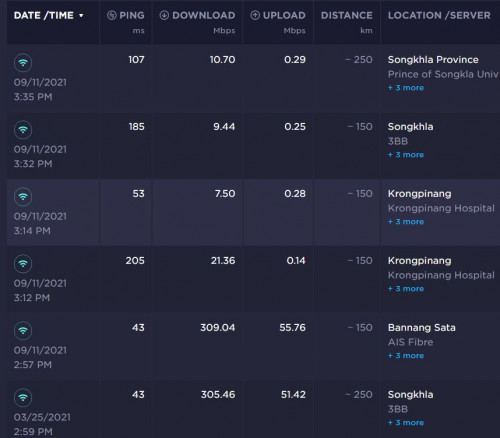
The below speedtest shows the old vs new router
user posted image

249 Pages « < 189 190 191 192 193 > » Top
 

Change to:
| Lo-Fi Version
0.0323sec    1.57    6 queries    GZIP Disabled
Time is now: 17th December 2025 - 01:23 AM