Outline ·
[ Standard ] ·
Linear+
TP-LINK Malaysia Official Thread, Technical Enquiries and Support
|
spideymung
|
 Sep 4 2021, 07:34 PM Sep 4 2021, 07:34 PM
|
Getting Started


|
Hi sifu sifu, I just upgraded to the ax73 and done setup. Everything works fine except my BluguardP2P alarm device which is wired. In my tether app, it does not recognize the device. My cctv is also wired and works fine. Anybody has encountered? I tried swapping ports and restarting everything. Also upgraded to latest firmware after I got the router. Any ideas?
|
|
|
|
|
|
spideymung
|
Sep 4 2021, 08:16 PM
|
Getting Started
|
QUOTE(blacktubi @ Sep 4 2021, 08:04 PM) If your alarm system is configured to static IP previously, you’ll need to make sure your AX73 is operating on the same IP range. Oh ya, if you use Unifi, the Unifi default VLAN profile disables LAN1 and LAN4 for normal devices. I used LAN2 and LAN3, it didn’t come on the tether app. But can see in advanced as per pic below. How do I check the static ip? I doubt that is the case, it was plug and play. Any firewall steps I can disable? 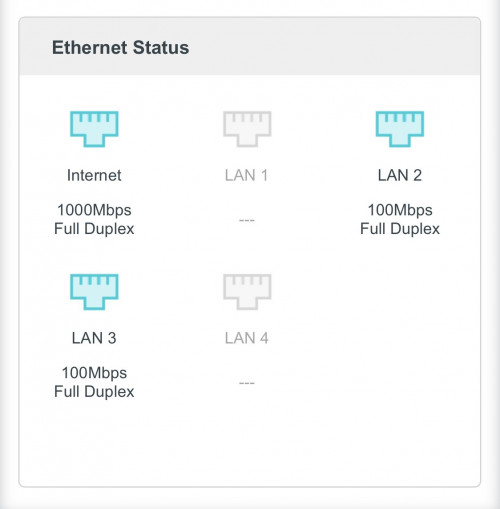 |
|
|
|
|
|
spideymung
|
Sep 4 2021, 08:36 PM
|
Getting Started
|
QUOTE(blacktubi @ Sep 4 2021, 08:22 PM) I think most alarm vendor will set them on a fixed IP so it's hard to know it unless you know the previous configuration. Do you remember what's the IP previously? It should be something like 192.168.xx.xx Haha they just plugged it in. I am not sure…maybe can call them? |
|
|
|
|
|
spideymung
|
Sep 4 2021, 08:43 PM
|
Getting Started
|
QUOTE(spideymung @ Sep 4 2021, 08:36 PM) Haha they just plugged it in. I am not sure…maybe can call them? The only difference is it was an asus ac1200 router and this is an ax73 |
|
|
|
|
|
spideymung
|
Sep 5 2021, 10:55 AM
|
Getting Started
|
QUOTE(blacktubi @ Sep 4 2021, 08:04 PM) If your alarm system is configured to static IP previously, you’ll need to make sure your AX73 is operating on the same IP range. Oh ya, if you use Unifi, the Unifi default VLAN profile disables LAN1 and LAN4 for normal devices. Anyways…is there a way to enable me to gain back access to LAN1 and LAN4? Since I don’t use hyyptv…seems to be a waste as I want to plug in my Apple TV and also smart tv or maybe an Xbox later down the road.. |
|
|
|
|
|
spideymung
|
Dec 29 2021, 07:35 PM
|
Getting Started
|
Sifu sifu, i wanted to wire my Samsung TV and Apple TV to my new AX73 router, but as only 2 LAN ports can work for internet, other 2 ports for unifi vlan are used for IPTV and VOIP. Current 2 LAN ports are being used for my cctv and alarm. 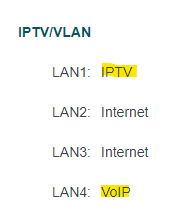 Any workaround how I can remove these 2 so I can utilize fully all 4 LAN ports. I had an old asus AC1200 router and tried to use it in AP Mode. Hooked up my cctv and alarm in the Asus router's LAN ports, but could not get the 2 items connected. This post has been edited by spideymung: Dec 29 2021, 07:38 PM |
|
|
|
|



 Quote
Quote

 0.1292sec
 1.01
1.01
 7 queries
 GZIP Disabled