Outline ·
[ Standard ] ·
Linear+
TP-LINK Malaysia Official Thread, Technical Enquiries and Support
|
jsontextbox
|
 Sep 20 2021, 07:24 PM Sep 20 2021, 07:24 PM
|
Getting Started


|
QUOTE(tyja @ Sep 20 2021, 07:07 AM) Yup. It work very well. But i never try to use vlan600 n vlan400. Just use vlan500. If you want to use omada controller to control router switch ap, make sure to check compatible list Nice! I am planning to run it off of a software controller, on Raspberry Pi. How's your experience with Omada so far? |
|
|
|
|
|
tyja
|
Sep 20 2021, 07:52 PM
|
|
|
QUOTE(jsontextbox @ Sep 20 2021, 07:24 PM) Nice! I am planning to run it off of a software controller, on Raspberry Pi. How's your experience with Omada so far? i'm quite like it. ubiquiti wannabe interface. my controller is on pi and nas synology. still thinking to get access point EAP. since it can handle 8 radio with total 16ssid. i have a lot iot, so i can spread between ssid. |
|
|
|
|
|
xSean
|
Sep 20 2021, 09:46 PM
|
|
|
Which one better? Ax73 vs Ax72?
|
|
|
|
|
|
FusionXY
|
Sep 20 2021, 10:01 PM
|
|
|
QUOTE(xSean @ Sep 20 2021, 09:46 PM) Which one better? Ax73 vs Ax72? AX73 - Triple core CPU. AX72 - Dual core CPU. |
|
|
|
|
|
MyProLife
|
Sep 20 2021, 10:18 PM
|
|
|
QUOTE(FusionXY @ Sep 20 2021, 10:01 PM) AX73 - Triple core CPU. AX72 - Dual core CPU. Ultimately cores number doesn't matter for routers or networking products IMO AX72 comes with Qualcomm Immersive home 216, is the same platform as xiaomi ax6000, dual core but the arm cortex a53 is much more powerful than broadcom entry level with seriously outdated cortex a7 AX72 is much better buy IMO |
|
|
|
|
|
dylan_chng
|
Sep 27 2021, 02:15 PM
|
|
|
One of my family member bought my family a MR6400 last year through Shopee. How to claim warranty? I emailed support.my@tp-link.com in August and got no reply.
|
|
|
|
|
|
fruitie
|
Sep 29 2021, 03:42 AM
|
Rise and Shine

|
Is anyone facing issue with Tether app? We have AX73 at home and my sis is using this app to monitor her daughter’s Internet usage. I also had this app installed in my iPhone and it was working for few months until one day the HomeShield feature no longer showing any details, just blank. I installed it on my spare Android phone and is also showing the same issue. Since my sis was still able to use it on her phone, so I didn’t bother much. Then since last week, her app is also having this issue. Deleted and reinstalled didn’t help. 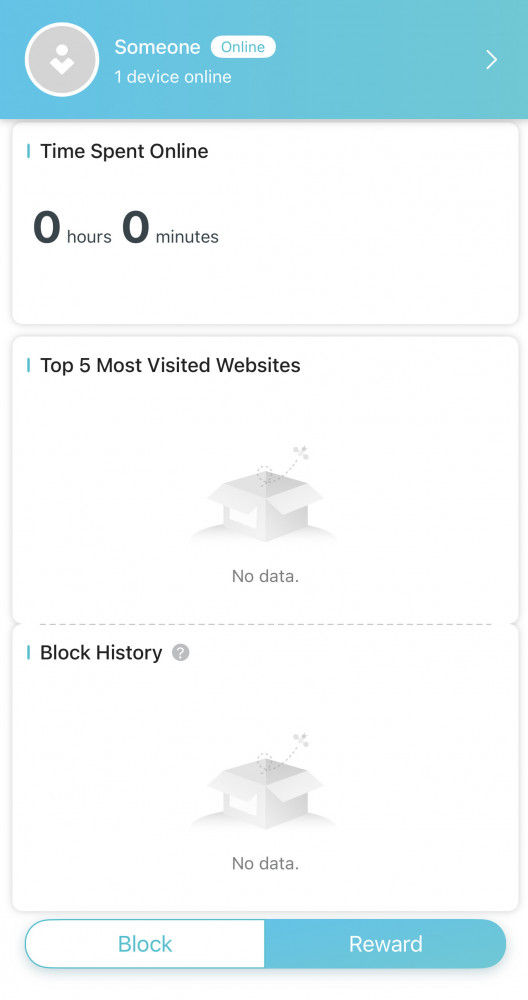 It’s not showing any data at all. This feature is really important as my sis is working while her daughter is at home attending online classes but without anybody monitoring her. Does anyone having this issue too? Any solution or alternative? |
|
|
|
|
|
blacktubi
|
Oct 2 2021, 04:55 PM
|
-

|
QUOTE(fruitie @ Sep 29 2021, 03:42 AM) Is anyone facing issue with Tether app? We have AX73 at home and my sis is using this app to monitor her daughter’s Internet usage. I also had this app installed in my iPhone and it was working for few months until one day the HomeShield feature no longer showing any details, just blank. I installed it on my spare Android phone and is also showing the same issue. Since my sis was still able to use it on her phone, so I didn’t bother much. Then since last week, her app is also having this issue. Deleted and reinstalled didn’t help. It’s not showing any data at all. This feature is really important as my sis is working while her daughter is at home attending online classes but without anybody monitoring her. Does anyone having this issue too? Any solution or alternative? HomeShield data is stored on the cloud. I afraid it might be server down or maintenance. If it is still not appearing after a while, I will suggest reset and setup again. |
|
|
|
|
|
fruitie
|
Oct 2 2021, 05:18 PM
|
Rise and Shine
|
QUOTE(blacktubi @ Oct 2 2021, 04:55 PM) HomeShield data is stored on the cloud. I afraid it might be server down or maintenance. If it is still not appearing after a while, I will suggest reset and setup again. Yeah, maybe it’s really our router issue. |
|
|
|
|
|
jimmy_none
|
Oct 4 2021, 11:29 PM
|
|
|
Hi.. Currently I am using Unifi 30mbps Unifi VSDL. How do I determine VR400 or VR600 is suitable for me? The difference I know is VoIP (I dont think I am using it) and AC1600. Do AC1600 really makes a lot of difference compared to AC1200? Thank you
|
|
|
|
|
|
taqu
|
Oct 5 2021, 12:12 PM
|
|
|
QUOTE(tyja @ Sep 20 2021, 07:52 PM) i'm quite like it. ubiquiti wannabe interface. my controller is on pi and nas synology. still thinking to get access point EAP. since it can handle 8 radio with total 16ssid. i have a lot iot, so i can spread between ssid. Since it seems Malaysia won't ever get Ubiquiti Unifi AX APs, Omada system is the only way to go. |
|
|
|
|
|
taqu
|
Oct 5 2021, 12:24 PM
|
|
|
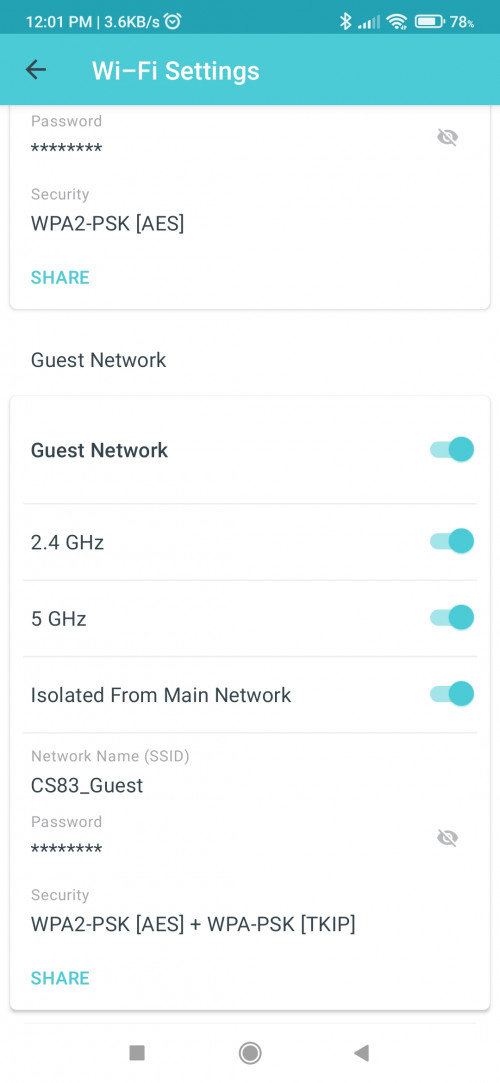 Kudos TP-Link for making Guest Wifi in Deco in AP Mode. With "Isolated from Main Network" enabled, devices on guest Wifi can only connect to router, and won't be able to see other devices in network, not even other devices connected to guest Wifi. |
|
|
|
|
|
aniq8676
|
Oct 5 2021, 01:10 PM
|
|
|
QUOTE(jimmy_none @ Oct 4 2021, 11:29 PM) Hi.. Currently I am using Unifi 30mbps Unifi VSDL. How do I determine VR400 or VR600 is suitable for me? The difference I know is VoIP (I dont think I am using it) and AC1600. Do AC1600 really makes a lot of difference compared to AC1200? Thank you Depending on your budget, but I suggest you take VR400 (v3) for Unifi VDSL 30mbps. AC1200 and AC1600 difference in terms of WIFI speed support. Since you are using 30mbps, then there is no difference at all. |
|
|
|
|
|
jimmy_none
|
Oct 5 2021, 01:22 PM
|
|
|
QUOTE(aniq8676 @ Oct 5 2021, 01:10 PM) Depending on your budget, but I suggest you take VR400 (v3) for Unifi VDSL 30mbps. AC1200 and AC1600 difference in terms of WIFI speed support. Since you are using 30mbps, then there is no difference at all. thanks for the reply. V600 is consider within my budget, just not sure is worth it. thanks for the heads up, v3 seems rare (even the official tp-link is selling first version, no v or v3) but manage to find a seller This post has been edited by jimmy_none: Oct 5 2021, 01:25 PM |
|
|
|
|
|
dchk
|
Oct 5 2021, 05:28 PM
|
|
|
Need some advise on an issue I'm facing. I have a Deco M9 (2 pcs) and M5 setup (2 pcs) connected to Unifi. The main satellite Deco M9 (ground floor) is then connected to TP-Link powerline AV600 to the other M9 (1st floor) and M5 (2nd floor) also via powerline AV600. This has been going on for almost 1.5 years. Reason for using powerline is to ensure a stable connection since Deco allows Ethernet backhaul. However, recently, I suspect the powerline is facing some issue causing the M9 to get disconnected.
I'm thinking of replacing this entire setup with either
Deco P9 Mesh (3pcs) with built in powerline
or
X60 (3 pcs) with AV1300 powerline.
Wanted to hear your opinions on which way to go?
X60 has Wifi 6, has 4 antenna. Lot more pricier.
P9 has built-in Powerline, but only 2 internal antenna
|
|
|
|
|
|
crimv
|
Oct 5 2021, 05:40 PM
|
Getting Started
|
i have tried ax50 , ax73 also will face intermittent disconnect & reconnect at random time.
|
|
|
|
|
|
xSean
|
Oct 5 2021, 10:56 PM
|
|
|
QUOTE(crimv @ Oct 5 2021, 05:40 PM) i have tried ax50 , ax73 also will face intermittent disconnect & reconnect at random time. Wifi or internet? |
|
|
|
|
|
crimv
|
Oct 6 2021, 09:00 AM
|
Getting Started
|
QUOTE(xSean @ Oct 5 2021, 10:56 PM) wifi |
|
|
|
|
|
xSean
|
Oct 6 2021, 09:24 AM
|
|
|
QUOTE(crimv @ Oct 6 2021, 09:00 AM) Generic issue or just your router? If generic issue, many complain or report it. |
|
|
|
|
|
crimv
|
Oct 6 2021, 09:34 AM
|
Getting Started
|
QUOTE(xSean @ Oct 6 2021, 09:24 AM) Generic issue or just your router? If generic issue, many complain or report it. not really sure whats going on .. just intermittent dc all my device wifi auto disconnect and reconnect .. if report they just going to replace a new unit ... maybe maybe just maybe alot interference at my area This post has been edited by crimv: Oct 6 2021, 09:35 AM |
|
|
|
|



 Quote
Quote




 0.0269sec
 0.89
0.89
 6 queries
 GZIP Disabled