

QUOTE(FusionXY @ Sep 11 2021, 03:45 PM)
You can consider RE505X or RE605X.

wow.. i just check the price on shopee, with this price i could get another ax20? would it be better choice for this price? i'm actually looking for lowest price possibleTP-LINK Malaysia Official Thread, Technical Enquiries and Support
|
|
 Sep 11 2021, 03:51 PM Sep 11 2021, 03:51 PM
|
 
Senior Member
1,081 posts Joined: Oct 2009 
|
QUOTE(FusionXY @ Sep 11 2021, 03:45 PM) You can consider RE505X or RE605X. wow.. i just check the price on shopee, with this price i could get another ax20? would it be better choice for this price? i'm actually looking for lowest price possible |
|
|
|
|
|
Sep 11 2021, 03:59 PM
Show posts by this member only | IPv6 | Post
#3822
|

Senior Member
3,836 posts Joined: Aug 2016
|
QUOTE(chrischiang @ Sep 11 2021, 03:51 PM) wow.. i just check the price on shopee, with this price i could get another ax20? would it be better choice for this price? i'm actually looking for lowest price possible AX20? One Mesh is not the same as AiMesh.Cannot connect router with router through One Mesh. Router with range extender only. If you plan to use as Access Point then no problem but maybe need to use different SSID. |
|
|
Sep 11 2021, 04:01 PM
|
|
Senior Member
1,081 posts Joined: Oct 2009
|
QUOTE(FusionXY @ Sep 11 2021, 03:59 PM) AX20? One Mesh is not the same as AiMesh. Oh understand.. so is router + ranger extender only... router + router will not work? Cannot connect router with router through One Mesh. Router with range extender only. If you plan to use as Access Point then no problem but maybe need to use different SSID. why i will need to use different SSID if i got for ap? |
|
|
Sep 11 2021, 04:06 PM
Show posts by this member only | IPv6 | Post
#3824
|
|
Senior Member
3,836 posts Joined: Aug 2016
|
QUOTE(chrischiang @ Sep 11 2021, 04:01 PM) Oh understand.. so is router + ranger extender only... router + router will not work? You can use the same, but not sure will it will affect the speed and connection.why i will need to use different SSID if i got for ap? It won't work router with router. It is different from AiMesh from Asus. |
|
|
Sep 11 2021, 04:17 PM
|
|
Senior Member
1,081 posts Joined: Oct 2009
|
QUOTE(FusionXY @ Sep 11 2021, 04:06 PM) You can use the same, but not sure will it will affect the speed and connection. Thanks! guess i just get the wifi extender! tyIt won't work router with router. It is different from AiMesh from Asus. |
|
|
Sep 11 2021, 04:19 PM
Show posts by this member only | IPv6 | Post
#3826
|
|
Senior Member
3,836 posts Joined: Aug 2016
|
QUOTE(chrischiang @ Sep 11 2021, 04:17 PM) Thanks! guess i just get the wifi extender! ty It can be used as extender or access point.Connect with one Mesh then use ethernet back haul. |
|
|
|
|
|
Sep 12 2021, 12:40 PM
|
 
Elite
8,420 posts Joined: Jul 2008 
|
QUOTE(arava @ Sep 11 2021, 03:47 PM) What i have tried: Have you check on your PC what is the port speed when this is happening?Trying every LAN port 1-4 Changing Ethernet cable cat5e and cat6 Reset TCP/DNS Reset Windows Network Turn on/off QoS Set negotiation speed to 1000Mbps Disable ipv6 The below speedtest shows the old vs new router 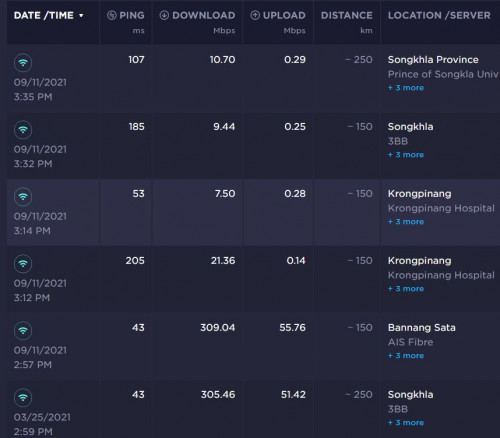 |
|
|
Sep 12 2021, 02:40 PM
Show posts by this member only | IPv6 | Post
#3828
|

Senior Member
5,542 posts Joined: Dec 2006 
|
just changed to a new AX1800, then it have interference with my speaker and now my speaker having rapid beeping pulse, it doens't happen with my previous Archer C1200
how do i stop the interference? turning off the wifi or changing the beacon interval to larger value helps, but i need the wifi for my other device also |
|
|
Sep 12 2021, 07:09 PM
Show posts by this member only | IPv6 | Post
#3829
|
|
Junior Member
511 posts Joined: Feb 2016
|
QUOTE(amduser @ Sep 12 2021, 02:40 PM) just changed to a new AX1800, then it have interference with my speaker and now my speaker having rapid beeping pulse, it doens't happen with my previous Archer C1200 just some wild guess, probably the interfernce is coming from the power adapter of the modem.how do i stop the interference? turning off the wifi or changing the beacon interval to larger value helps, but i need the wifi for my other device also u try to borrow an power strip with surge protector function, and use it on that power adapter and see if it solve the problem. btw, some low quality LED light bulb may cause power interfrence as well..  This post has been edited by hashtag2016: Sep 12 2021, 07:10 PM |
|
|
Sep 12 2021, 10:22 PM
Show posts by this member only | IPv6 | Post
#3830
|

Senior Member
1,725 posts Joined: Jan 2003
|
All versions of the Model Archer AX20, Archer AX21 and Archer AX1800 are electrically equal except the following difference:
1. Only different in model name between model Archer AX20 and model Archer AX1800. 2. The model name and shell are difference between model Archer AX20 and Archer AX21. Date: 2020-11-05 https://fccid.io/TE7AX20V2/Letter/17-Model-...-Letter-5053121 Improved Vent Design: Unleashes the full power of the whole machine. https://www.tp-link.com/us/home-networking/...er/archer-ax21/ This post has been edited by Alpha_Tay: Sep 12 2021, 10:48 PM |
|
|
Sep 12 2021, 11:45 PM
Show posts by this member only | IPv6 | Post
#3831
|
|
Senior Member
5,542 posts Joined: Dec 2006
|
QUOTE(hashtag2016 @ Sep 12 2021, 07:09 PM) just some wild guess, probably the interfernce is coming from the power adapter of the modem. i'm using the same power adapter from C1200, maybe tomorrow will try to change to the adapter that come with the new router and seeu try to borrow an power strip with surge protector function, and use it on that power adapter and see if it solve the problem. btw, some low quality LED light bulb may cause power interfrence as well.. i dont have any LED other than those on my graphic card and casing indicator light, the only that changed is the router and network cable, at first i thought is the 3.5mm audio cable loosen but after checking it doesn't seems like the case |
|
|
Sep 14 2021, 06:08 PM
|

Junior Member
612 posts Joined: Mar 2008
|
guys anyone know what is the password for maxis tp link ax20 password?
|
|
|
Sep 15 2021, 09:18 PM
|
|
Elite
8,420 posts Joined: Jul 2008
|
QUOTE(Gaara92 @ Sep 14 2021, 06:08 PM) guys anyone know what is the password for maxis tp link ax20 password? Maxis started giving the Archer AX20? |
|
|
|
|
|
Sep 15 2021, 09:52 PM
|
|
Senior Member
1,524 posts Joined: Dec 2020 From: Perak
|
QUOTE(blacktubi @ Sep 15 2021, 09:18 PM) Maxis started giving the Archer AX20? I'm not mistaken, Maxis also gave the Archer AX20 router to some of their customers before the KAON router became the official maxis fibre router.Not sure if they still provide the Archer AX20 router or not. |
|
|
Sep 17 2021, 07:34 PM
|
|
Junior Member
612 posts Joined: Mar 2008
|
QUOTE(blacktubi @ Sep 15 2021, 09:18 PM) Maxis started giving the Archer AX20? Yup it is tp-link Archer AX20 v2.0the problem is i forgot to ask the technician the router password |
|
|
Sep 17 2021, 08:08 PM
Show posts by this member only | IPv6 | Post
#3836
|
|
Elite
8,420 posts Joined: Jul 2008
|
QUOTE(Gaara92 @ Sep 17 2021, 07:34 PM) Yup it is tp-link Archer AX20 v2.0 Worst to worst, reset and setup again the problem is i forgot to ask the technician the router password  |
|
|
Sep 19 2021, 01:47 PM
|
|
Junior Member
612 posts Joined: Mar 2008
|
QUOTE(blacktubi @ Sep 17 2021, 08:08 PM) Worst to worst, reset and setup again And how to get the pppoe creds? |
|
|
Sep 20 2021, 12:43 AM
Show posts by this member only | IPv6 | Post
#3838
|
|
Junior Member
52 posts Joined: Nov 2020
|
Hi, I am planning to get the Omada series router, ER605. it shouldn't have a problem working with TM UniFi's VLAN right?
|
|
|
Sep 20 2021, 07:07 AM
|

Senior Member
913 posts Joined: Dec 2008 From: Nusa Indah, Johor Bahru 
|
QUOTE(jsontextbox @ Sep 20 2021, 12:43 AM) Hi, I am planning to get the Omada series router, ER605. it shouldn't have a problem working with TM UniFi's VLAN right? Yup. It work very well. But i never try to use vlan600 n vlan400. Just use vlan500. If you want to use omada controller to control router switch ap, make sure to check compatible list |
|
|
Sep 20 2021, 05:11 PM
Show posts by this member only | IPv6 | Post
#3840
|

Senior Member
1,413 posts Joined: Nov 2004 From: KL 
|
i notice that my AX90 keep disconnect & reconnect at random time.
no problem with speed & TV. is there any way for me to resolve this issue? using latest firmware Firmware Version: 1.1.3 Build 20210726 rel.82278(5553) |
| Change to: |  0.0247sec 0.0247sec
 1.53 1.53
 6 queries 6 queries
 GZIP Disabled GZIP Disabled
Time is now: 17th December 2025 - 02:06 PM |
 Quote
Quote