

QUOTE(andrekua2 @ Aug 28 2021, 09:12 AM)
I guess either this... or disable ipv6 or turn off windows firewall
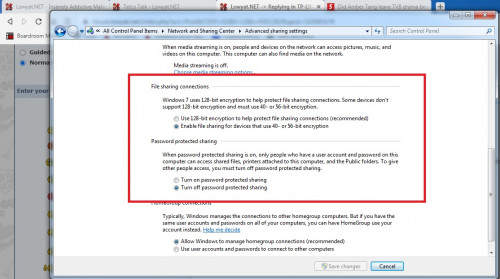

Thanks for the suggestion. I tried it but it didn't solve the problem.TP-LINK Malaysia Official Thread, Technical Enquiries and Support
|
|
 Aug 30 2021, 06:09 PM Aug 30 2021, 06:09 PM
|
 
Senior Member
5,989 posts Joined: Nov 2005 
|
QUOTE(andrekua2 @ Aug 28 2021, 09:12 AM) I guess either this... or disable ipv6 or turn off windows firewall Thanks for the suggestion. I tried it but it didn't solve the problem. |
|
|
|
|
|
Sep 1 2021, 12:09 AM
|

Senior Member
2,200 posts Joined: Mar 2006 From: OKR KL 
|
My experience with the RE300 extender for AX20 (onemesh) in a double storey 20x70 house is horrible. AX20 at ground floor hall while extender at top floor family area.
The RE300 keeps disconnecting and sometimes can’t even maintain 5ghz band. It frequently goes missing from the App. On top of that, the speed is halved compared to direct connecting a 2.4ghz band from AX20. Was using the Tether app. My advice is steer clear from extenders (especially Re300) unless you really really need the coverage. Better off using another router to set AP. Have turned off the extender for good and using direct connection, although corners can only get 2.4ghz, it’s still way faster than a 5ghz connection from extender. |
|
|
Sep 1 2021, 12:41 PM
|

Junior Member
460 posts Joined: Jun 2008
|
QUOTE(deepan84 @ Sep 1 2021, 12:09 AM) My experience with the RE300 extender for AX20 (onemesh) in a double storey 20x70 house is horrible. AX20 at ground floor hall while extender at top floor family area. you have tried speedtest with your phone at the re300 spot for 2.4ghz & 5ghz?The RE300 keeps disconnecting and sometimes can’t even maintain 5ghz band. It frequently goes missing from the App. On top of that, the speed is halved compared to direct connecting a 2.4ghz band from AX20. Was using the Tether app. My advice is steer clear from extenders (especially Re300) unless you really really need the coverage. Better off using another router to set AP. Have turned off the extender for good and using direct connection, although corners can only get 2.4ghz, it’s still way faster than a 5ghz connection from extender. |
|
|
Sep 1 2021, 01:05 PM
|
|
Senior Member
2,200 posts Joined: Mar 2006 From: OKR KL
|
QUOTE(szecheng @ Sep 1 2021, 12:41 PM) you have tried speedtest with your phone at the re300 spot for 2.4ghz & 5ghz? Sometimes I sit beside the re300 also can disconnect from tether app. And keeps jumping from my ax20 to re300. Can summarise that connection not stable to the extender. Location is perfect and already set channel to 44. |
|
|
Sep 1 2021, 05:45 PM
|

Junior Member
410 posts Joined: Apr 2008 From: Klang Valley
|
Just noticed that there is a new firmware update for AX73...hope this will resolve some WIFI disconnection issue.
|
|
|
Sep 2 2021, 07:18 AM
|
|
Newbie
34 posts Joined: Aug 2017
|
QUOTE(kfthoo @ Sep 1 2021, 05:45 PM) Just noticed that there is a new firmware update for AX73...hope this will resolve some WIFI disconnection issue. Good. I am in the wait list for the release version for the latest firmware for Deco M40. Hoping that latest firmware will address issue with slow unstable wifi when one ethernet port is set for a local network and not set for IPTV. |
|
|
|
|
|
Sep 2 2021, 09:44 AM
|
|
Junior Member
460 posts Joined: Jun 2008
|
QUOTE(deepan84 @ Sep 1 2021, 01:05 PM) Sometimes I sit beside the re300 also can disconnect from tether app. And keeps jumping from my ax20 to re300. Can summarise that connection not stable to the extender. Location is perfect and already set channel to 44. what i mean is turn off re300. speedtest at that location |
|
|
Sep 2 2021, 10:25 AM
Show posts by this member only | IPv6 | Post
#3788
|
|
Senior Member
2,200 posts Joined: Mar 2006 From: OKR KL
|
QUOTE(szecheng @ Sep 2 2021, 09:44 AM) what i mean is turn off re300. speedtest at that location for my 300mbps line, i can get around 270mbps if direct connect to AX20. probably because my iphone supports wifi6. if via RE300(AC), can get around 120-130mbps max. The issue I'm facing is the device keeps dropping or disconnecting from the AX20...or just goes missing from the tether app. No issue at all with the AX20. |
|
|
Sep 2 2021, 02:19 PM
|

Senior Member
913 posts Joined: Dec 2008 From: Nusa Indah, Johor Bahru 
|
Anyone can help step by step setup tplink router r605 omada using tm unifi?
This post has been edited by tyja: Sep 2 2021, 02:19 PM |
|
|
Sep 2 2021, 09:28 PM
|
|
Junior Member
460 posts Joined: Jun 2008
|
QUOTE(deepan84 @ Sep 2 2021, 10:25 AM) for my 300mbps line, i can get around 270mbps if direct connect to AX20. probably because my iphone supports wifi6. if via RE300(AC), can get around 120-130mbps max. The issue I'm facing is the device keeps dropping or disconnecting from the AX20...or just goes missing from the tether app. No issue at all with the AX20. if both phone & re300 at same location facing the problem u mentionedre300 is faulty claim waranty |
|
|
Sep 2 2021, 10:48 PM
|

Junior Member
938 posts Joined: Sep 2013
|
Is there a difference between using the M9 Deco Plus in Dynamic IP mode (connected to TM router) and M9 Deco Plus in PPPoE mode? I noticed that I can no longer get 800mbps with a wired connection changing from Dynamic IP connected to TM router and PPPoE mode connected to M9 deco via cat6 cable.
|
|
|
Sep 2 2021, 11:03 PM
Show posts by this member only | IPv6 | Post
#3792
|
|
Senior Member
1,524 posts Joined: Dec 2020 From: Perak
|
QUOTE(Steponlego @ Sep 2 2021, 10:48 PM) Is there a difference between using the M9 Deco Plus in Dynamic IP mode (connected to TM router) and M9 Deco Plus in PPPoE mode? I noticed that I can no longer get 800mbps with a wired connection changing from Dynamic IP connected to TM router and PPPoE mode connected to M9 deco via cat6 cable. Deco Mesh seems to have a Speed Drop issue in PPPoE mode. Mine Deco M4New firmware to address this issue is still in BETA. |
|
|
Sep 2 2021, 11:13 PM
|
|
Junior Member
938 posts Joined: Sep 2013
|
QUOTE(aniq8676 @ Sep 2 2021, 11:03 PM) Deco Mesh seems to have a Speed Drop issue in PPPoE mode. Mine Deco M4 I see. Guess it's nothing wrong on unifi side. I need to use PPPoE mode because too many cables when using the TM router in dynamic IP.New firmware to address this issue is still in BETA. |
|
|
|
|
|
Sep 2 2021, 11:15 PM
|
 
Elite
8,420 posts Joined: Jul 2008 
|
QUOTE(Steponlego @ Sep 2 2021, 10:48 PM) Is there a difference between using the M9 Deco Plus in Dynamic IP mode (connected to TM router) and M9 Deco Plus in PPPoE mode? I noticed that I can no longer get 800mbps with a wired connection changing from Dynamic IP connected to TM router and PPPoE mode connected to M9 deco via cat6 cable. Make sure you don't use the HomeCare features.They will slow things down. Not noticeable on slower connection but definitely noticeable on 800Mbps. |
|
|
Sep 3 2021, 12:31 AM
|
|
Junior Member
938 posts Joined: Sep 2013
|
QUOTE(blacktubi @ Sep 2 2021, 11:15 PM) Make sure you don't use the HomeCare features. HomeCare is disabled. Still not seeing anywhere near 800mbps like yesterday, but managed to get 588mbps. Deco M9 is updated to the latest firmware. Seems to be Unifi problem then? Currently only my house is connected to the unifi distributor port box outside.... can't imagine how it will be when all the neighbors starts using unifi.They will slow things down. Not noticeable on slower connection but definitely noticeable on 800Mbps. |
|
|
Sep 3 2021, 12:14 PM
Show posts by this member only | IPv6 | Post
#3796
|

Senior Member
3,112 posts Joined: Jul 2006
|
Hi Guys,
If say i want to use mesh extender for my house, do i need to change the modem to One Mesh compatible as well? Currently using Huawei B618 4G modem, want to extend the range using mesh setup (not repeater). 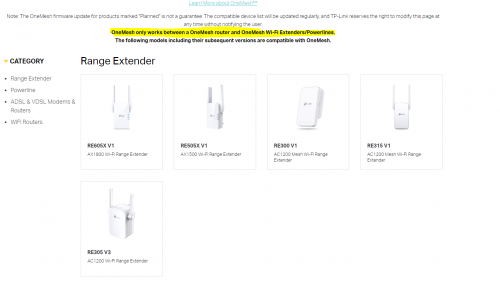 is that true? This post has been edited by coolkwc: Sep 3 2021, 12:16 PM |
|
|
Sep 4 2021, 02:56 PM
|

Junior Member
98 posts Joined: Mar 2010
|
Hi, anyone know how to unlock celcom ax10 router? i want to use for unifi, but could detect WAN internet.
Please help,,,, |
|
|
Sep 4 2021, 03:07 PM
Show posts by this member only | IPv6 | Post
#3798
|
|
Senior Member
1,524 posts Joined: Dec 2020 From: Perak
|
QUOTE(nick.remember.u @ Sep 4 2021, 02:56 PM) Hi, anyone know how to unlock celcom ax10 router? i want to use for unifi, but could detect WAN internet. Cant, Archer AX10 from Celcom Fibre is not the same as Archer AX10 sold to consumers.Please help,,,, |
|
|
Sep 4 2021, 03:25 PM
|
|
Junior Member
98 posts Joined: Mar 2010
|
QUOTE(aniq8676 @ Sep 4 2021, 04:07 PM) Cant, Archer AX10 from Celcom Fibre is not the same as Archer AX10 sold to consumers. im looking some unlock tips, because it can set AP or router mode only. Cant use for other ISP |
|
|
Sep 4 2021, 04:11 PM
Show posts by this member only | IPv6 | Post
#3800
|

Senior Member
1,878 posts Joined: Apr 2019
|
QUOTE(nick.remember.u @ Sep 4 2021, 02:56 PM) Hi, anyone know how to unlock celcom ax10 router? i want to use for unifi, but could detect WAN internet. You might want to consider purchasing an affordable router from TP-Link's value branded Mercusys:Please help,,,, Checkout this review: Mercusys MR70X review: Affordable Wi-Fi 6! https://www.digitalcitizen.life/mercusys-mr70x-review/ Quoted from the site: QUOTE However, from our testing, we suspect it to be similar to that of TP-Link Archer AX10 - triple-core processor, 256 MB of RAM, and 16 MB of storage space for the firmware. Few people know that TP-Link owns the Mercusys brand. One technical proof of this is the quick setup wizard on the Mercusys MR70X: it is the same as on the TP-Link Archer AX models that we tested. It only uses a different color (red instead of cyan). |
| Change to: |  0.0241sec 0.0241sec
 0.97 0.97
 6 queries 6 queries
 GZIP Disabled GZIP Disabled
Time is now: 17th December 2025 - 11:21 AM |
 Quote
Quote