Outline ·
[ Standard ] ·
Linear+
TP-LINK Malaysia Official Thread, Technical Enquiries and Support
|
micwk
|
 Sep 14 2018, 10:25 AM Sep 14 2018, 10:25 AM
|
Getting Started


|
QUOTE(SilentVampire @ Sep 14 2018, 08:18 AM) Read Blacktubi reply and enable TM Unifi VLAN settings. Thanks a million Blacktubi and Silent Vampire. I got it to work. But I only get like 200+ mbps on wireless and ethernet cable. My BTU is a Huawei HG8240H ** I’m turbo-ed to 800mbps recently ** This post has been edited by micwk: Sep 14 2018, 10:26 AM |
|
|
|
|
|
SilentVampire
|
Sep 14 2018, 11:07 AM
|
|
|
QUOTE(micwk @ Sep 14 2018, 10:25 AM) Thanks a million Blacktubi and Silent Vampire. I got it to work. But I only get like 200+ mbps on wireless and ethernet cable. My BTU is a Huawei HG8240H ** I’m turbo-ed to 800mbps recently ** Try with a different RJ45, preferably Cat6, and click the link on my signature and read all the info there. |
|
|
|
|
|
rocktank
|
Sep 14 2018, 06:28 PM
|
Getting Started
|
QUOTE(TP-LINK MY @ Sep 13 2018, 12:30 PM) 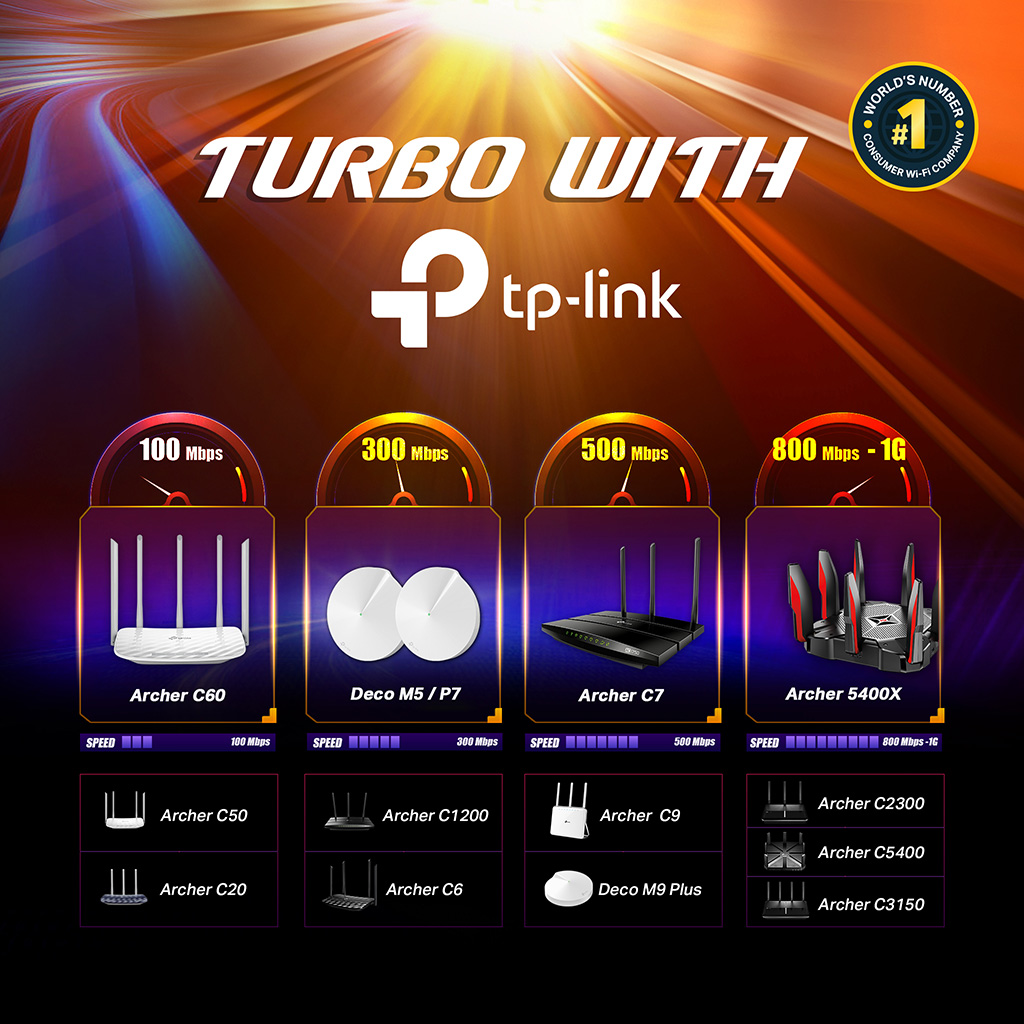 Are you ready for the TURBO Internet speed upgrade? TP-Link Wireless Routers surely is! Check if your router is supported and don't hesitate to ask us for more information! Hi, is this means archer c20 (AC 900) only can support up to 100mbps via WiFi? I just been told that I got the unifi turbo upgraded to 300mbps, but the speed test result is just 8x.xx mbps |
|
|
|
|
|
SilentVampire
|
Sep 14 2018, 06:41 PM
|
|
|
QUOTE(rocktank @ Sep 14 2018, 06:28 PM) Hi, is this means archer c20 (AC 900) only can support up to 100mbps via WiFi? I just been told that I got the unifi turbo upgraded to 300mbps, but the speed test result is just 8x.xx mbps Of course, and the C20 only has FE ports, which means that it only supports up to 100Mbps on the router LAN ports. Click on my signature and read everything theee, and change your router. |
|
|
|
|
|
stasio
|
Sep 14 2018, 07:57 PM
|
|
|
QUOTE(TP-LINK MY @ Sep 13 2018, 12:30 PM) Are you ready for the TURBO Internet speed upgrade? TP-Link Wireless Routers surely is! Check if your router is supported and don't hesitate to ask us for more information! When Archer 2700 (with Intel CPU) is coming...?  This post has been edited by stasio: Sep 14 2018, 07:58 PM This post has been edited by stasio: Sep 14 2018, 07:58 PM |
|
|
|
|
|
micwk
|
Sep 14 2018, 09:00 PM
|
Getting Started
|
A thousand apologies, just a quick question. My connection via ethernet cable reaches about 700mbps. While my connection via wireless can only reach 300mbps. Is it normal?
Device: IPhone X & MacBook Pro
Router : Archer C3150
|
|
|
|
|
|
SilentVampire
|
Sep 14 2018, 09:09 PM
|
|
|
QUOTE(micwk @ Sep 14 2018, 09:00 PM) A thousand apologies, just a quick question. My connection via ethernet cable reaches about 700mbps. While my connection via wireless can only reach 300mbps. Is it normal? Device: IPhone X & MacBook Pro Router : Archer C3150 Yes. Click the link on my signature, and read everything there, green text. Your device needs to be able to support the speed as well, and wireless have many overheads. |
|
|
|
|
|
rocktank
|
Sep 14 2018, 11:47 PM
|
Getting Started
|
QUOTE(SilentVampire @ Sep 14 2018, 06:41 PM) Of course, and the C20 only has FE ports, which means that it only supports up to 100Mbps on the router LAN ports. Click on my signature and read everything theee, and change your router. thanks, just went thru your shared info, i gotta change my router then. thanks ya  |
|
|
|
|
|
SilentVampire
|
Sep 15 2018, 12:00 AM
|
|
|
QUOTE(rocktank @ Sep 14 2018, 11:47 PM) thanks, just went thru your shared info, i gotta change my router then. thanks ya No worries. Good luck. |
|
|
|
|
|
Doraku
|
Sep 15 2018, 10:05 AM
|
|
|
QUOTE(stasio @ Sep 14 2018, 07:57 PM) When Archer 2700 (with Intel CPU) is coming...? Why not make your own Router using VyOS  Amd Ryzen 2400g 4GB ram alot of gigabit and SFP ethernet port, The only problem is VyOS dosen`t have GUI currently so you need to be VyOS expert  or you can use Mikrotik RouterOS the only problem is RouterOS is not free |
|
|
|
|
|
stasio
|
Sep 15 2018, 12:53 PM
|
|
|
QUOTE(Doraku @ Sep 15 2018, 10:05 AM) Why not make your own Router using VyOS Amd Ryzen 2400g 4GB ram alot of gigabit and SFP ethernet port, The only problem is VyOS dosen`t have GUI currently so you need to be VyOS expert or you can use Mikrotik RouterOS the only problem is RouterOS is not free Why people still buying routers, as can make their own...haha......  |
|
|
|
|
|
GYren
|
Sep 15 2018, 02:44 PM
|
New Member
|
Does anyone experience TP-LINK Archer C60 v2.0 / AC1350 rebooting issue?
I'm using this router for my Unifi, but experience keep rebooting issue, and i tried to change back to old TM router, so far no such issue occur, yet...
Anyone know how to solved the rebooting issue?
|
|
|
|
|
|
SilentVampire
|
Sep 15 2018, 05:00 PM
|
|
|
QUOTE(GYren @ Sep 15 2018, 02:44 PM) Does anyone experience TP-LINK Archer C60 v2.0 / AC1350 rebooting issue? I'm using this router for my Unifi, but experience keep rebooting issue, and i tried to change back to old TM router, so far no such issue occur, yet... Anyone know how to solved the rebooting issue? I would suggest changing router to something better. That has no gigabit ports, and it is very limited on the hardware side. Click the link on my signature to see recommended routers. |
|
|
|
|
|
chocobo7779
|
Sep 15 2018, 05:09 PM
|
|
|
QUOTE(Doraku @ Sep 15 2018, 10:05 AM) Why not make your own Router using VyOS Amd Ryzen 2400g 4GB ram alot of gigabit and SFP ethernet port, The only problem is VyOS dosen`t have GUI currently so you need to be VyOS expert or you can use Mikrotik RouterOS the only problem is RouterOS is not free Wasn't Pfsense will work just fine, no?  |
|
|
|
|
|
GYren
|
Sep 15 2018, 07:44 PM
|
New Member
|
QUOTE(SilentVampire @ Sep 15 2018, 05:00 PM) I would suggest changing router to something better. That has no gigabit ports, and it is very limited on the hardware side. Click the link on my signature to see recommended routers. But my Unifi only 50mbps, my condo not fiber optic installed..... the router is Unifi compatible but seems like got rebooting issue.... |
|
|
|
|
|
SilentVampire
|
Sep 15 2018, 07:46 PM
|
|
|
QUOTE(GYren @ Sep 15 2018, 07:44 PM) But my Unifi only 50mbps, my condo not fiber optic installed..... the router is Unifi compatible but seems like got rebooting issue.... Ah, in that case, you wil need to be a new router. Sounds like the router is no longer performing optimally. |
|
|
|
|
|
TiMMy_Burch
|
Sep 22 2018, 03:23 PM
|
New Member
|
I have a question. Searched around got mixed answers:
I just got turbo-ed 500Mbps.
My double storey house is three phase powered. 1 dB box.
now my room upstairs plug is connected to blue wire, whereas my router downstairs is connected to red wire.
So. Will the powerline TL-WPA8630PKIT works?
|
|
|
|
|
|
SilentVampire
|
Sep 22 2018, 03:52 PM
|
|
|
QUOTE(TiMMy_Burch @ Sep 22 2018, 03:23 PM) I have a question. Searched around got mixed answers: I just got turbo-ed 500Mbps. My double storey house is three phase powered. 1 dB box. now my room upstairs plug is connected to blue wire, whereas my router downstairs is connected to red wire. So. Will the powerline TL-WPA8630PKIT works? Not possible, sounds like they are on a different circuit, and I would not recommend powerline. Get an expensive router that has superb wireless coverage, and refer to the link on my sig, to see list of compatible routers. |
|
|
|
|
|
TiMMy_Burch
|
Sep 22 2018, 06:13 PM
|
New Member
|
QUOTE(SilentVampire @ Sep 22 2018, 03:52 PM) Not possible, sounds like they are on a different circuit, and I would not recommend powerline. Get an expensive router that has superb wireless coverage, and refer to the link on my sig, to see list of compatible routers. Too bad. So is C3150 > c9 in terms of coverage, stability etc? |
|
|
|
|
|
shahie
|
Sep 22 2018, 07:15 PM
|
|
|
QUOTE(TiMMy_Burch @ Sep 22 2018, 03:23 PM) I have a question. Searched around got mixed answers: I just got turbo-ed 500Mbps. My double storey house is three phase powered. 1 dB box. now my room upstairs plug is connected to blue wire, whereas my router downstairs is connected to red wire. So. Will the powerline TL-WPA8630PKIT works? no...must connected via the same phase. to be honest, no matter how fast speed quoted on your powerline networking, you will only get less than 100mbps. trust me. wired cat5e or cat6 connection is always the best. lol |
|
|
|
|




 Quote
Quote




 0.0914sec
 0.92
0.92
 6 queries
 GZIP Disabled