

Anybody using Archer C2300 ?
TP-LINK Malaysia Official Thread, Technical Enquiries and Support
TP-LINK Malaysia Official Thread, Technical Enquiries and Support
|
|
 Aug 13 2018, 09:13 PM Aug 13 2018, 09:13 PM
Return to original view | Post
#1
|
 
All Stars
18,503 posts Joined: Oct 2007 From: P.Jaya 
|
Anybody using Archer C2300 ?
|
|
|
|
|
|
Aug 13 2018, 11:35 PM
Return to original view | Post
#2
|
|
All Stars
18,503 posts Joined: Oct 2007 From: P.Jaya
|
QUOTE(SilentVampire @ Aug 13 2018, 10:47 PM) I wouldn’t recommend it, if you want to watch UnifiTV. It screws that up. It would be better to get the C3150 v2. No IPTV for sure. All 4 ports for internet. C2300 has better hardware then C3150 and RM100 cheaper. This post has been edited by stasio: Aug 13 2018, 11:37 PM |
|
|
Sep 13 2018, 12:57 AM
Return to original view | Post
#3
|
|
All Stars
18,503 posts Joined: Oct 2007 From: P.Jaya
|
QUOTE(liauzh @ Sep 13 2018, 12:02 AM) any router recommendation for UniFi Turbo 800Mbps? https://forum.lowyat.net/topic/4638136 |
|
|
Sep 14 2018, 07:57 PM
Return to original view | IPv6 | Post
#4
|
|
All Stars
18,503 posts Joined: Oct 2007 From: P.Jaya
|
QUOTE(TP-LINK MY @ Sep 13 2018, 12:30 PM) Are you ready for the TURBO Internet speed upgrade? TP-Link Wireless Routers surely is! Check if your router is supported and don't hesitate to ask us for more information!  This post has been edited by stasio: Sep 14 2018, 07:58 PM |
|
|
Sep 15 2018, 12:53 PM
Return to original view | IPv6 | Post
#5
|
|
All Stars
18,503 posts Joined: Oct 2007 From: P.Jaya
|
QUOTE(Doraku @ Sep 15 2018, 10:05 AM) Why not make your own Router using VyOS Why people still buying routers, as can make their own...haha......  Amd Ryzen 2400g 4GB ram alot of gigabit and SFP ethernet port, The only problem is VyOS dosen`t have GUI currently so you need to be VyOS expert  or you can use Mikrotik RouterOS the only problem is RouterOS is not free or you can use Mikrotik RouterOS the only problem is RouterOS is not free  |
|
|
Sep 23 2018, 10:17 AM
Return to original view | IPv6 | Post
#6
|
|
All Stars
18,503 posts Joined: Oct 2007 From: P.Jaya
|
QUOTE(TiMMy_Burch @ Sep 22 2018, 10:50 PM) around the same speed <200 Mbps with the settings above. "Crap" C1200 (TIME@300) ,Wifi all on Auto.....5GHz getting 295 (in other room...distance ~8m).... i tot i can get at least 80% of the 500Mbps thru 5ghz / 2.4ghz  Samsung S5..... 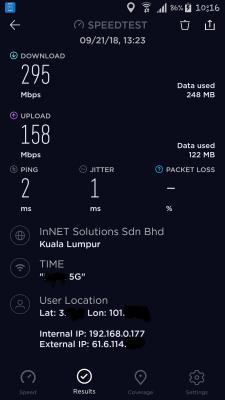
|
|
|
|
|
|
Sep 23 2018, 09:14 PM
Return to original view | IPv6 | Post
#7
|
|
All Stars
18,503 posts Joined: Oct 2007 From: P.Jaya
|
QUOTE(CyanT @ Sep 23 2018, 05:27 PM) Guys, I have a C1200 v1.0 with TIME connection. Every once in a while (sometimes once a few days, sometimes once a few hours), the router would seem to be unresponsive, WiFi and LAN will show to have no internet connection, and neither the wired PC or WiFi connected phone can access the router interface. It will only recover when the router is powered off and on. I have searched from Google, and some have suggested to disable 5Ghz WiFi, and some have suggested to disable ipv6. I have done both but it seems like these solutions are temporary, the issue will come back after a few days/weeks. Are you have latest TIME firmware C1200v1_eu_time-up-boot-1.0.0 Build 20180502 rel.45702 ?Does anyone of you have this experience before? Any solution? Thank you. |
|
|
Sep 23 2018, 09:38 PM
Return to original view | IPv6 | Post
#8
|
|
All Stars
18,503 posts Joined: Oct 2007 From: P.Jaya
|
QUOTE(CyanT @ Sep 23 2018, 09:32 PM) Yup, same firmware. I think you should post in deducated thread...https://forum.lowyat.net/topic/4497511/+660 |
|
|
Sep 24 2018, 06:26 PM
Return to original view | IPv6 | Post
#9
|
|
All Stars
18,503 posts Joined: Oct 2007 From: P.Jaya
|
QUOTE(SHOfrE3zE @ Sep 24 2018, 04:05 PM) still the same problem. already set as mentioned and getting 100mbps full duplex for internet only. Seems you got mixed 100 and 1000Mbps.[attachmentid=10036323] Try factory reset or check your router ( and PC also) duplex...should be Auto Negotiation : 
This post has been edited by stasio: Sep 24 2018, 06:27 PM |
|
|
Sep 24 2018, 06:59 PM
Return to original view | IPv6 | Post
#10
|
|
All Stars
18,503 posts Joined: Oct 2007 From: P.Jaya
|
QUOTE(blacktubi @ Sep 24 2018, 06:40 PM) Seems like a weird issue with the hardware. Try a different LAN cable.  Yea, I didnt mention that ALL LAN cables to be at least Cat5e (or Cat6). |
|
|
Sep 27 2018, 11:53 AM
Return to original view | Post
#11
|
|
All Stars
18,503 posts Joined: Oct 2007 From: P.Jaya
|
QUOTE(deadfish @ Sep 27 2018, 11:48 AM) https://www.tp-link.com/us/products/details...cher-C2700.html Supose to be this year October/November.Hi TP-Link rep, when do you think this model will be launched in Malaysia? Will it be in 2018 or 2019? |
|
|
Oct 8 2018, 06:51 AM
Return to original view | IPv6 | Post
#12
|
|
All Stars
18,503 posts Joined: Oct 2007 From: P.Jaya
|
QUOTE(nill @ Oct 8 2018, 03:03 AM) I accidentally update my Archer C9 v1 with US firmware, Archer C9(US)_V1_180125. Tried the following but failed: https://forum.lowyat.net/index.php?showtopi...7602&hl=unbrick1. Setup TFTP server 192.168.0.66 and send Archer C9(UN)_V1_160517 2. Update to dd-wrt https://wiki.dd-wrt.com/wiki/index.php/TP_Link_Archer_C9 Unable to connect PPoE (UniFi) with the US firmware. Please offer some advise. |
| Change to: |  0.0266sec 0.0266sec
 1.01 1.01
 7 queries 7 queries
 GZIP Disabled GZIP Disabled
Time is now: 4th December 2025 - 10:24 PM |
 Quote
Quote