

QUOTE(TiMMy_Burch @ Sep 22 2018, 06:13 PM)
Too bad. So is C3150 > c9 in terms of coverage, stability etc?

Yes, of course.TP-LINK Malaysia Official Thread, Technical Enquiries and Support
|
|
 Sep 22 2018, 07:21 PM Sep 22 2018, 07:21 PM
Show posts by this member only | IPv6 | Post
#1101
|
 
Senior Member
5,714 posts Joined: Mar 2007   
|
QUOTE(TiMMy_Burch @ Sep 22 2018, 06:13 PM) Too bad. So is C3150 > c9 in terms of coverage, stability etc? Yes, of course. |
|
|
|
|
|
Sep 22 2018, 07:46 PM
Show posts by this member only | IPv6 | Post
#1102
|

Junior Member
35 posts Joined: Oct 2015
|
QUOTE(SilentVampire @ Sep 22 2018, 07:21 PM) Yes, of course. Ok get the c3150 first then only see how it goes. Cheers |
|
|
Sep 22 2018, 07:52 PM
Show posts by this member only | IPv6 | Post
#1103
|
|
Senior Member
5,714 posts Joined: Mar 2007
|
QUOTE(TiMMy_Burch @ Sep 22 2018, 07:46 PM) Ok get the c3150 first then only see how it goes. Cheers You won’t regret your purchase. It is really a good router. |
|
|
Sep 22 2018, 09:06 PM
|

Senior Member
1,675 posts Joined: Jan 2003 From: Kuala Lumpur
|
Hi tp-link,
I recently purchased the TL-PA4010P kit as it mentioned 600Mbps Powerline Speed... I was excited when Unifi Turbo-ed my speed! But that was also when my nightmare begins...firstly, I felt so cheated that though you stated 600Mbps, a 10/100 Ethernet port makes it impossible to go anywhere near 600Mbps! Thus, I have to then swap the location of my router making the homeplug solely for HyppTV connection. Problem with this setting is, the network disconnects through the homeplug precisely every 15mins! Need to restart HyppTV to continue watching, making it very annoying! Can you propose a solution to the above 2 problems? Thank you. |
|
|
Sep 22 2018, 10:30 PM
|
|
Junior Member
35 posts Joined: Oct 2015
|
QUOTE(SilentVampire @ Sep 22 2018, 07:52 PM) You won’t regret your purchase. It is really a good router. Hey bro.. i've bought the C3150, setup was easy.. with LAN cable plugged in my laptop i got close to 500Mbps.but standing infront of the router, my huawei p20pro speed test i got: 5ghz : max 180+- Mbps 2.4ghz : less than 100Mbps what may be the problem here? is that normal ? |
|
|
Sep 22 2018, 10:34 PM
|
|
Senior Member
5,714 posts Joined: Mar 2007
|
QUOTE(TiMMy_Burch @ Sep 22 2018, 10:30 PM) Hey bro.. i've bought the C3150, setup was easy.. with LAN cable plugged in my laptop i got close to 500Mbps. Set 5GHz to AC only, channel width to 80MHz, Channel 152 and try again. That is normal though, at least for 2.4GHz as it is very congested and full of interference. Try that setting for 5Ghz first.but standing infront of the router, my huawei p20pro speed test i got: 5ghz : max 180+- Mbps 2.4ghz : less than 100Mbps what may be the problem here? is that normal ? |
|
|
|
|
|
Sep 22 2018, 10:50 PM
|
|
Junior Member
35 posts Joined: Oct 2015
|
QUOTE(SilentVampire @ Sep 22 2018, 10:34 PM) Set 5GHz to AC only, channel width to 80MHz, Channel 152 and try again. That is normal though, at least for 2.4GHz as it is very congested and full of interference. Try that setting for 5Ghz first. around the same speed <200 Mbps with the settings above.  i tot i can get at least 80% of the 500Mbps thru 5ghz / 2.4ghz  |
|
|
Sep 22 2018, 11:02 PM
|
|
Senior Member
5,714 posts Joined: Mar 2007
|
QUOTE(TiMMy_Burch @ Sep 22 2018, 10:50 PM) around the same speed <200 Mbps with the settings above. Your device must support it too, bro. Huawei is only 2x2 MIMO. See here: https://forum.lowyat.net/topic/4658454 i tot i can get at least 80% of the 500Mbps thru 5ghz / 2.4ghz There are limits to wireless speeds, so you can’t expect too much. |
|
|
Sep 22 2018, 11:03 PM
|
|
Junior Member
35 posts Joined: Oct 2015
|
aight thanks bro for the help & advices
|
|
|
Sep 22 2018, 11:09 PM
|

Senior Member
766 posts Joined: Oct 2007 From: Penang Island
|
QUOTE(SilentVampire @ Sep 22 2018, 11:02 PM) Your device must support it too, bro. Huawei is only 2x2 MIMO. See here: https://forum.lowyat.net/topic/4658454 Note8 also is 2x2 MIMO. i am using C2600 manage to get 500Mbps.There are limits to wireless speeds, so you can’t expect too much.  |
|
|
Sep 22 2018, 11:17 PM
|
|
Senior Member
5,714 posts Joined: Mar 2007
|
QUOTE(calvinlaw510 @ Sep 22 2018, 11:09 PM) Note8 also is 2x2 MIMO. i am using C2600 manage to get 500Mbps. Really hard to say why that is. Probably Samsung has better hardware, and uses better antennas. Too many variables to consider. |
|
|
Sep 23 2018, 12:31 AM
|

All Stars
11,456 posts Joined: Oct 2007 From: KL
|
QUOTE(TiMMy_Burch @ Sep 22 2018, 10:50 PM) around the same speed <200 Mbps with the settings above. Sometimes the device tak ngam with the router. i tot i can get at least 80% of the 500Mbps thru 5ghz / 2.4ghz With the Mikrotik hAP AC2, my iPhone 6s gets 343Mbps. With my Aztech, iPhone 6s gets only 304Mbps while my iPad2 gets 518Mbps. I was expecting more from the 6S/Aztech combo. Devices are both 2x2. I have more test results here: https://forum.lowyat.net/index.php?act=ST&f=13&t=4658454 This post has been edited by soonwai: Sep 23 2018, 12:32 AM |
|
|
Sep 23 2018, 12:45 AM
|
|
Junior Member
35 posts Joined: Oct 2015
|
i there anything i can do to increase my wireless speed?  |
|
|
|
|
|
Sep 23 2018, 01:04 AM
|

Senior Member
777 posts Joined: Apr 2012
|
QUOTE(TiMMy_Burch @ Sep 23 2018, 12:45 AM) i there anything i can do to increase my wireless speed? |
|
|
Sep 23 2018, 09:52 AM
|

Junior Member
36 posts Joined: Dec 2012
|
QUOTE(SilentVampire @ Sep 15 2018, 07:46 PM) Ah, in that case, you wil need to be a new router. Sounds like the router is no longer performing optimally. So what can i do now? Request to change another Archer C60 router? claim warranty? or topup $ for a better router? Only bought this from Ookas for 3 months tho.... sigh....  I'm hoping if got some settings or tips can solve the issue will be the best... |
|
|
Sep 23 2018, 10:17 AM
Show posts by this member only | IPv6 | Post
#1116
|

All Stars
18,503 posts Joined: Oct 2007 From: P.Jaya
|
QUOTE(TiMMy_Burch @ Sep 22 2018, 10:50 PM) around the same speed <200 Mbps with the settings above. "Crap" C1200 (TIME@300) ,Wifi all on Auto.....5GHz getting 295 (in other room...distance ~8m).... i tot i can get at least 80% of the 500Mbps thru 5ghz / 2.4ghz Samsung S5..... 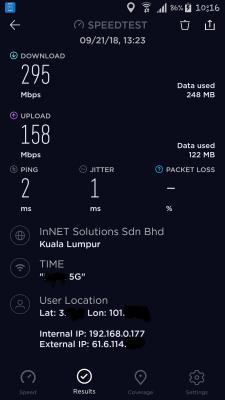
|
|
|
Sep 23 2018, 10:29 AM
|
|
Senior Member
1,418 posts Joined: Jul 2015
|
QUOTE(calvinlaw510 @ Sep 22 2018, 11:09 PM) Note8 also is 2x2 MIMO. i am using C2600 manage to get 500Mbps. Note 8 is the confusing one. My note 8 always max 866mbps so its 2x2, but i swear i saw it connect at 1300mbps just a few times on certain routers (maybe due to 1024qam)...https://youtu.be/rUZS06-x7Yk This post has been edited by miloaisdino: Sep 23 2018, 10:31 AM |
|
|
Sep 23 2018, 10:38 AM
|
|
Senior Member
5,714 posts Joined: Mar 2007
|
QUOTE(GYren @ Sep 23 2018, 09:52 AM) So what can i do now? Request to change another Archer C60 router? claim warranty? or topup $ for a better router? Topup for a better router. Get a new one, gigabit router. I recommend C7 v5 or v4, or see my signature for list of recommended routers, and other general info.Only bought this from Ookas for 3 months tho.... sigh.... I'm hoping if got some settings or tips can solve the issue will be the best... QUOTE(miloaisdino @ Sep 23 2018, 10:29 AM) Note 8 is the confusing one. My note 8 always max 866mbps so its 2x2, but i swear i saw it connect at 1300mbps just a few times on certain routers (maybe due to 1024qam)... Note 8 is confusing.https://youtu.be/rUZS06-x7Yk |
|
|
Sep 23 2018, 05:27 PM
|

Senior Member
1,232 posts Joined: Apr 2015 From: Penang
|
Guys, I have a C1200 v1.0 with TIME connection. Every once in a while (sometimes once a few days, sometimes once a few hours), the router would seem to be unresponsive, WiFi and LAN will show to have no internet connection, and neither the wired PC or WiFi connected phone can access the router interface. It will only recover when the router is powered off and on. I have searched from Google, and some have suggested to disable 5Ghz WiFi, and some have suggested to disable ipv6. I have done both but it seems like these solutions are temporary, the issue will come back after a few days/weeks.
Does anyone of you have this experience before? Any solution? Thank you. This post has been edited by CyanT: Sep 23 2018, 05:27 PM |
|
|
Sep 23 2018, 09:14 PM
Show posts by this member only | IPv6 | Post
#1120
|
|
All Stars
18,503 posts Joined: Oct 2007 From: P.Jaya
|
QUOTE(CyanT @ Sep 23 2018, 05:27 PM) Guys, I have a C1200 v1.0 with TIME connection. Every once in a while (sometimes once a few days, sometimes once a few hours), the router would seem to be unresponsive, WiFi and LAN will show to have no internet connection, and neither the wired PC or WiFi connected phone can access the router interface. It will only recover when the router is powered off and on. I have searched from Google, and some have suggested to disable 5Ghz WiFi, and some have suggested to disable ipv6. I have done both but it seems like these solutions are temporary, the issue will come back after a few days/weeks. Are you have latest TIME firmware C1200v1_eu_time-up-boot-1.0.0 Build 20180502 rel.45702 ?Does anyone of you have this experience before? Any solution? Thank you. |
| Change to: |  0.0289sec 0.0289sec
 0.64 0.64
 6 queries 6 queries
 GZIP Disabled GZIP Disabled
Time is now: 4th December 2025 - 10:23 AM |
 Quote
Quote