Welcome Guest ( Log In | Register )

Outline · [ Standard ] · Linear+

 TP-LINK Malaysia Official Thread, Technical Enquiries and Support

views
     
shahie
post Sep 22 2018, 07:15 PM

On my way
****
Junior Member
506 posts

Joined: Feb 2005
QUOTE(TiMMy_Burch @ Sep 22 2018, 03:23 PM)
I have a question. Searched around got mixed answers:

I just got turbo-ed 500Mbps.

My double storey house is three phase powered. 1 dB box.

now my room upstairs plug is connected to blue wire, whereas my router downstairs is connected to red wire.

So. Will the powerline TL-WPA8630PKIT works?
*
no...must connected via the same phase. to be honest, no matter how fast speed quoted on your powerline networking, you will only get less than 100mbps. trust me. wired cat5e or cat6 connection is always the best. lol
shahie
post Oct 14 2018, 08:03 AM

On my way
****
Junior Member
506 posts

Joined: Feb 2005
hi,

just need the advise on my new RE650, configured as an wired AP from the main router (dir-882, gigabit LAN), once i connected to this RE650 via wifi on my note 8, signal strength and wifi data link is 866mbps (5ghz band), but when i did the unifi speed test to TM server (or singtel), only get 200mbps (unifi package 300mbps). CH width set to 80mhz, and channel set to auto. when i swap to my RE450 and connected to his wifi, i easily get 280 - 310mbps on the speed test on my note 8 (channel width also 80Mhz and channel set to auto). so, my LAN cat5e connection is fine in this case right? just now i update my RE650 firmware to the latest one (RE650(US)_V1_180719), do the speed test and even worst, get 90mbps only. could it be the defect item that the shop gave to me?

This post has been edited by shahie: Oct 14 2018, 08:09 AM
shahie
post Oct 14 2018, 03:28 PM

On my way
****
Junior Member
506 posts

Joined: Feb 2005
QUOTE(magika @ Oct 14 2018, 12:46 PM)
Firmware should be UK version ? Download from Tplink Malaysia  RE650(UK)_V1_171228

Channel width for me set to auto better download speed
*
i saw on my packaging, got RE650(AS) thus compatibles with the new firmware after i check on the global TP link website, btw later i have a try to flash back with the stock firmware either i have a luck or not.

This post has been edited by shahie: Oct 14 2018, 03:29 PM
shahie
post Nov 24 2020, 01:35 PM

On my way
****
Junior Member
506 posts

Joined: Feb 2005
QUOTE(tyja @ Nov 24 2020, 11:14 AM)
currently im on 500mb package, is it suitable to use m9 plus?
*
yes... at least, to me it's a minimum requirement to enjoy that speed on wireless, unless you don't care much about the speed as long as got the internet. lol

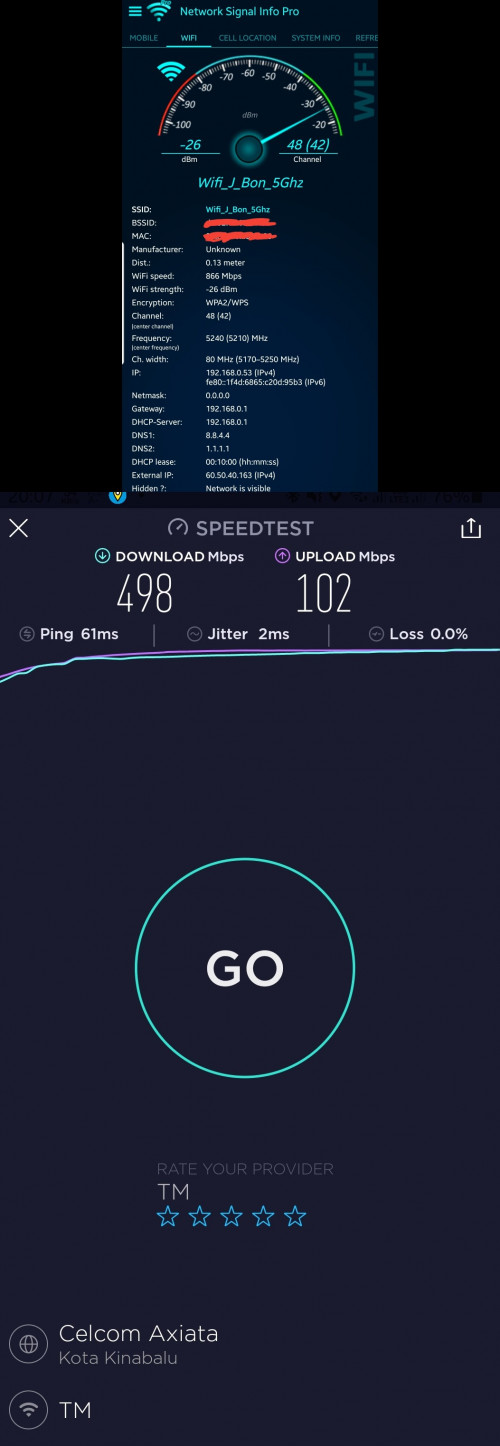
this is mine....M9 plus as an AP using ethernet backhaul from mikrotik rb4011igs+rm router, configure as a STAR connections.

user posted image
shahie
post Nov 24 2020, 03:07 PM

On my way
****
Junior Member
506 posts

Joined: Feb 2005
QUOTE(Vincent6596 @ Nov 24 2020, 01:49 PM)
any sifu here can teach me how can i connect my deco m5 to eable ethernet backhaul feature.

currently i was connected the main node to the router given by time, then i try 2nd node to the router as well but seem like the ethernet backhaul is not function.

is it my connection wrong ??
*
ethernet backhaul consists of 2 method, chain or star?
shahie
post Nov 29 2020, 01:24 PM

On my way
****
Junior Member
506 posts

Joined: Feb 2005
QUOTE(davidman82 @ Nov 29 2020, 01:20 PM)
I just bought TPLINK AX50 to replace my old wifi 5 router(AC1750 by tplink)

After i setup and start using, both my 2 laptops cant find wifi network from AX50, but my desktop with wifi6 adapter and my hp(Huawei P9plus & Note 20) can detect the wifi.

May i know what's the problem?
*
Seem to be your wifi protocol was set only for 802.11ax, that why other device with wifi g/n/ac can't see. just look back on your setup and set it to 802.11n/ac/ax, so that old device can see.

thank you.

This post has been edited by shahie: Nov 29 2020, 01:25 PM
shahie
post Nov 29 2020, 03:30 PM

On my way
****
Junior Member
506 posts

Joined: Feb 2005
QUOTE(davidman82 @ Nov 29 2020, 02:40 PM)
after i set 2.4ghz to  802.11b/g/n and channel to 11. then both my laptop can find 2.4ghz liao.. but still cant find 5ghz
*
Hi

if you unsure, just leave the channel to auto.
shahie
post Nov 30 2020, 02:11 PM

On my way
****
Junior Member
506 posts

Joined: Feb 2005
QUOTE(hafiziza @ Nov 30 2020, 12:39 PM)
When will the Deco X96 be available?
*
deco X90 still not yet in malaysia i think. lol
shahie
post Dec 2 2020, 09:09 AM

On my way
****
Junior Member
506 posts

Joined: Feb 2005
QUOTE(deepan84 @ Dec 2 2020, 08:51 AM)
I have the AX20 also. I plan to purchase a RE305 and connect it via ethernet cable. So it will be functioning as an AP. Does OneMesh work on AP connection?
*
what is your internet connection speed? before i can share my thoughts.

tq
shahie
post Dec 2 2020, 02:21 PM

On my way
****
Junior Member
506 posts

Joined: Feb 2005
QUOTE(deepan84 @ Dec 2 2020, 11:37 AM)
500mbps
*
ok...similar with mine, to be honest with you, to deal with that speed especially on wifi, you need a powerful machine, either from the main router itself to until the wireless AP, unless you don't care much about the speed, as long as you got internet. i have tried :
1. Mikrotik wired RB750gr3 as a main, after TM ONU
2. via LAN from Mikrotik RB750gr3 : 1 length CAT6 to Dir3060 at living room, 1 length to Dir 882 at upstairs room 1, and another Dir882 for master bedroom upstairs, all as an wireless AP, 5ghz band, protocol AC only, same SSID, same password but different channel, for the benefits of the roaming purpose.

observation : 1. since my mikrotik only dual core 880mhz, 256MB RAM, it's run up to 80% (without fasttrack enable) during the full bandwidth running at 500mbps. i have about 10 device connected on my house. 2. slightly delay on the roaming experience maybe due to the absence of the mesh capabilities. 3. overall wifi speed inside my house is within 350 to 450mbps. i'm using wireless networking apps to measure the wifi signal coming to the device.

until...,.i get the free deco mesh m9 plus from the TM, and get the new powerful mikrotik RB4011igs+rm wired router (google for the spec) to replace the whole of my above setup, it's changed the whole wifi experience in my house. with the mesh capabilities, all connected via LAN for the ethernet backhaul, really impress me and my family. as an additions to that, i'm waiting for my 2 unit deco mesh X60 to arrive, to add to the network via LAN later.

my advise, get the good mesh wifi, as an long investment, consider the minimum spec similar to the tplink mesh m9 plus. higher the better. get it connected from your AX20 either via the chain method or star method and not via wifi. good luck.

This post has been edited by shahie: Dec 2 2020, 02:26 PM

shahie
post Dec 2 2020, 04:54 PM

On my way
****
Junior Member
506 posts

Joined: Feb 2005
QUOTE(deepan84 @ Dec 2 2020, 04:03 PM)
so from your comments, i understand that mesh wifi with a powerful (wired) router is needed for seamless experience. i was of the impression that the AX20 + RE305 can be connected via ethernet (my house has concealed LAN) to achieve OneMesh. too bad la. If i were to buy a Deco now, my AX20 would be wasted as i would either have to turn off the wifi capabilities or use Deco as the main router.

I guess i'll just make do with the AX20 unless the deadzone becomes unbearable.
*
if i'm were you, since Ax20 also have a mesh capabilities, just use it as a main, deco unit 1 as an wired AP slightly further away. if you don't have any LAN ready beyond that, just install another deco unit 2 at other area you need and let deco 1 and 2 communicate via wifi backhaul.
shahie
post Dec 3 2020, 11:32 AM

On my way
****
Junior Member
506 posts

Joined: Feb 2005
QUOTE(WHITE APPLE @ Dec 3 2020, 08:29 AM)
Good morning. So what should I set in the decoder?
*
if you intend to access remotely, beyond your LAN networking, you should assign the fix IP so that you can enable the port fowarding and use the dynamic DNS for that.
shahie
post Dec 3 2020, 02:31 PM

On my way
****
Junior Member
506 posts

Joined: Feb 2005
QUOTE(blacktubi @ Dec 3 2020, 11:39 AM)
I would prefer DHCP (Auto IP) on the decoder and configure fixed IP lease on the router.

By doing this, the router won't allocate the same IP to other devices.
*
my correction...DHCP is always auto. after the first ip assignment to the device, we configure or set whatever ip allocated by the dhcp to be static/fix.
shahie
post Dec 4 2020, 10:18 AM

On my way
****
Junior Member
506 posts

Joined: Feb 2005
QUOTE(jchong @ Dec 4 2020, 08:36 AM)
I was just wondering about that. Thanks for clarifying that OneMesh can't do ethernet backhaul  sad.gif

Looks like I will have to get a proper mesh system then...
*
see to be no backhaul on one mesh. read this:

https://community.tp-link.com/us/home/stories/detail/536

This post has been edited by shahie: Dec 4 2020, 10:19 AM
shahie
post Dec 6 2020, 01:58 PM

On my way
****
Junior Member
506 posts

Joined: Feb 2005
QUOTE(Fat Albert @ Dec 6 2020, 01:00 PM)
Anybody where i can buy deco m9 plus adapter. My adapter tenggelam air la.. Banjir.. Full water inside.. Urgent
*
https://shopee.com.my/TL-DECO-M9-POWER-ADAP...0706.7217754886
shahie
post Dec 7 2020, 07:34 AM

On my way
****
Junior Member
506 posts

Joined: Feb 2005
QUOTE(lazybump_nonsense @ Dec 7 2020, 12:15 AM)
hey guys i need help. Just acquired AX50 today, but the speed i got from wireless is so much worst than Maxis original router(C5v).

I can get rougly 400mbps when i am 0m from C5v, but i only can get 200mbps on my Ax50. and on Lan can only get 300mbps while 500mbps on C5v.

May i know is it any problem with my router? Or i have a wrong setting on my router?
*
AX50 actually only with a dual core cpu as compare to AX20 quad core. where in theory can do more. BTW, please confirm that no Qos was set.
shahie
post Dec 7 2020, 09:52 AM

On my way
****
Junior Member
506 posts

Joined: Feb 2005
QUOTE(lazybump_nonsense @ Dec 7 2020, 08:50 AM)
Hello sir. This is my QOS.

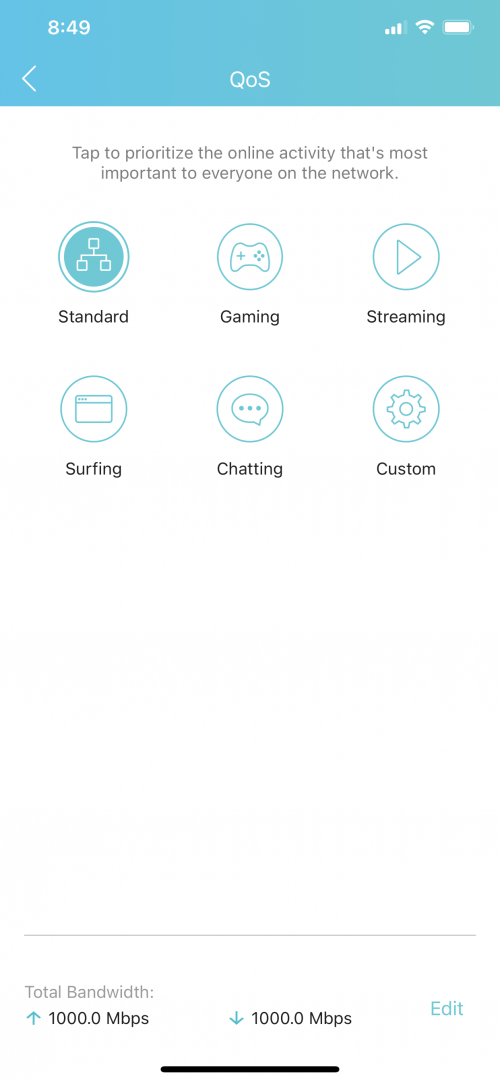
user posted image
*
Ok, i do believe you are using same LAN cable on the ONU to the default router and to PC = 500mbps while after swapping to AX50 = suddenly only get 300mbps. base on the Qos snapshot, seem to be the default router with his telco firmware works better. i think both router with the same powerplant, only AX50 is a wifi 6. wait some expert to guide you further.

This post has been edited by shahie: Dec 7 2020, 09:54 AM
shahie
post Dec 7 2020, 10:33 AM

On my way
****
Junior Member
506 posts

Joined: Feb 2005
QUOTE(lazybump_nonsense @ Dec 7 2020, 09:58 AM)
meaning i waste money getting the same thing?  sad.gif  sad.gif

i find out the problem is with wifi mode. i switched off the AX signal then i can reach close to 500mbps. but if i using AX i can only can 180~200 mbps
*
to be honest with you, i spend a lot $$ on the equipment, trying and error people said, just to deal with that 500mbps especially on wifi. finally the best setup and guarantee speed on wifi (at the most area on my 2 storey house including in the toilet, not lower than 330mbps) = Main wired router Mikrotik RB4011igs+rm, 2 unit Deco mesh X60, 2 unit Deco Mesh M9 plus (free from TM) and all of them connected via CAT5e/CAT6 cable dedicated direct from the main Mikrotik RB4011igs+rm router.

This post has been edited by shahie: Dec 7 2020, 10:35 AM
shahie
post Dec 7 2020, 02:08 PM

On my way
****
Junior Member
506 posts

Joined: Feb 2005
QUOTE(tyja @ Dec 7 2020, 12:27 PM)
Ur deco is on ap mode? Have u try backhaul between deco? I got low speed when backhaul between x60 n m9. Im on router mode.
*
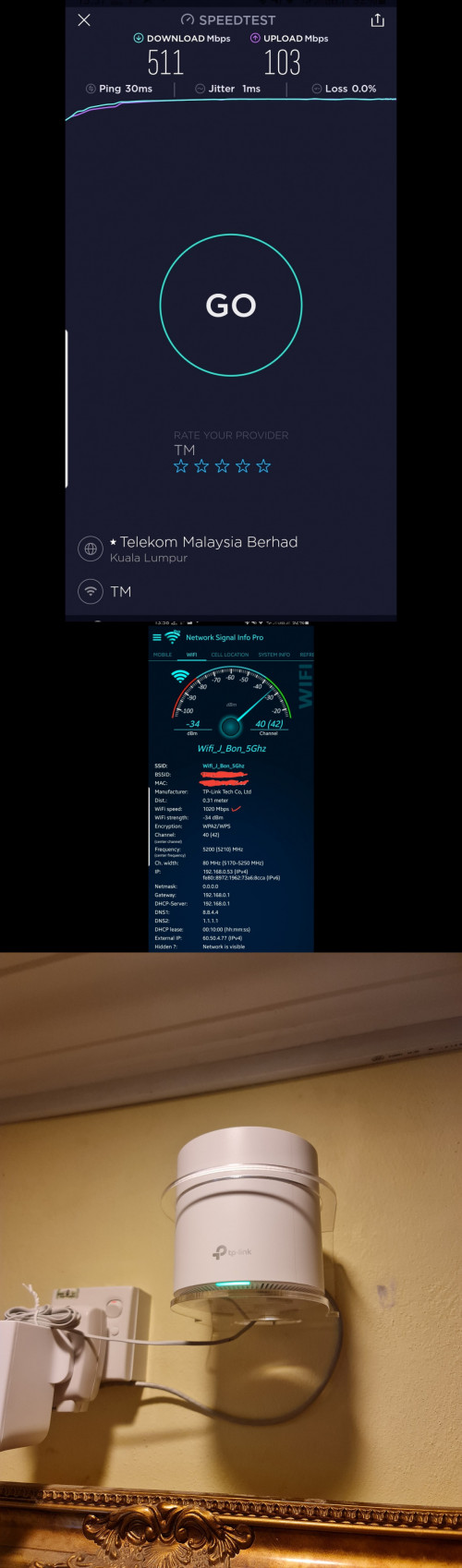
yes..... all my deco is on AP mode with Star network method, i.e. all via CAT5e and CAT6 individually direct from mikrotik router. one of them, X60 mounted at 7 feet high at my living room.

below a speed taken just now. seated about 15ft from the router.

user posted image
shahie
post Dec 7 2020, 07:15 PM

On my way
****
Junior Member
506 posts

Joined: Feb 2005
QUOTE(lazybump_nonsense @ Dec 7 2020, 06:08 PM)
by the way I got 1 question. AX50 keep showing weak security on my iPhone, anyone know how to fix it?
*
you need to configure your wifi security to WPA3. if not available, at least WPA2 + AES.

2 Pages  1 2 >Top
 

Change to:
| Lo-Fi Version
0.1238sec    0.41    7 queries    GZIP Disabled
Time is now: 7th December 2025 - 01:08 AM