

Guys, which apps allow us to watch Astro on evpad? I did factory reset and now all apps gone.
Android / Other TV Box, see Page 1 first... V2
Android / Other TV Box, see Page 1 first... V2
|
|
 Apr 15 2019, 08:23 PM Apr 15 2019, 08:23 PM
|
 
Senior Member
1,281 posts Joined: Oct 2010  
|
Guys, which apps allow us to watch Astro on evpad? I did factory reset and now all apps gone.
|
|
|
|
|
|
Apr 16 2019, 01:00 AM
|
 
Staff
72,803 posts Joined: Sep 2005 From: KUL 
|
QUOTE(yankiat @ Apr 15 2019, 08:23 PM) Guys, which apps allow us to watch Astro on evpad? I did factory reset and now all apps gone. No piracy talk here, the only legit way is to use Astro Go app but only if your box allows to install it. |
|
|
Apr 16 2019, 01:06 AM
|

Junior Member
369 posts Joined: Nov 2010
|
Hello Brothers, good day..
i am new to this android box stuff, i did analysis i kinda pening seeing lots of adroid box from rm100 to rm1000... some with 64gb, 4g ram, and extra.. Some saying need to use VPN, when does it required ? My main concern, streaming 4K HDR UHD DOLBY supported android box since i have 4K HDR Dolby audio supported TV. Im bored with ASTRO monthly paying high for nothing, and planning to have android box. My TV already preloaded with some movie apps, such as NETFLIX, IFLIX, GOOGLEPLAYMOVIES, and extra. But too bad, TV not allowing me to download other movie apps even from the preloaded web browser. Probably restricted to download any apps directly to TV. I see most of the apps in tv needed registration ? Do i need the android box still ? This post has been edited by GHOSTVIC: Apr 16 2019, 01:07 AM |
|
|
Apr 16 2019, 08:56 AM
|

Junior Member
306 posts Joined: Jan 2019
|
QUOTE(GHOSTVIC @ Apr 16 2019, 01:06 AM) Hello Brothers, good day.. Actually you can install other Android apps.i am new to this android box stuff, i did analysis i kinda pening seeing lots of adroid box from rm100 to rm1000... some with 64gb, 4g ram, and extra.. Some saying need to use VPN, when does it required ? My main concern, streaming 4K HDR UHD DOLBY supported android box since i have 4K HDR Dolby audio supported TV. Im bored with ASTRO monthly paying high for nothing, and planning to have android box. My TV already preloaded with some movie apps, such as NETFLIX, IFLIX, GOOGLEPLAYMOVIES, and extra. But too bad, TV not allowing me to download other movie apps even from the preloaded web browser. Probably restricted to download any apps directly to TV. I see most of the apps in tv needed registration ? Do i need the android box still ? 1) First you go to Google playstore to download and install a SideLoader. 2) Then you change the settings on your TV to allow unknown source. 3) Download your apk files from sites like apkpure.com into a thumbdrive. 4) Install a file explorer like ES Explorer or some other file managers from Android TV Appstore. 5) Run ES EXplorer. Stick your thumbdrive into the TV. It should appear, now you can install the apk and the apps will be available from your Sideloader app. Above thks to bro AVFAN.  ==Update=== I forgot what TV you have...is it Android TV? The above only applicable for Android TV.....my mistake here. This post has been edited by skyforcerld: Apr 16 2019, 09:04 AM |
|
|
Apr 16 2019, 11:15 AM
Show posts by this member only | IPv6 | Post
#5385
|

Senior Member
826 posts Joined: Oct 2004
|
QUOTE(skyforcerld @ Apr 16 2019, 08:56 AM) Actually you can install other Android apps. Yeah it could be Smart TV and can only use what is being preinstalled1) First you go to Google playstore to download and install a SideLoader. 2) Then you change the settings on your TV to allow unknown source. 3) Download your apk files from sites like apkpure.com into a thumbdrive. 4) Install a file explorer like ES Explorer or some other file managers from Android TV Appstore. 5) Run ES EXplorer. Stick your thumbdrive into the TV. It should appear, now you can install the apk and the apps will be available from your Sideloader app. Above thks to bro AVFAN. ==Update=== I forgot what TV you have...is it Android TV? The above only applicable for Android TV.....my mistake here. |
|
|
Apr 16 2019, 02:09 PM
Show posts by this member only | IPv6 | Post
#5386
|

Senior Member
7,118 posts Joined: Oct 2011 From: Wakanda
|
QUOTE(GHOSTVIC @ Apr 16 2019, 01:06 AM) Hello Brothers, good day.. Yes you do need an external player.. As per your requirements? When you say Dolby.. We talking ATMOS level or....? As for Astro replacement.. Again, we can't discuss such.. It's officially illegal. So Google and proceed at own risk. Nevertheless, there are plenty sources and means to get em. So won't be hard to find.i am new to this android box stuff, i did analysis i kinda pening seeing lots of adroid box from rm100 to rm1000... some with 64gb, 4g ram, and extra.. Some saying need to use VPN, when does it required ? My main concern, streaming 4K HDR UHD DOLBY supported android box since i have 4K HDR Dolby audio supported TV. Im bored with ASTRO monthly paying high for nothing, and planning to have android box. My TV already preloaded with some movie apps, such as NETFLIX, IFLIX, GOOGLEPLAYMOVIES, and extra. But too bad, TV not allowing me to download other movie apps even from the preloaded web browser. Probably restricted to download any apps directly to TV. I see most of the apps in tv needed registration ? Do i need the android box still ? VPN is required for what a VPN does.. Accessing what isn't originally accessible. Whether it works or you need it or how long? Depends entirely on the content you watch or plan to. This post has been edited by voncrane: Apr 16 2019, 02:10 PM |
|
|
|
|
|
Apr 16 2019, 05:31 PM
|
|
All Stars
24,335 posts Joined: Feb 2011
|
|
|
|
Apr 16 2019, 07:41 PM
|
|
Junior Member
99 posts Joined: Jul 2015
|
QUOTE(Ramjade @ Apr 16 2019, 05:31 PM) [URL=Roku Ultra | HD/4K/HDR Streaming Media Player. Now includes Premium JBL Headphones. (2018) https://www.amazon.com/dp/B07HDHXZH4/ref=cm...i_92BTCbYKGCWQZ]Roku Ultra [/URL] |
|
|
Apr 16 2019, 08:33 PM
|
|
Junior Member
369 posts Joined: Nov 2010
|
QUOTE(skyforcerld @ Apr 16 2019, 08:56 AM) Actually you can install other Android apps. Hi bro i have looking that option to enable unknown source in tv.. like how we do in mobile.1) First you go to Google playstore to download and install a SideLoader. 2) Then you change the settings on your TV to allow unknown source. 3) Download your apk files from sites like apkpure.com into a thumbdrive. 4) Install a file explorer like ES Explorer or some other file managers from Android TV Appstore. 5) Run ES EXplorer. Stick your thumbdrive into the TV. It should appear, now you can install the apk and the apps will be available from your Sideloader app. Above thks to bro AVFAN. ==Update=== I forgot what TV you have...is it Android TV? The above only applicable for Android TV.....my mistake here. But i do not see tht setting anywhere for NU8000 samsung smart tv. |
|
|
Apr 16 2019, 08:57 PM
|
|
Junior Member
369 posts Joined: Nov 2010
|
QUOTE(voncrane @ Apr 16 2019, 02:09 PM) Yes you do need an external player.. As per your requirements? When you say Dolby.. We talking ATMOS level or....? As for Astro replacement.. Again, we can't discuss such.. It's officially illegal. So Google and proceed at own risk. Nevertheless, there are plenty sources and means to get em. So won't be hard to find. I see those preinstalled apps in smart tv offering movies all need to subscribe monthly or yearly to watch movies.. some tv series seems free. If get android box would be having same restrictions right unless get apps that offering free movies.VPN is required for what a VPN does.. Accessing what isn't originally accessible. Whether it works or you need it or how long? Depends entirely on the content you watch or plan to. Already have netflix in tv, premium UHD contain monthly rm51 ringgit.. but any restrictions or can stream smoothly for 100mbps unifi connection ? Or telco blocking any contains even pay for netflix ? |
|
|
Apr 16 2019, 08:59 PM
Show posts by this member only | IPv6 | Post
#5391
|

All Stars
33,613 posts Joined: May 2008
|
QUOTE(GHOSTVIC @ Apr 16 2019, 08:33 PM) Hi bro i have looking that option to enable unknown source in tv.. like how we do in mobile. Should be in setting -> security.But i do not see tht setting anywhere for NU8000 samsung smart tv. |
|
|
Apr 16 2019, 09:16 PM
|
|
Junior Member
369 posts Joined: Nov 2010
|
QUOTE(voncrane @ Apr 16 2019, 02:09 PM) Yes you do need an external player.. As per your requirements? When you say Dolby.. We talking ATMOS level or....? As for Astro replacement.. Again, we can't discuss such.. It's officially illegal. So Google and proceed at own risk. Nevertheless, there are plenty sources and means to get em. So won't be hard to find. I see those preinstalled apps in smart tv offering movies all need to subscribe monthly or yearly to watch movies.. some tv series seems free. If get android box would be having same restrictions right unless get apps that offering free movies.VPN is required for what a VPN does.. Accessing what isn't originally accessible. Whether it works or you need it or how long? Depends entirely on the content you watch or plan to. Already have netflix in tv, premium UHD contain monthly rm51 ringgit.. but any restrictions or can stream smoothly for 100mbps unifi connection ? Or telco blocking any contains even pay for netflix ? |
|
|
Apr 16 2019, 09:38 PM
|
|
Junior Member
306 posts Joined: Jan 2019
|
QUOTE(GHOSTVIC @ Apr 16 2019, 08:33 PM) Hi bro i have looking that option to enable unknown source in tv.. like how we do in mobile. This is not an Android TV, it is using its own propriatery Samsung OS, hence you cant install Android apps.But i do not see tht setting anywhere for NU8000 samsung smart tv. |
|
|
|
|
|
Apr 16 2019, 09:40 PM
|
|
Junior Member
306 posts Joined: Jan 2019
|
QUOTE(GHOSTVIC @ Apr 16 2019, 09:16 PM) I see those preinstalled apps in smart tv offering movies all need to subscribe monthly or yearly to watch movies.. some tv series seems free. If get android box would be having same restrictions right unless get apps that offering free movies. 100Mbps is more than enough. Netflix 4K is only about 25Mbps max. Telco won't block Netflix.Already have netflix in tv, premium UHD contain monthly rm51 ringgit.. but any restrictions or can stream smoothly for 100mbps unifi connection ? Or telco blocking any contains even pay for netflix ? |
|
|
Apr 17 2019, 02:10 AM
Show posts by this member only | IPv6 | Post
#5395
|
|
Senior Member
7,118 posts Joined: Oct 2011 From: Wakanda
|
QUOTE(GHOSTVIC @ Apr 16 2019, 08:33 PM) Hi bro i have looking that option to enable unknown source in tv.. like how we do in mobile. You won't find it.. Samsung TVs ship with their proprietary tv OS.. Tizen.. Frankly, I prefer it to many of the half-baked or problematic Android TV OS powered TVs out there. End up, those owners still need to get an external player.But i do not see tht setting anywhere for NU8000 samsung smart tv. QUOTE(GHOSTVIC @ Apr 16 2019, 08:57 PM) I see those preinstalled apps in smart tv offering movies all need to subscribe monthly or yearly to watch movies.. some tv series seems free. If get android box would be having same restrictions right unless get apps that offering free movies. Firstly.. There's no such thing as an Android TV box.. There are box shaped devices that run Android mobile OS and can be used to watch media content. It's basically a phone/tablet connected via HDMI to the TV.. Understand this first. The rest is self explanatory..Already have netflix in tv, premium UHD contain monthly rm51 ringgit.. but any restrictions or can stream smoothly for 100mbps unifi connection ? Or telco blocking any contains even pay for netflix ? Free or premium... Is really up to the amount of effort you are willing to put in. Can get for free? Yes.. Don't want to or can't out in the work (continously) to source and maintain the free stuff? Better to go the paid route and let someone else handle for you. Like you already have a Netflix account and they manage the library...vs you go hunting for free sources. For now, there are no such restrictions in place to throttle Netflix. 100Mbps is sufficient to stream Netflix's UHD HDR content. Provided there aren't any other unrestrained heavy users connected to the same network. QUOTE(puchongite @ Apr 16 2019, 08:59 PM) Should be in setting -> security. Nah fam.. It won't be cuz it's not an Android TV OS.QUOTE(skyforcerld @ Apr 16 2019, 09:38 PM) This is not an Android TV, it is using its own propriatery Samsung OS, hence you cant install Android apps. Correct and incorrect.. Officially? There's no straightforward way to install and natively run Android apps on Tizen.. However, through the use of ACL, etc.. Some success can be had. Personally, I haven't bothered with such as I've got a decent external player. Besides, the average TV's hardware will be weaker for certain file playback. Mine for sure is weaker.. Can't even read h.265 files.QUOTE(skyforcerld @ Apr 16 2019, 09:40 PM) 100Mbps is more than enough. Netflix 4K is only about 25Mbps max. Telco won't block Netflix. Nope.. 25Mbps is the minimum dedicated speed requirement to stream Netflix's UHD content. One will require more speed in order to achieve smoother and nonstop UHD res playback, especially with other simultaneous internet users and or devices.This post has been edited by voncrane: Apr 17 2019, 02:12 AM |
|
|
Apr 17 2019, 02:56 AM
|
|
Junior Member
369 posts Joined: Nov 2010
|
QUOTE(voncrane @ Apr 17 2019, 02:10 AM) You won't find it.. Samsung TVs ship with their proprietary tv OS.. Tizen.. Frankly, I prefer it to many of the half-baked or problematic Android TV OS powered TVs out there. End up, those owners still need to get an external player. Great brother thanks for the information, really informative and appreciate it. Ya when i stream tv youtube 4k videos via celcom mobile hotspot, buffering like hell. Speed test, connection shows up to 50mbps, yet buffering probably wireless signal fluctuation. Wired is reliable i believe.Firstly.. There's no such thing as an Android TV box.. There are box shaped devices that run Android mobile OS and can be used to watch media content. It's basically a phone/tablet connected via HDMI to the TV.. Understand this first. The rest is self explanatory.. Free or premium... Is really up to the amount of effort you are willing to put in. Can get for free? Yes.. Don't want to or can't out in the work (continously) to source and maintain the free stuff? Better to go the paid route and let someone else handle for you. Like you already have a Netflix account and they manage the library...vs you go hunting for free sources. For now, there are no such restrictions in place to throttle Netflix. 100Mbps is sufficient to stream Netflix's UHD HDR content. Provided there aren't any other unrestrained heavy users connected to the same network. Nah fam.. It won't be cuz it's not an Android TV OS. Correct and incorrect.. Officially? There's no straightforward way to install and natively run Android apps on Tizen.. However, through the use of ACL, etc.. Some success can be had. Personally, I haven't bothered with such as I've got a decent external player. Besides, the average TV's hardware will be weaker for certain file playback. Mine for sure is weaker.. Can't even read h.265 files. Nope.. 25Mbps is the minimum dedicated speed requirement to stream Netflix's UHD content. One will require more speed in order to achieve smoother and nonstop UHD res playback, especially with other simultaneous internet users and or devices. Between any suggestion on android box brother, nvidea shield kind a expensive with least space and ram. Another brother recommended FIRE TV. |
|
|
Apr 17 2019, 09:37 AM
Show posts by this member only | IPv6 | Post
#5397
|
|
Senior Member
7,118 posts Joined: Oct 2011 From: Wakanda
|
QUOTE(GHOSTVIC @ Apr 17 2019, 02:56 AM) Great brother thanks for the information, really informative and appreciate it. Ya when i stream tv youtube 4k videos via celcom mobile hotspot, buffering like hell. Speed test, connection shows up to 50mbps, yet buffering probably wireless signal fluctuation. Wired is reliable i believe. Yup.. Wired all the way is definitely the most reliable. Also, TM's network is more stable than a shared mobile network connection. Though that is dependent on location as some places, 4G signals are strong and offer better speeds than TM's offerings.. Streamyx areas.. But that doesn't apply to you. If Celcom buffers content from solid Google servers, then others will be even more poor.Between any suggestion on android box brother, nvidea shield kind a expensive with least space and ram. Another brother recommended FIRE TV. Do not get Amazon's Firetv as you already have a smart tv for the essentials..Native 4K Netflix and YouTube. Yup, the Nvidia Shield is expensive. But if you have the proper AV equipment to match it? It's actually the best option. You can either spring for the larger 500GB version or you take the 16GB version... But pair it with a larger external drive (typical usb) and activate it's "adoptable storage" feature. For decent cheaper options, yet capable of handling high bitrate 4K HDR10, etc files and up to DTS:X sound format? That'd be the Minix Neo U9-H and the HiMedia Q10 Pro. I've done some form of comparison in a recent post. So look that up. It's easier if you just isolate my posts and you read backwards.. Or search.. Only thing I'd add unto that is.. *To get say ATMOS passthrough on the Q10 Pro? You either have to play the file using KODI + a customer "Wrapper" provided by HiMedia or using the native Media Center/Player. This box, though "old" is still very versatile where HD Audio is concerned. *For the Neo U9-H, Minix is a diamond backer and strong Kodi supporter and so they came up with a custom Minix only Kodi app.. This ships natively with all Minix boxes. Using it, you can get Kodi to easily passthrough audio up to DTS:X during playback. Also known to have rock solid firmwares and most app compatibility.. Of course, with both... Ideally you need to have compatible AVRs too.. Which is a must have for anyone who's serious about enjoying ATMOS and DTS:X formats. Soundbars or TV speakers simply don't cut it..  |
|
|
Apr 17 2019, 12:32 PM
|
|
Junior Member
369 posts Joined: Nov 2010
|
QUOTE(voncrane @ Apr 17 2019, 09:37 AM) Yup.. Wired all the way is definitely the most reliable. Also, TM's network is more stable than a shared mobile network connection. Though that is dependent on location as some places, 4G signals are strong and offer better speeds than TM's offerings.. Streamyx areas.. But that doesn't apply to you. If Celcom buffers content from solid Google servers, then others will be even more poor. Fooohhh sudah pening for a moment... totally blank hahah..Do not get Amazon's Firetv as you already have a smart tv for the essentials..Native 4K Netflix and YouTube. Yup, the Nvidia Shield is expensive. But if you have the proper AV equipment to match it? It's actually the best option. You can either spring for the larger 500GB version or you take the 16GB version... But pair it with a larger external drive (typical usb) and activate it's "adoptable storage" feature. For decent cheaper options, yet capable of handling high bitrate 4K HDR10, etc files and up to DTS:X sound format? That'd be the Minix Neo U9-H and the HiMedia Q10 Pro. I've done some form of comparison in a recent post. So look that up. It's easier if you just isolate my posts and you read backwards.. Or search.. Only thing I'd add unto that is.. *To get say ATMOS passthrough on the Q10 Pro? You either have to play the file using KODI + a customer "Wrapper" provided by HiMedia or using the native Media Center/Player. This box, though "old" is still very versatile where HD Audio is concerned. *For the Neo U9-H, Minix is a diamond backer and strong Kodi supporter and so they came up with a custom Minix only Kodi app.. This ships natively with all Minix boxes. Using it, you can get Kodi to easily passthrough audio up to DTS:X during playback. Also known to have rock solid firmwares and most app compatibility.. Of course, with both... Ideally you need to have compatible AVRs too.. Which is a must have for anyone who's serious about enjoying ATMOS and DTS:X formats. Soundbars or TV speakers simply don't cut it.. Digesting the information you given here brother.. |
|
|
Apr 17 2019, 08:20 PM
Show posts by this member only | IPv6 | Post
#5399
|
|
Senior Member
7,118 posts Joined: Oct 2011 From: Wakanda
|
QUOTE(GHOSTVIC @ Apr 17 2019, 12:32 PM) Fooohhh sudah pening for a moment... totally blank hahah.. Haha.. My bad bro.. There's just so much variables and I tried to summarize it all without leaving core info out.. That's why kudos to TS who tried to summarize and explain at the same time.. Just relax, take a breather and dive in.. It'll all make sense.. if it doesn't? Just get either of the recommendations and you should be fine.Digesting the information you given here brother.. |
|
|
Apr 17 2019, 11:27 PM
Show posts by this member only | IPv6 | Post
#5400
|
|
Junior Member
369 posts Joined: Nov 2010
|
QUOTE(voncrane @ Apr 17 2019, 08:20 PM) Haha.. My bad bro.. There's just so much variables and I tried to summarize it all without leaving core info out.. That's why kudos to TS who tried to summarize and explain at the same time.. Just relax, take a breather and dive in.. It'll all make sense.. if it doesn't? Just get either of the recommendations and you should be fine. Bro.. just had my 100mbps unifi and subscribed for netflix which is free for 1st month..But i see not so outstanding collection.. even i tried to search some old movies not able to find.. example LOTR,HOBBITS cannot be found I thought it works better than free apps i used to watch movies where hell of collection old movies example popcorn.. But NETFLIX... is it different country has different collection and restrictions ? I thought NETFLIX TV APP has issues, so downloaded app in my mobile and did searching yet same those movies cannot be found. Another thing i tried to play UHD 4K movies but in my smart tv not full resolution, the screen not stretched even setting is 16:9 Most of the UHD 4K OR HDR movies not full stretched.. I even called NETFLIX support service, they claimed it depends on title and not all movies will.play full screen is that true ? Checked the profile setting in mobile app anything related to the quality, since in TV NETFLIX no much settings. Just basic. So in mobile app, checked the profile and changed from auto to high quality but no difference. Below are the example on HDR & ULTRA HD 4K, title saying so but i have no idea whether the movie playing HDR/UHD4K. Puzzle  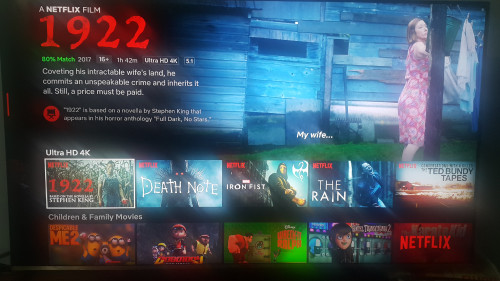  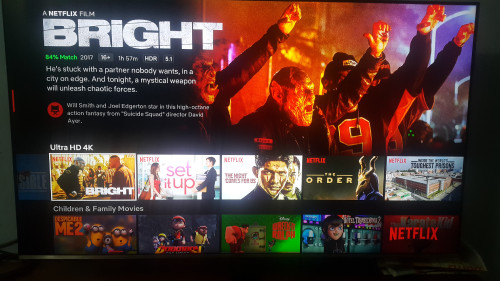 This post has been edited by GHOSTVIC: Apr 18 2019, 01:52 AM |
| Change to: |  0.0214sec 0.0214sec
 0.41 0.41
 6 queries 6 queries
 GZIP Disabled GZIP Disabled
Time is now: 3rd December 2025 - 11:25 PM |
 Quote
Quote