hi guys.. i am very new to tv box... so i am looking for a basic entry level box. so far i have targeted 2 box which is X96 and MXQ Pro+.(both around rm190) both also have 2Gb/16Rom.. preinstalled kodi, google store etc etc.... found both them in lelong.com.my.
are the 2 mention above good choice .? are there better ones with around same budget ? please advise...tq in advance..
As I mentioned in the post earlier, these boxes do not have an external antenna. Never use X96 but I think they are similar OEM products as MXQ pro.
Do you need to connect to a far away router ? If yes, then you might need to rethink about these boxes.
This post has been edited by puchongite: Sep 8 2017, 10:19 AM
sorry because i don't use all that. I only use for normal Kodi streaming. Bought it due to it's RAM, and storage size and speed. I use BT headphones most of the time. Good enough for me.
H96Pro+ also a box without external wifi antenna. Any issue with the wifi connection ?
there are various types of antenna design...some are better than others...you need to know what to look for...if it is really missing then you have a serious problem...
some antenna are more directional...you can install a wifi signal app...rotate the box up/down/left/right/etc...see which position is better...
example my vensmile u1 uses an internal antenna but reception is better than my himedia Q16 with external antenna...
Yeah I know it is a problem, as I compare side by side my android handphone is able to connect to the far away router whereas this box MxQ pro+ is intermittently dropping its connection. And when I open it up, I don't see any cable at all, everything is just circuit board and components.
But after I made my phone as wifi repeater/extender, it is able to use by phone to connect to internet, and the connection is stable. That's because my phone and the MxQ is only 5 feet away.
The gold / copper pattern bottom center is antenna... dunno for bt or wifi... if your box got bt... then there should be another...looks something like it...
Yeah this box has a bluetooth which the previous does not have.
Tested the bluetooth speaker working with the box.
Some pcb got 2-4 layers... see if backside got antenna or not...
If not you can try find the wifi chip and trace the antenna pin...see where it goes...
Better give up on it, as even if all these available, I would need to solder some cable on to it. That's way beyond something I would be willing to do. As is, I think it could sustain a stable wifi if the router is kind of within 5-10m.
There is an android toast notification with text "WIFI" or something appearing on the screen whenever wifi drops and reconnects, one can check the stability of wifi by looking at the frequency of this message popping out.
I got problem with my android box m8s mini s905. Any recommended place to send for repair in klang valley. Thankyou.
What problem is that ? You think it is software problem or hardware problem ? Software problem worst come to worst, reflash back to the factory firmware .....
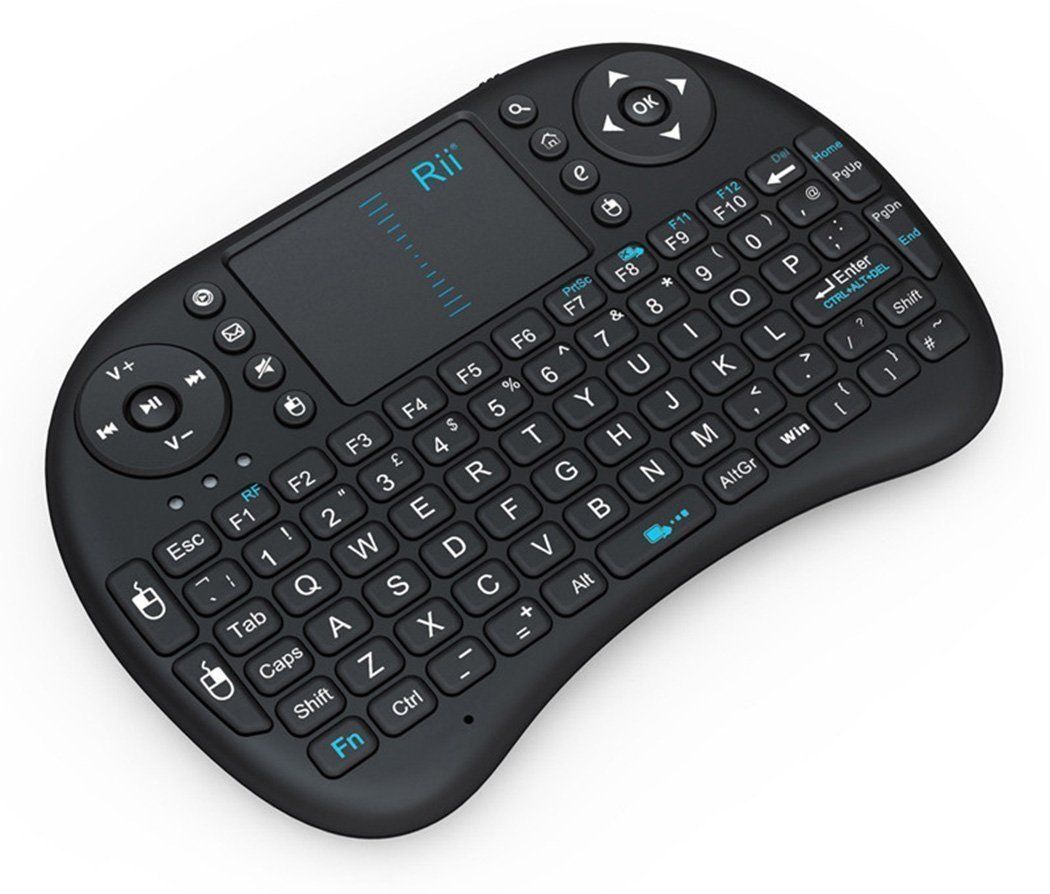
The proposed keyboard layout files are no more downloadable, I guess I will have to recreate one and name it according to my vendor id and product id for it to work properly.
I have created this one for my keyboard vendor 093a product id 1688, haven't tested
Basically this is what's inside the file :-
key 126 MENU key 68 POWER WAKE key 28 ENTER
This HOPEFULLY will make menu key working by pressing the 'Win' button on the bottom right, and pressing F10 will power off ( suspend ) the tvbox and hitting 'Enter' will really enter ( right now hitting enter shows a 'q' on the input ).
Initially I wanted to use the 'e' button on the right side of the touchpad to be the MENU key, but it seems it transmit the same code as the 'Home' button. I think it is a manufacturer fault to make both 'e' and 'home' transmit the same keycode.
This post has been edited by puchongite: Sep 14 2017, 07:21 AM
This HOPEFULLY will make menu key working by pressing the 'Win' button on the bottom right, and pressing F10 will power off ( suspend ) the tvbox and hitting 'Enter' will really enter ( right now hitting enter shows a 'q' on the input ).
Initially I wanted to use the 'e' button on the right side of the touchpad to be the MENU key, but it seems it transmit the same code as the 'Home' button. I think it is a manufacturer fault to make both 'e' and 'home' transmit the same keycode.
After some testing I found that the android TV box which I have, it does not take the vendor_xxxxx_product_yyyy.kl file. I have to modify the Generic.kl directly, meaning it is a global behaviour affecting all inputs.
Nevertheless after changing Generic.kl I got MENU working on the 'WIN' key. The keycode for Win key is 126 as shown earlier. Also changed POWER and key 28 accordingly.
got my MXQ pro+ yesterday, not bad for box that price... totally satisfied with the product and performance... only lagging is my internet speed... currently on streamyx 8mbps...
Haven't found any other problem with the box except the poor wifi.
QUOTE(sonypshomer @ Sep 14 2017, 01:07 PM)
What android version preinstalled? Marshmallow or oreo or still kitkat?
Marshmallow for my box. It's seller dependent. Some sellers still mention it as kitkat even though the actual box is already marshmallow.


 Sep 8 2017, 09:33 AM


 Quote
Quote




 0.0265sec
 0.86
0.86
 7 queries
 GZIP Disabled