Welcome Guest ( Log In | Register )

Bump Topic Topic Closed RSS Feed
137 Pages « < 57 58 59 60 61 > » Bottom

Outline · [ Standard ] · Linear+

Unifi Official TM UniFi High Speed Broadband Thread V27, We Want Cheaper Price!

views
     
daus89
post Nov 4 2016, 03:06 PM

Casual
***
Junior Member
454 posts

Joined: Aug 2009


QUOTE(jhleo1 @ Nov 4 2016, 11:27 AM)
Any call from TM yet? Or how long TM will call up for further information since the TM online registration process doesn't take up much info of us.
*
i filled up on wednesday,but till now no follow up call from tm yet
they said they will contact us within 3 days, i guess next monday they will call me

jhleo1
post Nov 4 2016, 04:54 PM

Look at all my stars!!
*******
Senior Member
4,381 posts

Joined: Jan 2003
Thanks.

QUOTE(daus89 @ Nov 4 2016, 03:06 PM)
i filled up on wednesday,but till now no follow up call from tm yet
they said they will contact us within 3 days, i guess next monday they will call me
*
ka_one2000
post Nov 4 2016, 05:01 PM

Getting Started
**
Junior Member
218 posts

Joined: Nov 2007
hi, kindly advise me on the Hypptv, Is Channel 555 (Boomerang) and Channel 620 (BBC Lifestyle) HD? cause on my Hypptv the channel is not HD. Thanks again
icecreamcake
post Nov 4 2016, 05:18 PM

Casual
***
Junior Member
307 posts

Joined: Aug 2012
Hi guys, I just changed from streamyx 4mbps to unifi 30mbps yesterday.

Is it the phone line provided by unifi is free to call to landline like streamyx or pay per use?
jhleo1
post Nov 4 2016, 05:28 PM

Look at all my stars!!
*******
Senior Member
4,381 posts

Joined: Jan 2003
Best is to call TM to find out your package. May not free.

QUOTE(icecreamcake @ Nov 4 2016, 05:18 PM)
Hi guys, I just changed from streamyx 4mbps to unifi 30mbps yesterday.

Is it the phone line provided by unifi is free to call to landline like streamyx or pay per use?
*
VeeJay
post Nov 4 2016, 05:29 PM

Look at all my stars!!
*******
Senior Member
3,845 posts

Joined: Aug 2005


QUOTE(icecreamcake @ Nov 4 2016, 05:18 PM)
Hi guys, I just changed from streamyx 4mbps to unifi 30mbps yesterday.

Is it the phone line provided by unifi is free to call to landline like streamyx or pay per use?
*
It depends on the package that you had signed. some has free call some dont. If you had gone thru the standard upgrade rm199 then the call is free for the first 600min. If I'm not mistaken the new package with RM20 has 1000minutes free call
oscar16
post Nov 4 2016, 05:52 PM

Getting Started
**
Junior Member
73 posts

Joined: Mar 2014
QUOTE(brainocide @ Nov 4 2016, 05:01 AM)
C/P: IPv6 is the Internet's next-generation protocol, designed to replace the current Internet Protocol, IP Version 4. In order to communicate over the Internet, computers and other devices must have sender and receiver addresses. These numeric addresses are known as Internet Protocol addresses. The main advantage of IPv6 over IPv4 is its larger address space. The length of an IPv6 address is 128 bits, compared with 32 bits in IPv4. The address space therefore has 2128 or approximately 3.4×1038 addresses.

Yeap, 28mbps after installation. Enable disable ipv6 also same. IMO, I suggest u to make speedtest using TM Speedtest. TM Speedtest also using oklaa speedtest application and it host on their site. So for me its more accurate compare using standard oklaa speedtest that we normaly choose server location. Before, tm speedtest really bad but now ok.
*
I've enabled iPv6 for my C5 but when I test the iPv6, it shows No IPv6 address detected.

This post has been edited by oscar16: Nov 4 2016, 06:18 PM
icecreamcake
post Nov 4 2016, 05:54 PM

Casual
***
Junior Member
307 posts

Joined: Aug 2012
QUOTE(jhleo1 @ Nov 4 2016, 05:28 PM)
Best is to call TM to find out your package. May not free.
*
QUOTE(VeeJay @ Nov 4 2016, 05:29 PM)
It depends on the package that you had  signed. some has free call some dont. If you had gone thru the standard upgrade rm199 then the call is free for the first 600min. If I'm not mistaken the new package with RM20 has 1000minutes free call
*
Thanks for the prompt response.

BTW the wifi signal coverage of tp-link C5 provided by tm not so powerful enough.

Need to change back to asus high power router to cover all area. rclxub.gif
aa123aa
post Nov 4 2016, 06:53 PM

Getting Started
**
Junior Member
180 posts

Joined: Mar 2015
Going to get unifi install next week at my house. May i know what are the things that i should take note of during or after the installation? any advise? thanks.

This post has been edited by aa123aa: Nov 4 2016, 06:53 PM
TSsHawTY
post Nov 4 2016, 08:47 PM

Frequent Reporter
********
All Stars
14,908 posts

Joined: Jul 2005

QUOTE(aa123aa @ Nov 4 2016, 06:53 PM)
Going to get unifi install next week at my house. May i know what are the things that i should take note of during or after the installation? any advise? thanks.
1. When they call you, make sure to take a record of the phone number & name of the contractor that comes

2. There are 2 types of installation:
A. For Full Fibre: The free installation is free for the first 15 meter from the point where they drill a hole in your house.
B. For VDSL: The free installation is free for the first 15 meter from the telephone port on the wall of your house

If they say the 15 meter is counted from the pole, they are trying to scam you, if they do this, quickly call TM helpline at 100 and report it straight away infront of the contractor. Even if they apologize, continue with the report, request TM to send another contractor. Provide the phone number and name of the contractor to the TM helpline

3. Make sure you have TV/LCD Monitor with an HDMI port so they can test the HyppTV
glamour
post Nov 5 2016, 12:05 AM

Under Cover Police
***
Junior Member
425 posts

Joined: Oct 2004
From: Penang


unifi now reject google dns
any idea how to solve it?
Icehart
post Nov 5 2016, 12:40 AM

72.55.191.6
********
All Stars
14,899 posts

Joined: Apr 2005
From: Kuala Lumpur & Selangor


QUOTE(glamour @ Nov 5 2016, 12:05 AM)
unifi now reject google dns
any idea how to solve it?
*
They can reject Google DNS? blink.gif
Ashlyn1995
post Nov 5 2016, 01:29 AM

New Member
*
Newbie
1 posts

Joined: Nov 2016
Hi, I just noticed that unifi is going to launch in my area soon. But I'm worried that it may not be stable or will have a lot of problems. Currently using streamyx 4mbps and it often gets disconnected and have limited connection especially at night.

And another question, is it true that in a housing area, for one row of houses, only a limited number of houses are able to have unifi because tm wants to control the quality of the speed?

Any thoughts? Thank you!
sgpdsmss
post Nov 5 2016, 06:15 AM

Regular
******
Senior Member
1,704 posts

Joined: Jan 2005
QUOTE(glamour @ Nov 5 2016, 12:05 AM)
unifi now reject google dns
any idea how to solve it?
*
How to check ~know TM reject Google DNS?

Thanks..
jhleo1
post Nov 5 2016, 08:45 AM

Look at all my stars!!
*******
Senior Member
4,381 posts

Joined: Jan 2003
How to differentiate the type of cable by colors?

QUOTE(sHawTY @ Nov 4 2016, 08:47 PM)
1. When they call you, make sure to take a record of the phone number & name of the contractor that comes

2. There are 2 types of installation:
A. For Full Fibre: The free installation is free for the first 15 meter from the point where they drill a hole in your house.
B. For VDSL: The free installation is free for the first 15 meter from the telephone port on the wall of your house

If they say the 15 meter is counted from the pole, they are trying to scam you, if they do this, quickly call TM helpline at 100 and report it straight away infront of the contractor. Even if they apologize, continue with the report, request TM to send another contractor. Provide the phone number and name of the contractor to the TM helpline

3. Make sure you have TV/LCD Monitor with an HDMI port so they can test the HyppTV
*
aa123aa
post Nov 5 2016, 10:16 AM

Getting Started
**
Junior Member
180 posts

Joined: Mar 2015
QUOTE(sHawTY @ Nov 4 2016, 08:47 PM)
1. When they call you, make sure to take a record of the phone number & name of the contractor that comes

2. There are 2 types of installation:
A. For Full Fibre: The free installation is free for the first 15 meter from the point where they drill a hole in your house.
B. For VDSL: The free installation is free for the first 15 meter from the telephone port on the wall of your house

If they say the 15 meter is counted from the pole, they are trying to scam you, if they do this, quickly call TM helpline at 100 and report it straight away infront of the contractor. Even if they apologize, continue with the report, request TM to send another contractor. Provide the phone number and name of the contractor to the TM helpline

3. Make sure you have TV/LCD Monitor with an HDMI port so they can test the HyppTV
*
Hi, thanks for the reply.

Ok. I think mine would be the second option since there is telephone pole behind my house.

1. Do you have idea what type of router tm is providing now? any issue/problem with that? do i have any option to choose? it is necessary to get a better one (dont mind investing in a better one if the quality given one is so bad)?

2. LCD monitor, do you mean the normal desktop LCD monitor like samsung can be used for HyppTV? Coz i dont have any TV to test on as I am planning to install it in the upstair room instead of installing it in the living hall like most houses do.

This post has been edited by aa123aa: Nov 5 2016, 10:17 AM
ad2000
post Nov 5 2016, 10:23 AM

Casual
***
Junior Member
405 posts

Joined: Jul 2005


QUOTE(glamour @ Nov 5 2016, 12:05 AM)
unifi now reject google dns
any idea how to solve it?
*
this is something new hmm.gif I've no problem at all with google or open DNS
TSsHawTY
post Nov 5 2016, 11:08 AM

Frequent Reporter
********
All Stars
14,908 posts

Joined: Jul 2005

QUOTE(glamour @ Nov 5 2016, 12:05 AM)
unifi now reject google dns
I'm still using Google DNS until now, still working without any issue
QUOTE(Ashlyn1995 @ Nov 5 2016, 01:29 AM)
But I'm worried that it may not be stable or will have a lot of problems. Currently using streamyx 4mbps and it often gets disconnected and have limited connection especially at night.
Nonsense. Sape suruh pakai router TM, get a 3rd party router and you won't have that limited connectivity issue
I've been using UniFi with ASUS routers for nearly 6 years now, never had the limited connectivity issue thumbsup.gif
QUOTE(Ashlyn1995 @ Nov 5 2016, 01:29 AM)
And another question, is it true that in a housing area, for one row of houses, only a limited number of houses are able to have unifi because tm wants to control the quality of the speed?
No, UniFi ports is limited, you lambat register, you terlepas la.
If port is finished, you may have to wait between months to years for TM to install another port, so act fast
QUOTE(jhleo1 @ Nov 5 2016, 08:45 AM)
How to differentiate the type of cable by colors?
What cable?
QUOTE(aa123aa @ Nov 5 2016, 10:16 AM)
Ok. I think mine would be the second option since there is telephone pole behind my house.
Telephone pole? If you're living in a landed house, you will be getting the Full Fiber
Only apartment & condos get VDSL
QUOTE(aa123aa @ Nov 5 2016, 10:16 AM)
1. Do you have idea what type of router tm is providing now? any issue/problem with that? do i have any option to choose? it is necessary to get a better one (dont mind investing in a better one if the quality given one is so bad?
To me, it doesn't matter what router they give you, they're all crap. That's why I've always been using ASUS routers all through 6 years I've been with UniFi

Test what you get first. If you're not satisfied, then only buy a 3rd party routers
QUOTE(aa123aa @ Nov 5 2016, 10:16 AM)
2. LCD monitor, do you mean the normal desktop LCD monitor like samsung can be used for HyppTV? Coz i dont have any TV to test on as I am planning to install it in the upstair room instead of installing it in the living hall like most houses do.
As I've mentioned earlier, you need to have either an LCD TV or LCD monitor with an HDMI port. Refer to the image below for what HDMI port looks like:
user posted image

If your LCD monitor only comes with a DVI port, then you'll need a DVI to HDMI converter like the image below
user posted image

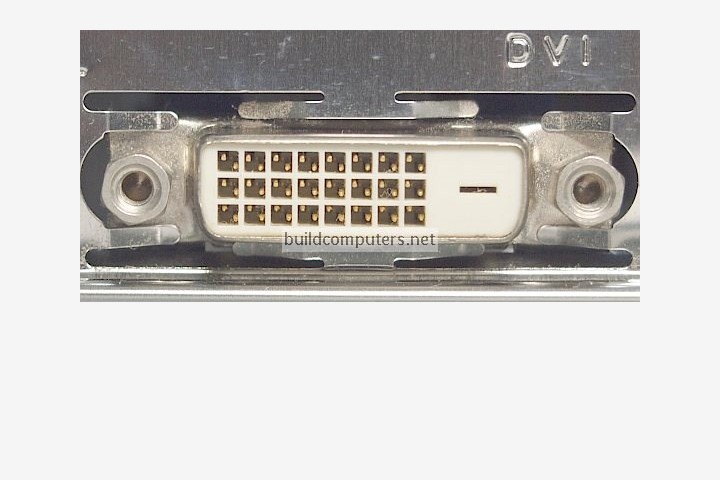
And this is how DVI port looks like:
user posted image

This post has been edited by sHawTY: Nov 5 2016, 11:16 AM

aa123aa
post Nov 5 2016, 11:28 AM

Getting Started
**
Junior Member
180 posts

Joined: Mar 2015
QUOTE(sHawTY @ Nov 5 2016, 11:08 AM)
I'm still using Google DNS until now, still working without any issue
Nonsense. Sape suruh pakai router TM, get a 3rd party router and you won't have that limited connectivity issue
I've been using UniFi with ASUS routers for nearly 6 years now, never had the limited connectivity issue thumbsup.gif
No, UniFi ports is limited, you lambat register, you terlepas la.
If port is finished, you may have to wait between months to years for TM to install another port, so act fast
What cable?
Telephone pole? If you're living in a landed house, you will be getting the Full Fiber
Only apartment & condos get VDSL
To me, it doesn't matter what router they give you, they're all crap. That's why I've always been using ASUS routers all through 6 years I've been with UniFi

Test what you get first. If you're not satisfied, then only buy a 3rd party routers
As I've mentioned earlier, you need to have either an LCD TV or LCD monitor with an HDMI port. Refer to the image below for what HDMI port looks like:
user posted image

If your LCD monitor only comes with a DVI port, then you'll need a DVI to HDMI converter like the image below
user posted image

And this is how DVI port looks like:
user posted image
*
Yup. Landed house. thanks for the info. appreciate that.

Agree. TM router memang teruk one. Any router brand and model that you would suggest to replace those lousy router? Budget around rm400-500

Is there any particular internet setting that we shall do in order to have better and constant speed? got to know that tm unifi 30mbps can be quite unstable and sometime you can get only 15-20 mbps. I guess it might be true. LoL


do I have to set the hyptv on that installation day itself? could we set it up ourselves later on if we want to use it. coz not so keen of using that at the moment. maybe after getting a new monitor only use it.

This post has been edited by aa123aa: Nov 5 2016, 11:38 AM
TSsHawTY
post Nov 5 2016, 12:10 PM

Frequent Reporter
********
All Stars
14,908 posts

Joined: Jul 2005

QUOTE(aa123aa @ Nov 5 2016, 11:28 AM)
Agree. TM router memang teruk one. Any router brand and model that you would suggest to replace those lousy router? Budget around rm400-500
Save more money so you can jump straight to ASUS RT-AC68U
Or buy through installment with 0% interest using Maybank EzyPay
QUOTE(aa123aa @ Nov 5 2016, 11:28 AM)
do I have to set the hyptv on that installation day itself? could we set it up ourselves later on if we want to use it. coz not so keen of using that at the moment. maybe after getting a new monitor only use it.
They will need the LCD TV/LCD Monitor to test it right away
Even if you won't be using it, they still need it to test HyppTV

137 Pages « < 57 58 59 60 61 > » Top
Topic ClosedOptions
 

Change to:
| Lo-Fi Version
0.0367sec    0.43    6 queries    GZIP Disabled
Time is now: 3rd December 2025 - 06:36 PM