Outline ·
[ Standard ] ·
Linear+
Connect to Bittorrent trackers, Being blocked? Try this :)
|
GKWong
|
 Jan 21 2007, 01:19 AM Jan 21 2007, 01:19 AM
|

|
QUOTE(reddevils500 @ Jan 21 2007, 01:02 AM) Hmm..... After 1am, it seems I can get to connect the international peers but couldn't get to download from them.  ahh....although it can connected to international seeders and peers, but cant hav any transfer between them. all dload and upload is from malaysian only...see all ip from tm.net.my transfering only. |
|
|
|
|
|
ed0gawa
|
Jan 21 2007, 02:42 AM
|
|
|
Finally.. BitComet won't work somehow... and i switch to BitLord...
it works... and i get to connect to trackers.. and quite a number of peers..
While for my Gf pc, she didn't use PAW or anything.. just download and start. She is able to connect to all trackers with no issue at all...
|
|
|
|
|
|
acop
|
Jan 21 2007, 03:35 AM
|
New Member

|
Heard the news? BitComet seems to have negative 'perseption' by certain group of torrent users.. The claim is Comet 'hogs' the bandwidth by implementing the 'super-seed' function.. Maybe the cause to the case of incapability to connect to trackers is base on the assumption of the servers' admin to let other torrent user to experience better speed since the claim stated (or is it on another article) that most of Comet users dont seed that much.. Here is the link.. knock yourselves out.. http://torrentfreak.com/bittornado-bans-all-bitcomet-users/Lesson here, dont use BitComet..? Seed more... |
|
|
|
|
|
ed0gawa
|
Jan 21 2007, 05:59 AM
|
|
|
Wow.. amazing... thanks to threadstarter and all that helped. Getting real decent speed after being able to connect to trackers... downloaded 2 episode of Bleach in 40 minutes  Back to my anime frenzy .... ** sigh, i can't surf when Torrent is on.. any help on this? This post has been edited by ed0gawa: Jan 21 2007, 06:02 AM |
|
|
|
|
|
chan01
|
Jan 21 2007, 09:01 AM
|
Getting Started
|
i new to bit torent and i try to download using torrent but why i only can download 1 file...for example, only death note can be downloaded and the other just stuck and not downloading...I try with many different software like bitcomec and bitspiret and all is the same, just can download death note.... i already port forwarding for utorrent.... 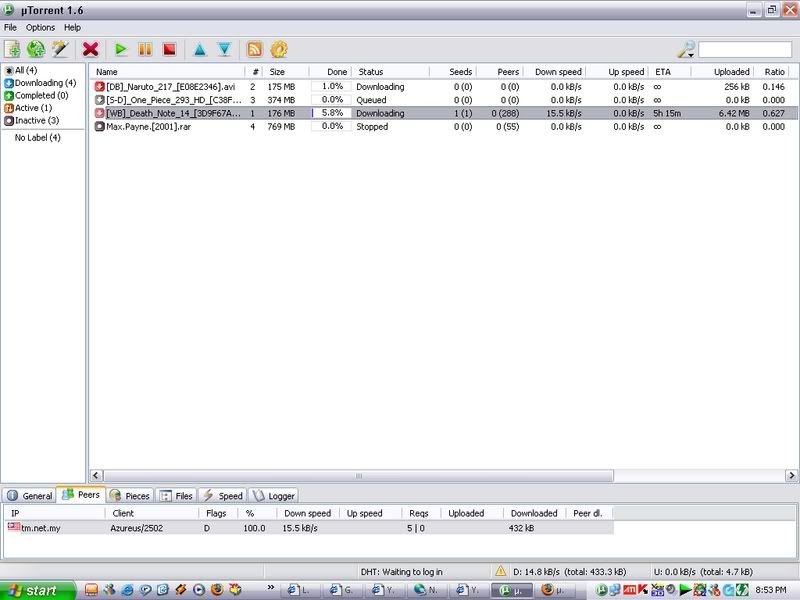 This post has been edited by chan01: Jan 21 2007, 09:03 AM This post has been edited by chan01: Jan 21 2007, 09:03 AM |
|
|
|
|
|
ed0gawa
|
Jan 21 2007, 09:13 AM
|
|
|
If there are local (M'sian) that are "sharing" the file, you will be able to download.
Look at the peers of your death note anime. The peers are local, thus u get a decent speed.
I never had any luck on connecting with international peers....
|
|
|
|
|
|
chan01
|
Jan 21 2007, 09:23 AM
|
Getting Started
|
QUOTE(ed0gawa @ Jan 21 2007, 09:13 AM) If there are local (M'sian) that are "sharing" the file, you will be able to download. Look at the peers of your death note anime. The peers are local, thus u get a decent speed. I never had any luck on connecting with international peers.... no wonder... only death note can be downloaded... so, maybe after the repair of the international link, wil i be able to download??? thanks for ur quick reply  |
|
|
|
|
|
MX510
|
Jan 21 2007, 10:56 AM
|
|
|
Mine can connect to international seeder and local seeder without any problems
|
|
|
|
|
|
lex
|
 Jan 21 2007, 11:06 AM Jan 21 2007, 11:06 AM
|
Old Am I?

|
As I suspected, the reason its difficult to connect to peers especially non-local ones.. » Click to show Spoiler - click again to hide... « 10:38:11.609 0 peer Out: Creating outgoing connection . . .
10:38:11.625 0 peer Out: Creating outgoing connection . . .
10:38:11.625 0 peer Out: Creating outgoing connection . . .
10:38:13.531 0 peer Peer connection closed: failed to establish outgoing connection: Connection refused: no further information . . .
10:38:32.609 0 peer Peer connection closed: failed to establish outgoing connection: Connection timed out: no further information . . .
10:38:32.640 0 peer Peer connection closed: failed to establish outgoing connection: Connection timed out: no further information . . . The shaper simply look for header patterns. For example » Click to show Spoiler - click again to hide... « GET /ping.html?check=azureus_rand_19093 HTTP/1.1 |
|
|
|
|
|
CadeF
|
Jan 21 2007, 11:16 AM
|
Getting Started
|
Difficult, or impossible?
|
|
|
|
|
|
the65thsquare
|
Jan 21 2007, 12:10 PM
|
New Member
|
QUOTE(CadeF @ Jan 21 2007, 11:16 AM) Difficult, or impossible? Difficult. I have some links running to US and Europe with reasonable speeds of 4-8 kB. However, I also have 402 errors with other torrents, and 402 means bad gateways. I guess they just pulled the cable up from the sea to fix it together.  Or our ISP just effed-up our own gateways. You pays your money and takes your pick, eh? |
|
|
|
|
|
supadupa
|
Jan 21 2007, 12:15 PM
|
|
|
bitloard is the best...it works for now...but downloading all from tmnut's user...better than nothing
|
|
|
|
|
|
TSsilverhawk
|
Jan 21 2007, 12:54 PM
|
Eyes on Target

|
I've used
bitlord
bitcomet
bitspirit
None of these have improved my connection/download speed compared to utorrent. Still can't connect to the international seeds/peers. Even after changing the peer ID using bitspirit.
|
|
|
|
|
|
supadupa
|
Jan 21 2007, 01:03 PM
|
|
|
QUOTE(silverhawk @ Jan 21 2007, 12:54 PM) I've used bitlord bitcomet bitspirit None of these have improved my connection/download speed compared to utorrent. Still can't connect to the international seeds/peers. Even after changing the peer ID using bitspirit. yep....all local seed n peer can be connected only  my fren system running linux can download using azerues with no prob... guess it's time to change my OS to linux too liao |
|
|
|
|
|
Kabadi84
|
Jan 21 2007, 01:37 PM
|
|
|
QUOTE(newbieockids @ Jan 20 2007, 02:05 AM)  1) after download Proxomitron, extract and run proxomitron.exe(the green icon).. If any pop-up come out from your firewall just allow it.. 2) In Proxomitron main window, "Edit Filter" section, click "Headers", then a "HTTP Header Filters" window will come out.. 3) In "HTTP Header Filters" window, scroll down and you will find there is 6 user-agent option.. Choose any one of them by ticking at "OUT" section and then click "Apply", "Ok".. 4) Configure your BT client to use this proxy.. 5) Launch Proxomitron log windows and then start your torrent task to see if it works.. Proxomitron was using port 8080 on default so if u're behind a router, forward port 8080.. sorry noobie here cant understand what is step no 4 |
|
|
|
|
|
Polaris
|
Jan 21 2007, 01:39 PM
|
|
|
QUOTE(newbieockids @ Jan 20 2007, 02:05 AM) 4) Configure your BT client to use this proxy.. 5) Launch Proxomitron log windows and then start your torrent task to see if it works.. Proxomitron was using port 8080 on default so if u're behind a router, forward port 8080.. How do I do 4 and 5 in Azureus? I spent hours last night trying out startServer, failed, trying out proxymitron now. |
|
|
|
|
|
duckevo
|
Jan 21 2007, 01:43 PM
|
|
|
after using paw + utorrent, i managed 2 connect 2 some international peers... aus, us jpn & singapore....  average speed around 15kbps... sometimes around 30-50 kps if local peers around... not bad though... added opera and mozilla firefox as user agent..... |
|
|
|
|
|
hahaha85
|
Jan 21 2007, 02:03 PM
|
Getting Started
|
I have tried bitcomet, utorrent and bitlord....Finally, bitlord works for me. I am using paw program(not like proxomitron cause it makes my program a bit lag when dragging it)...My speed in the afternoon for these few months are less than 15kb, but now it flies high till 50kb++ even without port forwarding my router... Thanks to sifu here... |
|
|
|
|
|
t3chn0m4nc3r
|
 Jan 21 2007, 02:16 PM Jan 21 2007, 02:16 PM
|
|
|
QUOTE(Gametaipan @ Jan 20 2007, 10:04 PM) » Click to show Spoiler - click again to hide... « It is total for today, but the other day i have over 150kps on a single file. There u go:  [/spoiler] Wow... u r a real torrent freak lar... but then u using the 1MB package rite...? BTW... i got error 408... juz started... finally got some time...  i'm a noob when it comes to networks...  This post has been edited by t3chn0m4nc3r: Jan 21 2007, 02:19 PM This post has been edited by t3chn0m4nc3r: Jan 21 2007, 02:19 PM |
|
|
|
|
|
the65thsquare
|
Jan 21 2007, 02:20 PM
|
New Member
|
Ya ya ya. We supposed to guess what BT client you guys using when asking for help.
|
|
|
|
|




 Quote
Quote










 0.0237sec
 0.65
0.65
 6 queries
 GZIP Disabled