

QUOTE(SkyToLove @ Oct 1 2018, 08:48 PM)
This is what I achieved in my AC1200 just now


why mine cant even get 300Mbps? 
TIME [OFFICIAL] TIME Fibre Broadband™ v3.o, 500 Mbps of rocket science
|
|
 Oct 1 2018, 09:18 PM Oct 1 2018, 09:18 PM
|
 
All Stars
11,308 posts Joined: Feb 2008 
|
QUOTE(SkyToLove @ Oct 1 2018, 08:48 PM) This is what I achieved in my AC1200 just now why mine cant even get 300Mbps? |
|
|
|
|
|
Oct 1 2018, 09:22 PM
|

Junior Member
234 posts Joined: Jan 2005 
|
QUOTE(idoblu @ Oct 1 2018, 09:18 PM) why mine cant even get 300Mbps? Depending on your router and the wifi capability of the device you use. |
|
|
Oct 1 2018, 09:23 PM
|

Junior Member
746 posts Joined: May 2011
|
Tried running a speedtest at my place and I only got this result.
Probably because of my router and device. Tried using Ethernet but at most I can get 100Mbps, my laptop's ethernet not strong enough.  |
|
|
Oct 1 2018, 09:25 PM
|
|
Junior Member
234 posts Joined: Jan 2005
|
QUOTE(HMMaster @ Oct 1 2018, 09:14 PM) same here... wifi around 200mbps using iPad 2018 and Mi A1. Router is Dlink DIR850L. That's more or less the limitation of Dlink DIR850L.https://www.smallnetbuilder.com/wireless/wi...eviewed?start=3 |
|
|
Oct 1 2018, 09:26 PM
|

Senior Member
1,829 posts Joined: Mar 2013
|
mine is huawei connect to a black router i assume? so can directly plug the network cable from huawei modem to pc?
|
|
|
Oct 1 2018, 09:31 PM
Show posts by this member only | IPv6 | Post
#9786
|

Senior Member
3,834 posts Joined: Aug 2016
|
QUOTE(iwubpreve @ Oct 1 2018, 09:26 PM) mine is huawei connect to a black router i assume? so can directly plug the network cable from huawei modem to pc? Yes. You can connect if you want to perform direct connection to ONU to test the speed. Only LAN 1 Port of the ONU have signal only.First thing you must have the PPPOE Login details and setup PPPOE to the PC. Thanks This post has been edited by FusionXY: Oct 1 2018, 09:31 PM |
|
|
|
|
|
Oct 1 2018, 09:36 PM
|

Senior Member
736 posts Joined: Jun 2006 From: Ipoh
|
QUOTE(muncheno @ Oct 1 2018, 09:03 PM) From Penang, near Relau. Update on LAN. 100mbps upgraded. Using Huawei WS880 router and tested with Huawei P20pro on 5Ghz WiFi. My Speedtest Result DL 324 Mbps UL 431 Mbps DL 487 Mbps UL 458 Mbps |
|
|
Oct 1 2018, 09:37 PM
|
|
Senior Member
853 posts Joined: Apr 2017
|
QUOTE(stephantsen @ Oct 1 2018, 08:53 PM) try use lan... it is normal that wifi cannot achieve 500Mbps with time stock router You are damn right. TIME 100Mbps using AC1200 router (given by TIME) on speedtest.net with LAN cable:DL ~ 459Mbps UL ~ 164Mbps Not sure why my upload is always low though Edit: location is Taman Desa KL This post has been edited by chonghe: Oct 1 2018, 09:37 PM |
|
|
Oct 1 2018, 09:41 PM
|

Senior Member
4,470 posts Joined: Sep 2007 From: Kuala Lumpur
|
Wow
|
|
|
Oct 1 2018, 09:48 PM
|

Junior Member
429 posts Joined: Jan 2003
|
For anyone out there who has just upgraded and dont want to lay LAN cable the ONLY wireless card u should get is the tplink T8E or the T9E. Those are the only 2 cards that work with speeds as claimed. Dont even bother with usb card no matter what they say it is just junk.
My T8E is around 8 meters seperated with 4 walls and i can max out my 500mbps wif 5ghz wifi. Same as LAN cable. I have changed at least 6 usb AC adapters they are all junk. Learn from my mistake. They are cheap for a reason. |
|
|
Oct 1 2018, 10:01 PM
|

Junior Member
396 posts Joined: Apr 2007 From: Penang, Malaysia 
|
 Finally got my speed upgraded, tested on desktop. Penang - Mar Vista Resort |
|
|
Oct 1 2018, 10:17 PM
|
|
Senior Member
2,670 posts Joined: Sep 2006
|
Those with high end router (AC1750 - AC5300), what's the max speed you can get on your smartphone at 5Ghz?
|
|
|
Oct 1 2018, 10:19 PM
|
|
Junior Member
234 posts Joined: Jan 2005
|
QUOTE(beetch @ Oct 1 2018, 09:48 PM) For anyone out there who has just upgraded and dont want to lay LAN cable the ONLY wireless card u should get is the tplink T8E or the T9E. Those are the only 2 cards that work with speeds as claimed. Dont even bother with usb card no matter what they say it is just junk. Have you tried TPLINK Archer T9UH? I'm thinking to get one.My T8E is around 8 meters seperated with 4 walls and i can max out my 500mbps wif 5ghz wifi. Same as LAN cable. I have changed at least 6 usb AC adapters they are all junk. Learn from my mistake. They are cheap for a reason. |
|
|
|
|
|
Oct 1 2018, 10:19 PM
|

Junior Member
217 posts Joined: Mar 2011
|
Area - Serdang, seri Kembangan
Package - 100mbps Upgraded to - 500mbps Test setting - Wired connection Router - TIME provided AC1200 yess Finally I've joined the party  btw speed is below 200mbps using 5ghz wifi. but I think it will get better eventually. other test result Xbox one - 36ms ping (used to be 100+ for last few days) Steam - stable download at 40-50mbps PS4 - stable 450mbps (using cable) All in game ping are stable now (Rainbow 6 seige 9ms) This post has been edited by Deathhunter: Oct 1 2018, 10:48 PM Attached thumbnail(s) 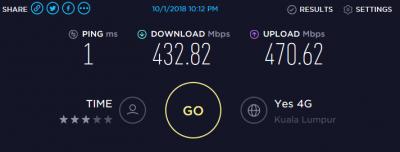
|
|
|
Oct 1 2018, 10:40 PM
|

Junior Member
68 posts Joined: Sep 2018
|
And here 1 October almost gone but still don't get speed upgrade at Shah Alam. I only see a few of 300Mbps and very rare 500Mbps package have been speed upgraded. But so much of 100Mbps package that has been upgraded so far. Wonder why?

This post has been edited by mds14: Oct 1 2018, 10:41 PM |
|
|
Oct 1 2018, 10:51 PM
|
|
Junior Member
76 posts Joined: Mar 2008
|
QUOTE(jjj2 @ Oct 1 2018, 09:24 AM) Please take a photo of the devices & we will tell you Just sighted my modem and router..it's huawei (modem i assumed?) being hooked to DIR850L..would both equipment still be able to cope with the speed upgrade for the current subscribed speed of 300mbps? sorry tech amateur here  Not sure how much would the upgrade speed be, as I have pretty inconsistent speedtest result today.sometimes may shoot up to slightly lower than 500mbps..weird.. |
|
|
Oct 1 2018, 10:59 PM
|
 
Moderator
10,308 posts Joined: Jan 2003 From: Kuala Lumpur
|
QUOTE(beetch @ Oct 1 2018, 09:48 PM) For anyone out there who has just upgraded and dont want to lay LAN cable the ONLY wireless card u should get is the tplink T8E or the T9E. Those are the only 2 cards that work with speeds as claimed. Dont even bother with usb card no matter what they say it is just junk. Which router you are using?My T8E is around 8 meters seperated with 4 walls and i can max out my 500mbps wif 5ghz wifi. Same as LAN cable. I have changed at least 6 usb AC adapters they are all junk. Learn from my mistake. They are cheap for a reason. |
|
|
Oct 1 2018, 11:01 PM
|
|
All Stars
52,874 posts Joined: Jan 2003
|
QUOTE(neo89 @ Oct 1 2018, 10:51 PM) Just sighted my modem and router..it's huawei (modem i assumed?) being hooked to DIR850L..would both equipment still be able to cope with the speed upgrade for the current subscribed speed of 300mbps? sorry tech amateur here If you're on 300Mbps plan now, you'll be upgraded to 800Mbps plan.Not sure how much would the upgrade speed be, as I have pretty inconsistent speedtest result today.sometimes may shoot up to slightly lower than 500mbps..weird.. Your current wireless router is not able to reach that speed. |
|
|
Oct 1 2018, 11:10 PM
|

Senior Member
761 posts Joined: Jan 2003
|
Hold your horses. Wait for wifi ax. Will hit 1gbps average throughput. Intel will integrate this into wiskey lake. Router will be on the way. Finger cross they will not be expensive.
|
|
|
Oct 1 2018, 11:11 PM
|
|
All Stars
52,874 posts Joined: Jan 2003
|
QUOTE(Ree73 @ Oct 1 2018, 11:10 PM) Hold your horses. Wait for wifi ax. Will hit 1gbps average throughput. Intel will integrate this into wiskey lake. Router will be on the way. Finger cross they will not be expensive. When will that be?6 months? 1 years? |
|
Topic ClosedOptions
|
| Change to: |  0.1630sec 0.1630sec
 4.22 4.22
 6 queries 6 queries
 GZIP Disabled GZIP Disabled
Time is now: 4th December 2025 - 12:01 PM |
 Quote
Quote