Outline ·
[ Standard ] ·
Linear+
Unifi Official TM UniFi High Speed Broadband Thread V22, ( -_・) ︻デ═一▸ Maxis & Time
|
Andy72
|
 Oct 27 2015, 07:39 AM Oct 27 2015, 07:39 AM
|
Getting Started


|
QUOTE(zher4883 @ Oct 27 2015, 07:33 AM) That was bullshit, any rj45 cable will do as long as it is rj45 cable Actually, there is a difference. PC-to-PC cables are also known as crossed cables and are used to connect a PC to another PC directly without going through a router or a switch. PC-to-network cables are also known as straight cables and are used to connect PC to router or switch. These cables differ in the way the 4 pairs of cables inside it are crimped. However, most equipment nowadays are smart enough to be able to use both types of cables regardless. So it does not make a difference which type of cables you use. The most common type of cables sold in shops are straight cables. This post has been edited by Andy72: Oct 27 2015, 07:44 AM |
|
|
|
|
|
djhenry91
|
Oct 27 2015, 07:56 AM
|
|
|
QUOTE(zher4883 @ Oct 27 2015, 07:33 AM) That was bullshit, any rj45 cable will do as long as it is rj45 cable Not all rj45 cable is straight wan.. U need go Google it Got diagram about wiring inside rj45 cable Got different.. |
|
|
|
|
|
qwan1101
|
Oct 27 2015, 08:07 AM
|
Getting Started
|
QUOTE(Andy72 @ Oct 27 2015, 07:39 AM) Actually, there is a difference. PC-to-PC cables are also known as crossed cables and are used to connect a PC to another PC directly without going through a router or a switch. PC-to-network cables are also known as straight cables and are used to connect PC to router or switch. These cables differ in the way the 4 pairs of cables inside it are crimped. However, most equipment nowadays are smart enough to be able to use both types of cables regardless. So it does not make a difference which type of cables you use. The most common type of cables sold in shops are straight cables. So... i have to look for cable named "straight cables" (usually prepack in computer shop) to connect my router to unifi hypptv box. Is it correct? |
|
|
|
|
|
plumberly
|
Oct 27 2015, 08:15 AM
|
|
|
QUOTE(qwan1101 @ Oct 27 2015, 08:07 AM) So... i have to look for cable named "straight cables" (usually prepack in computer shop) to connect my router to unifi hypptv box. Is it correct? My 2 cents here as I bought a LAN cable recently for connecting from my router to my TV. Only found out the 2 types after I bought the cable. Luckily I bought the right type. Ha. Initially I could not stream data and thus investigated the problem and found the 2 types. No streaming as I did not complete the software side. Some infor below for you to digest. Straight Cable
You usually use straight cable to connect different type of devices. This type of cable will be used most of the time and can be used to:
1) Connect a computer to a switch/hub's normal port.
2) Connect a computer to a cable/DSL modem's LAN port.
3) Connect a router's WAN port to a cable/DSL modem's LAN port.
4) Connect a router's LAN port to a switch/hub's uplink port. (normally used for expanding network)
5) Connect 2 switches/hubs with one of the switch/hub using an uplink port and the other one using normal port.
Crossover Cable
Sometimes you will use crossover cable, it's usually used to connect same type of devices. A crossover cable can be used to:
1) Connect 2 computers directly.
2) Connect a router's LAN port to a switch/hub's normal port. (normally used for expanding network)
3) Connect 2 switches/hubs by using normal port in both switches/hubs.http://www.home-network-help.com/straight.html |
|
|
|
|
|
Andy72
|
Oct 27 2015, 08:17 AM
|
Getting Started
|
QUOTE(qwan1101 @ Oct 27 2015, 08:07 AM) So... i have to look for cable named "straight cables" (usually prepack in computer shop) to connect my router to unifi hypptv box. Is it correct? Yes, you are right. You can determine if the cable is straight or not by looking at the colour coding of the wiring on both ends of the cable. There are 4 pairs of wires. If the colours on both ends match, then it is a straight cable. This post has been edited by Andy72: Oct 27 2015, 08:21 AM |
|
|
|
|
|
nikrizal
|
Oct 27 2015, 10:10 AM
|
|
|
correct correct correct.. buy cable with both ends look similar like this.. Attached image(s)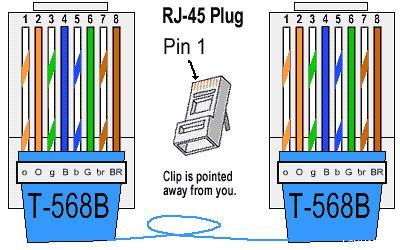 |
|
|
|
|
|
djhenry91
|
Oct 27 2015, 10:19 AM
|
|
|
back to networking 101 basic
i got learn sikit sikit but forget liao..
now got people share can read back..
|
|
|
|
|
|
jolmy
|
Oct 27 2015, 10:29 AM
|
|
|
QUOTE(fruitie @ Oct 26 2015, 09:19 PM) I'm not sure but it seems mine comes with free voice, I didn't install my phone set so cannot verify for you. I just reached home and wasn't around last weekend, FB issue seems fixed. No more slow loading.  Well, regarding the RM20 discount thingy, how long does it take for TM to call you upon submission of report to SKMM? I did so last Friday, and just now I submitted the enquiry via OCC with the SKMM reference number as well. |
|
|
|
|
|
tritonite
|
Oct 27 2015, 10:33 AM
|
|
|
I wouldn't worry too much. The vast majority of LAN cables sold in shops are straight-through, also labelled as 'patch' cables.
Crossover cables are the ones you need to deliberately look for, and they are usually labelled as such.
This post has been edited by tritonite: Oct 27 2015, 10:44 AM
|
|
|
|
|
|
zeese
|
Oct 27 2015, 10:48 AM
|
|
|
QUOTE(shinchan5347 @ Oct 26 2015, 10:24 PM) What's the difference between upgrading my unifi officially from tm via 100 and thru agent..I mean individually from a person both are same. If you upgrade by contacting tm, tm will pick an agent for you. The agent will put your request in queue, if he already has many customers in his waiting list. If you upgrade thru an agent, basically you pick your own agent, and probably, since this agent has to work harder to get his own customers, maybe the agent will do the work quicker and you get ur unifi faster. Maybe. Sometimes, this kind of agent provides free gifts, or put you in a lucky draw.. This post has been edited by zeese: Oct 27 2015, 10:50 AM |
|
|
|
|
|
fruitie
|
Oct 27 2015, 10:58 AM
|
Rise and Shine

|
QUOTE(jolmy @ Oct 27 2015, 10:29 AM) Well, regarding the RM20 discount thingy, how long does it take for TM to call you upon submission of report to SKMM? I did so last Friday, and just now I submitted the enquiry via OCC with the SKMM reference number as well. Complained on Sunday, SKMM acknowledged receipt on Monday, TM called on Tuesday. |
|
|
|
|
|
jolmy
|
Oct 27 2015, 11:14 AM
|
|
|
QUOTE(fruitie @ Oct 27 2015, 10:58 AM) Complained on Sunday, SKMM acknowledged receipt on Monday, TM called on Tuesday. That's fast. I'm still waiting...  |
|
|
|
|
|
jolmy
|
Oct 27 2015, 11:26 AM
|
|
|
QUOTE(zarchrykl @ Oct 27 2015, 11:20 AM) Just manage to get early promo discount. Earlier i subscribe with jumbo pack 229 but decide to take aneka only and they agreed. So 179 only so how long it took from the time you reported to SKMM & TM calling you?? |
|
|
|
|
|
fruitie
|
Oct 27 2015, 11:28 AM
|
Rise and Shine
|
QUOTE(jolmy @ Oct 27 2015, 11:14 AM) That's fast. I'm still waiting... You can always walk in to the nearest TM Point now since they should know by now. |
|
|
|
|
|
zarchrykl
|
Oct 27 2015, 11:29 AM
|
Getting Started
|
3 day but i thing no meed to report ler just go to tmpoint.. Because i change plan new contract involved 😭😭😭😭
|
|
|
|
|
|
funnyface
|
Oct 27 2015, 11:30 AM
|
|
|
QUOTE(fruitie @ Oct 27 2015, 11:28 AM) You can always walk in to the nearest TM Point now since they should know by now. went to TM point last saturday, she say cannot change from unifi30+ruby to unifi30 advance+ruby...  can only change to aneka/venam or jumbo if wan to move to this new promo  |
|
|
|
|
|
jolmy
|
Oct 27 2015, 12:16 PM
|
|
|
Thanks, so at TMpoint we just have to ask for the UniFi RM20 Special Discount form is it?? QUOTE(fruitie @ Oct 27 2015, 11:28 AM) You can always walk in to the nearest TM Point now since they should know by now. Ah wait, you mean if I am on the RM209 with Ruby Pack cannot get the RM20 discount or what?? QUOTE(zarchrykl @ Oct 27 2015, 11:29 AM) 3 day but i thing no meed to report ler just go to tmpoint.. Because i change plan new contract involved 😭😭😭😭 QUOTE(funnyface @ Oct 27 2015, 11:30 AM) went to TM point last saturday, she say cannot change from unifi30+ruby to unifi30 advance+ruby... can only change to aneka/venam or jumbo if wan to move to this new promo |
|
|
|
|
|
zarchrykl
|
Oct 27 2015, 12:21 PM
|
Getting Started
|
QUOTE(jolmy @ Oct 27 2015, 12:16 PM) Thanks, so at TMpoint we just have to ask for the UniFi RM20 Special Discount form is it?? Ah wait, you mean if I am on the RM209 with Ruby Pack cannot get the RM20 discount or what?? yes u can. u ask for ruby pack that comes with discounted price rm189. just that u can't get the free voice as rm20 is from there.. i think so.. i change at tm point cyberjaya just now and immediately after that i check the system.. walla change already. |
|
|
|
|



 Quote
Quote




 0.0294sec
 0.24
0.24
 6 queries
 GZIP Disabled