

QUOTE(effectz @ Jul 13 2025, 11:37 PM)
Just want to try for few months. Not heavy user, just netflix on 1 tv and light browsing.

Any reasons? Is it for cost savingI think Maxis can offer you cheaper price if you are on their infra
The Official Maxis FTTH Thread | v5, Maxis Home Fibre Internet, from RM89
|
|
 Jul 13 2025, 11:57 PM Jul 13 2025, 11:57 PM
|
 
Elite
8,400 posts Joined: Jul 2008  
|
QUOTE(effectz @ Jul 13 2025, 11:37 PM) Just want to try for few months. Not heavy user, just netflix on 1 tv and light browsing. Any reasons? Is it for cost savingI think Maxis can offer you cheaper price if you are on their infra |
|
|
|
|
|
Jul 14 2025, 01:47 PM
|
 
Senior Member
6,793 posts Joined: Oct 2008 From: Kuala Lumpur  
|
QUOTE(effectz @ Jul 13 2025, 11:37 PM) Just want to try for few months. Not heavy user, just netflix on 1 tv and light browsing. If totally netflix/streaming and light browsing, 5G is sufficient. But to really test out, I suggest you subscribe 5G for example using 5G prepaid sim or U Home 5G without contract. Then you can decide to ditch fibre permanently if you feel it is enough for your usage. effectz liked this post
|
|
|
Jul 14 2025, 01:50 PM
|

Senior Member
1,108 posts Joined: Oct 2006
|
QUOTE(blacktubi @ Jul 13 2025, 11:57 PM) Any reasons? Is it for cost saving I think Maxis can offer you cheaper price if you are on their infra QUOTE(YoungMan @ Jul 14 2025, 01:47 PM) If totally netflix/streaming and light browsing, 5G is sufficient. Yes. Gonna test first, maxis just had installed their infra back of my house. Need to terminate first before can do RM99 300mbps plan. Meantime, will test 5G see for myself if reliable. Thanks for your advises.But to really test out, I suggest you subscribe 5G for example using 5G prepaid sim or U Home 5G without contract. Then you can decide to ditch fibre permanently if you feel it is enough for your usage. This post has been edited by effectz: Jul 14 2025, 01:50 PM |
|
|
Jul 17 2025, 09:30 PM
Show posts by this member only | IPv6 | Post
#9524
|

Senior Member
1,368 posts Joined: Aug 2010
|
Currently using UniFi 1Gbps, planning to port over to maxis due to UniFi junk modem keep frequent disconnects.
If port over will maxis provide new modem / router ? Is maxis better then UniFi now ? Maxis 1Gbps - RM 159 UniFi 1Gbps - RM 219 (Currently) 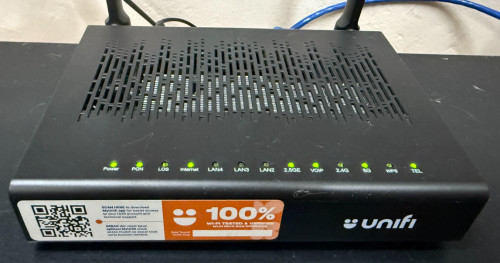 This post has been edited by Raymond T.: Jul 17 2025, 09:31 PM |
|
|
Jul 18 2025, 11:43 AM
|
|
Junior Member
380 posts Joined: Oct 2017
|
QUOTE(Raymond T. @ Jul 17 2025, 09:30 PM) Currently using UniFi 1Gbps, planning to port over to maxis due to UniFi junk modem keep frequent disconnects. Earlier this year i upgraded my maxis fibre from 500mbps to 1gbps. They give me skyworth 2.5gbps onu and koan wifi 6 routerIf port over will maxis provide new modem / router ? Is maxis better then UniFi now ? Maxis 1Gbps - RM 159 UniFi 1Gbps - RM 219 (Currently) |
|
|
Jul 18 2025, 01:53 PM
|
|
Senior Member
6,793 posts Joined: Oct 2008 From: Kuala Lumpur
|
QUOTE(Raymond T. @ Jul 17 2025, 09:30 PM) Currently using UniFi 1Gbps, planning to port over to maxis due to UniFi junk modem keep frequent disconnects. Unlike Unifi which uses AIO ONU +router combo, Maxis provides separate router and ONU. I'm not sure how's the performance of their router now, but you could easily replace with own better router with this setup. If port over will maxis provide new modem / router ? Is maxis better then UniFi now ? Maxis 1Gbps - RM 159 UniFi 1Gbps - RM 219 (Currently) My personal experience, I find Maxis has less congestion at night compare to Unifi. |
|
|
|
|
|
Jul 21 2025, 11:00 PM
Show posts by this member only | IPv6 | Post
#9527
|
|
Senior Member
1,368 posts Joined: Aug 2010
|
QUOTE(YoungMan @ Jul 18 2025, 01:53 PM) Unlike Unifi which uses AIO ONU +router combo, Maxis provides separate router and ONU. I'm not sure how's the performance of their router now, but you could easily replace with own better router with this setup. I see, just to check Maxis 1Gbps what's their upload speed ?My personal experience, I find Maxis has less congestion at night compare to Unifi. |
|
|
Jul 22 2025, 10:17 AM
|
|
Senior Member
6,793 posts Joined: Oct 2008 From: Kuala Lumpur
|
QUOTE(Raymond T. @ Jul 21 2025, 11:00 PM) I see, just to check Maxis 1Gbps what's their upload speed ? 500mbps same as Unifi |
|
|
Jul 23 2025, 12:45 PM
|
 
Staff
72,788 posts Joined: Sep 2005 From: KUL 
|
I have a problem now. I have been using Maxis for more than 3 years, and I have no issue with it. My house is always vacant, and I go back occasionally; however, I have other smart IoT devices connected in the house. There was no major disconnection in the past, and even if it happened, it would reconnect on its own.
Recently, I am facing issue with disconnections. Earlier, Maxis instructed me to change to port 2, and it was okay since July 11th. However, today I woke up to some automation notifications that they didn't work this morning. I checked and all my smart IoT devices were offline. I called Maxis, and they told me it showed no connection since 11.51 pm last night. Unfortunately, Maxis is not able to do anything besides restarting my port, but it required me to restart the modem and router. Additionally, since I'm using my own router, they cannot perform any troubleshooting... The connection didn't come back after restarting my port. I'm not even sure if it's an issue with my Asus router. I hardly hear issues with Asus routers, to be honest.  How can I get it solved when I'm not always in the house? This is frustrating... How can I get it solved when I'm not always in the house? This is frustrating... |
|
|
Jul 23 2025, 01:31 PM
|
|
Elite
8,400 posts Joined: Jul 2008
|
QUOTE(fruitie @ Jul 23 2025, 12:45 PM) I have a problem now. I have been using Maxis for more than 3 years, and I have no issue with it. My house is always vacant, and I go back occasionally; however, I have other smart IoT devices connected in the house. There was no major disconnection in the past, and even if it happened, it would reconnect on its own. Do you have the USB 4G backup modem from Maxis, you can use that as a secondary WAN connection on your ASUS router Recently, I am facing issue with disconnections. Earlier, Maxis instructed me to change to port 2, and it was okay since July 11th. However, today I woke up to some automation notifications that they didn't work this morning. I checked and all my smart IoT devices were offline. I called Maxis, and they told me it showed no connection since 11.51 pm last night. Unfortunately, Maxis is not able to do anything besides restarting my port, but it required me to restart the modem and router. Additionally, since I'm using my own router, they cannot perform any troubleshooting... The connection didn't come back after restarting my port. I'm not even sure if it's an issue with my Asus router. I hardly hear issues with Asus routers, to be honest. How can I get it solved when I'm not always in the house? This is frustrating... |
|
|
Jul 23 2025, 02:19 PM
|
|
Staff
72,788 posts Joined: Sep 2005 From: KUL
|
QUOTE(blacktubi @ Jul 23 2025, 01:31 PM) Do you have the USB 4G backup modem from Maxis, you can use that as a secondary WAN connection on your ASUS router No, I don't. They only give me a Nokia modem and a Huawei router. How to get this USB 4G backup modem? |
|
|
Jul 23 2025, 03:25 PM
Show posts by this member only | IPv6 | Post
#9532
|

Senior Member
1,030 posts Joined: Jan 2022
|
QUOTE(fruitie @ Jul 23 2025, 02:19 PM) No, I don't. They only give me a Nokia modem and a Huawei router. How to get this USB 4G backup modem? Need to subscribe to Maxis Postpaid plan and pair both your Postpaid line and Maxis Home Fibre before they issue you that USB 4G modem last time.But need to be careful in future if you want to port out your mobile number or fibre line even if you have no contract you must request to debundle both lines before they allow port out. Key here is Maxis Family Plan Bundle. |
|
|
Jul 23 2025, 03:31 PM
|
|
Staff
72,788 posts Joined: Sep 2005 From: KUL
|
QUOTE(petpenyubobo @ Jul 23 2025, 03:25 PM) Need to subscribe to Maxis Postpaid plan and pair both your Postpaid line and Maxis Home Fibre before they issue you that USB 4G modem last time. Oh no wonder. I don't have a postpaid plan with Maxis, only this Maxis Fiber.But need to be careful in future if you want to port out your mobile number or fibre line even if you have no contract you must request to debundle both lines before they allow port out. Key here is Maxis Family Plan Bundle. The next thing I plan to do when I go back to my place is to change my Asus router to Maxis Huawei router. Then, I change the SSID and password to be the same as my Asus router, so that I don't need to setup all my IoT devices again. This will work right? In this case, I can verify if it is a router issue or Maxis issue, then Maxis has no more reason not to help me troubleshoot. |
|
|
|
|
|
Jul 23 2025, 03:36 PM
|
|
Senior Member
1,185 posts Joined: Nov 2020
|
QUOTE(Raymond T. @ Jul 17 2025, 09:30 PM) Currently using UniFi 1Gbps, planning to port over to maxis due to UniFi junk modem keep frequent disconnects. depends la, i was on 1gbps for almost 2 years with normal 1gbps modem.If port over will maxis provide new modem / router ? Is maxis better then UniFi now ? Maxis 1Gbps - RM 159 UniFi 1Gbps - RM 219 (Currently) after complain multiple times they gave the 2.5gbps skyworth, but speed max was same as the 1gbps modem at max 930, even with 2.5gbps router, switch, and usb c to 2.5gbps adapter. |
|
|
Jul 23 2025, 03:47 PM
Show posts by this member only | IPv6 | Post
#9535
|
|
Senior Member
1,030 posts Joined: Jan 2022
|
QUOTE(fruitie @ Jul 23 2025, 03:31 PM) Oh no wonder. I don't have a postpaid plan with Maxis, only this Maxis Fiber. Not worth it actually both Maxis Postpaid (cheapest) + Home Fibre Plan Bundle together it's almost RM200 with VAT.The next thing I plan to do when I go back to my place is to change my Asus router to Maxis Huawei router. Then, I change the SSID and password to be the same as my Asus router, so that I don't need to setup all my IoT devices again. This will work right? In this case, I can verify if it is a router issue or Maxis issue, then Maxis has no more reason not to help me troubleshoot. Since your Postpaid is already made unlimited, no lost for Maxis to issue you an extra unlimited data backup SIM that is tied to the 4G dongle. RM200 might as well subscribe an unlimited prepaid plan or the cheapest fibre plan out there at roughly almost half the price. RM89 + RM50 Of if you need just the data sim consider XOX, TuneTalk, DiGi Prepaid SIM plans which are just under RM65 depending on needs and modem friendly. |
|
|
Jul 23 2025, 03:49 PM
Show posts by this member only | IPv6 | Post
#9536
|

Senior Member
1,218 posts Joined: Jan 2010 From: Today 06.09 am
|
QUOTE(fruitie @ Jul 23 2025, 03:31 PM) Oh no wonder. I don't have a postpaid plan with Maxis, only this Maxis Fiber. As long as your SSID and the password same, then you can reconfigure back with the Maxis Huawei Router. The next thing I plan to do when I go back to my place is to change my Asus router to Maxis Huawei router. Then, I change the SSID and password to be the same as my Asus router, so that I don't need to setup all my IoT devices again. This will work right? In this case, I can verify if it is a router issue or Maxis issue, then Maxis has no more reason not to help me troubleshoot. I had issues with both AC86U and AC68U , so I end up using different router for home usage. Somehow the Asus router tends to hang with no trace of logs after more than average 9 days. Had to manual restart it which is annoying. |
|
|
Jul 23 2025, 03:58 PM
|
|
Staff
72,788 posts Joined: Sep 2005 From: KUL
|
QUOTE(petpenyubobo @ Jul 23 2025, 03:47 PM) Not worth it actually both Maxis Postpaid (cheapest) + Home Fibre Plan Bundle together it's almost RM200 with VAT. Ya, not interested in Maxis postpaid as my corporate plan is paid directly by company. My own number is on Digi Ambassador which is 0 cost.Since your Postpaid is already made unlimited, no lost for Maxis to issue you an extra unlimited data backup SIM that is tied to the 4G dongle. RM200 might as well subscribe an unlimited prepaid plan or the cheapest fibre plan out there at roughly almost half the price. RM89 + RM50 Of if you need just the data sim consider XOX, TuneTalk, DiGi Prepaid SIM plans which are just under RM65 depending on needs and modem friendly. Back to this discussion, even if I subscribe to another 5G plan it doesn't help with my situation though because my IoT stuff will only be connected to one connection. QUOTE(Keatsan @ Jul 23 2025, 03:49 PM) As long as your SSID and the password same, then you can reconfigure back with the Maxis Huawei Router. Yes, I plan to do it. I'm suspecting it is the port issue to my unit because it seems other units in my condo are not having issues. But I don't have proof until I change back the router.I had issues with both AC86U and AC68U , so I end up using different router for home usage. Somehow the Asus router tends to hang with no trace of logs after more than average 9 days. Had to manual restart it which is annoying. My Asus TUF Gaming AX3000 is still kinda new I don't think it is the router issue though.  |
|
|
Jul 23 2025, 04:20 PM
|
|
Senior Member
1,218 posts Joined: Jan 2010 From: Today 06.09 am
|
QUOTE(fruitie @ Jul 23 2025, 03:58 PM) Ya, not interested in Maxis postpaid as my corporate plan is paid directly by company. My own number is on Digi Ambassador which is 0 cost. Nevertheless, back to default Maxis router. Hopefully that isolates one lesser problem to troubleshoot. Back to this discussion, even if I subscribe to another 5G plan it doesn't help with my situation though because my IoT stuff will only be connected to one connection. Yes, I plan to do it. I'm suspecting it is the port issue to my unit because it seems other units in my condo are not having issues. But I don't have proof until I change back the router. My Asus TUF Gaming AX3000 is still kinda new I don't think it is the router issue though. |
|
|
Jul 23 2025, 04:22 PM
|
|
Staff
72,788 posts Joined: Sep 2005 From: KUL
|
QUOTE(Keatsan @ Jul 23 2025, 04:20 PM) Nevertheless, back to default Maxis router. Hopefully that isolates one lesser problem to troubleshoot. That's right and I need to read how to configure it because I unplugged it the moment the installer left.  |
|
|
Jul 24 2025, 08:02 PM
|

Senior Member
994 posts Joined: Jun 2009 From: Sabah
|
How to get 1gbps for RM159?
This post has been edited by Topet: Jul 24 2025, 08:02 PM |
| Change to: |  0.0364sec 0.0364sec
 0.68 0.68
 6 queries 6 queries
 GZIP Disabled GZIP Disabled
Time is now: 1st December 2025 - 05:49 PM |
 Quote
Quote