Welcome Guest ( Log In | Register )

488 Pages « < 468 469 470 471 472 > » Bottom

Outline · [ Standard ] · Linear+

 The Official Maxis FTTH Thread | v5, Maxis Home Fibre Internet, from RM89

views
     
kart
post Dec 31 2024, 09:50 AM

Regular
******
Senior Member
1,598 posts

Joined: Aug 2014
QUOTE(PRSXFENG @ Dec 30 2024, 06:05 PM)
For the ZTE, according to this video
It is 192.168.1.1

However, you cannot access it from behind the TP-Link router

you must connect a LAN Cable from your device to the ZTE directly

Is there any reason why you need to access the ZTE? Generally there isn't much to do there
*
Thank you for your information, PRSXFENG.


It is for me to understand the setting of ZTE ONT. However, I will not change the setting, because I am not knowledgeable in networking.


I tried to plug a LAN cable between LAN2 port of ZTE ONT, and the LAN port of my computer, but my computer shows that 192.168.1.1 IP address is unreachable.


Since I am using TM infra, the username and password of ZTE ONT should be same, as mentioned in the video you shared, right?
PRSXFENG
post Dec 31 2024, 10:03 AM

Look at all my stars!!
*******
Senior Member
2,608 posts

Joined: Nov 2020


QUOTE(kart @ Dec 31 2024, 09:50 AM)
Thank you for your information, PRSXFENG.
It is for me to understand the setting of ZTE ONT. However, I will not change the setting, because I am not knowledgeable in networking.
I tried to plug a LAN cable between LAN2 port of ZTE ONT, and the LAN port of my computer, but my computer shows that 192.168.1.1 IP address is unreachable.
Since I am using TM infra, the username and password of ZTE ONT should be same, as mentioned in the video you shared, right?
*
Might need to use specific LAN ports, or setup static ip

Not sure since I've never used ZTE ONU before

But try static ip of like
IP 192.168.1.2
Subnet 255.255.255.0
Gateway 192.168.1.1
kkm
post Jan 18 2025, 03:26 PM

Regular
******
Senior Member
1,258 posts

Joined: Jan 2003
Hi, anyone here using ott or other video streaming services? Is Maxis tolerant of this, or do they try to mess the stream like Unifi?
ck77
post Jan 20 2025, 03:32 PM

Look at all my stars!!
*******
Senior Member
2,591 posts

Joined: May 2008
QUOTE(kkm @ Jan 18 2025, 03:26 PM)
Hi, anyone here using ott or other video streaming services? Is Maxis tolerant of this, or do they try to mess the stream like Unifi?
*
no issues for me
YoungMan
post Jan 20 2025, 07:40 PM

Look at all my stars!!
*******
Senior Member
6,794 posts

Joined: Oct 2008
From: Kuala Lumpur


QUOTE(kkm @ Jan 18 2025, 03:26 PM)
Hi, anyone here using ott or other video streaming services? Is Maxis tolerant of this, or do they try to mess the stream like Unifi?
*
Ott navigator you mean. So far no problem with Ott and tv box.
kart
post Jan 31 2025, 09:00 AM

Regular
******
Senior Member
1,598 posts

Joined: Aug 2014
Previously, I used TMnet Streamyx internet service (under copper wire infrastructure).


In the event of heavy rain with thunder, I would detach the RJ-11 telephone cable between ADSL Router and the wall socket, to prevent the ADSL Router getting struck by lightning.


At present, I am using my Maxis Home Fibre subscription (under TM fibre infrastructure).


Do I need to detach the optical fibre from ZTE ONT during heavy rain with thunder, in order to prevent TP-Link router and ZTE ONT getting struck by lightning?


Thank you for your information. smile.gif
QuantumEdge
post Jan 31 2025, 09:57 AM

Regular
******
Senior Member
1,594 posts

Joined: Jan 2016


QUOTE(kart @ Jan 31 2025, 09:00 AM)
Previously, I used TMnet Streamyx internet service (under copper wire infrastructure).
In the event of heavy rain with thunder, I would detach the RJ-11 telephone cable between ADSL Router and the wall socket, to prevent the ADSL Router getting struck by lightning.
At present, I am using my Maxis Home Fibre subscription (under TM fibre infrastructure).
Do I need to detach the optical fibre from ZTE ONT during heavy rain with thunder, in order to prevent TP-Link router and ZTE ONT getting struck by lightning?
Thank you for your information. smile.gif
*
Fibre cable doesnt conduct electricity, it is made out of glass
And the stainless steel cord inside is not connected to your ONT, it is there to give structural strength
So dont worry, you can keep it plugged in
dev/numb
post Jan 31 2025, 12:47 PM

On my way
****
Junior Member
691 posts

Joined: Nov 2021
QUOTE(kart @ Jan 31 2025, 09:00 AM)
Previously, I used TMnet Streamyx internet service (under copper wire infrastructure).
In the event of heavy rain with thunder, I would detach the RJ-11 telephone cable between ADSL Router and the wall socket, to prevent the ADSL Router getting struck by lightning.
At present, I am using my Maxis Home Fibre subscription (under TM fibre infrastructure).
Do I need to detach the optical fibre from ZTE ONT during heavy rain with thunder, in order to prevent TP-Link router and ZTE ONT getting struck by lightning?
Thank you for your information. smile.gif
*
The only risk comes from electrical surges in case your house is directly struck by lightning. In most homes the breakers will trip first, but it’s always prudent to have those surge protection multi-socket strips (APC, Belkin, etc) for any sort of sensitive electrical equipment. Aside from that no need to worry about detaching/unplugging anything.

This post has been edited by dev/numb: Jan 31 2025, 01:03 PM
tampinmy
post Feb 3 2025, 06:05 PM

Getting Started
**
Junior Member
266 posts

Joined: May 2009


My cloudfare DNS over TLS it's down. It's 10mbps download, but upload speed still 500mbps. After removing, it's ok now. Anyone having issue
wong_86
post Feb 3 2025, 08:21 PM

DUDE
****
Junior Member
565 posts

Joined: Oct 2007
From: MARS


QUOTE(tampinmy @ Feb 3 2025, 06:05 PM)
My cloudfare DNS over TLS it's down. It's 10mbps download, but upload speed still 500mbps. After removing, it's ok now. Anyone having issue
*
same here, download speed 10mbps, upload 100mbps, JB area
tampinmy
post Feb 3 2025, 10:27 PM

Getting Started
**
Junior Member
266 posts

Joined: May 2009


QUOTE(wong_86 @ Feb 3 2025, 08:21 PM)
same here, download speed 10mbps, upload 100mbps, JB area
*
I've removed it for now
fruitie
post Feb 25 2025, 05:34 PM

Rise and Shine
Group Icon
Staff
72,801 posts

Joined: Sep 2005
From: KUL

Finally after getting free 10 months of subscription fees, Maxis starts charging me again as expected and it’s RM 129 for 300Mbps.
alfredhow78
post Feb 26 2025, 03:00 AM

Casual
***
Junior Member
380 posts

Joined: Oct 2017
QUOTE(fruitie @ Feb 25 2025, 05:34 PM)
Finally after getting free 10 months of subscription fees, Maxis starts charging me again as expected and it’s RM 129 for 300Mbps.
*
Wow not usually 6 months only meh?
fruitie
post Feb 26 2025, 04:23 AM

Rise and Shine
Group Icon
Staff
72,801 posts

Joined: Sep 2005
From: KUL

QUOTE(alfredhow78 @ Feb 26 2025, 03:00 AM)
Wow not usually 6 months only meh?
*
No la. Mine was initially given 8 months free subscription then they screwed up and started billing me in the fourth month, which they cannot reverse anymore. Thankfully, I had SST credits from the last four months and it was used to offset this mistake. As a token of appreciation, Maxis gave me another 6 months when I made a complaint about the free months removal. So, all in one, it was 10 months for me.
Keatsan
post Feb 27 2025, 02:10 PM

If it ain't broke, don't 6ix it
******
Senior Member
1,218 posts

Joined: Jan 2010
From: Today 06.09 am
QUOTE(fruitie @ Feb 26 2025, 04:23 AM)
No la. Mine was initially given 8 months free subscription then they screwed up and started billing me in the fourth month, which they cannot reverse anymore. Thankfully, I had SST credits from the last four months and it was used to offset this mistake. As a token of appreciation, Maxis gave me another 6 months when I made a complaint about the free months removal. So, all in one, it was 10 months for me.
*
I had the same issue as you before in terms of the rebate not reflect in billing. Quite hassle to communicate with them and informing them about the issue.

But overall they will honor back the discount and rebates once it's been resolved
fruitie
post Feb 27 2025, 03:17 PM

Rise and Shine
Group Icon
Staff
72,801 posts

Joined: Sep 2005
From: KUL

QUOTE(Keatsan @ Feb 27 2025, 02:10 PM)
I had the same issue as you before in terms of the rebate not reflect in billing. Quite hassle to communicate with them and informing them about the issue.

But overall they will honor back the discount and rebates once it's been resolved
*
Yeah but mine is slightly different, it’s the free months suddenly gone. Rebate was still honored if I can recall. Anyway, glad that yours is also sorted out.
xjoshualaw29
post Mar 1 2025, 12:08 PM

Casual
***
Junior Member
304 posts

Joined: Aug 2018


Hi

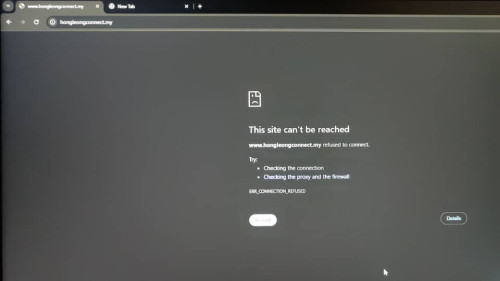
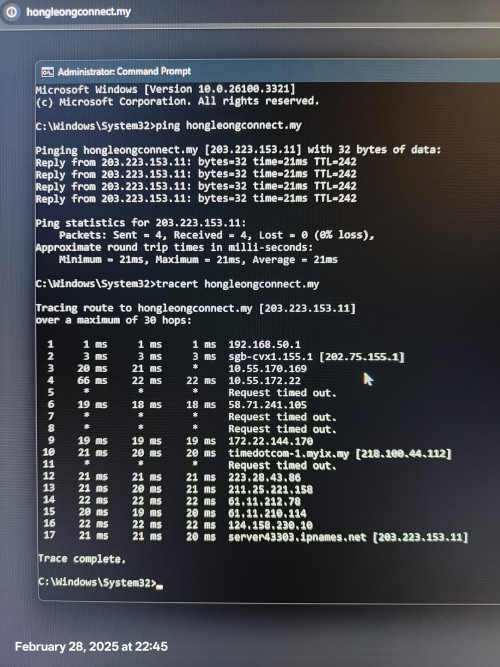
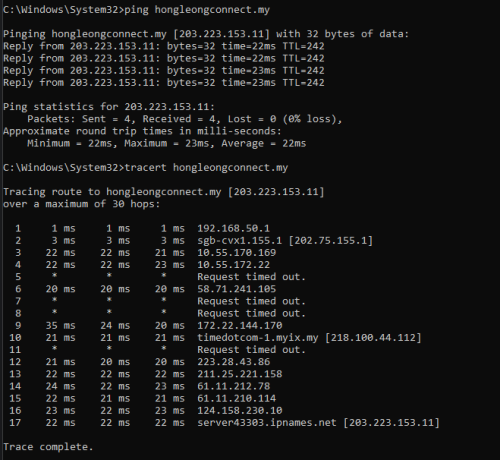
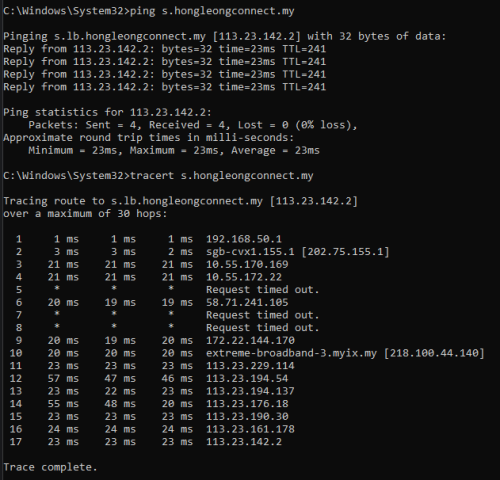
Is anyone on the public IP 202.75.155.X range on maxis home fiber? I am using public IP but then this IP subnet range seems to be just having issues trying to access Hong Leong Bank. Other banks are just fine. It is just Hong Leong Bank.

It has reoccured after I managed to just change back to the 58.XX.XX.XX IP subnet range.

Screenshots are below for reference if anyone has the same issue.

user posted image
user posted image

Ping results is fine but then IP subnet got blocked. I did a MCMC report before on this but all they do is just put me back on the 58.XX.XX.XX subnet to fix the issue. They did not fix the 202.75.155.X range by talking with HLB on this.

This post has been edited by xjoshualaw29: Mar 1 2025, 12:10 PM
alexander3133
post Mar 3 2025, 06:55 PM

Regular
******
Senior Member
1,716 posts

Joined: May 2006
From: JDT


QUOTE(xjoshualaw29 @ Mar 1 2025, 12:08 PM)
Hi

Is anyone on the public IP 202.75.155.X range on maxis home fiber? I am using public IP but then this IP subnet range seems to be just having issues trying to access Hong Leong Bank. Other banks are just fine. It is just Hong Leong Bank.

It has reoccured after I managed to just change back to the 58.XX.XX.XX IP subnet range.

Screenshots are below for reference if anyone has the same issue.

user posted image
user posted image

Ping results is fine but then IP subnet got blocked. I did a MCMC report before on this but all they do is just put me back on the 58.XX.XX.XX subnet to fix the issue. They did not fix the 202.75.155.X range by talking with HLB on this.
*
No issue here, public IP, now on 121.121.X.X
Maybe you try click online banking from https://www.hlb.com.my/
It will redirect you to https://s.hongleongconnect.my/rib/app/fo/login?icp=hlb-en-all-header-txt-connectweb


user posted image

user posted image
xjoshualaw29
post Mar 4 2025, 01:14 AM

Casual
***
Junior Member
304 posts

Joined: Aug 2018


QUOTE(alexander3133 @ Mar 3 2025, 06:55 PM)
No issue here, public IP, now on 121.121.X.X
Maybe you try click online banking from https://www.hlb.com.my/
It will redirect you to https://s.hongleongconnect.my/rib/app/fo/login?icp=hlb-en-all-header-txt-connectweb
user posted image

user posted image
*
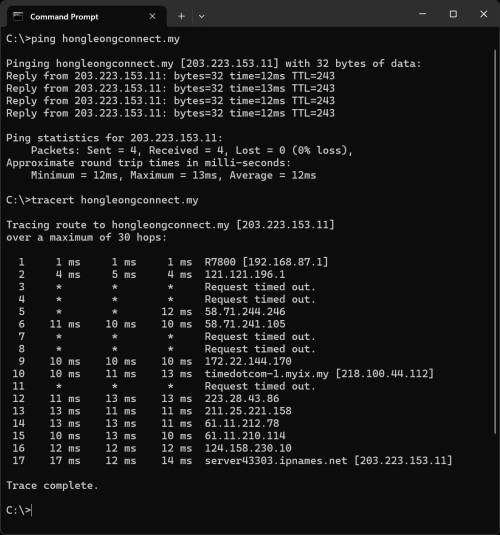
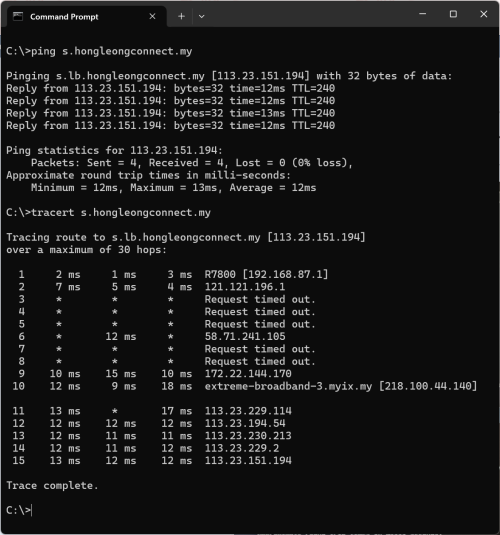
Hi, thanks for your update. But I still have gotten the same result even on https://www.hlb.com.my/.

Initially can go in from there but stuck at redirect page giving connection refused.

Screenshots of ping and tracert shown today on 04/03/2025 1:11am

user posted image

user posted image
xjoshualaw29
post Mar 4 2025, 01:46 PM

Casual
***
Junior Member
304 posts

Joined: Aug 2018


QUOTE(xjoshualaw29 @ Mar 4 2025, 01:14 AM)
Hi, thanks for your update. But I still have gotten the same result even on https://www.hlb.com.my/.

Initially can go in from there but stuck at redirect page giving connection refused.

Screenshots of ping and tracert shown today on 04/03/2025 1:11am

user posted image

user posted image
*
Update:

Received Call from Maxis Tech Team and they said they tried to call 3 times yesterday when I did not receive a call from them. They asked if other bank websites are affected but somehow, RHB, CIMB, Maybank and all other banks except Hong Leong Bank seems to be having the issue.

Even they seem confused and wondering what is the issue... I already suspected IP subnet blocked as I have to use Cloudflare WARP to get into the website... blink.gif

This post has been edited by xjoshualaw29: Mar 4 2025, 01:46 PM

488 Pages « < 468 469 470 471 472 > » Top
 

Change to:
| Lo-Fi Version
0.0214sec    0.57    6 queries    GZIP Disabled
Time is now: 3rd December 2025 - 12:38 PM