Welcome Guest ( Log In | Register )

10 Pages  1 2 3 > » Bottom

Outline · [ Standard ] · Linear+

 The Official Maxis FTTH Thread | v5, Maxis Home Fibre Internet, from RM89

views
     
PRSXFENG
post Jan 28 2021, 10:06 AM

Look at all my stars!!
*******
Senior Member
2,608 posts

Joined: Nov 2020


QUOTE(stryfox @ Jan 19 2021, 04:54 PM)
just subscribed to 500Mbs but line very slow (less 100Mbs). call CS then Maxis guy came, troubleshoot and take back Tp-llink AX1500 (archer ax10) and replaced with Archer c5v (maxis old router) 😩 No more Wi-Fi6 router
*
Eh as far as I know the AX10 doesn't have USB or VOIP
How do they get the 4G backup and VOIP working on the AX10?
PRSXFENG
post Jan 28 2021, 10:10 AM

Look at all my stars!!
*******
Senior Member
2,608 posts

Joined: Nov 2020


Also, is the firmware of the AX10 stock or is it a custom Maxis firmware?
PRSXFENG
post Jan 29 2021, 01:39 PM

Look at all my stars!!
*******
Senior Member
2,608 posts

Joined: Nov 2020


QUOTE(kwai_83 @ Jan 28 2021, 12:50 PM)
not sure ax10 ax20 is the latest provide by maxis for those not using voip
*
Eh they also give AX20?
Should really ask them if can upgrade my c5v lol
PRSXFENG
post Jan 30 2021, 02:36 PM

Look at all my stars!!
*******
Senior Member
2,608 posts

Joined: Nov 2020


QUOTE(Xanxeviera. @ Jan 30 2021, 02:31 PM)
I think you might get to change the router if ur current c5v got problem
Mine got lot of disconnect and high ping, call cs and later on they came bring the tp-link ax20  drool.gif
*
Wow AX20, welp Maxis still hasn’t responded to my query lol
PRSXFENG
post Jan 30 2021, 02:37 PM

Look at all my stars!!
*******
Senior Member
2,608 posts

Joined: Nov 2020


QUOTE(SpectacularButter @ Jan 29 2021, 07:06 PM)
I am using Maxis 100mbps but getting 30Mbps download speed in speed test. They gave me Archer C5v router. Since changing, every few days later the internet will suddenly disconnect and i just need to on/off the router to make the internet come back. Any ideas how to improve the situation? Been calling Maxis but ask me to call when problem happens... but it is so hard to get through when it happens.
*
Hmm its odd but you could try setting up an auto reboot schedule in the router to reboot like every night
PRSXFENG
post Jan 31 2021, 04:51 PM

Look at all my stars!!
*******
Senior Member
2,608 posts

Joined: Nov 2020


QUOTE(YoungMan @ Jan 30 2021, 02:59 PM)
Bro, let's put the MCMC words to the test. Report to them and see if they can handle in 24 hours.
*
They just called me today, I'm on the Hotlink Postpaid and Fibre 99 Plan and they say cannot it's for Maxis Fibre

They did tell me if I did want to change to contact their technical department at another number, I didn't bother, I'll rather just buy on my own a better router
PRSXFENG
post Feb 12 2021, 10:04 AM

Look at all my stars!!
*******
Senior Member
2,608 posts

Joined: Nov 2020


QUOTE(effectz @ Feb 11 2021, 08:53 PM)
If on contract, can I use my own AC1200?
*
You can use whatever router you like as long as it can do PPPoE, and you have the PPPoE credentials, just ask Customer Service for it
PRSXFENG
post Feb 18 2021, 12:34 PM

Look at all my stars!!
*******
Senior Member
2,608 posts

Joined: Nov 2020


QUOTE(kae7 @ Feb 18 2021, 11:16 AM)
Existing customer who subscribed 100Mbps and above get Maxis new Wi-Fi 6 router or not?
*
No idea as they just ask to contact CS

If anyone is curious, this is the router they are giving according to soyacincau

http://www.kaonbroadband.com/product/retri...epeater&lang=en
PRSXFENG
post Feb 21 2021, 06:54 PM

Look at all my stars!!
*******
Senior Member
2,608 posts

Joined: Nov 2020


QUOTE(kae7 @ Feb 19 2021, 06:02 PM)
Don’t know how to setup the non-Maxis router. Thought they have special configuration on router setting
*
If you don't use the VOIP phone, it's very easy, just ask their customer service for your PPPoE credentials, then when you buy a new router, just select PPPoE and enter those credentials
Some tplink routers even have a preset for Unifi, Maxis and other ISPs

But if you do use VOIP phone, then it's a pain
PRSXFENG
post Mar 2 2021, 10:21 AM

Look at all my stars!!
*******
Senior Member
2,608 posts

Joined: Nov 2020


QUOTE(kwai_83 @ Mar 1 2021, 10:08 PM)
maxis wifi 6 router seems got 2 type.update any body have upgrade to wifi 6 router?
*
I'm still using the Archer C5v from before but it appears Maxis is giving either the TP-Link AX10/20 or the new "Kaon Broadband" stuff
PRSXFENG
post Mar 8 2021, 08:26 AM

Look at all my stars!!
*******
Senior Member
2,608 posts

Joined: Nov 2020


QUOTE(joshhd @ Mar 7 2021, 09:53 PM)
Wait a second....
user posted image

user posted imageSource: https://www.youtube.com/watch?v=mUcAGO621Q0
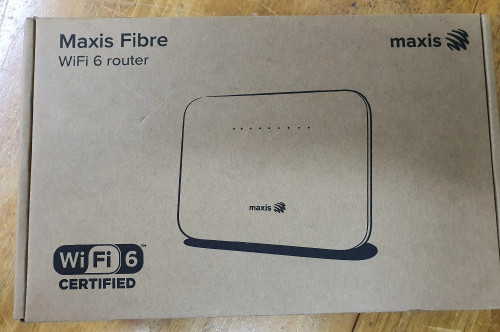
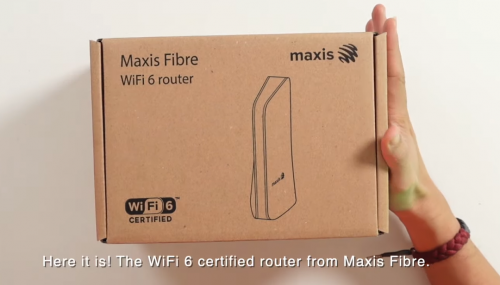
There's 2 models of Maxis Fibre WiFi 6 router??  :confused:  :confused:  sweat.gif
How can we decide which one to take?
*
Some people on here also got TP-Link AX10/AX20 (No VOIP) too

So it's a random lucky draw of which router you get?
PRSXFENG
post Mar 8 2021, 08:28 AM

Look at all my stars!!
*******
Senior Member
2,608 posts

Joined: Nov 2020


QUOTE(Candy12 @ Mar 7 2021, 09:25 PM)
The rounded edge design looks very Huawei.

Seems from the Huawei Carrier Grade partner customized CPE with WiFi 6:
https://carrier.huawei.com/en/products/fixe...roducts/DN8245V

Probably an customized AX3 board with fitted FXS ports on it fitted into a carrier grade generic casing just like the TP-Link C5V.

I don't need the phone ports anymore as I hardly use the home fixed line nowadays. The consumer AX3 Pro router by Huawei just costs under RM250 outside.
*
Btw, the TP-Link Archer C5v is a rebranded TP-Link vr1200v without the DSL port.
PRSXFENG
post Mar 9 2021, 08:32 AM

Look at all my stars!!
*******
Senior Member
2,608 posts

Joined: Nov 2020


QUOTE(Takashi1978 @ Mar 8 2021, 05:45 PM)
Weird why there is no aftertermarket MESh router outside with the big brands that can support the voip and keep out phone.

My mom super kepoh and loves the unlimited calls......LOL
*
Well I recall there was a D-Link one but the router itself is ancient now so no point

There is a way to keep VOIP but requires keeping the stock router as a dumb access point for VOIP (aka Modem to Mesh Router to old Router (wifi disabled) to phone)

What I don't get is that the Huawei Modem has 2 phone ports and Unifi uses that, but maxis doesn't and always has to get a router that has Phone ports.
PRSXFENG
post Mar 14 2021, 08:43 AM

Look at all my stars!!
*******
Senior Member
2,608 posts

Joined: Nov 2020


QUOTE(CuriOu5 @ Mar 13 2021, 03:59 PM)
I am currently on the old 300Mbps package with unlimited voice calls. The contract has expired 4 months ago. The new wifi 6 upgrade is for new plans above 100Mbps without unlimited local voice calls. That means I have to pay an additional RM250 (RM10 x 24 x 1.06) to upgrade to the wifi 6 modem.

What do you all think. Upgrade and pay the additional RM10 per month of just buy a new wifi 6 modem. If buying the wifi 6 modem, which model to get and easy to setup.

Thanks.
*
PS, it's called router, not modem

Modem is the TM/ Huawei box that the fibre connects to

Also, if you do want to change your router, you will have to ask Maxis for the PPPoE credentials so the new router can authenticate to your account. Just ask Customer Support, they'll verify ownership and then sms the details to you
PRSXFENG
post Mar 31 2021, 09:38 PM

Look at all my stars!!
*******
Senior Member
2,608 posts

Joined: Nov 2020


QUOTE(Tokik Siwok @ Mar 31 2021, 02:08 PM)
anyone having problem accessing fb and instagram since morning?

browser says "Your connection is not private" when trying to access
*
Might be a Facebook problem?
The mobile app was crashing for me yesterday and it seems like a widespread issue.

Side note check your dns and stuff to make sure it's not something malicious.
PRSXFENG
post Apr 8 2021, 02:10 PM

Look at all my stars!!
*******
Senior Member
2,608 posts

Joined: Nov 2020


QUOTE(nokia6280 @ Apr 8 2021, 11:05 AM)
not sure has this question being asked before, if the backbone is TM for Maxis broadband 2 routers will be installed where the TM router will connect to the fire channel and the Maxis Wifi router will connect to the TM router to broadcast wifi signal.

Recently, i have brought a Mercusys Halo Mesh wifi system, may i know can i connect this mesh wifi to the TM router? if can how?

Thanks.
*
Its a Huawei/TM Branded/Fibrehome branded ONT/Modem that connects to the Maxis Router via LAN 2. The ONT connects to the Fibre cable to the distribution box outside.

To use your own router, simple ask Customer Support for your PPPoE credentials, then unplug the maxis router and plug in your new router, then setup your new router in PPPoE mode.

Note, if you do need to use the VOIP phone, you will not be able to / have to do some messy wiring as you need the stock router to make calls.
PRSXFENG
post Apr 8 2021, 02:13 PM

Look at all my stars!!
*******
Senior Member
2,608 posts

Joined: Nov 2020


QUOTE(okw1 @ Apr 7 2021, 01:09 PM)
Hi all, few questions here:

1. What is the difference between Unifi 300mbps and Maxis fibre 300mbps? saw the price of two plans is so different (RM 149 vs RM 199)
2. How is the experience of Maxis Fibre? Good/bad service?

Thanks for answering my questions.
*
1. As other have said TV and Voice services.

2. This depends highly on your location, if you're a lucky one that uses Maxis Infrastructure, nice and fast. If you're one on TM Unifi infrastructure, you will be gimped by TM and never see 300Mbps due to unfair practices to encourage you to go Unifi.

PRSXFENG
post Apr 8 2021, 08:22 PM

Look at all my stars!!
*******
Senior Member
2,608 posts

Joined: Nov 2020


QUOTE(kyu85 @ Apr 8 2021, 03:54 PM)
need some help. i tried to change the maxis router to TP link AX1500 router. but unable to get the phone work. How can i solve this?
*
That's the one thing about Maxis's VOIP implementation
It will only work on stock router.

So most end up going this route

ONT -> your new router - > Maxis router, wifi disabled - > phone

You can find a guide to set this up on the forums somewhere
PRSXFENG
post Apr 8 2021, 08:26 PM

Look at all my stars!!
*******
Senior Member
2,608 posts

Joined: Nov 2020


QUOTE(sitescope @ Apr 4 2021, 08:47 PM)
Meaning we cant chg anything in settings ?
Who hold admin id ? Maxis ?
*
Hmm on the older TP-Link Archer c5v the admin account was Administrator + SN behind on a sticker.

There was also a hidden root user of MaxSysAdm and Ng88Mxs@2019!

Try these 2 combinations.
Thought I expect them to not work
Alternatively, try

root + adminHW
and
admintelecom + telecomadmin

These are the admin credentials for the Huawei ONT box for older installations

Also peek at the Huawei HiLink app and see if it's supported.

If you're a bit more techy, try to see if there's an option to export a backup of the config of the router, then see if you can open it and peek for admin details, or if its encrypted try Routerpassview (Antivirus flags it but it's not a virus) that's how I got the MaxSysAdm details.

I'm still using the older tplink so I can't find for you

This post has been edited by PRSXFENG: Apr 8 2021, 08:27 PM

PRSXFENG
post Apr 9 2021, 05:08 PM

Look at all my stars!!
*******
Senior Member
2,608 posts

Joined: Nov 2020


QUOTE(Mushi.Nv @ Apr 9 2021, 02:48 PM)
For the new Huawei Wifi 6 Router.
They have root, administrator, MaxDNSprUsr and user.

But the passwords are hash with salts. Not sure how to get the plaint text password.
*
I guess MaxDNSprUsr would be the new MaxSysAdm

Try shoving the hashed password into the password field anyway, I recall it worked on one of the older maxis routers, thought I expect Huawei to not make that mistake.

Also found this on github, give it a try
https://gist.github.com/staaldraad/605a5e40abaaa5915bc7

The only other option is to ask someone who works for maxis doing the installation

This post has been edited by PRSXFENG: Apr 9 2021, 05:15 PM

10 Pages  1 2 3 > » Top
 

Change to:
| Lo-Fi Version
0.2244sec    0.89    7 queries    GZIP Disabled
Time is now: 11th December 2025 - 04:16 AM