Welcome Guest ( Log In | Register )

Outline · [ Standard ] · Linear+

 The Official Maxis FTTH Thread | v5, Maxis Home Fibre Internet, from RM89

views
     
kart
post Nov 17 2024, 10:23 AM

Regular
******
Senior Member
1,597 posts

Joined: Aug 2014
The components of Unifi Home Fibre Service:
- Internet service
- Voice over internet (VOIP) service
- UnifiTV


What are the components of Maxis Home Fibre service? Is it just internet service and phone service?


I want just internet service and phone service.


The reason of me rejecting Unifi Home Fibre Service is that I am unable to remove UnifiTV from Unifi Home Fibre Service.


Thank you.
kart
post Dec 5 2024, 04:34 PM

Regular
******
Senior Member
1,597 posts

Joined: Aug 2014
It is going be my first time to subscribe to Maxis Home Fibre 100 Mbps service (RM 89.00). I plan to add RM 10.00 / mth for unlimited calls.


I want just internet service and phone service.


1) Correct me, if I am wrong. The monthly subscription fee is RM 104.95 (which is RM 99.00 with 6% service tax), right?


2) For Maxis Home Fibre 100 Mbps service, is it true that I receive the equipment form Maxis?

- Modem (comprising either the Optical Network Terminal (“ONT”) or Broadband Termination Unit (“BTU”) as the case may be).
- WiFi 6 certified router.
- Digital Enhanced Cordless Telecommunication Phone (“DECT”) phone.


3) How many electrical power sockets do I need, for Maxis Home Fibre service?


Thank you for your advice. smile.gif

This post has been edited by kart: Dec 5 2024, 04:44 PM
kart
post Dec 6 2024, 08:13 AM

Regular
******
Senior Member
1,597 posts

Joined: Aug 2014
Thank you for your respective replies, jsnhoh and blibala. smile.gif

QUOTE(blibala @ Dec 6 2024, 07:13 AM)
Just use 3way multi adapter will do.. No need worry about socket
*
Noted.

I just want to make sure that Maxis will not give me a set-top-box for IPTV, for any sort of content streaming service.

Basically, I want just internet service and phone service.

_____

What is the best brand of WiFi 6 certified router and Modem (Optical Network Terminal (“ONT”) or Broadband Termination Unit (“BTU”)), given by Maxis?

This post has been edited by kart: Dec 6 2024, 08:15 AM
kart
post Dec 7 2024, 06:42 PM

Regular
******
Senior Member
1,597 posts

Joined: Aug 2014
What is the best brand of WiFi 6 certified router and Modem (Optical Network Terminal (“ONT”) or Broadband Termination Unit (“BTU”)), given by Maxis?


Or, does Maxis provide only 1 brand of router, ONT or BTU?


Thank you.
kart
post Dec 8 2024, 09:27 AM

Regular
******
Senior Member
1,597 posts

Joined: Aug 2014
QUOTE(blacktubi @ Dec 7 2024, 08:54 PM)
Maxis is still giving a separate router and fiber modem, I think it's better since it's easier to change to your own router

For lower end I believe got few models and they are more or less the same

For 500Mbps-1Gbps I think they are only giving KAON AR2140, they are better than the router from Unifi but not as good as AX4200/AX5400 routers that you can buy yourself

2Gbps and above getting a WiFi 6E router
*
Thank you for your informative replies, blacktubi.


So, are D-Link routers not provided by Maxis? It is ok. I understand.


I am going to subscribe to Maxis Home Fibre 100 Mbps service. So, as you said, I have to lower my expectation, and accept the Maxis-supplied router and modem are of lower quality.


If there is a slightly better brand of the Maxis-supplied router and modem, I will ask the Maxis installer to provide that particular brand, to my house.


I am not knowledgeable in networking equipment. So, I will stick with Maxis-supplied router and modem at the moment.

This post has been edited by kart: Dec 8 2024, 09:28 AM

kart
post Dec 8 2024, 10:16 PM

Regular
******
Senior Member
1,597 posts

Joined: Aug 2014
QUOTE(PRSXFENG @ Dec 8 2024, 05:26 PM)
Eh, not like TM Unifi or TIME is giving anything that's good anyways
D-Link isn't great, just look at their recent issues where despite significant security flaws were found, they just say go buy a new router.

For the modem, it really doesn't matter, they all work basically the same

So far I've seen the following routers being given, it may depend on their stock and your plan

TP-Link EX510
TP-Link EX230v

Huawei OptiXstar LG8245X6

Kaon AR2140
and
Another model of Kaon only for 2Gbps users

They're fine enough for casual home use, and 100Mbps isn't challenging to process
*
Thank you for providing the list of Maxis-supplied routers.

Which router should be the best router, among these Maxis-supplied routers?

I will ask the Maxis installer to provide that particular brand, to my house, if it is possible.


kart
post Dec 20 2024, 09:07 AM

Regular
******
Senior Member
1,597 posts

Joined: Aug 2014
For my Maxis Home Fibre subscription, Maxis gave me TP Link EX230v router.


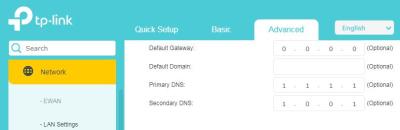
In order to enable DNS over HTTPS (Secure DNS), I tried to type the following Cloudflare DNS in the router’s gateway IP address.


Advanced > Network > LAN Settings > DHCP Server

Primary DNS : 1.1.1.1
Secondary DNS: 1.0.0.1


However, https://dnsleaktest.com shows that the DNS assigned to me is 162.15X.XX.XX (X represents a number).


Is my method incorrect? Please advise the correct steps to implement DNS over HTTPS.


Thank you. smile.gif


Attached Image

kart
post Dec 20 2024, 10:37 AM

Regular
******
Senior Member
1,597 posts

Joined: Aug 2014
PRSXFENG

Thank you for your reply.

Is it actually the limitation of TP Link EX230v router that does not allow DNS over HTTPS, rather than the restriction imposed by Maxis?

https://dnsleaktest.com shows that the DNS assigned to me is 162.158.25.XX (X represents a number).

I did change Primary DNS and Secondary DNS a few days ago, and restarted my router a few times. However, dnsleaktest did not show 1.1.1.1 as the DNS assigned to me.
kart
post Dec 30 2024, 03:46 PM

Regular
******
Senior Member
1,597 posts

Joined: Aug 2014
For my Maxis Home Fibre subscription (under TM infra), Maxis gave me ZTE ZXHN F620 GPON ONT, and TP-Link EX230v router.


The Gateway IP address of TP-Link router is http://192.168.1.XXX (X represents a number).


What is the IP address of ZTE ONT (for accessing the ONT setting)?


Thank you. smile.gif
kart
post Dec 31 2024, 09:50 AM

Regular
******
Senior Member
1,597 posts

Joined: Aug 2014
QUOTE(PRSXFENG @ Dec 30 2024, 06:05 PM)
For the ZTE, according to this video
It is 192.168.1.1

However, you cannot access it from behind the TP-Link router

you must connect a LAN Cable from your device to the ZTE directly

Is there any reason why you need to access the ZTE? Generally there isn't much to do there
*
Thank you for your information, PRSXFENG.


It is for me to understand the setting of ZTE ONT. However, I will not change the setting, because I am not knowledgeable in networking.


I tried to plug a LAN cable between LAN2 port of ZTE ONT, and the LAN port of my computer, but my computer shows that 192.168.1.1 IP address is unreachable.


Since I am using TM infra, the username and password of ZTE ONT should be same, as mentioned in the video you shared, right?
kart
post Jan 31 2025, 09:00 AM

Regular
******
Senior Member
1,597 posts

Joined: Aug 2014
Previously, I used TMnet Streamyx internet service (under copper wire infrastructure).


In the event of heavy rain with thunder, I would detach the RJ-11 telephone cable between ADSL Router and the wall socket, to prevent the ADSL Router getting struck by lightning.


At present, I am using my Maxis Home Fibre subscription (under TM fibre infrastructure).


Do I need to detach the optical fibre from ZTE ONT during heavy rain with thunder, in order to prevent TP-Link router and ZTE ONT getting struck by lightning?


Thank you for your information. smile.gif
kart
post Oct 18 2025, 10:23 PM

Regular
******
Senior Member
1,597 posts

Joined: Aug 2014
For my Maxis Home Fibre subscription (under TM infra), the LOS indicator of GPON ONT is blinking.


The cause is that there is a fiber cut just outside the MDF room.


1) For such fiber cut (which is not inside my home), am I required to pay for the fibre replacement cost to Maxis? Or, will Maxis absorb the fibre replacement cost?


2) For such fiber cut, will the TM technician replace the portion of the fiber near the fibre cut, or will the TM technician lay new fibre from the MDF room to my home?


Thank you for your clarification.


Change to:
| Lo-Fi Version
0.1883sec    0.78    7 queries    GZIP Disabled
Time is now: 1st December 2025 - 09:34 AM