Welcome Guest ( Log In | Register )

488 Pages « < 467 468 469 470 471 > » Bottom

Outline · [ Standard ] · Linear+

 The Official Maxis FTTH Thread | v5, Maxis Home Fibre Internet, from RM89

views
     
Quanta
post Dec 18 2024, 12:35 PM

Idiot member
******
Senior Member
1,425 posts

Joined: Jan 2003
From: Pearl 14000 + Kayangan 01000


QUOTE(dante1989 @ Dec 17 2024, 09:44 PM)
Currently the LOS light is blinking red for me …
*
This is physically fiber cable problem. Same as mine previously, where when it rain, LOS light would be blinking. Found out that there was a dent (very minor dent) at the main cable from the distribution box into my house. So need fix by laying a new fiber cable. After that my internet is stable with -20dBm reading.

Bear in mind that TM plays dirty with Maxis customers on HSBB. If you are on Unifi, you are going to get a dedicated port with -16dBm reading which is super good. And if you are on Maxis, your main port would be splitted into two and there is some degradation in term of optical power.

This post has been edited by Quanta: Dec 18 2024, 12:39 PM
YoungMan
post Dec 18 2024, 02:10 PM

Look at all my stars!!
*******
Senior Member
6,796 posts

Joined: Oct 2008
From: Kuala Lumpur


QUOTE(Quanta @ Dec 18 2024, 12:35 PM)
This is physically fiber cable problem. Same as mine previously, where when it rain, LOS light would be blinking. Found out that there was a dent (very minor dent) at the main cable from the distribution box into my house. So need fix by laying a new fiber cable. After that my internet is stable with -20dBm reading.

Bear in mind that TM plays dirty with Maxis customers on HSBB. If you are on Unifi, you are going to get a dedicated port with -16dBm reading which is super good. And if you are on Maxis, your main port would be splitted into two and there is some degradation in term of optical power.
*
Port split also depend on number of subscribers in your area. If not much subs, you will maintain the dedicated port.
But what's likely to happen is your speed is hard capped on TM infra, meaning you will always get 5-10% below actual speed.
Quanta
post Dec 18 2024, 03:28 PM

Idiot member
******
Senior Member
1,425 posts

Joined: Jan 2003
From: Pearl 14000 + Kayangan 01000


The majority of my neighbors who are on Unifi do get dedicated ports. However, the minority of us—three neighbors, including myself—who are on Maxis and Digi, are assigned to the splitted ports. Anyhow, after laying new fiber cable, the internet speed is great without any issues with connectivity. We just need to ensure that the optical power is below -27dBm.

This post has been edited by Quanta: Dec 18 2024, 03:29 PM
dante1989
post Dec 19 2024, 02:07 AM

Getting Started
**
Junior Member
288 posts

Joined: Sep 2010


QUOTE(Quanta @ Dec 18 2024, 12:35 PM)
This is physically fiber cable problem. Same as mine previously, where when it rain, LOS light would be blinking. Found out that there was a dent (very minor dent) at the main cable from the distribution box into my house. So need fix by laying a new fiber cable. After that my internet is stable with -20dBm reading.

Bear in mind that TM plays dirty with Maxis customers on HSBB. If you are on Unifi, you are going to get a dedicated port with -16dBm reading which is super good. And if you are on Maxis, your main port would be splitted into two and there is some degradation in term of optical power.
*
update on my issue, there was an outage in my area. however when i called them to report on my issue they say no outages reported currently.

i only found out through SMS about the outage.

took them around 4-5 hours to fix the issue.
kart
post Dec 20 2024, 09:07 AM

Regular
******
Senior Member
1,598 posts

Joined: Aug 2014
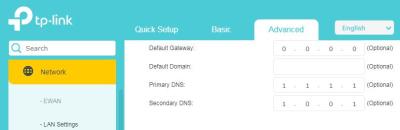
For my Maxis Home Fibre subscription, Maxis gave me TP Link EX230v router.


In order to enable DNS over HTTPS (Secure DNS), I tried to type the following Cloudflare DNS in the router’s gateway IP address.


Advanced > Network > LAN Settings > DHCP Server

Primary DNS : 1.1.1.1
Secondary DNS: 1.0.0.1


However, https://dnsleaktest.com shows that the DNS assigned to me is 162.15X.XX.XX (X represents a number).


Is my method incorrect? Please advise the correct steps to implement DNS over HTTPS.


Thank you. smile.gif


Attached Image

PRSXFENG
post Dec 20 2024, 09:46 AM

Look at all my stars!!
*******
Senior Member
2,608 posts

Joined: Nov 2020


QUOTE(kart @ Dec 20 2024, 09:07 AM)
For my Maxis Home Fibre subscription, Maxis gave me TP Link EX230v router.
In order to enable DNS over HTTPS (Secure DNS), I tried to type the following Cloudflare DNS in the router’s gateway IP address.
Advanced > Network > LAN Settings > DHCP Server

Primary DNS : 1.1.1.1
Secondary DNS: 1.0.0.1
However, https://dnsleaktest.com shows that the DNS assigned to me is 162.15X.XX.XX (X represents a number).
Is my method incorrect? Please advise the correct steps to implement DNS over HTTPS.
Thank you. smile.gif
Attached Image
*
There's no DoH on this router, you're just using standard DNS

you censored too many bits of the IP, so that's not useful information, give at least the first 2 chunks uncensored.

Anyways, you probably need to change IPv6 DNS as well to fully use Cloudflare DNS
Just look around for a IPv6 setting

EDIT: Another thing is, DHCP doesn't immediately push the changes, there's no way for your router to tell your devices that settings have to change, instead it has to wait for your devices need to ask again, but usually it's set to like, 12 or 24 hours cycle
Best way to force devices to ask again is simply restart router so your devices are disconnected and will ask on reconneect

This post has been edited by PRSXFENG: Dec 20 2024, 09:53 AM
kart
post Dec 20 2024, 10:37 AM

Regular
******
Senior Member
1,598 posts

Joined: Aug 2014
PRSXFENG

Thank you for your reply.

Is it actually the limitation of TP Link EX230v router that does not allow DNS over HTTPS, rather than the restriction imposed by Maxis?

https://dnsleaktest.com shows that the DNS assigned to me is 162.158.25.XX (X represents a number).

I did change Primary DNS and Secondary DNS a few days ago, and restarted my router a few times. However, dnsleaktest did not show 1.1.1.1 as the DNS assigned to me.
PRSXFENG
post Dec 20 2024, 10:56 AM

Look at all my stars!!
*******
Senior Member
2,608 posts

Joined: Nov 2020


QUOTE(kart @ Dec 20 2024, 10:37 AM)
PRSXFENG

Thank you for your reply.

Is it actually the limitation of TP Link EX230v router that does not allow DNS over HTTPS, rather than the restriction imposed by Maxis?

https://dnsleaktest.com shows that the DNS assigned to me is 162.158.25.XX (X represents a number).

I did change Primary DNS and Secondary DNS a few days ago, and restarted my router a few times. However, dnsleaktest did not show 1.1.1.1 as the DNS assigned to me.
*
Most consumer routers dont support DoH/DoT, even though they could in theory

Some TP-Link routers do, All Asus routers do DoT, and custom firmware like OpenWRT do
It's basically just they didnt implement this feature

anyways, that 162.158.25.xx range appears to be on cloudflare, so you are using 1.1.1.1, just that you're routed to their local nearest server

you can test with
https://one.one.one.one/help/
and
https://www.dnscheck.tools/

You should be on Cloudflare
jasontanky
post Dec 20 2024, 03:29 PM

Casual
***
Junior Member
446 posts

Joined: Nov 2015


Anyone knows if the RM99 300Mbps Maxis Fibre promotion is available to new subscribers under TM infra?
PRSXFENG
post Dec 20 2024, 04:03 PM

Look at all my stars!!
*******
Senior Member
2,608 posts

Joined: Nov 2020


QUOTE(jasontanky @ Dec 20 2024, 03:29 PM)
Anyone knows if the RM99 300Mbps Maxis Fibre promotion is available to new subscribers under TM infra?
*
I think that promo is basically for their own infra customers because their cost is lower and to attract more customers

Don't quote me on this but I think it *may* be available under the condition you have to bundle it with their postpaid
The promo flyer was posted here before I think

And I think the prices also increase after 2 years
sadlyfalways
post Dec 26 2024, 09:59 AM

Regular
******
Senior Member
1,185 posts

Joined: Nov 2020
can anyone using public ip on maxis do a pingplotter to 8.8.8.8 and show me the results?

right now i am using nextdns on asus gateway, deco as ap and unifi modem in my network.

got so many hops in my pingplotter but ping is low.

just wondering why haha
alexander3133
post Dec 26 2024, 05:05 PM

Regular
******
Senior Member
1,716 posts

Joined: May 2006
From: JDT


QUOTE(sadlyfalways @ Dec 26 2024, 09:59 AM)
can anyone using public ip on maxis do a pingplotter to 8.8.8.8 and show me the results?

right now i am using nextdns on asus gateway, deco as ap and unifi modem in my network.

got so many hops in my pingplotter but ping is low.

just wondering why haha
*
user posted image
sadlyfalways
post Dec 26 2024, 09:26 PM

Regular
******
Senior Member
1,185 posts

Joined: Nov 2020
QUOTE(alexander3133 @ Dec 26 2024, 05:05 PM)
user posted image
*
Thank you! Is 14 hops normal?

At work I only have 7, but I’m assuming enterprise connections have better routing
dev/numb
post Dec 29 2024, 11:20 AM

On my way
****
Junior Member
691 posts

Joined: Nov 2021
QUOTE(sadlyfalways @ Dec 26 2024, 09:26 PM)
Thank you! Is 14 hops normal?

At work I only have 7, but I’m assuming enterprise connections have better routing
*
Mine shows 14 hops as well. Maxis Fibre on TM infra.
Possibility of your work connection being on Maxis own infra?

If not, I can only assume that it’s more hops early on in the traceroute (before it reaches google owned IPs) results due to the switches and load balancing for residential connections. It’s normal for enterprise connections to have more optimized routing in many countries.
sulfuriq
post Dec 30 2024, 12:26 AM

Regular
******
Senior Member
1,183 posts

Joined: Jun 2009
What Router Maxis Fiber will use for 2gb internet subscriber? Is it the same Router ?
blacktubi
post Dec 30 2024, 12:29 AM

-
Group Icon
Elite
8,402 posts

Joined: Jul 2008

QUOTE(sulfuriq @ Dec 30 2024, 12:26 AM)
What Router Maxis Fiber will use for 2gb internet subscriber? Is it the same Router ?
*
KAON WiFi 6E router, performance is actually quite decent.
kart
post Dec 30 2024, 03:46 PM

Regular
******
Senior Member
1,598 posts

Joined: Aug 2014
For my Maxis Home Fibre subscription (under TM infra), Maxis gave me ZTE ZXHN F620 GPON ONT, and TP-Link EX230v router.


The Gateway IP address of TP-Link router is http://192.168.1.XXX (X represents a number).


What is the IP address of ZTE ONT (for accessing the ONT setting)?


Thank you. smile.gif
lamode
post Dec 30 2024, 04:10 PM

anything could happen!
*******
Senior Member
3,902 posts

Joined: Jul 2007
QUOTE(kart @ Dec 30 2024, 03:46 PM)
For my Maxis Home Fibre subscription (under TM infra), Maxis gave me ZTE ZXHN F620 GPON ONT, and TP-Link EX230v router.
The Gateway IP address of TP-Link router is http://192.168.1.XXX (X represents a number).
What is the IP address of ZTE ONT (for accessing the ONT setting)?
Thank you.  smile.gif
*
usually that's also in 192.168.1.1 or 192.168.0.1 but in a diff VLAN than your router.
so try connect a LAN cable directly to ONT, the port using by router.
PRSXFENG
post Dec 30 2024, 06:05 PM

Look at all my stars!!
*******
Senior Member
2,608 posts

Joined: Nov 2020


QUOTE(kart @ Dec 30 2024, 03:46 PM)
For my Maxis Home Fibre subscription (under TM infra), Maxis gave me ZTE ZXHN F620 GPON ONT, and TP-Link EX230v router.
The Gateway IP address of TP-Link router is http://192.168.1.XXX (X represents a number).
What is the IP address of ZTE ONT (for accessing the ONT setting)?
Thank you.  smile.gif
*
Alright, the TP-Link is on 192.168.1.254
It's the same for everyone, that's what Maxis configured

For the ZTE, according to this video

It is 192.168.1.1

However, you cannot access it from behind the TP-Link router

you must connect a LAN Cable from your device to the ZTE directly

Is there any reason why you need to access the ZTE? Generally there isn't much to do there

YoungMan
post Dec 30 2024, 08:21 PM

Look at all my stars!!
*******
Senior Member
6,796 posts

Joined: Oct 2008
From: Kuala Lumpur


QUOTE(PRSXFENG @ Dec 30 2024, 06:05 PM)
Alright, the TP-Link is on 192.168.1.254
It's the same for everyone, that's what Maxis configured

For the ZTE, according to this video

It is 192.168.1.1

However, you cannot access it from behind the TP-Link router

you must connect a LAN Cable from your device to the ZTE directly

Is there any reason why you need to access the ZTE? Generally there isn't much to do there
*
Probably to get the Ploam password. But I think it is encrypted, as I tried and cannot see the password.

488 Pages « < 467 468 469 470 471 > » Top
 

Change to:
| Lo-Fi Version
0.0371sec    0.53    6 queries    GZIP Disabled
Time is now: 4th December 2025 - 01:45 AM