Outline ·
[ Standard ] ·
Linear+
The Official Maxis FTTH Thread | v5, Maxis Home Fibre Internet, from RM89
|
Oltromen Ripot
|
 Jun 21 2024, 05:14 PM Jun 21 2024, 05:14 PM
|

|
QUOTE(milksoda @ Jun 21 2024, 01:54 PM) about the maxis whatapp how to get human agent to connect. it always bots. i wanted to ask about my order details. tried to WhatsApp back the maxis telesales whatapp but keep getting request unsuccessful lol. i have complaint before. especially since i am using non-maxis number to whatsapp. the bot will treat me as non-subscriber, force to identify using my fibre subscription, then upon successfully identification, will treat me as confirmed non-subscriber. calling 123 will advise me to use whatsapp instead of calling. This post has been edited by Oltromen Ripot: Jun 21 2024, 05:15 PM |
|
|
|
|
|
DjKenji
|
Jun 24 2024, 04:03 PM
|
|
|
recent upgrade the plan from 800mbps to 2gbps After market router and switch, modem remain the same Huawei(HG8240H) since 2019 my question is, internet backbone support 2gbps but LAN ports are bottlenecked at 1gbps, speedtest will test internet backbone. Local speed cap at 1gbps. How to solve this instead of upgrade all the device, modem, router, switch 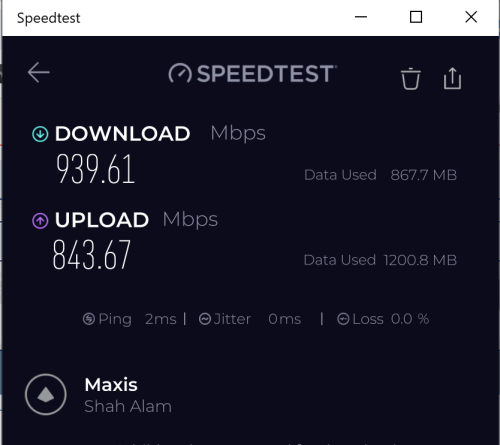 |
|
|
|
|
|
wong_86
|
Jun 24 2024, 04:26 PM
|
|
|
helo guys, from your experience, how long for techician to solve the broken fibre ? Maxis fibre riding on TM infra.
|
|
|
|
|
|
aniq8676
|
Jun 24 2024, 05:08 PM
|
|
|
QUOTE(DjKenji @ Jun 24 2024, 04:03 PM) recent upgrade the plan from 800mbps to 2gbps After market router and switch, modem remain the same Huawei(HG8240H) since 2019 my question is, internet backbone support 2gbps but LAN ports are bottlenecked at 1gbps, speedtest will test internet backbone. Local speed cap at 1gbps. How to solve this instead of upgrade all the device, modem, router, switch Need to change to a 2.5Gbps modem, the existing modem only supports up to 1Gbps (940Mbps) |
|
|
|
|
|
jsnhoh
|
Jun 24 2024, 05:45 PM
|
|
|
QUOTE(wong_86 @ Jun 24 2024, 04:26 PM) helo guys, from your experience, how long for techician to solve the broken fibre ? Maxis fibre riding on TM infra. 2 to 5 days in normal case, worst case , it might drag for a month time. |
|
|
|
|
|
YoungMan
|
Jun 24 2024, 07:50 PM
|
|
|
QUOTE(DjKenji @ Jun 24 2024, 04:03 PM) recent upgrade the plan from 800mbps to 2gbps After market router and switch, modem remain the same Huawei(HG8240H) since 2019 my question is, internet backbone support 2gbps but LAN ports are bottlenecked at 1gbps, speedtest will test internet backbone. Local speed cap at 1gbps. How to solve this instead of upgrade all the device, modem, router, switch First you should get the installer to replace the Huawei modem. Need something that has 2.5g port. QUOTE(wong_86 @ Jun 24 2024, 04:26 PM) helo guys, from your experience, how long for techician to solve the broken fibre ? Maxis fibre riding on TM infra. Depend on area, some area TM technician very efficient. The fastest 2 3 days. |
|
|
|
|
|
PRSXFENG
|
Jun 24 2024, 10:54 PM
|
|
|
QUOTE(DjKenji @ Jun 24 2024, 04:03 PM) recent upgrade the plan from 800mbps to 2gbps After market router and switch, modem remain the same Huawei(HG8240H) since 2019 my question is, internet backbone support 2gbps but LAN ports are bottlenecked at 1gbps, speedtest will test internet backbone. Local speed cap at 1gbps. How to solve this instead of upgrade all the device, modem, router, switch upgrading plan should have resulted in you receiving a Skyworth GN630E modem and a Kaon something 2.5gbit router check with Maxis on that? |
|
|
|
|
|
apowerfulskill
|
Jun 25 2024, 11:02 AM
|
Getting Started

|
Those who upgraded to 1Gbps recently, maintained previous modem too?
|
|
|
|
|
|
AhBoy~~
|
Jun 25 2024, 11:43 AM
|
|
|
QUOTE(wong_86 @ Jun 24 2024, 04:26 PM) helo guys, from your experience, how long for techician to solve the broken fibre ? Maxis fibre riding on TM infra. broken clip in TM DP box took 3 week to settle... call maxis... ding ding dong dong 1 week+ to arrange maxis technician visit, after Maxis came over found not their issue, ding ding dong dong another 1 week+ to arrange TM staff and maxis come together to check on the issue again so if broken part is worst than a clip then I would expect it will take even longer. |
|
|
|
|
|
luffy87
|
Jun 26 2024, 03:15 PM
|
New Member
|
Wrong Replay
This post has been edited by luffy87: Jun 26 2024, 03:16 PM
|
|
|
|
|
|
sadlyfalways
|
Jun 27 2024, 09:40 PM
|
|
|
Anyone notice any slowdown on the network today? Ping wise?
Speedtest still gigabit, but having issues even sending basic WhatsApp photo or loading TikTok comments
Downloading and streaming works normally, just the latency sensitive applications having issues
On Google dns, public ip, ipv4
|
|
|
|
|
|
milksoda
|
Jun 30 2024, 01:50 PM
|
Getting Started
|
anybody know why 5ghz always will disconnect itself. sometimes I'm connected to 5ghz but it will show connected but no internet signal also full bar. after reboot can use 5ghz again. but after 1 day or 2 day need to reboot or else can't use 5ghz . 2.4ghz is fine no problem
This post has been edited by milksoda: Jun 30 2024, 01:51 PM
|
|
|
|
|
|
Singh93
|
Jun 30 2024, 05:56 PM
|
Getting Started
|
QUOTE(milksoda @ Jun 30 2024, 02:50 PM) anybody know why 5ghz always will disconnect itself. sometimes I'm connected to 5ghz but it will show connected but no internet signal also full bar. after reboot can use 5ghz again. but after 1 day or 2 day need to reboot or else can't use 5ghz . 2.4ghz is fine no problem what router are you using? |
|
|
|
|
|
milksoda
|
Jun 30 2024, 09:35 PM
|
Getting Started
|
QUOTE(Singh93 @ Jun 30 2024, 05:56 PM) what router are you using? KAON AR2140 |
|
|
|
|
|
netken
|
Jul 1 2024, 08:18 AM
|
|
|
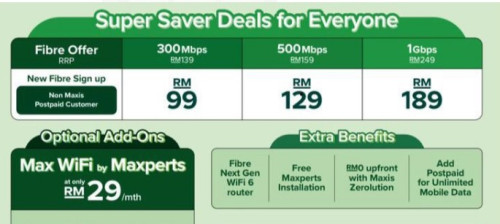 received this promo for a new condo setup - will the price i.e. RM129 for 500mb permanent or just for 1yr or 2yr? |
|
|
|
|
|
Singh93
|
Jul 1 2024, 08:51 PM
|
Getting Started
|
QUOTE(milksoda @ Jun 30 2024, 10:35 PM) swap with another router ,your issue should resolve |
|
|
|
|
|
Topet
|
Jul 2 2024, 05:01 AM
|
|
|
QUOTE(milksoda @ Jun 30 2024, 09:35 PM) Same thing happened to me, change router to Asus all problem solved. |
|
|
|
|
|
apowerfulskill
|
Jul 2 2024, 10:25 AM
|
Getting Started
|
QUOTE(Topet @ Jul 2 2024, 05:01 AM) Same thing happened to me, change router to Asus all problem solved. What router are you using now? |
|
|
|
|
|
Topet
|
Jul 2 2024, 12:10 PM
|
|
|
QUOTE(apowerfulskill @ Jul 2 2024, 10:25 AM) What router are you using now? I'm using Asus RT-AX1800HP right now. |
|
|
|
|



 Quote
Quote






 0.0261sec
 0.76
0.76
 6 queries
 GZIP Disabled