

Bunch of PPPOE authentication failed in my router logs
This post has been edited by blacktubi: Jul 3 2024, 02:45 AM
The Official Maxis FTTH Thread | v5, Maxis Home Fibre Internet, from RM89
|
|
 Jul 3 2024, 02:45 AM Jul 3 2024, 02:45 AM
|
 
Elite
8,420 posts Joined: Jul 2008  
|
Maxis Fiber is down out of a sudden, seems like a widespread issue
Bunch of PPPOE authentication failed in my router logs This post has been edited by blacktubi: Jul 3 2024, 02:45 AM |
|
|
|
|
|
Jul 3 2024, 03:24 AM
|
 
Senior Member
980 posts Joined: Feb 2006 From: Kuala Lumpur 
|
Mine just came back online. What happened?
|
|
|
Jul 3 2024, 10:26 AM
Show posts by this member only | IPv6 | Post
#9043
|

Junior Member
304 posts Joined: Aug 2018
|
QUOTE(blacktubi @ Jul 3 2024, 02:45 AM) Maxis Fiber is down out of a sudden, seems like a widespread issue That was random. I didn't notice but knowing that having unstable connection at 130am while playing games at so could be suddenly overloaded?Bunch of PPPOE authentication failed in my router logs  |
|
|
Jul 3 2024, 10:38 AM
|
|
Elite
8,420 posts Joined: Jul 2008
|
QUOTE(xjoshualaw29 @ Jul 3 2024, 10:26 AM) That was random. I didn't notice but knowing that having unstable connection at 130am while playing games at so could be suddenly overloaded? Seems like an issue with TM as Unifi users are affected as well |
|
|
Jul 3 2024, 10:40 AM
Show posts by this member only | IPv6 | Post
#9045
|

Senior Member
4,034 posts Joined: Dec 2019
|
checked just now.
i think this is side effect of the alleged outage. 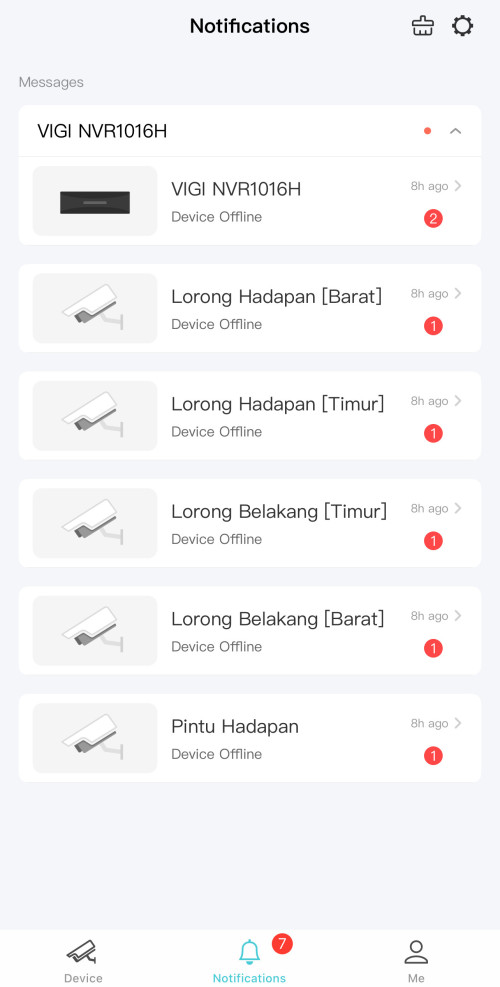 |
|
|
Jul 5 2024, 11:18 AM
|

Junior Member
268 posts Joined: May 2009
|
QUOTE(tampinmy @ Jun 19 2024, 02:16 PM) Just the reply I'm looking for. Thank you. Still waiting for installation, it's taking so longSubmitted the request today.  |
|
|
|
|
|
Jul 5 2024, 02:24 PM
|

Senior Member
6,823 posts Joined: Oct 2008 From: Kuala Lumpur 
|
QUOTE(tampinmy @ Jul 5 2024, 11:18 AM) Still waiting for installation, it's taking so long If you port out from Unifi, then it is going to take a while. After TM confirm to release your line, Maxis tech will still have to come together with TM tech for the installation. |
|
|
Jul 5 2024, 04:05 PM
Show posts by this member only | IPv6 | Post
#9048
|
|
Junior Member
304 posts Joined: Aug 2018
|
QUOTE(YoungMan @ Jul 5 2024, 02:24 PM) If you port out from Unifi, then it is going to take a while. After TM confirm to release your line, Maxis tech will still have to come together with TM tech for the installation. How long does it take though? My case was different as they just create a new order then asked me to go TMpoint to terminate saja although they messed up the installation since had to find the distribution point (DP) box in my area. My installation they gave the wrong DP and luckily I kept the old details of the DP. At least that saved the time to do the installation. I suppose that way is faster but then a lot of mistakes from the Maxis CS side to provide the correct details for installtion  My friend joined me on the same bandwagon using 1Gbps but his case already around 4 days of waiting for the transfer process. I guess maybe 2 weeks if TM trying to be holding back. |
|
|
Jul 5 2024, 05:03 PM
Show posts by this member only | IPv6 | Post
#9049
|
|
Junior Member
224 posts Joined: Sep 2019
|
QUOTE(tampinmy @ Jul 5 2024, 12:18 PM) Still waiting for installation, it's taking so long I got everything done within 4days. |
|
|
Jul 5 2024, 05:13 PM
|
|
Junior Member
268 posts Joined: May 2009
|
QUOTE(YoungMan @ Jul 5 2024, 02:24 PM) If you port out from Unifi, then it is going to take a while. After TM confirm to release your line, Maxis tech will still have to come together with TM tech for the installation. TM already approve the transfer out on 27th, but maxis didn't call until I called them add make noise today |
|
|
Jul 5 2024, 08:39 PM
|
|
Senior Member
6,823 posts Joined: Oct 2008 From: Kuala Lumpur
|
QUOTE(xjoshualaw29 @ Jul 5 2024, 04:05 PM) How long does it take though? It can take anyway from few days to 2 weeks, depend how fast TM want to release your line, and also how fast TM and Maxis technician can arrange appointment. Meanwhile after installation, your Unifi will run for about 10 or 12 days before TM close the account. If you like, this is the window of opportunity for you to plug back Unifi router into lan 1 of the BTU and run both Maxis and Unifi simultaneously. My case was different as they just create a new order then asked me to go TMpoint to terminate saja although they messed up the installation since had to find the distribution point (DP) box in my area. My installation they gave the wrong DP and luckily I kept the old details of the DP. At least that saved the time to do the installation. I suppose that way is faster but then a lot of mistakes from the Maxis CS side to provide the correct details for installtion My friend joined me on the same bandwagon using 1Gbps but his case already around 4 days of waiting for the transfer process. I guess maybe 2 weeks if TM trying to be holding back. QUOTE(tampinmy @ Jul 5 2024, 05:13 PM) TM already approve the transfer out on 27th, but maxis didn't call until I called them add make noise today Hope your installation gets sorted out soon.This post has been edited by YoungMan: Jul 5 2024, 08:43 PM |
|
|
Jul 5 2024, 09:50 PM
Show posts by this member only | IPv6 | Post
#9052
|
|
Junior Member
304 posts Joined: Aug 2018
|
QUOTE(YoungMan @ Jul 5 2024, 08:39 PM) It can take anyway from few days to 2 weeks, depend how fast TM want to release your line, and also how fast TM and Maxis technician can arrange appointment. Meanwhile after installation, your Unifi will run for about 10 or 12 days before TM close the account. If you like, this is the window of opportunity for you to plug back Unifi router into lan 1 of the BTU and run both Maxis and Unifi simultaneously. Ah... that explain why my unifi account still works temporarily. Tempting to put back but then limited by 1 fiber line unless i split it which I am not sure will it affect the speeds. Oh well... Happy with my speeds for now. TM capped my speed properly and overall satisfied with it. Just going to put up my TUF AX6000 tomorrow morning and test it.For now, with the AX4200  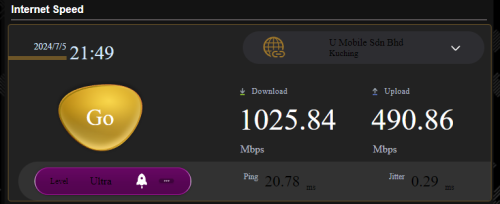 |
|
|
Jul 6 2024, 11:46 AM
|
|
Senior Member
6,823 posts Joined: Oct 2008 From: Kuala Lumpur
|
QUOTE(xjoshualaw29 @ Jul 5 2024, 09:50 PM) Ah... that explain why my unifi account still works temporarily. Tempting to put back but then limited by 1 fiber line unless i split it which I am not sure will it affect the speeds. Oh well... Happy with my speeds for now. TM capped my speed properly and overall satisfied with it. Just going to put up my TUF AX6000 tomorrow morning and test it. Good good... Who do you contact to fix the speed capped? Maxis or TM? I am also trying to get Maxis to cap my speed properly but without success. It remain 90% of subscribed speed.For now, with the AX4200 |
|
|
|
|
|
Jul 6 2024, 11:57 AM
Show posts by this member only | IPv6 | Post
#9054
|
|
Junior Member
304 posts Joined: Aug 2018
|
QUOTE(YoungMan @ Jul 6 2024, 11:46 AM) Good good... Who do you contact to fix the speed capped? Maxis or TM? I am also trying to get Maxis to cap my speed properly but without success. It remain 90% of subscribed speed. My case was Maxis had to ask TM. Since my package was initially using the wrong DP port. I provided the details for my DP box at the back of my house and TM had to check their backend. Once they got the confirmation, the modem PON line is green light and stable. Initially, it was blinking continously but after liasing with the TM contractors. I requested for as much details as possible. Ranging from the ONU password until the DP box details. I also enquired that for the 2.5Gbps modem replacement to remove the hardware bottleneck. I think you can check back my posts in the other subforum where Blacktubi had his issue as well that I mention that they priortize to provide the 2.5Gbps modem to 2Gbps users instead of both 1Gbps and 2Gbps users. Hopefully you can settle yours as well. I am not sure how is the TM contractors in your State compared to Sarawak here.  |
|
|
Jul 6 2024, 02:12 PM
|
|
Senior Member
6,823 posts Joined: Oct 2008 From: Kuala Lumpur
|
QUOTE(xjoshualaw29 @ Jul 6 2024, 11:57 AM) My case was Maxis had to ask TM. Since my package was initially using the wrong DP port. Haha, I'm also from Sarawak. I do not subs to 1gbps though, just that can notice the speed capped ever since I switch from Unifi to Digi fibre, then Maxis fibre.I provided the details for my DP box at the back of my house and TM had to check their backend. Once they got the confirmation, the modem PON line is green light and stable. Initially, it was blinking continously but after liasing with the TM contractors. I requested for as much details as possible. Ranging from the ONU password until the DP box details. I also enquired that for the 2.5Gbps modem replacement to remove the hardware bottleneck. I think you can check back my posts in the other subforum where Blacktubi had his issue as well that I mention that they priortize to provide the 2.5Gbps modem to 2Gbps users instead of both 1Gbps and 2Gbps users. Hopefully you can settle yours as well. I am not sure how is the TM contractors in your State compared to Sarawak here. :thumbsup: |
|
|
Jul 6 2024, 03:13 PM
|
|
Junior Member
304 posts Joined: Aug 2018
|
QUOTE(YoungMan @ Jul 6 2024, 02:12 PM) Haha, I'm also from Sarawak. I do not subs to 1gbps though, just that can notice the speed capped ever since I switch from Unifi to Digi fibre, then Maxis fibre. Ah... I see... I used Maxis fibre before but then when it first started, the routing was quite bad for my case. It was really capped for that time using 100Mbps where you get only 90 Mbps for download and 40 for upload. But that was before the SKMM MsQOS was created. That time used maxis for business setup but then need to go back Unifi due to keeping telephone line number. Escalated till TMpoint Batu Lintang head of marketing come to my parents office due to expensive pricing for Unifi Business back then. RM199 for it was like pricey so requested for something less than that. They initially offered RM179 but still too pricey since I said something like RM129 pricing. Ended up agreeing with RM139 package where getting 100Mbps for it and now with the speed upgrade of 300Mbps for RM139. |
|
|
Jul 8 2024, 06:57 PM
Show posts by this member only | IPv6 | Post
#9057
|

Senior Member
1,347 posts Joined: Jan 2021
|
I'm currently paying RM89 for 30Mbps, I wish to upgrade to 100Mbps, but Maxis offers me RM99 instead of RM89 for the 100Mbps. It is so unfair for existing customer like me to pay more for 100Mbps while new users pay RM10 less for 100Mbps. jusbella liked this post
|
|
|
Jul 8 2024, 08:30 PM
|
|
Senior Member
6,823 posts Joined: Oct 2008 From: Kuala Lumpur
|
QUOTE(Created On 21/1/2021 @ Jul 8 2024, 06:57 PM) I'm currently paying RM89 for 30Mbps, I wish to upgrade to 100Mbps, but Maxis offers me RM99 instead of RM89 for the 100Mbps. Go and register to switch to Unifi, then Maxis will counter offer. Likewise those Unifi subs who register to switch to Maxis, TM will counter offer.It is so unfair for existing customer like me to pay more for 100Mbps while new users pay RM10 less for 100Mbps. |
|
|
Jul 8 2024, 10:37 PM
Show posts by this member only | IPv6 | Post
#9059
|
|
Senior Member
1,347 posts Joined: Jan 2021
|
QUOTE(YoungMan @ Jul 8 2024, 08:30 PM) Go and register to switch to Unifi, then Maxis will counter offer. Likewise those Unifi subs who register to switch to Maxis, TM will counter offer. I still have 8 months before the contract ends.  |
|
|
Jul 8 2024, 11:33 PM
|
|
Junior Member
131 posts Joined: Aug 2006
|
QUOTE(Created On 21/1/2021 @ Jul 8 2024, 10:37 PM) I still have 8 months before the contract ends. No problem. I got a free upgrade to 100Mbps/RM89, and I still got 12 months to go for the original 30Mbps/RM89 contract. You can try & get the transfer id from Unifi. After sharing the transfer id with Maxis, they'll ask you to pay the remaining contracts at the Maxis store. Act dumb & say will try to find free time go. Then, wait for a couple of days. Someone from Maxis fiber will contact & help to upgrade to 100Mbps/RM89 (as per new instruction from the government). Good luck. |
| Change to: |  0.0542sec 0.0542sec
 1.03 1.03
 6 queries 6 queries
 GZIP Disabled GZIP Disabled
Time is now: 17th December 2025 - 03:35 AM |
 Quote
Quote