

QUOTE(MrWrath @ Oct 29 2017, 03:47 PM)
is it possible to setup connection directly from streamyx modem to pc and disabling wifi? my wpa password have been hacked twice in a few month.

use lan cable and disable wifi radio on modem setupStreamyx Streamyx 4Mbps Club V6
|
|
 Oct 29 2017, 04:07 PM Oct 29 2017, 04:07 PM
|
 
Junior Member
730 posts Joined: Feb 2013 From: Malaysia  
|
QUOTE(MrWrath @ Oct 29 2017, 03:47 PM) is it possible to setup connection directly from streamyx modem to pc and disabling wifi? my wpa password have been hacked twice in a few month. use lan cable and disable wifi radio on modem setup |
|
|
|
|
|
Oct 30 2017, 12:10 PM
|

Senior Member
2,150 posts Joined: Apr 2009 From: 首尔 
|
QUOTE(MrWrath @ Oct 29 2017, 03:47 PM) is it possible to setup connection directly from streamyx modem to pc and disabling wifi? my wpa password have been hacked twice in a few month. change a new modem router without wifi function  |
|
|
Oct 31 2017, 08:54 AM
|

Senior Member
773 posts Joined: Oct 2009 From: nowhere
|
QUOTE(calvinkli @ Oct 29 2017, 01:37 AM) my area have unifi almost a year ago , with whole "jalan" , each "jalan" have 2 box , i don't know why only my "jalan" have one box .. can't apply for unifi .. then complain for many tm agent, call on phone, visit tm tower, after half year, finally i can see my address inside the system.. time to cut my 4mbps next month, can't wait to install "maxis 10mbps with voice unlimited" regarding ur 4mbps lag, im having the same issue too, surprisingly, get this, since ive upgraded from 2mbps to 4mbps. last time when i was on 2mbps, its fine.anyway im riding this topic because recently i been lag in game,lowyat page sometime load until error etc , even with good qos , after i check i found that i'm having private ip.. 10.x.x.x , any other 4mbps subscriber also having this issue? is that private ip cause alot problem? i mostly play mobile legends and some fps on pc. before this ping was around 50~70, now all i got is 90ms minimum. not to mention theres noticeable delay to load web page. speedtest also returned inconsistent results, varying from 3.4mbps to 3.8mbps. cant really stream 1080p YouTube videos smoothly. same goes to my office unifi. it seems more sluggish since got that 50mbps free upgrade from 30mbps. i couldve swear, previously, ping to google only 5-10ms. now i got 35ms consistently. wtf? in conclusion, i think the higher speed package, the crappest F.U.P (fair usage policy) they'll get. This post has been edited by cjoenic: Oct 31 2017, 08:56 AM |
|
|
Oct 31 2017, 12:17 PM
|

Junior Member
106 posts Joined: Jan 2006 From: Selangor
|
QUOTE(cjoenic @ Oct 31 2017, 08:54 AM) regarding ur 4mbps lag, im having the same issue too, surprisingly, get this, since ive upgraded from 2mbps to 4mbps. last time when i was on 2mbps, its fine. maybe you need check what ip you get? i mostly play mobile legends and some fps on pc. before this ping was around 50~70, now all i got is 90ms minimum. not to mention theres noticeable delay to load web page. speedtest also returned inconsistent results, varying from 3.4mbps to 3.8mbps. cant really stream 1080p YouTube videos smoothly. same goes to my office unifi. it seems more sluggish since got that 50mbps free upgrade from 30mbps. i couldve swear, previously, ping to google only 5-10ms. now i got 35ms consistently. wtf? in conclusion, i think the higher speed package, the crappest F.U.P (fair usage policy) they'll get. i use 4mbps more than 2year work good but after got private ip , it's frequent disconnect (midnight) and also some website load very slow until time out. i would like to know 4mbps user now also having private ip ? |
|
|
Oct 31 2017, 12:25 PM
|

Junior Member
534 posts Joined: Nov 2007
|
QUOTE(calvinkli @ Oct 31 2017, 12:17 PM) maybe you need check what ip you get? how to check whether u are on private ip or not?i use 4mbps more than 2year work good but after got private ip , it's frequent disconnect (midnight) and also some website load very slow until time out. i would like to know 4mbps user now also having private ip ? |
|
|
Oct 31 2017, 01:16 PM
|

Senior Member
4,672 posts Joined: Nov 2016
|
QUOTE(calvinkli @ Oct 31 2017, 12:17 PM) maybe you need check what ip you get? I notice mine been changed to private IP since last year but no disconnect issue. Slow loading for website not always and should not be due to private IP issue, I guess probably due to low end modem and congested WiFi frequency.i use 4mbps more than 2year work good but after got private ip , it's frequent disconnect (midnight) and also some website load very slow until time out. i would like to know 4mbps user now also having private ip ? QUOTE(WIS9000 @ Oct 31 2017, 12:25 PM) how to check whether u are on private ip or not? Check at your router landing page and compare it with your public IP by Googling it. |
|
|
|
|
|
Oct 31 2017, 01:56 PM
|
|
Junior Member
534 posts Joined: Nov 2007
|
QUOTE(#Victor @ Oct 31 2017, 01:16 PM) I notice mine been changed to private IP since last year but no disconnect issue. Slow loading for website not always and should not be due to private IP issue, I guess probably due to low end modem and congested WiFi frequency. thanks for googling it for me.. i know how to do that.Check at your router landing page and compare it with your public IP by Googling it. but how to tell whether the range is under public / private? and does that make any difference? i am also facing slow web page loading recently. before this, i do get occasional disconnection which needs to dial 100 to resolve sometimes. also using speed test app, sometimes the ping very long time before the actual testing and results are shown, while other times, the result comes out fast. is this an indication of some issue on my side? or tm's side? |
|
|
Oct 31 2017, 02:06 PM
|
|
Junior Member
106 posts Joined: Jan 2006 From: Selangor
|
QUOTE(#Victor @ Oct 31 2017, 01:16 PM) I notice mine been changed to private IP since last year but no disconnect issue. Slow loading for website not always and should not be due to private IP issue, I guess probably due to low end modem and congested WiFi frequency. this happen always on midnight, modem either asus or linksysCheck at your router landing page and compare it with your public IP by Googling it. 2 wifi ssid on low density area max can see 3~4 ssid wont be congested when get disconnected i will go router check , its write disconnected , sometime write unauthenticated the private ip will be random , didn't get back the same |
|
|
Oct 31 2017, 02:33 PM
|

Senior Member
5,714 posts Joined: Mar 2007
|
QUOTE(WIS9000 @ Oct 31 2017, 01:56 PM) thanks for googling it for me.. i know how to do that. Public IP is always 10.x.x.x or 172.16.x.x. to 172.31.x.x or 192.168.x.x. That does not make a difference in daily use but your ports can’t be forwarded for gaming or CCTV. but how to tell whether the range is under public / private? and does that make any difference? i am also facing slow web page loading recently. before this, i do get occasional disconnection which needs to dial 100 to resolve sometimes. also using speed test app, sometimes the ping very long time before the actual testing and results are shown, while other times, the result comes out fast. is this an indication of some issue on my side? or tm's side? That’s on TM side for ping taking a long time. |
|
|
Oct 31 2017, 03:18 PM
|
|
Senior Member
4,672 posts Joined: Nov 2016
|
QUOTE(WIS9000 @ Oct 31 2017, 01:56 PM) thanks for googling it for me.. i know how to do that. Check ur WAN connection IP address in ur router landing page, if different with ur public IP that u see from Google or starts with the prefix mentioned, u are in private IP.but how to tell whether the range is under public / private? and does that make any difference? i am also facing slow web page loading recently. before this, i do get occasional disconnection which needs to dial 100 to resolve sometimes. also using speed test app, sometimes the ping very long time before the actual testing and results are shown, while other times, the result comes out fast. is this an indication of some issue on my side? or tm's side?  |
|
|
Nov 1 2017, 10:33 AM
|

All Stars
28,129 posts Joined: Aug 2009
|
While browsing I stumble to this website.
On the comments section many people across the world comment about their ISP pricing and speed. https://www.gbmb.org/mbps-to-mbs Price per speed, Malaysia is really pathetic. |
|
|
Nov 1 2017, 10:52 AM
Show posts by this member only | IPv6 | Post
#4072
|

Senior Member
3,669 posts Joined: Apr 2006
|
QUOTE(nuvi @ Nov 1 2017, 10:33 AM) While browsing I stumble to this website. What do you expect..... On the comments section many people across the world comment about their ISP pricing and speed. https://www.gbmb.org/mbps-to-mbs Price per speed, Malaysia is really pathetic.  My sister only pay SGD 37 for 1Gbps fiber at Singapore. Currency after conversion = RM115. Meanwhile...In malaysia, we are paying RM179 or 199 for 30Mbps.  |
|
|
Nov 1 2017, 12:13 PM
|
|
All Stars
28,129 posts Joined: Aug 2009
|
QUOTE(JohnLai @ Nov 1 2017, 10:52 AM) What do you expect..... Try RM140 for 4Mbps My sister only pay SGD 37 for 1Gbps fiber at Singapore. Currency after conversion = RM115. Meanwhile...In malaysia, we are paying RM179 or 199 for 30Mbps. |
|
|
|
|
|
Nov 1 2017, 06:00 PM
|
|
Senior Member
4,672 posts Joined: Nov 2016
|
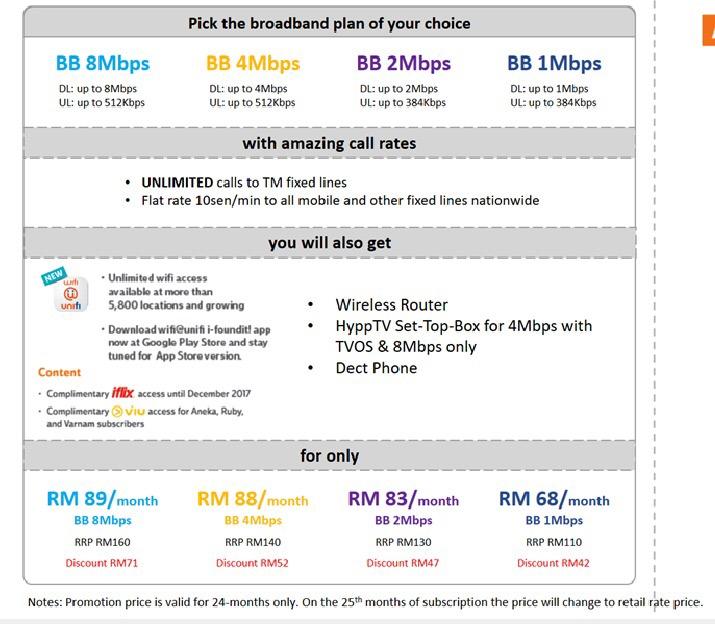
Wut!? 8Mbps now at RM89, for those who using 4Mbps @ RM88 just add RM1 to get 8Mbps
  |
|
|
Nov 1 2017, 06:57 PM
|
|
All Stars
28,129 posts Joined: Aug 2009
|
QUOTE(#Victor @ Nov 1 2017, 06:00 PM) Wut!? 8Mbps now at RM89, for those who using 4Mbps @ RM88 just add RM1 to get 8Mbps Is this from official tm? Damn that's almost half price. Wonder existing subscriber can change it or have to terminate the line first. |
|
|
Nov 1 2017, 07:46 PM
|

Senior Member
1,043 posts Joined: Jun 2009
|
with this price... just use for 2 years only...
|
|
|
Nov 1 2017, 08:25 PM
|

Senior Member
2,164 posts Joined: Jul 2006 From: Kuala Lumpur
|
Yes, I can confirm this price 8Mbps RM89/month but only for 2 years
|
|
|
Nov 1 2017, 09:01 PM
|
 
Elite
8,421 posts Joined: Jul 2008 
|
QUOTE(LeonTan @ Nov 1 2017, 08:25 PM) Yes, I can confirm this price 8Mbps RM89/month but only for 2 years Where can we apply for this plan? |
|
|
Nov 1 2017, 09:43 PM
|

Senior Member
4,179 posts Joined: Mar 2012 From: Kuala Lumpur  
|
QUOTE(aku_dia @ Nov 1 2017, 07:46 PM) with this price... just use for 2 years only... After 2 years, you and me might not know what package comes out already.Again after 2 years if the price back again normal price, I guess lot of ppl will cancel account and run away one. QUOTE(LeonTan @ Nov 1 2017, 08:25 PM) Yes, I can confirm this price 8Mbps RM89/month but only for 2 years This one applicable for existing change package to this one?Or only for new registration? |
|
|
Nov 2 2017, 01:35 AM
|

Junior Member
354 posts Joined: Sep 2008 From: Seremban
|
QUOTE(LeonTan @ Nov 1 2017, 08:25 PM) Yes, I can confirm this price 8Mbps RM89/month but only for 2 years Can existing customer with no contract subscribe to this plan and retaining my old phone no? |
| Change to: |  0.0335sec 0.0335sec
 0.46 0.46
 6 queries 6 queries
 GZIP Disabled GZIP Disabled
Time is now: 22nd December 2025 - 05:55 AM |
 Quote
Quote