

QUOTE(batman1172 @ Mar 5 2017, 06:16 PM)
Will 4mbps Streamyx get free upgrade to 8mbps ?

Not likely. But, some approved areas will get the 10mbps upgrade in phases starting April 2017, according to other threads.Streamyx Streamyx 4Mbps Club V6
|
|
 Mar 5 2017, 01:45 PM Mar 5 2017, 01:45 PM
Return to original view | Post
#1
|
 
Senior Member
5,714 posts Joined: Mar 2007   
|
QUOTE(batman1172 @ Mar 5 2017, 06:16 PM) Will 4mbps Streamyx get free upgrade to 8mbps ? Not likely. But, some approved areas will get the 10mbps upgrade in phases starting April 2017, according to other threads. |
|
|
|
|
|
Sep 16 2017, 09:39 PM
Return to original view | Post
#2
|
|
Senior Member
5,714 posts Joined: Mar 2007
|
QUOTE(nazanto @ Sep 16 2017, 08:26 PM) guys. i need some recommend on decent cheap router for my 4mb streamyx at home. the silver one that im using now sometimes keep restarting on its own and its suck when im watching netflix or others shit on tv. This would be decent and cheap enough for you:https://www.lelong.com.my/d-link-dsl-2750e-...7-01-Sale-I.htm This would be the next step up if you want something better and could be used for Unifi Lite if you decide to upgrade in the future: https://www.lelong.com.my/latest-d-link-vds...7-01-Sale-I.htm |
|
|
Sep 30 2017, 10:05 PM
Return to original view | Post
#3
|
|
Senior Member
5,714 posts Joined: Mar 2007
|
QUOTE(fastreader @ Sep 30 2017, 09:45 PM) my landline and internet line is split out using a splitter. Try using a different splitter, it could be a failed splitter as the splitter usually helps with that issue.one problem that i encounter (not sure whether is it related to the use of splitter), is that all voice call would experience "noises", like cracking sound or those "sssshhhh sshhh" sound.. 1) using a splitter, would this result in slower speed?..or should i separate both? 2) how do i separate both? apply for a new telephone line? |
|
|
Oct 1 2017, 08:25 AM
Return to original view | Post
#4
|
|
Senior Member
5,714 posts Joined: Mar 2007
|
QUOTE(Skylinestar @ Oct 1 2017, 01:12 AM) How to choose a good splitter? No good or bad splinter, just a splitter that works or not. |
|
|
Oct 1 2017, 03:13 PM
Return to original view | Post
#5
|
|
Senior Member
5,714 posts Joined: Mar 2007
|
QUOTE(chikuera @ Oct 1 2017, 03:10 PM) Hi guys. is below stats OK? Your stats is really good but it could be the modem/router issue. What modem router are you using?Been getting inconsistent speed since Sept..like in 1 minute it will be 3.5-4 Mbps but in the next 5 mins is less than 1 Mbps. Has called 100 and technician came to my house citing wiring/cabling error and replace them and add new splitter also. However, after a week, same problem still happen. Kindly help [attachmentid=9191726] |
|
|
Oct 1 2017, 05:19 PM
Return to original view | Post
#6
|
|
Senior Member
5,714 posts Joined: Mar 2007
|
QUOTE(chikuera @ Oct 1 2017, 04:50 PM) i guess so. because sometimes the speed are really great. for example last night, I have no problem at all (slight laggy) steaming EPL match That's an okay modem router. It could be an overheating issue though, or something wrong with the hardware. You could possibly try with a different modem/router.this morning is a totally different story  my router is a 2 years old TP-Link TD-W8961ND |
|
|
|
|
|
Oct 1 2017, 10:58 PM
Return to original view | Post
#7
|
|
Senior Member
5,714 posts Joined: Mar 2007
|
QUOTE(chikuera @ Oct 1 2017, 09:55 PM) i have two of the same model lol bought 1 free 1 last time Nah, that's standard TM procedure. My other house that's on Streamyx had a line problem, and they offered me the same option. But, mine was resolved for free without any stipulations as there was a degraded wiring issue that was not mine or TM fault's. I can't really recommend a decent modem/router wth that price. I wanted to recommend the D-Link DSL 2750E but it is full of vulnerabilities plus their reputation is really shit at the moment with the rubbish bin router issue. tm did suggest to me this but not sure if they are just trying to scam me or what lol [attachmentid=9192247] anyway, any recommendation for a better modem/router? preferably with reasonable price (under RM150) with more than okay performance |
|
|
Oct 2 2017, 11:07 AM
Return to original view | Post
#8
|
|
Senior Member
5,714 posts Joined: Mar 2007
|
QUOTE(chikuera @ Oct 2 2017, 10:25 AM) i actually chose the 2nd option but nothing happens. later I made another complain, they send a technician over but did not mention about that options lol I have been using the TP-Link D7 for a year now, but I can't recommend it to you as it's no longer sold or being produced as TP-Link is phasing out ADSL modem routers and changing their product line to ADSL/VDSL combo modem routers. As blacktubi said, use the most affordable TP-Link modem router, like the one you're already using at the moment. If you want something better, I would suggest trying the TD-W8970. A bit pricier, but I would think that it's worth the upgrade.yeah read a review on that particular model stated it is the best value. at lazada only 79.90 the cheapest. but like you said, quite skeptical on the brand due to latest issue lol our currency is getting better! *said by gomen lol what modem router that you guys use? |
|
|
Oct 2 2017, 11:36 AM
Return to original view | Post
#9
|
|
Senior Member
5,714 posts Joined: Mar 2007
|
QUOTE(chikuera @ Oct 2 2017, 11:17 AM) i did some research from my side. An AC router will only improve your wifi connection if your wifi 2.4GHz band channel is congested, and you go on 5GHz band which is AC. It have nothing to do with the speed or stability of your connection. Read here: Is connecting an AC router will improve the speed stability of my wifi connection? if yes, how to connect to current modem router? just connect via ethernet cable? https://www.howtogeek.com/234751/what-is-80...d-do-i-need-it/ You will have to replace the entire modem router if you want to use AC. For Streamyx, I won't suggest using the 5GHz band as there won't be any significant improvements as your connection speed is not high enough to enjoy the full benefits of AC. |
|
|
Oct 12 2017, 04:51 PM
Return to original view | Post
#10
|
|
Senior Member
5,714 posts Joined: Mar 2007
|
QUOTE(megnamon @ Oct 12 2017, 04:25 PM) Normal for second hop ( after the router as first hop ) is far far away location ? Yes, you're connecting to TM's gateway. It's normal.checked second hop ip location, located at KL with https://www.iplocation.net/ my house at muar, johor. |
|
|
Oct 31 2017, 02:33 PM
Return to original view | Post
#11
|
|
Senior Member
5,714 posts Joined: Mar 2007
|
QUOTE(WIS9000 @ Oct 31 2017, 01:56 PM) thanks for googling it for me.. i know how to do that. Public IP is always 10.x.x.x or 172.16.x.x. to 172.31.x.x or 192.168.x.x. That does not make a difference in daily use but your ports can’t be forwarded for gaming or CCTV. but how to tell whether the range is under public / private? and does that make any difference? i am also facing slow web page loading recently. before this, i do get occasional disconnection which needs to dial 100 to resolve sometimes. also using speed test app, sometimes the ping very long time before the actual testing and results are shown, while other times, the result comes out fast. is this an indication of some issue on my side? or tm's side? That’s on TM side for ping taking a long time. |
|
|
Nov 12 2017, 04:21 PM
Return to original view | Post
#12
|
|
Senior Member
5,714 posts Joined: Mar 2007
|
QUOTE(AtMostFear @ Nov 12 2017, 03:29 PM) I'm currently on 4Mbps. No. They usually set it higher to avoid disconnection and to compensate for any data loss.At my modem status, my Data Rate for Download is 4095kbps and Attainable Rate is 12968kbps. Does that mean my port supports up to 12Mbps? Already called TM to upgrade my account to 8Mbps but they said my port only supports up to 6Mbps. |
|
|
Nov 29 2017, 12:09 PM
Return to original view | Post
#13
|
|
Senior Member
5,714 posts Joined: Mar 2007
|
QUOTE(jerry1227 @ Nov 29 2017, 12:00 PM) I m using TM for almost 2years, but today I facing constant disconnection every 10minute, any possible of cable/copper wire faulty or just my modern is broken? Recommend to call technician to check? Require to Pay RM53 :s Any pro tm user can help me with this? Could be the wire problem. You are not required to pay RM53 if the problem is TM’s responsibility. I would call them if I were you. |
|
|
|
|
|
Nov 29 2017, 05:39 PM
Return to original view | Post
#14
|
|
Senior Member
5,714 posts Joined: Mar 2007
|
QUOTE(jerry1227 @ Nov 29 2017, 03:26 PM) Direct connection, not using splitter. What your opinion? Using the inacom w7100n modem they gave. Is the modem that weak, even cant stand small thunderstorm? That's a very old router modem. No surprises that it is unable to resist even a small thunderstorm. |
|
|
Nov 29 2017, 08:21 PM
Return to original view | Post
#15
|
|
Senior Member
5,714 posts Joined: Mar 2007
|
QUOTE(jerry1227 @ Nov 29 2017, 07:39 PM) So is higher chance modem problem? Or I should wait the tech to come and check. Here what the staff on twitter told me. It looks to be TM fault. Don’t worry too much. If you are worried, get a new router modem to test the connection fors6, I recommend this router modem, instead of the Innacomm that you are using: "Ok, We will escalate your issue to our team. For your information, a flat rate of RM53.00 per visit (inclusive of GST) will be imposed, unless the fault is within TM’s scope of responsibilities. " How high chance will be the cable went wrong since I just installed 1 year+ only. Advise pls, Dont want to pay that high service charges. -.- http://www.lazada.com.my/tp-link-td-w8961n...53bfYGxtoi&mp=1 Just get the Streamyx username and password if you want to set up the new router modem. QUOTE(jerry1227 @ Nov 29 2017, 07:57 PM) Upstream Power 8.5 dBm The SNR margin look good, but the down stream is abnormally high, which they could set lower for stability. This might be the reason. Don’t worry about it. It is rarely your fault.Downstream Power 9.5 dBm Adsl Line Status SHOWTIME.L0 Adsl Mode G992.5 Up Stream 637 kbps Down Stream 10239 kbps Attainable Up Stream 1132 kbps Attainable Down Stream 21524 kbps Attenuation Down Stream 9 Attenuation Up Stream 8 SNR Margin Down Stream 20.6 SNR Margin Up Stream 20.4 Vendor ID RETK Firmware Version 4923c106 CRC Errors 0 Up Stream BER 0e-7 Down Stream BER 0e-7 Up Output Power 8.5 Down Output Power 9.5 Down Stream ES 0 Up Stream ES 0 Down Stream SES 0 Up Stream SES 0 Down Stream UAS 0 Up Stream UAS 4294966925 |
|
|
Dec 5 2017, 07:27 AM
Return to original view | Post
#16
|
|
Senior Member
5,714 posts Joined: Mar 2007
|
QUOTE(pandera999 @ Dec 4 2017, 10:53 PM) my cousin is thinking to replace her current TM Streamyx modem router.. any brand you guys can suggest.. 4mbps router offer by tm now.. only give her upload download around 400kbps/100kbps only Depends on her budget. If you want something better, you can try the D-Link 2877AL/TH9 or if she just want something that works, she can try the TP-Link TD-W8968, which is cheaper. |
|
|
Dec 5 2017, 12:33 PM
Return to original view | Post
#17
|
|
Senior Member
5,714 posts Joined: Mar 2007
|
QUOTE(pandera999 @ Dec 5 2017, 09:53 AM) i think TP link much better than current stock TM adsl.... keep giving lagging issue I would also recommend the TP-Link modem router. Anything is better than the stock TM device that they give you! |
|
|
Dec 12 2017, 09:54 PM
Return to original view | Post
#18
|
|
Senior Member
5,714 posts Joined: Mar 2007
|
QUOTE(ericong77 @ Dec 12 2017, 09:52 PM) Where is the login page at TM portal for streamyx user? Link is gone. You have to login via unifi.com.my now. |
|
|
Dec 27 2017, 01:24 PM
Return to original view | Post
#19
|
|
Senior Member
5,714 posts Joined: Mar 2007
|
QUOTE(#Victor @ Dec 27 2017, 12:09 PM) How does Streamyx billing works? I just notice in last month bill, it charges for next month's usage (pay first use later) like UniFi? Yes, they do that.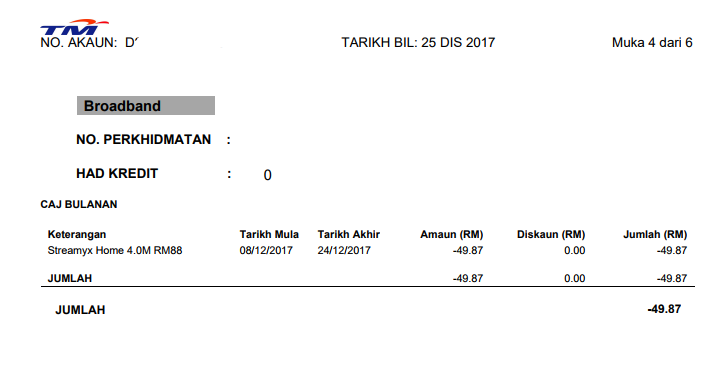 |
|
|
Jan 9 2018, 10:38 PM
Return to original view | Post
#20
|
|
Senior Member
5,714 posts Joined: Mar 2007
|
QUOTE(DayDreamerZ @ Jan 9 2018, 10:15 PM) Hello. Anyone know how to fix this problem? Change your modem router and test with a different BETTER one.Modem model: ADSL-RIGER-DB120WL ISP : Streamyx Package : 4mbps During browsing sometimes this page appears 'This site can’t be reached' then becomes 'There is no Internet Connection'. Weirdly, sometimes no problem...but slow. Using handphone connect but it is the same. It has been several months since this problem appeared. |
| Change to: |  0.0794sec 0.0794sec
 0.34 0.34
 7 queries 7 queries
 GZIP Disabled GZIP Disabled
Time is now: 2nd December 2025 - 02:04 AM |
 Quote
Quote