

does unifi throttle p2p? i cannot achieve 500KB download recently, only get max 250KB donwload
Unifi Official TM UniFi High Speed Broadband Thread V19, ( -_・) ︻デ═一▸ Maxis & Time
Unifi Official TM UniFi High Speed Broadband Thread V19, ( -_・) ︻デ═一▸ Maxis & Time
|
|
 Dec 23 2014, 09:03 PM Dec 23 2014, 09:03 PM
|
 
Senior Member
2,768 posts Joined: Oct 2006 
|
does unifi throttle p2p? i cannot achieve 500KB download recently, only get max 250KB donwload
|
|
|
|
|
|
Dec 23 2014, 09:14 PM
Show posts by this member only | IPv6 | Post
#2222
|

Senior Member
614 posts Joined: Sep 2009 
|
some websites are extremely slow today.
|
|
|
Dec 24 2014, 04:56 AM
Show posts by this member only | IPv6 | Post
#2223
|

Junior Member
132 posts Joined: Jun 2009
|
hi i have a problem with my unifi..
whenever i use the iptv, i cant get internet connection. anyone facing the problem..im using the stock unifi router ( silver) |
|
|
Dec 24 2014, 06:19 AM
Show posts by this member only | IPv6 | Post
#2224
|

Senior Member
4,333 posts Joined: Jan 2003
|
QUOTE(xSean @ Dec 23 2014, 09:03 PM) does unifi throttle p2p? i cannot achieve 500KB download recently, only get max 250KB donwload I am getting full speed of >600KBps all the time for P2P.  Haven't experienced any throttling at all since Unifi VIP5 was installed in August this year.  |
|
|
Dec 24 2014, 03:02 PM
|

Senior Member
857 posts Joined: Oct 2009
|
QUOTE(xSean @ Dec 23 2014, 09:03 PM) does unifi throttle p2p? i cannot achieve 500KB download recently, only get max 250KB donwload I think that's either the listen port is blocked or maybe the trackers are bad...So far no problem p2p.. |
|
|
Dec 24 2014, 06:29 PM
|

All Stars
24,465 posts Joined: Nov 2010
|
QUOTE(xSean @ Dec 23 2014, 09:03 PM) does unifi throttle p2p? i cannot achieve 500KB download recently, only get max 250KB donwload unfi does not throttle, no limit - for now.if dedicated to one device, vip5 gives u max 625KBps - achieveable with ethernet or strong wifi. |
|
|
|
|
|
Dec 24 2014, 09:07 PM
|

Junior Member
10 posts Joined: Nov 2014
|
Guys,
has anyone of you successfully connected Huawei's EC6106V5 STB for HyppTV IPTV wirelessly using stock firmware.? I have had my Unifi 5MBPS for a couple of months now and i find it kinda useless to be subscribed to HyppTV without getting access to it because the BTU and RG has been far away from my main TV. I have my RG4332 residential gateway modem connected to my home network which has a 16-port switch and 2 other wireless routers across the house. Since it is a 2 storey house, and every room has an ethernet port already concealed and connected to the switch in the store room via cat5 cable, I managed to strategically place the wireless routers & RG4332 & BTU so that every room has got wireless connectivity without dead-spots. However, I still have a problem for my STB because my TV is no where near any ethernet port, and I want to configure it with what I already have without spending extra to get the channels for my TV. The only logical way i can think of is to wirelessly connect this EC6106V5 STB to the home network or RG4332 router so that I can plug it to my TV via HDMI without cables running around(everything else is concealed so a bit cacat to run a long ass ethernet cable from any of the LAN ports around the house). So far, I have a couple of options. Obvious one is to buy the ever famous homeplug and voilah!, problem solved. But my house has 3 phase power with different circuit breakers upstairs and downstairs, and the Unifi technicians only managed to install the BTU and RG upstairs, which was at the front of the house where it was the easiest to pull the fibre optic cable straight from the TNB tiang. So I don't wanna risk buying a pair and then it doesn't work. It might work but I'm putting this idea on hold for budget purposes. The second option is to use Huawei's STBs built in wireless connectivity function to directly access IPTV over the air. I can connect to the internet through the STB's browser if i use any of the available wifi connections from the house, but obviously the IPTV doesn't work because the RG4332 has only port 4 associated with IPTV functionality. So i tried fixing one wireless access point straight to lanPort4 and was hoping that once the STB connects to this Wifi point, it will work but it didn't. Then, I found out how to go into operator mode and bind an SSID together with LANport4 to the VLAN 600 WAN connection which is Unifi's IPTV service in the RG4332. For some odd reason, it shows a no satellite image on the channels but I am able to browse TV guide etc, which was frustrating because it doesn't make sense! All the network configuration(host ip,dns and gateway address) is the same as plugging through a LAN cable but the damn channels don't show. Third final option is to get a Unifi supported router and either try port binding there or flash my RG4332 or other routers with custom firmware like OpenWRT etc, but costs $ and risk of losing internet connection over the next few days. So, My question to any technically savvy lowyat forum users out there is: is there a way to configure the given stock router from unifi and successfully connect the STB wirelessly with working channels including HD ones.? Took me the whole day to crack this puzzle, so I would appreciate if any one out there has been through this before or tried hooking up this shit (EC6106V5 wirelessly to RG4332). Thank you for the feedback, if any. Have a nice day peeps This post has been edited by dankzone: Dec 24 2014, 09:12 PM Attached thumbnail(s) 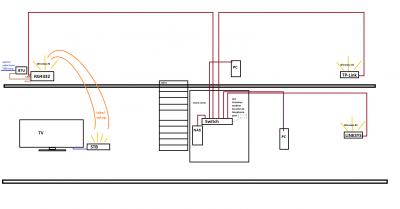

|
|
|
Dec 25 2014, 12:04 AM
|
|
Junior Member
228 posts Joined: Sep 2011
|
hello i wish to terminate unifi after 2014 ended. have a few question in mind
1. since billing starts mid-month to mid-month, do i still need to pay the half month for jan 2015? i remembered the first month they calculate the rent based on the days left to the next billing period, so wondering if this applies to the termination month/date or not. 2. my subscription is almost 3 years already if im not mistaken, and i heard that i need to return XXX stuffs for them to process the termination faster. is this true? 3. can i just go to any tm center? or only specific center like only can go to titiwangsa instead of the one near wangsa walk. 4. i am the owner of the account, do i need to prepare any black-white documents? thanks again! |
|
|
Dec 25 2014, 09:11 AM
|

All Stars
14,909 posts Joined: Jul 2005 
|
QUOTE(edr1c @ Dec 25 2014, 12:04 AM) hello i wish to terminate unifi after 2014 ended. have a few question in mind 1. Not sure about this.1. since billing starts mid-month to mid-month, do i still need to pay the half month for jan 2015? i remembered the first month they calculate the rent based on the days left to the next billing period, so wondering if this applies to the termination month/date or not. 2. my subscription is almost 3 years already if im not mistaken, and i heard that i need to return XXX stuffs for them to process the termination faster. is this true? 3. can i just go to any tm center? or only specific center like only can go to titiwangsa instead of the one near wangsa walk. 4. i am the owner of the account, do i need to prepare any black-white documents? thanks again! 2. You only need to bring the BTU (broadband termination unit). You can keep the router & HyppTV set-top-box. 3. Any TM-Point will be able to assist you in terminating your account. 4. No documents needed, just bring your IC & the UniFi BTU. |
|
|
Dec 25 2014, 09:12 AM
Show posts by this member only | IPv6 | Post
#2230
|
|
Senior Member
4,333 posts Joined: Jan 2003
|
QUOTE(dankzone @ Dec 24 2014, 09:07 PM) Guys, The built-in wireless adapter in the Huawei STB cannot be used for IPTV streaming in Unifi.has anyone of you successfully connected Huawei's EC6106V5 STB for HyppTV IPTV wirelessly using stock firmware.? I have had my Unifi 5MBPS for a couple of months now and i find it kinda useless to be subscribed to HyppTV without getting access to it because the BTU and RG has been far away from my main TV. I have my RG4332 residential gateway modem connected to my home network which has a 16-port switch and 2 other wireless routers across the house. Since it is a 2 storey house, and every room has an ethernet port already concealed and connected to the switch in the store room via cat5 cable, I managed to strategically place the wireless routers & RG4332 & BTU so that every room has got wireless connectivity without dead-spots. However, I still have a problem for my STB because my TV is no where near any ethernet port, and I want to configure it with what I already have without spending extra to get the channels for my TV. The only logical way i can think of is to wirelessly connect this EC6106V5 STB to the home network or RG4332 router so that I can plug it to my TV via HDMI without cables running around(everything else is concealed so a bit cacat to run a long ass ethernet cable from any of the LAN ports around the house). So far, I have a couple of options. Obvious one is to buy the ever famous homeplug and voilah!, problem solved. But my house has 3 phase power with different circuit breakers upstairs and downstairs, and the Unifi technicians only managed to install the BTU and RG upstairs, which was at the front of the house where it was the easiest to pull the fibre optic cable straight from the TNB tiang. So I don't wanna risk buying a pair and then it doesn't work. It might work but I'm putting this idea on hold for budget purposes. The second option is to use Huawei's STBs built in wireless connectivity function to directly access IPTV over the air. I can connect to the internet through the STB's browser if i use any of the available wifi connections from the house, but obviously the IPTV doesn't work because the RG4332 has only port 4 associated with IPTV functionality. So i tried fixing one wireless access point straight to lanPort4 and was hoping that once the STB connects to this Wifi point, it will work but it didn't. Then, I found out how to go into operator mode and bind an SSID together with LANport4 to the VLAN 600 WAN connection which is Unifi's IPTV service in the RG4332. For some odd reason, it shows a no satellite image on the channels but I am able to browse TV guide etc, which was frustrating because it doesn't make sense! All the network configuration(host ip,dns and gateway address) is the same as plugging through a LAN cable but the damn channels don't show. Third final option is to get a Unifi supported router and either try port binding there or flash my RG4332 or other routers with custom firmware like OpenWRT etc, but costs $ and risk of losing internet connection over the next few days. So, My question to any technically savvy lowyat forum users out there is: is there a way to configure the given stock router from unifi and successfully connect the STB wirelessly with working channels including HD ones.? Took me the whole day to crack this puzzle, so I would appreciate if any one out there has been through this before or tried hooking up this shit (EC6106V5 wirelessly to RG4332). Thank you for the feedback, if any. Have a nice day peeps It is meant for Streamyx use. I, too, have tried to attach a wireless AP to LanPort4 of the RG to connect to the STB, but it also showed a no satellite image on the TV screen. Your best bet is to use an Aztech homeplug solution designed for 3-phase operation.  |
|
|
Dec 25 2014, 01:40 PM
|

All Stars
14,899 posts Joined: Apr 2005 From: Kuala Lumpur & Selangor
|
QUOTE(edr1c @ Dec 25 2014, 12:04 AM) hello i wish to terminate unifi after 2014 ended. have a few question in mind For No 1, they will charge you on a pro-rated basis.1. since billing starts mid-month to mid-month, do i still need to pay the half month for jan 2015? i remembered the first month they calculate the rent based on the days left to the next billing period, so wondering if this applies to the termination month/date or not. 2. my subscription is almost 3 years already if im not mistaken, and i heard that i need to return XXX stuffs for them to process the termination faster. is this true? 3. can i just go to any tm center? or only specific center like only can go to titiwangsa instead of the one near wangsa walk. 4. i am the owner of the account, do i need to prepare any black-white documents? thanks again! |
|
|
Dec 25 2014, 05:16 PM
|

Junior Member
237 posts Joined: Jun 2009 From: German Malaysian Institute
|
Guys, can i apply for unifi if i blacklisted by other telco?
|
|
|
Dec 25 2014, 07:12 PM
|

Junior Member
135 posts Joined: Sep 2012
|
working now
This post has been edited by abec: Dec 27 2014, 10:02 AM |
|
|
|
|
|
Dec 26 2014, 06:37 AM
|
|
All Stars
18,455 posts Joined: Oct 2010
|
Search thru this thread on 'double storey' and found differing advices on putting the wireless router on ground or upper floor. So which is better?
This post has been edited by MGM: Dec 26 2014, 06:40 AM |
|
|
Dec 26 2014, 01:18 PM
|
|
All Stars
24,465 posts Joined: Nov 2010
|
QUOTE(MGM @ Dec 26 2014, 06:37 AM) Search thru this thread on 'double storey' and found differing advices on putting the wireless router on ground or upper floor. So which is better? this is an excellent and impt question but the answers are not straightforward, at least to me when i tried reading some articles.the way i understand it, a typical wireless router dipole antenna transmits in a balloon form, a matter of how much the balloon is "squeezed ". read this for a quick understanding: http://www.techrepublic.com/blog/data-cent...misconceptions/ if above is correct, the ideal place to place the router has to be right in the center of the house. but how often is that possible?! unifi comes in either from the ground flr front for newer houses or from the back upper for older ones. unless one spends own money to pull the cable elsewhere. there have been all kinds of reports - some upper back says good, some say no good. some front lower says good, some say no good. and that's not surprising given all kinds of routers, their positions and amount of inference in each case. so... given the constraints, i think one can only try these: .. orig unifi router is surely weak - change to better one. .. play around with the twin antennae ("squeeze the ballon"), see if a particular position is better for where u want wifi. .. provide as much clear line of sight as possible to minimize distortion; wood, concrete do not matter; metal does. i have replaced router at front grdflr, back upstairs still pretty good wifi, very acceptable, no need homeplug or wifi repeater. it was not the case with orig unifi router. This post has been edited by AVFAN: Dec 26 2014, 01:30 PM |
|
|
Dec 26 2014, 04:02 PM
|
|
All Stars
18,455 posts Joined: Oct 2010
|
QUOTE(AVFAN @ Dec 26 2014, 01:18 PM) this is an excellent and impt question but the answers are not straightforward, at least to me when i tried reading some articles. Thanks for taking the trouble to explain, I will get a good router and install the setup at the upper floor TV room which is connected to the stairway in the middle of the house.the way i understand it, a typical wireless router dipole antenna transmits in a balloon form, a matter of how much the balloon is "squeezed ". read this for a quick understanding: http://www.techrepublic.com/blog/data-cent...misconceptions/ if above is correct, the ideal place to place the router has to be right in the center of the house. but how often is that possible?! unifi comes in either from the ground flr front for newer houses or from the back upper for older ones. unless one spends own money to pull the cable elsewhere. there have been all kinds of reports - some upper back says good, some say no good. some front lower says good, some say no good. and that's not surprising given all kinds of routers, their positions and amount of inference in each case. so... given the constraints, i think one can only try these: .. orig unifi router is surely weak - change to better one. .. play around with the twin antennae ("squeeze the ballon"), see if a particular position is better for where u want wifi. .. provide as much clear line of sight as possible to minimize distortion; wood, concrete do not matter; metal does. i have replaced router at front grdflr, back upstairs still pretty good wifi, very acceptable, no need homeplug or wifi repeater. it was not the case with orig unifi router. |
|
|
Dec 27 2014, 01:55 AM
|
|
All Stars
14,899 posts Joined: Apr 2005 From: Kuala Lumpur & Selangor
|
Any internal news if they will upgrade the current max package from 20Mbps to 30 or 50Mbps?
|
|
|
Dec 27 2014, 08:14 AM
Show posts by this member only | IPv6 | Post
#2238
|
|
Senior Member
4,333 posts Joined: Jan 2003
|
No.
|
|
|
Dec 27 2014, 10:11 AM
|
|
Junior Member
10 posts Joined: Nov 2014
|
QUOTE(raynman @ Dec 25 2014, 09:12 AM) The built-in wireless adapter in the Huawei STB cannot be used for IPTV streaming in Unifi. Thanks for the clarification raynman. Guess I will settle with the homeplugs.It is meant for Streamyx use. I, too, have tried to attach a wireless AP to LanPort4 of the RG to connect to the STB, but it also showed a no satellite image on the TV screen. Your best bet is to use an Aztech homeplug solution designed for 3-phase operation. Arigato |
|
|
Dec 27 2014, 01:45 PM
|

Senior Member
2,696 posts Joined: Nov 2007 From: forum.lowyat.net
|
Got a question, how long more before i can subscribe once they installed the green box infront of the house?
|
|
Topic ClosedOptions
|
| Change to: |  0.0538sec 0.0538sec
 0.68 0.68
 6 queries 6 queries
 GZIP Disabled GZIP Disabled
Time is now: 15th December 2025 - 03:59 PM |
 Quote
Quote