Welcome Guest ( Log In | Register )

Bump Topic Topic Closed RSS Feed

Outline · [ Standard ] · Linear+

Unifi Official TM UniFi High Speed Broadband Thread V19, ( -_・) ︻デ═一▸ Maxis & Time

views
     
Ahmaz
post Dec 21 2014, 02:51 PM

On my way
****
Junior Member
500 posts

Joined: May 2008


QUOTE(PBDHH @ Dec 21 2014, 01:44 PM)
Thx bro. Went there last evening and went to AonePlus booth at Hall2 (There are Asus premium distributor),
RT-AC87U was going for RM915 Nett. Definitely worst every single penny smile.gif
*
Darn... sorry about that.. I don't think I saw Aoneplus booth.. so maybe I missed it..
PBDHH
post Dec 21 2014, 03:28 PM

Getting Started
**
Junior Member
223 posts

Joined: Jan 2008


QUOTE(Ahmaz @ Dec 21 2014, 02:51 PM)
Darn... sorry about that.. I don't think I saw Aoneplus booth.. so maybe I missed it..
*
No worries bro. Sharing is caring and thank you for your effort in goggling up on Asus router pricing too smile.gif Really appreciate it.
PBDHH
post Dec 21 2014, 03:34 PM

Getting Started
**
Junior Member
223 posts

Joined: Jan 2008


QUOTE(raynman @ Dec 21 2014, 01:50 PM)
RM915 only? So cheap? The official SRP is RM1,199.  ohmy.gif
*
RM915 for cash price and 2% extra (RM933) if u pay via credit card. I purchased it straight away. It was seriously shocking for that price I paid.

This post has been edited by PBDHH: Dec 21 2014, 03:34 PM
StOwnz
post Dec 22 2014, 05:01 PM

New Member
*
Junior Member
35 posts

Joined: Mar 2009


Hello Guys, i have a Linksys WRT160N router, would like to replace with my Dlink Dir615.

Anyone would like to guide me about the vlan tagging configuration in this model?
Or i have to flash it with dd-wrt?

Please pm me or reply me!

Your guidance is highly appreciated!!

Thanks in advance!


cry.gif rclxub.gif rclxms.gif
eternity4av
post Dec 22 2014, 05:07 PM

♥ ♥ ♥ taeyeon
*******
Senior Member
2,270 posts

Joined: Nov 2004
hypp tv down in klang?
gin&tonic
post Dec 23 2014, 07:47 AM

Look at all my stars!!
*******
Senior Member
4,874 posts

Joined: Sep 2011


QUOTE(Joe Kreutz @ Dec 22 2014, 10:27 AM)
hi guys, i just registered online and waiting for the unifi team to call me.
how long would it usually take for them to call me, it stated in the website that they will call me within 3 working days but i have limited free time and hope they would call me ASAP.

anybody have info on how long would i have to wait until they call me?

any reply is highly appreciated.
*
On the 13dec I fwd my application forms n apply thru a former. 14dec TM replied thru email n fwd details n date of installation. 15dec received a call from TM to confirm unifi installation on 19 Dec. Happy with the fast installation.


mitodna
post Dec 23 2014, 11:29 AM

Getting Started
********
All Stars
14,039 posts

Joined: Jan 2003
anyone have their sip settings? thanks
xSean
post Dec 23 2014, 09:03 PM

Look at all my stars!!
*******
Senior Member
2,772 posts

Joined: Oct 2006
does unifi throttle p2p? i cannot achieve 500KB download recently, only get max 250KB donwload
I<3LYN
post Dec 23 2014, 09:14 PM

On my way
****
Senior Member
614 posts

Joined: Sep 2009


some websites are extremely slow today.
monyetgila
post Dec 24 2014, 04:56 AM

Getting Started
**
Junior Member
132 posts

Joined: Jun 2009


hi i have a problem with my unifi..
whenever i use the iptv, i cant get internet connection.
anyone facing the problem..im using the stock unifi router ( silver)
SUSraynman
post Dec 24 2014, 06:19 AM

Look at all my stars!!
*******
Senior Member
4,333 posts

Joined: Jan 2003


QUOTE(xSean @ Dec 23 2014, 09:03 PM)
does unifi throttle p2p? i cannot achieve 500KB download recently, only get max 250KB donwload
*
I am getting full speed of >600KBps all the time for P2P.

Haven't experienced any throttling at all since Unifi VIP5 was installed in August this year. smile.gif

winter01942
post Dec 24 2014, 03:02 PM

Rating 5/5
*****
Senior Member
857 posts

Joined: Oct 2009


QUOTE(xSean @ Dec 23 2014, 09:03 PM)
does unifi throttle p2p? i cannot achieve 500KB download recently, only get max 250KB donwload
*
I think that's either the listen port is blocked or maybe the trackers are bad...

So far no problem p2p..
AVFAN
post Dec 24 2014, 06:29 PM

20k VIP Club
*********
All Stars
24,471 posts

Joined: Nov 2010
QUOTE(xSean @ Dec 23 2014, 09:03 PM)
does unifi throttle p2p? i cannot achieve 500KB download recently, only get max 250KB donwload
*
unfi does not throttle, no limit - for now.

if dedicated to one device, vip5 gives u max 625KBps - achieveable with ethernet or strong wifi.
dankzone
post Dec 24 2014, 09:07 PM

New Member
*
Junior Member
10 posts

Joined: Nov 2014
Guys,

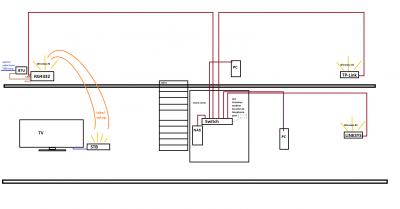
has anyone of you successfully connected Huawei's EC6106V5 STB for HyppTV IPTV wirelessly using stock firmware.? I have had my Unifi 5MBPS for a couple of months now and i find it kinda useless to be subscribed to HyppTV without getting access to it because the BTU and RG has been far away from my main TV.

I have my RG4332 residential gateway modem connected to my home network which has a 16-port switch and 2 other wireless routers across the house. Since it is a 2 storey house, and every room has an ethernet port already concealed and connected to the switch in the store room via cat5 cable, I managed to strategically place the wireless routers & RG4332 & BTU so that every room has got wireless connectivity without dead-spots. However, I still have a problem for my STB because my TV is no where near any ethernet port, and I want to configure it with what I already have without spending extra to get the channels for my TV.

The only logical way i can think of is to wirelessly connect this EC6106V5 STB to the home network or RG4332 router so that I can plug it to my TV via HDMI without cables running around(everything else is concealed so a bit cacat to run a long ass ethernet cable from any of the LAN ports around the house).

So far, I have a couple of options. Obvious one is to buy the ever famous homeplug and voilah!, problem solved. But my house has 3 phase power with different circuit breakers upstairs and downstairs, and the Unifi technicians only managed to install the BTU and RG upstairs, which was at the front of the house where it was the easiest to pull the fibre optic cable straight from the TNB tiang. So I don't wanna risk buying a pair and then it doesn't work. It might work but I'm putting this idea on hold for budget purposes.

The second option is to use Huawei's STBs built in wireless connectivity function to directly access IPTV over the air. I can connect to the internet through the STB's browser if i use any of the available wifi connections from the house, but obviously the IPTV doesn't work because the RG4332 has only port 4 associated with IPTV functionality. So i tried fixing one wireless access point straight to lanPort4 and was hoping that once the STB connects to this Wifi point, it will work but it didn't.

Then, I found out how to go into operator mode and bind an SSID together with LANport4 to the VLAN 600 WAN connection which is Unifi's IPTV service in the RG4332. For some odd reason, it shows a no satellite image on the channels but I am able to browse TV guide etc, which was frustrating because it doesn't make sense! All the network configuration(host ip,dns and gateway address) is the same as plugging through a LAN cable but the damn channels don't show.

Third final option is to get a Unifi supported router and either try port binding there or flash my RG4332 or other routers with custom firmware like OpenWRT etc, but costs $ and risk of losing internet connection over the next few days.

So, My question to any technically savvy lowyat forum users out there is: is there a way to configure the given stock router from unifi and successfully connect the STB wirelessly with working channels including HD ones.? Took me the whole day to crack this puzzle, so I would appreciate if any one out there has been through this before or tried hooking up this shit (EC6106V5 wirelessly to RG4332).

Thank you for the feedback, if any. Have a nice day peeps

This post has been edited by dankzone: Dec 24 2014, 09:12 PM


Attached thumbnail(s)
Attached Image Attached Image
edr1c
post Dec 25 2014, 12:04 AM

Getting Started
**
Junior Member
228 posts

Joined: Sep 2011
hello i wish to terminate unifi after 2014 ended. have a few question in mind

1. since billing starts mid-month to mid-month, do i still need to pay the half month for jan 2015? i remembered the first month they calculate the rent based on the days left to the next billing period, so wondering if this applies to the termination month/date or not.

2. my subscription is almost 3 years already if im not mistaken, and i heard that i need to return XXX stuffs for them to process the termination faster. is this true?

3. can i just go to any tm center? or only specific center like only can go to titiwangsa instead of the one near wangsa walk.

4. i am the owner of the account, do i need to prepare any black-white documents?

thanks again!
sHawTY
post Dec 25 2014, 09:11 AM

Frequent Reporter
********
All Stars
14,909 posts

Joined: Jul 2005

QUOTE(edr1c @ Dec 25 2014, 12:04 AM)
hello i wish to terminate unifi after 2014 ended. have a few question in mind

1. since billing starts mid-month to mid-month, do i still need to pay the half month for jan 2015? i remembered the first month they calculate the rent based on the days left to the next billing period, so wondering if this applies to the termination month/date or not.

2. my subscription is almost 3 years already if im not mistaken, and i heard that i need to return XXX stuffs for them to process the termination faster. is this true?

3. can i just go to any tm center? or only specific center like only can go to titiwangsa instead of the one near wangsa walk.

4. i am the owner of the account, do i need to prepare any black-white documents?

thanks again!
1. Not sure about this.
2. You only need to bring the BTU (broadband termination unit). You can keep the router & HyppTV set-top-box.
3. Any TM-Point will be able to assist you in terminating your account.
4. No documents needed, just bring your IC & the UniFi BTU.
SUSraynman
post Dec 25 2014, 09:12 AM

Look at all my stars!!
*******
Senior Member
4,333 posts

Joined: Jan 2003


QUOTE(dankzone @ Dec 24 2014, 09:07 PM)
Guys,

has anyone of you successfully connected Huawei's EC6106V5 STB for HyppTV IPTV wirelessly using stock firmware.? I have had my Unifi 5MBPS for a couple of months now and i find it kinda useless to be subscribed to HyppTV without getting access to it because the BTU and RG has been far away from my main TV.

I have my RG4332 residential gateway modem connected to my home network which has a 16-port switch and 2 other wireless routers across the house. Since it is a 2 storey house, and every room has an ethernet port already concealed and connected to the switch in the store room via cat5 cable, I managed to strategically place the wireless routers & RG4332 & BTU so that every room has got wireless connectivity without dead-spots. However, I still have a problem for my STB because my TV is no where near any ethernet port, and I want to configure it with what I already have without spending extra to get the channels for my TV.

The only logical way i can think of is to wirelessly connect this EC6106V5 STB to the home network or RG4332 router so that I can plug it to my TV via HDMI without cables running around(everything else is concealed so a bit cacat to run a long ass ethernet cable from any of the LAN ports around the house).

So far, I have a couple of options. Obvious one is to buy the ever famous homeplug and voilah!, problem solved. But my house has 3 phase power with different circuit breakers upstairs and downstairs, and the Unifi technicians only managed to install the BTU and RG upstairs, which was at the front of the house where it was the easiest to pull the fibre optic cable straight from the TNB tiang. So I don't wanna risk buying a pair and then it doesn't work. It might work but I'm putting this idea on hold for budget purposes.

The second option is to use Huawei's STBs built in wireless connectivity function to directly access IPTV over the air. I can connect to the internet through the STB's browser if i use any of the available wifi connections from the house, but obviously the IPTV doesn't work because the RG4332 has only port 4 associated with IPTV functionality. So i tried fixing one wireless access point straight to lanPort4 and was hoping that once the STB connects to this Wifi point, it will work but it didn't.

Then, I found out how to go into operator mode and bind an SSID together with LANport4 to the VLAN 600 WAN connection which is Unifi's IPTV service in the RG4332. For some odd reason, it shows a no satellite image on the channels but I am able to browse TV guide etc, which was frustrating because it doesn't make sense! All the network configuration(host ip,dns and gateway address) is the same as plugging through a LAN cable but the damn channels don't show.

Third final option is to get a Unifi supported router and either try port binding there or flash my RG4332 or other routers with custom firmware like OpenWRT etc, but costs $ and risk of losing internet connection over the next few days.

So, My question to any technically savvy lowyat forum users out there is: is there a way to configure the given stock router from unifi and successfully connect the STB wirelessly with working channels including HD ones.? Took me the whole day to crack this puzzle, so I would appreciate if any one out there has been through this before or tried hooking up this shit (EC6106V5 wirelessly to RG4332).

Thank you for the feedback, if any. Have a nice day peeps
*
The built-in wireless adapter in the Huawei STB cannot be used for IPTV streaming in Unifi.

It is meant for Streamyx use.

I, too, have tried to attach a wireless AP to LanPort4 of the RG to connect to the STB, but it also showed a no satellite image on the TV screen.

Your best bet is to use an Aztech homeplug solution designed for 3-phase operation.

user posted image

Icehart
post Dec 25 2014, 01:40 PM

72.55.191.6
********
All Stars
14,901 posts

Joined: Apr 2005
From: Kuala Lumpur & Selangor


QUOTE(edr1c @ Dec 25 2014, 12:04 AM)
hello i wish to terminate unifi after 2014 ended. have a few question in mind

1. since billing starts mid-month to mid-month, do i still need to pay the half month for jan 2015? i remembered the first month they calculate the rent based on the days left to the next billing period, so wondering if this applies to the termination month/date or not.

2. my subscription is almost 3 years already if im not mistaken, and i heard that i need to return XXX stuffs for them to process the termination faster. is this true?

3. can i just go to any tm center? or only specific center like only can go to titiwangsa instead of the one near wangsa walk.

4. i am the owner of the account, do i need to prepare any black-white documents?

thanks again!
*
For No 1, they will charge you on a pro-rated basis.
afeeq
post Dec 25 2014, 05:16 PM

Getting Started
**
Junior Member
237 posts

Joined: Jun 2009
From: German Malaysian Institute


Guys, can i apply for unifi if i blacklisted by other telco?
abec
post Dec 25 2014, 07:12 PM

Getting Started
**
Junior Member
135 posts

Joined: Sep 2012


working now

This post has been edited by abec: Dec 27 2014, 10:02 AM

Topic ClosedOptions
 

Change to:
| Lo-Fi Version
0.0383sec    1.02    6 queries    GZIP Disabled
Time is now: 18th December 2025 - 07:46 PM