Welcome Guest ( Log In | Register )

Bump Topic Topic Closed RSS Feed
128 Pages « < 43 44 45 46 47 > » Bottom

Outline · [ Standard ] · Linear+

 The SSD Thread V4, Solid State Drive

views
     
SUSkimsim
post Jan 22 2014, 06:34 PM

Let Me ❤️ You
*******
Senior Member
5,847 posts

Joined: Nov 2010
From: Malaysia 🇲🇾


QUOTE(sasuketaichou @ Jan 22 2014, 06:11 PM)
thanx guys but i think it didnt related with ssd or hdd, might be ram or proc or mobo, thanx for helping
*
Ram could be control of open many many program as same time, after half and hour to be exit the all program you might be feels that lagging like won't move.

SSD can be solve the boots up time and launch many software at same time, still feels very fast, unlike HDD wait till you drink a cup of coffee.
horns
post Jan 22 2014, 08:50 PM

\m/
*******
Senior Member
3,038 posts

Joined: Nov 2009
QUOTE(sasuketaichou @ Jan 22 2014, 06:11 PM)
thanx guys but i think it didnt related with ssd or hdd, might be ram or proc or mobo, thanx for helping
*
oh.. good luck :/
infernoaswen
post Jan 24 2014, 02:50 AM

(╯°□°)╯︵ ┻━┻)
*******
Senior Member
3,782 posts

Joined: Aug 2010
From: subang jaya


Noob here, want to ask is this score normal for my plextor M5S 128gb SSD? I checked toms hardware chart, their write speed is 200MB/s but I am getting only 130 rclxub.gif

Also how do I check my SSD health? I play games a lot & prefer to install on my SSD rather than HDD & I know lots of writing will wear off the SSD but how do I check? I checked via crystaldiskInfo & it says 100% but I am skeptical hmm.gif or I am just being paranoid?

C: is my main OS, D: is where my games are located (currently empty because I transferred all to HDD for re-partition since I need to install another os).

http://www.tomshardware.com/charts/ssd-cha...hmarks,129.html
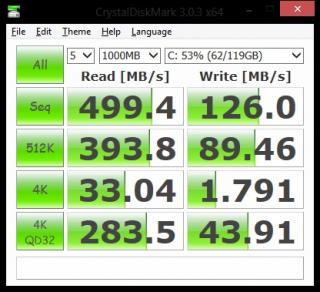
Attached Image Attached Image Attached Image

edit: I downloaded AS SSD & seems like seq write speed is ok, but not for the 4K. I google a bit & they say something to do with in-compressible file or what, dont really know what it is hmm.gif

This post has been edited by infernoaswen: Jan 24 2014, 03:37 AM
SUSkimsim
post Jan 24 2014, 06:17 AM

Let Me ❤️ You
*******
Senior Member
5,847 posts

Joined: Nov 2010
From: Malaysia 🇲🇾


QUOTE(infernoaswen @ Jan 24 2014, 02:50 AM)
Noob here, want to ask is this score normal for my plextor M5S 128gb SSD? I checked toms hardware chart, their write speed is 200MB/s but I am getting only 130  rclxub.gif

Also how do I check my SSD health? I play games a lot & prefer to install on my SSD rather than HDD & I know lots of writing will wear off the SSD but how do I check? I checked via crystaldiskInfo & it says 100% but I am skeptical  hmm.gif or I am just being paranoid?

C: is my main OS, D: is where my games are located (currently empty because I transferred all to HDD for re-partition since I need to install another os).

http://www.tomshardware.com/charts/ssd-cha...hmarks,129.html
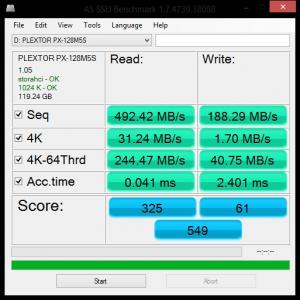
Attached Image Attached Image Attached Image

edit: I downloaded AS SSD & seems like seq write speed is ok, but not for the 4K. I google a bit & they say something to do with in-compressible file or what, dont really know what it is  hmm.gif
*
You can check your pc/laptop support SATA 2 or 3k write only.

Plextor M5S Specifications

Capacities
64GB (PX-64M5S)
Sequential Read (MB/s) - 520
Sequential Write (MB/s) - 90
Random Read (IOPS 4K) - 61,000
Random Write (IOPS 4K) - 25,000
Buffer Memory (DDR3) - 128MB
128 GB (PX-128M5S)
Sequential Read (MB/s) - 520
Sequential Write (MB/s) - 200
Random Read (IOPS 4K) - 71,000
Random Write (IOPS 4K) - 51,000
Buffer Memory (DDR3) - 256MB
256GB (PX-256M5S)
Sequential Read (MB/s) - 520
Sequential Write (MB/s) - 390
Random Read (IOPS 4K) - 73,000
Random Write (IOPS 4K) - 70,000
Buffer Memory (DDR3) - 512MB
Power Consumption (Typical): 0.7W (Idle); 2.8W (Active)
Temperature (Operating): 32 ºF to 158 ºF (0 ºC to 70 ºC)
Temperature (Non-operating): -40ºF to 185 ºF (-40 ºC to 85 ºC)
Shock: 1,500G/0.5 ms
Vibration (Operating): 7~800Hz, 2.17G (RMS)
MTBF: 1.5 million hour
Form Factor: 2.5"
Power Connector: 15-pin SATA connector for DC 5V input
Data Connector: 7-pin SATA connector
Dimensions (W x H x D): 69.85 x 100 x 9.5 mm
Weight: 2.54 oz / 75 g
Warranty: 3 years
Build and Design

Plextor uses an all-metal body with the PX-M5S, giving it a durable feel and a stylized look. The metal alloy used is presented with a brushed metal finish, adding a bit of texture and a very solid feel with the drive in your hand. Both top and bottom match in color and finish, which adds to the appearance and really rounds off this SSD.

This post has been edited by kimsim: Jan 24 2014, 06:21 AM

infernoaswen
post Jan 24 2014, 02:15 PM

(╯°□°)╯︵ ┻━┻)
*******
Senior Member
3,782 posts

Joined: Aug 2010
From: subang jaya


QUOTE(kimsim @ Jan 24 2014, 06:17 AM)
You can check your pc/laptop support SATA 2 or 3k write only.

Plextor M5S Specifications

Capacities
64GB (PX-64M5S)
Sequential Read (MB/s) - 520
Sequential Write (MB/s) - 90
Random Read (IOPS 4K) - 61,000
Random Write (IOPS 4K) - 25,000
Buffer Memory (DDR3) - 128MB
128 GB (PX-128M5S)
Sequential Read (MB/s) - 520
Sequential Write (MB/s) - 200
Random Read (IOPS 4K) - 71,000
Random Write (IOPS 4K) - 51,000
Buffer Memory (DDR3) - 256MB
256GB (PX-256M5S)
Sequential Read (MB/s) - 520
Sequential Write (MB/s) - 390
Random Read (IOPS 4K) - 73,000
Random Write (IOPS 4K) - 70,000
Buffer Memory (DDR3) - 512MB
Power Consumption (Typical): 0.7W (Idle); 2.8W (Active)
Temperature (Operating): 32 ºF to 158 ºF (0 ºC to 70 ºC)
Temperature (Non-operating): -40ºF to 185 ºF (-40 ºC to 85 ºC)
Shock: 1,500G/0.5 ms
Vibration (Operating): 7~800Hz, 2.17G (RMS)
MTBF: 1.5 million hour
Form Factor: 2.5"
Power Connector: 15-pin SATA connector for DC 5V input
Data Connector: 7-pin SATA connector
Dimensions (W x H x D): 69.85 x 100 x 9.5 mm
Weight: 2.54 oz / 75 g
Warranty: 3 years
Build and Design

Plextor uses an all-metal body with the PX-M5S, giving it a durable feel and a stylized look. The metal alloy used is presented with a brushed metal finish, adding a bit of texture and a very solid feel with the drive in your hand. Both top and bottom match in color and finish, which adds to the appearance and really rounds off this SSD.
*
How do I check that? I am using a maximus vi hero motherboard, it supports sata 3, 6gbps. hmm.gif
horns
post Jan 24 2014, 03:34 PM

\m/
*******
Senior Member
3,038 posts

Joined: Nov 2009
it's running at sata 3 speed.

as for health checking, crystal diskinfo should be good enough. or, you can get plextool from plextor website.

have you secure-erased it before? maybe it's at 'dirty state'. alternatively, leaving it alone/idle for a few hours might also help.


infernoaswen
post Jan 24 2014, 08:32 PM

(╯°□°)╯︵ ┻━┻)
*******
Senior Member
3,782 posts

Joined: Aug 2010
From: subang jaya


QUOTE(horns @ Jan 24 2014, 03:34 PM)
it's running at sata 3 speed.

as for health checking, crystal diskinfo should be good enough. or, you can get plextool from plextor website.

have you secure-erased it before? maybe it's at 'dirty state'. alternatively, leaving it alone/idle for a few hours might also help.
*
Nvm prob solved. Suspect irst causing the problem. Back to normal speed in clean os. Will test again when I have time. Thanks to sanko.
horns
post Jan 24 2014, 09:32 PM

\m/
*******
Senior Member
3,038 posts

Joined: Nov 2009
QUOTE(infernoaswen @ Jan 24 2014, 08:32 PM)
Nvm prob solved. Suspect irst causing the problem. Back to normal speed in clean os. Will test again when I have time. Thanks to sanko.
*
nice smile.gif
mengfart
post Jan 27 2014, 04:10 AM

༼ つ ◕_◕ ༽つ Giff Me Mana Kotol
******
Senior Member
1,701 posts

Joined: Oct 2010
From: Under your bed
I'm thinking to upgrade my HDD since i'm using 500gb which is not enough for me right now.

I've found out that seagate released a new product named SSHD and there's a seller in LYN who sells it.

https://forum.lowyat.net/topic/3088190/all

So, may I ask if it's compatible with lenovo Y580?

I'm not really that good with hardware stuff so lets say it's compatible, how do I copy all my files from my previous HDD to the new one?

Clone it or do a clean installation?

Kindly advise.

Thanks!

sai86
post Jan 27 2014, 11:41 AM

StilL LearninG
*******
Senior Member
4,934 posts

Joined: Sep 2008
From: Setapak


OCZ is back and with Vertex 460 for a BANG!! price is competitive as well.
http://www.guru3d.com/articles_pages/ocz_v..._review,19.html
300thecat
post Jan 27 2014, 08:15 PM

Enthusiast
*****
Senior Member
790 posts

Joined: Mar 2012
I just installed my Intel 530. For optimization, running Intel Toolbox should do the trick right? Is there further stuff that is required?

I also ran a benchmark check and my read/write is 432/95 which is a far-cry from the advertised 540/480. is it because I might be using SATAII?

This post has been edited by 300thecat: Jan 27 2014, 08:25 PM
SUSkimsim
post Jan 27 2014, 08:22 PM

Let Me ❤️ You
*******
Senior Member
5,847 posts

Joined: Nov 2010
From: Malaysia 🇲🇾


QUOTE(sai86 @ Jan 27 2014, 11:41 AM)
OCZ is back and with Vertex 460 for a BANG!! price is competitive as well.
http://www.guru3d.com/articles_pages/ocz_v..._review,19.html
*
Ya OCZ has lot of models

kenysl
post Jan 27 2014, 09:29 PM

Foodie
****
Senior Member
679 posts

Joined: Nov 2012


QUOTE(300thecat @ Jan 27 2014, 08:15 PM)
I just installed my Intel 530. For optimization, running Intel Toolbox should do the trick right? Is there further stuff that is required?

I also ran a benchmark check and my read/write is 432/95 which is a far-cry from the advertised 540/480. is it because I might be using SATAII?
*
SATA II should be the culprit, but I'm not sure that it would drop that much though.
Reference: (cr: maximumpc)
user posted image
300thecat
post Jan 28 2014, 11:19 AM

Enthusiast
*****
Senior Member
790 posts

Joined: Mar 2012
user posted image
Here's my readings. Dunno why the writing is so bad, almost 5 times worse than advertised.

This post has been edited by 300thecat: Jan 28 2014, 11:22 AM
SUSkimsim
post Jan 28 2014, 12:45 PM

Let Me ❤️ You
*******
Senior Member
5,847 posts

Joined: Nov 2010
From: Malaysia 🇲🇾


QUOTE(300thecat @ Jan 28 2014, 11:19 AM)
user posted image
Here's my readings. Dunno why the writing is so bad, almost 5 times worse than advertised.
*
What pc/laptop r u using now?

This is intel 530 120 or 240gb?

This post has been edited by kimsim: Jan 28 2014, 12:45 PM
wildwestgoh
post Jan 28 2014, 04:07 PM

Look at all my stars!!
*******
Senior Member
2,215 posts

Joined: Jul 2005


QUOTE(300thecat @ Jan 28 2014, 11:19 AM)
user posted image
Here's my readings. Dunno why the writing is so bad, almost 5 times worse than advertised.
*
Judging from the benchmark, something is little wrong, especially the 104422K.
I'm not so definite sure about that error but could be the mainboard driver issue? hmm.gif
I never tried my SSD on my old Core 2 system of which still running SATA2... erm, may give it a try if I'm darn free, hehe....

Anyway, just to confirm, post your PC info in full if possible, could use the Aida64 report form with Hardware specs only or any other software that can extract your hardware info without much trouble like open up casing.
300thecat
post Jan 28 2014, 04:09 PM

Enthusiast
*****
Senior Member
790 posts

Joined: Mar 2012
QUOTE(kimsim @ Jan 28 2014, 12:45 PM)
What pc/laptop r u using now?

This is intel 530 120 or 240gb?
*
user posted image
Here's my specs.

using Asus N55SL, bought it about two years ago. I don't know how to determine if I'm using SATAII or SATAIII now.. =/
QUOTE(wildwestgoh @ Jan 28 2014, 04:07 PM)
Judging from the benchmark, something is little wrong, especially the 104422K.
I'm not so definite sure about that error but could be the mainboard driver issue?  hmm.gif
I never tried my SSD on my old Core 2 system of which still running SATA2... erm, may give it a try if I'm darn free, hehe....

Anyway, just to confirm, post your PC info in full if possible, could use the Aida64 report form with Hardware specs only or any other software that can extract your hardware info without much trouble like open up casing.
*
Thanks for your detailed reply. I appreciate it a lot.

Oh and just asking, SSD read means computer boot speed, but writing only affects saving and copying data right?

This post has been edited by 300thecat: Jan 28 2014, 04:11 PM
-kytz-
post Jan 28 2014, 05:42 PM

10k Club
********
All Stars
12,573 posts

Joined: Nov 2008
For sure it's SATA II, I don't even know if there are any laptops with SATA III connection nowadays, maybe not even the high end laptops.

Honestly, don't need to bother between SATA II and SATA III, won't make any real world difference.

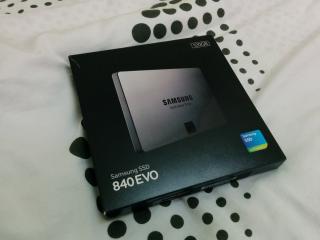
Btw, just got my 2nd Samsung SSD. This time in the form of the Evo brows.gif

Attached Image

This post has been edited by -kytz-: Jan 28 2014, 05:43 PM
SUSkimsim
post Jan 28 2014, 06:40 PM

Let Me ❤️ You
*******
Senior Member
5,847 posts

Joined: Nov 2010
From: Malaysia 🇲🇾


QUOTE(-kytz- @ Jan 28 2014, 05:42 PM)
For sure it's SATA II, I don't even know if there are any laptops with SATA III connection nowadays, maybe not even the high end laptops.

Honestly, don't need to bother between SATA II and SATA III, won't make any real world difference.

Btw, just got my 2nd Samsung SSD. This time in the form of the Evo brows.gif

Attached Image
*
Congrats your new purchase ssd
dante5047
post Jan 29 2014, 11:24 AM

Getting Started
**
Junior Member
112 posts

Joined: Mar 2010
From: Dark Desert Highway


Going to buy Kingston HyperX SSD to celebrate CNY tongue.gif
Does anybody have any comment on it? Thanks~

128 Pages « < 43 44 45 46 47 > » Top
Topic ClosedOptions
 

Change to:
| Lo-Fi Version
0.0294sec    0.70    6 queries    GZIP Disabled
Time is now: 10th December 2025 - 03:51 PM