

Hi guys/gals,
Have anyone try using your ASDL/VSDL Modem by plugging a 4g USB Modem into the usb port? Thanks
Home Networking ASUS Malaysia Networking User & Technical Support, Managed by ASUS Malaysia Representative
Home Networking ASUS Malaysia Networking User & Technical Support, Managed by ASUS Malaysia Representative
|
|
 Sep 21 2017, 11:51 AM Sep 21 2017, 11:51 AM
|
 
Junior Member
491 posts Joined: May 2005 
|
Hi guys/gals,
Have anyone try using your ASDL/VSDL Modem by plugging a 4g USB Modem into the usb port? Thanks |
|
|
|
|
|
Sep 21 2017, 01:55 PM
|

Senior Member
3,037 posts Joined: Dec 2011 
|
QUOTE(carjack18 @ Sep 21 2017, 11:51 AM) Hi guys/gals, Not so model support USB dongle.Have anyone try using your ASDL/VSDL Modem by plugging a 4g USB Modem into the usb port? Thanks  Try check your modem manual PDF regarding what their USB port supported. |
|
|
Sep 21 2017, 07:39 PM
|
|
Newbie
3 posts Joined: Feb 2014
|
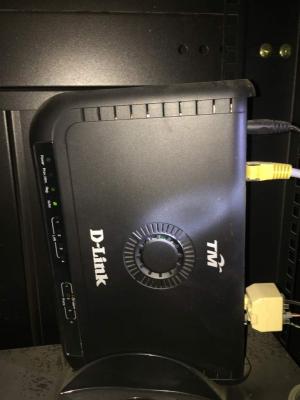
Is this Asus RT-AC68U can replace my current router which the LAN4 (red colour) is special for Unifa Phone Line modem.
Does this Asus RT-AC68U got LAN4 port which can connect my Phone Line modem? Attached thumbnail(s) 
|
|
|
Sep 22 2017, 10:46 AM
Show posts by this member only | IPv6 | Post
#7164
|

Junior Member
245 posts Joined: Feb 2010
|
QUOTE(carjack18 @ Sep 21 2017, 12:51 PM) Hi guys/gals, All ASUS AC modem router support 4G USB modem.Have anyone try using your ASDL/VSDL Modem by plugging a 4g USB Modem into the usb port? Thanks Attached thumbnail(s) 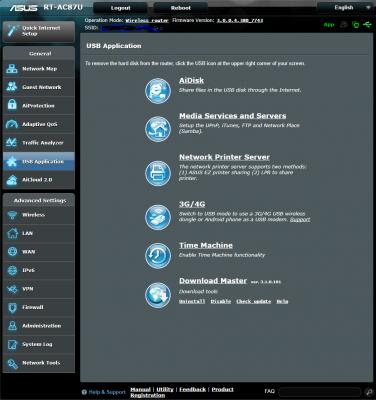
|
|
|
Sep 22 2017, 02:44 PM
|
|
Junior Member
491 posts Joined: May 2005
|
QUOTE(pl95077 @ Sep 22 2017, 10:46 AM) All ASUS AC modem router support 4G USB modem. Thanks, I intend to get a Asus AC modem router and connect to a USB 4g modem to get the connection. |
|
|
Sep 23 2017, 11:52 AM
|
|
Junior Member
76 posts Joined: Jan 2011
|
Hi Asus,
May I know how do I find NTP server. After updating the firmware to 3.0.0.4.380.7743 for Asus router RT18U, I've done the quick internet setup and entered the correct details and requirement (Unifi-Home) I'm still unable to connec to the internet. It keeps showing me this error: *Reminder: The system time has not been synchronized with an NTP server. Can help? Thanks! |
|
|
|
|
|
Sep 23 2017, 12:06 PM
|
|
Senior Member
3,037 posts Joined: Dec 2011
|
QUOTE(crazydjrock @ Sep 23 2017, 11:52 AM) Hi Asus, Hard reset router and re setup again.May I know how do I find NTP server. After updating the firmware to 3.0.0.4.380.7743 for Asus router RT18U, I've done the quick internet setup and entered the correct details and requirement (Unifi-Home) I'm still unable to connec to the internet. It keeps showing me this error: *Reminder: The system time has not been synchronized with an NTP server. Can help? Thanks! |
|
|
Sep 23 2017, 12:14 PM
|
|
Junior Member
76 posts Joined: Jan 2011
|
QUOTE(jusbella @ Sep 23 2017, 12:06 PM) Hard reset router and re setup again. Hi,I tried that suggestion but it still could not identify NTP server. Any other methods I could try? Thanks! |
|
|
Sep 23 2017, 12:16 PM
|
|
Senior Member
3,037 posts Joined: Dec 2011
|
QUOTE(crazydjrock @ Sep 23 2017, 12:14 PM) Hi, You try check the router can change ntp server or not? If can then you can search Google list of ntp server and change it.I tried that suggestion but it still could not identify NTP server. Any other methods I could try? Thanks! |
|
|
Sep 23 2017, 12:26 PM
|
|
Junior Member
76 posts Joined: Jan 2011
|
QUOTE(jusbella @ Sep 23 2017, 12:16 PM) You try check the router can change ntp server or not? If can then you can search Google list of ntp server and change it. That also I have tried changing to local NTP server but it still did not register. It shows it is connected but due to NTP time not in sync, it is stated as not connected |
|
|
Sep 23 2017, 12:35 PM
|

Senior Member
4,786 posts Joined: Jan 2003
|
QUOTE(crazydjrock @ Sep 23 2017, 12:26 PM) That also I have tried changing to local NTP server but it still did not register. It shows it is connected but due to NTP time not in sync, it is stated as not connected I wasn't aware that connection to ntp server is needed for internet to work with an Asus router. I set mine to manual time configuration if I recall correctly. No problems with internet access. |
|
|
Sep 23 2017, 03:57 PM
Show posts by this member only | IPv6 | Post
#7172
|

Junior Member
24 posts Joined: Dec 2010
|
Hi, I just switched to TIME, how to setup the internet? using RT-N66U
|
|
|
Sep 23 2017, 04:01 PM
|
|
Senior Member
3,037 posts Joined: Dec 2011
|
QUOTE(Max.Plan @ Sep 23 2017, 03:57 PM) Hi, I just switched to TIME, how to setup the internet? using RT-N66U Choose normal pppoe profile, time doesn't need any special requirement. |
|
|
|
|
|
Sep 23 2017, 05:04 PM
|
|
Junior Member
24 posts Joined: Dec 2010
|
QUOTE(jusbella @ Sep 23 2017, 04:01 PM) Choose normal pppoe profile, time doesn't need any special requirement. It works now, thanks.. |
|
|
Sep 23 2017, 05:04 PM
|
|
Junior Member
24 posts Joined: Dec 2010
|
QUOTE(jusbella @ Sep 23 2017, 04:01 PM) Choose normal pppoe profile, time doesn't need any special requirement. It works now, thanks.. |
|
|
Sep 24 2017, 05:42 PM
|

Senior Member
5,827 posts Joined: Jan 2003 From: Selayang, Selangor
|
QUOTE(ASUSmy @ Jul 12 2017, 02:53 PM) Hi RViN, Looks like its still happening.Can you try download the utilities from our websites? The latest version should be Version 1.0.5.5. Thank you For details, see this: QUOTE Two of the minidump files showed a PAGE_FAULT_IN_NONPAGED_AREA (50) stop error caused by the vuhub.sys: BugCheck 50, {ffff9f8f4dc230e6, 0, fffff809bf8a8000, 0} Unable to load image \SystemRoot\System32\drivers\vuhub.sys, Win32 error 0n2 *** WARNING: Unable to verify timestamp for vuhub.sys *** ERROR: Module load completed but symbols could not be loaded for vuhub.sys Probably caused by : vuhub.sys ( vuhub+8000 ) The process that crashed was the UsbService64.exe: Owning Process ffffa308971c7640 Image: UsbService64.exe The vuhub.sys, which appears to be dated from 2007, and theUsbService64.exe are components of an ASUS router utility (printer.exe) to help setting up a USB printer to connect to the router and use EZ printer sharing. Can you uninstall the ASUS printer utility? Source: https://answers.microsoft.com/en-us/windows...3a-4e05035a2441 More: https://answers.microsoft.com/en-us/windows...b1-cb3d41baaa91 Even more: http://vip.asus.com/forum/view.aspx?board_...SLanguage=en-us https://answers.microsoft.com/en-us/windows...92-db209bd7139d There driver in use needs to be updated (vuhub.sys). I've been using the LPR method for printing (which doesn't allow me to share the scan function of my printer) but now it seems even the LPR function isn't playing well, needing me to restart the printer quite often to get it to print. So I tried this utility again, which doesn't work either, unless random periodic BSODs in windows counts as working. Very disappointed. Never had any issues with my TP Link printer utility that allows for sharing of multifunction printers without problems. This post has been edited by RViN: Sep 24 2017, 05:48 PM |
|
|
Sep 26 2017, 07:01 PM
Show posts by this member only | IPv6 | Post
#7177
|
|
Senior Member
2,380 posts Joined: Mar 2005
|
Hi guys,
Anybody knows that if it's possible to remove the vlan tagging for the LAN4 port for hyppTV? I tried selecting none under the ISP profile and I can't even connect to unifi. Need the LAN4 port for other usage as I'm not using hyppTV at all. |
|
|
Sep 26 2017, 08:39 PM
|
 
Elite
8,415 posts Joined: Jul 2008 
|
QUOTE(kenlui @ Sep 26 2017, 07:01 PM) Hi guys, Select the Unifi-Business profile. It is basically the same thing just without HyppTV.Anybody knows that if it's possible to remove the vlan tagging for the LAN4 port for hyppTV? I tried selecting none under the ISP profile and I can't even connect to unifi. Need the LAN4 port for other usage as I'm not using hyppTV at all. |
|
|
Sep 26 2017, 10:09 PM
Show posts by this member only | IPv6 | Post
#7179
|
|
Senior Member
2,380 posts Joined: Mar 2005
|
QUOTE(blacktubi @ Sep 26 2017, 08:39 PM) Select the Unifi-Business profile. It is basically the same thing just without HyppTV. Thanks for the tips. But i managed to configure it manually, Vlan tag for WAN is 500 while IPTV is 600. I just had to remove the tag from Lan4. |
|
|
Sep 28 2017, 01:54 AM
|

Junior Member
37 posts Joined: Aug 2017
|
Hi Asus Support
Between ASUS RT-AC1300UHP and ASUS RT-AC55UHP, which router has better wifi coverage? Does the ASUS RT-AC1300UHP has a DLNA (media) server built in? |
| Change to: |  0.0311sec 0.0311sec
 1.05 1.05
 6 queries 6 queries
 GZIP Disabled GZIP Disabled
Time is now: 12th December 2025 - 09:00 PM |
 Quote
Quote