Welcome Guest ( Log In | Register )

826 Pages « < 201 202 203 204 205 > » Bottom

Outline · [ Standard ] · Linear+

Home Networking ASUS Malaysia Networking User & Technical Support, Managed by ASUS Malaysia Representative

views
     
SUSTXSim
post Jan 8 2016, 06:51 PM

TIME Fibre Assistant and Wi-Fi Router Assistant
*******
Senior Member
2,137 posts

Joined: Oct 2015


QUOTE(kattz @ Jan 8 2016, 05:46 PM)
Hello,

I am hoping you would be able to help me out as I have literally tried out everything and I just think now it's a hardware issue.

I have been using the RT-AC68U since around April 2014 with TIME fiber and Astro IPTV. The setup is that the modem is the original Huawei modem, and I am using the Asus as a wireless router, set up with a 2.4 GHz and 5 GHz network. During this time everything was stable, and I maybe reset my router a few times.

Everything was working fine until November of 2015, when I started getting random disconnect problems with my internet. Please note that there were no changes in my setup or my internet - just one day the wireless network was working but no internet access. Initially I just assumed a restart was required (which fixed the problem for a while) but it started happening regularly.

Every few days in the beginning, the internet would stop working, and I would have to restart the router to get it working again, or run the "internet connection wizard" from inside the router software.

My next step was to upgrade the firmware and see perhaps that would fix it, but nothing changed. Another problem started to occur (independent of firmware), where I am now losing my wireless connection altogether. I will be connected fine, internet working but all of a sudden packets drop and my device are disconnected from the network and I need to restart the router. I have tried searching google using the logs from my router but to no avail. Every time I restart my router, the logs are wiped clean as well, and the logging date is reset to 1st of Aug, and then a message comes after a while saying that a discrepancy of 6583456 minutes or something was detected, then the log dates are fixed until the next restart.

This is not a modem issue either: I tried connecting the Linksys router provided by TIME, and that worked fine for a whole month without any restarts or loss of internet connection.

I have checked the running temperature of my router CPU - it hovers between 96C and 100C. My ambient room temperature is not that high - maybe this could be a reason?

I really have tried everything possible but the last resort seems to be that I will need to return the router under warranty and ask for a replacement? I still have over a year left of the 3 year warranty. I have otherwise been very happy with the router overall, and was even thinking of adding a NAS to my setup. Now I will wait for the router issue to be sorted before moving forward.

Any advice/help regarding fixes or warranty process would be greatly appreciated! I bought the router off the forum here from Mika. Thank you!
*
Hi, are you still having problems? Have you tried to setup again by fill PPPoE ID and Password?

rjflyguy
post Jan 9 2016, 01:36 AM

Casual
***
Junior Member
324 posts

Joined: Jan 2006


QUOTE(ASUSmy @ Jan 8 2016, 11:24 AM)
Hi rjflyguy,

Below is the link to download the beta firmware for the RT-AC55UHP.

https://www.asuswebstorage.com/navigate/s/6...A49EA86234C9A2Y

Thank you
*
Thank you bro. Will try tomorrow morning the beta firmware....
readix
post Jan 9 2016, 01:44 AM

Casual
***
Junior Member
305 posts

Joined: Jan 2003


hi...

i have n66u. i have a problem where my port forwarding settings will self-disappear after a period of time. when i tried to add the settings back, the port forwarding list will show nothing. i kept updating to latest firmware but the same prob persist.

has anyone experience this before?

thanks
ericlawyh
post Jan 9 2016, 11:21 PM

Getting Started
**
Junior Member
116 posts

Joined: Oct 2015
Hello ASUSmy,

I am happy with the RT-AC1200HP's performance as a WiFi router.

But, the NAS performance is truly terrible and pathetic.

Below is the actual screenshot when I copy over some files directly from Window 10 laptop via 5 GHz wireless connection to an external WD USB 3.0 HDD connected to RT-AC1200HP.

Attached Image
cyberazi
post Jan 10 2016, 03:05 PM

New Member
*
Junior Member
13 posts

Joined: Nov 2004


HI,
I just got my Maxis installed and i immediately found out the thomson router suxxx. i have a spare AC66U router lying around but if recall its from SG so i duno if the video on the instruction will help can anyone confirm this?

Also how do i get my fibre username and password???
voncrane
post Jan 10 2016, 03:08 PM

Noir et fier!
*******
Senior Member
7,120 posts

Joined: Oct 2011
From: Wakanda


QUOTE(cyberazi @ Jan 10 2016, 03:05 PM)
HI,
I just got my Maxis installed and i immediately found out the thomson router suxxx. i have a spare AC66U router lying around but if recall its from SG so i duno if the video on the instruction will help can anyone confirm this?

Also how do i get my fibre username and password???
*
Call customer service for login details.. You can try setting up the AC66U first to see if it'll work.
Kah_hou
post Jan 10 2016, 04:40 PM

New Member
*
Newbie
4 posts

Joined: Jan 2016
QUOTE(emy_xvidia @ Oct 12 2015, 07:46 PM)
sweet! drool.gif and what's greater is that its 2.4Ghz band can reach up to 1Gbps, 5Ghz up to 1.9Gbps if I'm not mistaken.. so it's just not a new router with more LAN ports tongue.gif
*
Do you know where I can get this is Malaysia?
Kah_hou
post Jan 10 2016, 04:40 PM

New Member
*
Newbie
4 posts

Joined: Jan 2016
QUOTE(emy_xvidia @ Oct 12 2015, 07:46 PM)
sweet! drool.gif and what's greater is that its 2.4Ghz band can reach up to 1Gbps, 5Ghz up to 1.9Gbps if I'm not mistaken.. so it's just not a new router with more LAN ports tongue.gif
*
Kah_hou
post Jan 10 2016, 04:41 PM

New Member
*
Newbie
4 posts

Joined: Jan 2016
Do you know where I can get this in Malaysia and how much is it?
Kah_hou
post Jan 10 2016, 10:24 PM

New Member
*
Newbie
4 posts

Joined: Jan 2016
The asus rt-ac88u
pl95077
post Jan 11 2016, 12:04 AM

Getting Started
**
Junior Member
245 posts

Joined: Feb 2010
QUOTE(cyberazi @ Jan 10 2016, 04:05 PM)
HI,
I just got my Maxis installed and i immediately found out the thomson router suxxx. i have a spare AC66U router lying around but if recall its from SG so i duno if the video on the instruction will help can anyone confirm this?

Also how do i get my fibre username and password???
*
Login in to your thomson router you will able to see your user id, password is add 1 behind your user id.

for setup you may refer to below link:
https://www.youtube.com/watch?v=iBRbk1FSFj0
uhlaw
post Jan 11 2016, 12:24 AM

-[L]aw -
*******
Senior Member
2,896 posts

Joined: Nov 2005
From: Criminal Underworld


Tomorrow technician will come to my house to install UniFi.
And I also bought RT-N12HP B1 and update firmware to Version 3.0.0.4.378.9443
Is there anything that I have to take note? Please kindly guide me smile.gif

This post has been edited by uhlaw: Jan 11 2016, 12:26 AM
triad
post Jan 11 2016, 12:31 AM

Casual
***
Junior Member
356 posts

Joined: Apr 2005
From: KOKO KOVID
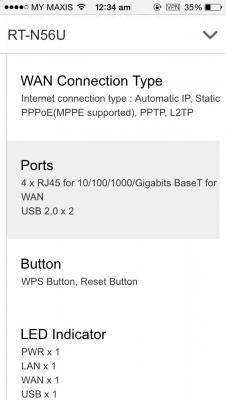
N56 wan port and lan port is 100 mbps or 1000 mbps?
@ASUSmy
jusbella
post Jan 11 2016, 12:35 AM

Look at all my stars!!
*******
Senior Member
3,037 posts

Joined: Dec 2011


QUOTE(triad @ Jan 11 2016, 12:31 AM)
N56 wan port and lan port is 100 mbps or 1000 mbps?
@ASUSmy
*


Attached thumbnail(s)
Attached Image
emy_xvidia
post Jan 11 2016, 02:08 AM

Look at all my stars!!
*******
Senior Member
2,735 posts

Joined: Mar 2006
From: Malaysia - Swindon Town
QUOTE(Kah_hou @ Jan 10 2016, 04:40 PM)
Do you know where I can get this is Malaysia?
*
I remembered Asus Malaysia said about not reaching here yet. Somewhere in February.
TSASUSmy
post Jan 11 2016, 10:07 AM

Look at all my stars!!
*******
Senior Member
2,319 posts

Joined: Mar 2010
QUOTE(uhlaw @ Jan 11 2016, 12:24 AM)
Tomorrow technician will come to my house to install UniFi.
And I also bought RT-N12HP B1 and update firmware to Version 3.0.0.4.378.9443
Is there anything that I have to take note? Please kindly guide me smile.gif
*
Hi uhlaw,

You follow the video below do to the setup for our router to support the UNIFI.

https://www.youtube.com/watch?v=ESAPAJqWxH4

Thank you
TSASUSmy
post Jan 11 2016, 10:12 AM

Look at all my stars!!
*******
Senior Member
2,319 posts

Joined: Mar 2010
QUOTE(readix @ Jan 9 2016, 01:44 AM)
hi...

i have n66u. i have a problem where my port forwarding settings will self-disappear after a period of time. when i tried to add the settings back, the port forwarding list will show nothing. i kept updating to latest firmware but the same prob persist.

has anyone experience this before?

thanks
*
Hi readix,

May I know what is your current firmware version? And has you try to do a factory reset after the update?

And may I know where is this router use at? Restaurant? cafe? bar? or any place that has a lot of people going in and out and used the WiFi?

Thank you

This post has been edited by ASUSmy: Jan 11 2016, 10:13 AM
TSASUSmy
post Jan 11 2016, 10:17 AM

Look at all my stars!!
*******
Senior Member
2,319 posts

Joined: Mar 2010
QUOTE(kattz @ Jan 8 2016, 05:46 PM)
Hello,

I am hoping you would be able to help me out as I have literally tried out everything and I just think now it's a hardware issue.

I have been using the RT-AC68U since around April 2014 with TIME fiber and Astro IPTV. The setup is that the modem is the original Huawei modem, and I am using the Asus as a wireless router, set up with a 2.4 GHz and 5 GHz network. During this time everything was stable, and I maybe reset my router a few times.

Everything was working fine until November of 2015, when I started getting random disconnect problems with my internet. Please note that there were no changes in my setup or my internet - just one day the wireless network was working but no internet access. Initially I just assumed a restart was required (which fixed the problem for a while) but it started happening regularly.

Every few days in the beginning, the internet would stop working, and I would have to restart the router to get it working again, or run the "internet connection wizard" from inside the router software.

My next step was to upgrade the firmware and see perhaps that would fix it, but nothing changed. Another problem started to occur (independent of firmware), where I am now losing my wireless connection altogether. I will be connected fine, internet working but all of a sudden packets drop and my device are disconnected from the network and I need to restart the router. I have tried searching google using the logs from my router but to no avail. Every time I restart my router, the logs are wiped clean as well, and the logging date is reset to 1st of Aug, and then a message comes after a while saying that a discrepancy of 6583456 minutes or something was detected, then the log dates are fixed until the next restart.

This is not a modem issue either: I tried connecting the Linksys router provided by TIME, and that worked fine for a whole month without any restarts or loss of internet connection.

I have checked the running temperature of my router CPU - it hovers between 96C and 100C. My ambient room temperature is not that high - maybe this could be a reason?

I really have tried everything possible but the last resort seems to be that I will need to return the router under warranty and ask for a replacement? I still have over a year left of the 3 year warranty. I have otherwise been very happy with the router overall, and was even thinking of adding a NAS to my setup. Now I will wait for the router issue to be sorted before moving forward.

Any advice/help regarding fixes or warranty process would be greatly appreciated! I bought the router off the forum here from Mika. Thank you!
*
Hi kattz,

May I know what is your current firmware version and has you tried to do the factory reset after the latest firmware update?

And can you try changing the WiFi channel of the WiFi.

Thank you

kattz
post Jan 11 2016, 10:24 AM

New Member
*
Junior Member
13 posts

Joined: Dec 2011


Hi both,

Thanks for your replies - I am still having issues and now they are so bad that the internet was disconnecting every 5 minutes or the router kept dropping signals. I have since switched to my Linksys router and everything has been stable for 4 days now - not a single restart or wireless drop.

To answer your question, my firmware version is 3.0.0.4.380.1031 that I downloaded from the Asus website itself, completely reset my router and NVRAM back to factory settings then loaded the firmware on via the recovery tool. Did not make any difference at all.

I've also tried changing to various channels for both my networks but nothing seems to help.

Would you suggest I go about submitting a warranty claim now?
TSASUSmy
post Jan 11 2016, 10:49 AM

Look at all my stars!!
*******
Senior Member
2,319 posts

Joined: Mar 2010
QUOTE(kattz @ Jan 11 2016, 10:24 AM)
Hi both,

Thanks for your replies - I am still having issues and now they are so bad that the internet was disconnecting every 5 minutes or the router kept dropping signals. I have since switched to my Linksys router and everything has been stable for 4 days now - not a single restart or wireless drop.

To answer your question, my firmware version is 3.0.0.4.380.1031 that I downloaded from the Asus website itself, completely reset my router and NVRAM back to factory settings then loaded the firmware on via the recovery tool. Did not make any difference at all.

I've also tried changing to various channels for both my networks but nothing seems to help.

Would you suggest I go about submitting a warranty claim now?
*
Hi kattz,

If the problem still persist even after updating the firmware to the latest then you can send it for warranty claim.

You can try asking Mika where he bought it, or if he is a dealer, you can send it back to him to ask him to send for warranty claim.

Thank you

826 Pages « < 201 202 203 204 205 > » Top
 

Change to:
| Lo-Fi Version
0.0327sec    0.79    6 queries    GZIP Disabled
Time is now: 13th December 2025 - 01:34 AM