Welcome Guest ( Log In | Register )

826 Pages « < 202 203 204 205 206 > » Bottom

Outline · [ Standard ] · Linear+

Home Networking ASUS Malaysia Networking User & Technical Support, Managed by ASUS Malaysia Representative

views
     
TSASUSmy
post Jan 11 2016, 11:14 AM

Look at all my stars!!
*******
Senior Member
2,319 posts

Joined: Mar 2010
QUOTE(ericlawyh @ Jan 9 2016, 11:21 PM)
Hello ASUSmy,

I am happy with the RT-AC1200HP's performance as a WiFi router.

But, the NAS performance is truly terrible and pathetic.

Below is the actual screenshot when I copy over some files directly from Window 10 laptop via 5 GHz wireless connection to an external WD USB 3.0 HDD connected to RT-AC1200HP.

[attachmentid=5744279]
*
Hi ericlawyh,

With the same files, may I know what is the transfer rate that you get if you plug in the HDD to the laptop USB 2.0 when transferring the files.

And may I know what is your WiFi adapter model for your laptop.

Thank you
readix
post Jan 11 2016, 02:34 PM

Casual
***
Junior Member
305 posts

Joined: Jan 2003


QUOTE(ASUSmy @ Jan 11 2016, 10:12 AM)
Hi readix,

May I know what is your current firmware version? And has you try to do a factory reset after the update?

And may I know where is this router use at? Restaurant? cafe? bar? or any place that has a lot of people going in and out and used the WiFi?

Thank you
*
Firmware Version:3.0.0.4.378_9459.

yes, factory reset after every update.

used in cafe.

Thanks
TSASUSmy
post Jan 11 2016, 05:42 PM

Look at all my stars!!
*******
Senior Member
2,319 posts

Joined: Mar 2010
QUOTE(readix @ Jan 11 2016, 02:34 PM)
Firmware Version:3.0.0.4.378_9459.

yes, factory reset after every update.

used in cafe.

Thanks
*
Hi readix,

Can you try updating the beta firmware from the link below?

https://www.asuswebstorage.com/navigate/s/9...A4C90CF8079479Y

Thank you
3antz
post Jan 11 2016, 09:13 PM

Getting Started
**
Junior Member
206 posts

Joined: Aug 2011
Hi, can i know which is the latest firmware for RTN12HP? Via the link on frontpage is 3.0.0.4.376.4018. If I search on Asus it is 3.0.0.4.378.9443 ? Which is the correct version? tnx
jimmy_none
post Jan 11 2016, 09:17 PM

On my way
****
Senior Member
648 posts

Joined: Sep 2006


hi.. i am planning to get a modem for streamyx.. may I know is DSL-N12E supported? thanks

This post has been edited by jimmy_none: Jan 11 2016, 09:29 PM
Netto Hikari
post Jan 11 2016, 10:53 PM

Solution Architect?
*******
Senior Member
2,410 posts

Joined: Jan 2003
From: Selangor


guys, how do u setup asus router for maxis fibre? i tried the youtube tutorial, but cant connect. i connect the WAN port from asus to port 2 of huawei man modem, the same port that the maxis provided router.

This post has been edited by Netto Hikari: Jan 11 2016, 10:54 PM
Skoosha
post Jan 12 2016, 02:33 AM

New Member
*
Junior Member
32 posts

Joined: Aug 2015
QUOTE(3antz @ Jan 11 2016, 09:13 PM)
Hi, can i know which is the latest firmware for RTN12HP? Via the link on frontpage is 3.0.0.4.376.4018. If I search on Asus it is 3.0.0.4.378.9443 ? Which is the correct version? tnx
*
Was wondering the same myself... I just dug out my old 12 HP after having some problems with the D-link AC 750 (Dir 816). The answer to your question will depend on what Revision of RTN 12HP you got.. If you have the B1 you can flash the latest which is 3.0.0.4.378.9443.
This leads to my question addressed to ASUS MY.. Both revision of the router started of using same firmware version numbers, with the first upgrade to 4018 fixing the same issues.. The B1 then got 3 more updates to the current 9443 with numerous security and other upgrades... Does this mean that the non B1 revision is still lacking the following??

ASUS RT-N12HP_B1 Firmware version 3.0.0.4.378.7449

Security fixes
- Enhanced the login authentication strength and fixed related issues.
- Forced administrator to change the default password "admin" in internet setup wizard.
- Added protection mechanism for GUI login brute-force attack for login username and password.
- Administrator can assign a specified IP to login GUI in Administration > System > "Allow only specified IP.
- Fixed CSRF and XSS vulnerability when router is in default status.
- Fixed infosvr security issue.

ASUS RT-N12HP_B1 Firmware version 3.0.0.4.378.9165

Security Fixes
- Fixed CVE-2015-6949 buffer overflow issue, special thanks for Elvis Collado at Praetorian.
- Fixed Web server Accept-Language buffer overflow, special thanks for Elvis Collado at DVLabs.
- Fixed Web server URL handler buffer overflow special thanks for Elvis Collado at DVLabs.
- Fixed CSRF and XSS vulnerability.
- Fixed infosvr security issue
- Enhanced router login password and wireless password (WPA2) strength check method to against brute-force attack.
- Reject administrator to set too easy to guess login and wireless password to avoid brute-force attack.

ASUS RT-N12HP B1 Firmware version 3.0.0.4.378.9443

Security fixes:
- Fixed User-Agent buffer overflow.
- Fixed null ptr dereference in https issue.
- Fixed buffer overflow issues.
- Modified brute-force protection mechanism in router login page.
- Fixed CVE-2015-6949 buffer overflow issue.
- Fixed Web server Accept-Language buffer overflow.
- Fixed Web server URL handler buffer overflow.
- Fixed CSRF and XSS vulnerability.
- Enhanced router login password and wireless password(WPA2) strength check method to against brute-force attack.
- Reject administrator to set too easy to guess login and wireless password to avoid brute-force attack.
- Fixed CSRF and XSS vulnerability when router is in default status (user does not set the router yet)..

As you can see there has been extensive work to get the B1 Patched and updated....
Is the non B1 Rev safe to use without all these security updates??

Thanks for your help

Roger

TSASUSmy
post Jan 12 2016, 10:44 AM

Look at all my stars!!
*******
Senior Member
2,319 posts

Joined: Mar 2010
QUOTE(jimmy_none @ Jan 11 2016, 09:17 PM)
hi.. i am planning to get a modem for streamyx.. may I know is DSL-N12E supported? thanks
*
Hi jimmy_none,

Yes, DSL-N12E can support Streamyx.

Thank you
sgmichael
post Jan 12 2016, 10:49 AM

Getting Started
**
Junior Member
206 posts

Joined: Nov 2011
Hi,
I'm new in wifi technical , need help from here networking expertise.

I need to setup a standalone wifi hup for sharing files in between 10-15 laptops and 2 wifi printers, this wifi hub is to configure as router for devices access to a main single laptop ( this laptop work as data storage center).

Kindly advise, possible to have this wifi hub and it can configure and work with above require environment ? If yes, what is the device can recommend ?

Thanks.


ericlawyh
post Jan 12 2016, 10:52 PM

Getting Started
**
Junior Member
116 posts

Joined: Oct 2015
QUOTE(ASUSmy @ Jan 11 2016, 11:14 AM)
Hi ericlawyh,

With the same files, may I know what is the transfer rate that you get if you plug in the HDD to the laptop USB 2.0 when transferring the files.

And may I know what is your WiFi adapter model for your laptop.

Thank you
*
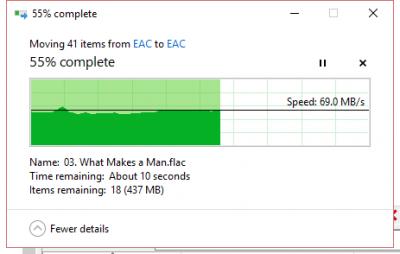
Bear in mind that, the now-aging USB 2.0 standard can theoretically transfer data at a very high 480 megabits per second (mbps), or 60 megabytes per second (MBps).

But, what happened to the ASUS Router NAS performance throughput? Can you provide the actual tested performance statistics for the higher grade AC class routers?

Below are the screenshots for your reference.

File transfer rate when connecting the HDD via USB 2.0:
Attached Image

File transfer rate when connecting the HDD via USB 3.0
Attached Image

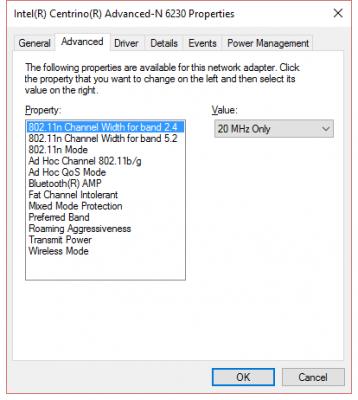
Wifi Adapter properties:
Attached Image
Netto Hikari
post Jan 12 2016, 10:58 PM

Solution Architect?
*******
Senior Member
2,410 posts

Joined: Jan 2003
From: Selangor


QUOTE(Netto Hikari @ Jan 11 2016, 10:53 PM)
guys, how do u setup asus router for maxis fibre? i tried the youtube tutorial, but cant connect. i connect the WAN port from asus to port 2 of huawei man modem, the same port that the maxis provided router.
*
@ASUSmy
i tried both maxis mode available in the drop down menu, but still cannot connect.

This post has been edited by Netto Hikari: Jan 12 2016, 10:58 PM
Netto Hikari
post Jan 12 2016, 11:10 PM

Solution Architect?
*******
Senior Member
2,410 posts

Joined: Jan 2003
From: Selangor


QUOTE(ericlawyh @ Jan 12 2016, 10:52 PM)
Bear in mind that, the now-aging USB 2.0 standard can theoretically transfer data at a very high 480 megabits per second (mbps), or 60 megabytes per second (MBps).

But, what happened to the ASUS Router NAS performance throughput? Can you provide the actual tested performance statistics for the higher grade AC class routers?

Below are the screenshots for your reference.

File transfer rate when connecting the HDD via USB 2.0:
Attached Image

File transfer rate when connecting the HDD via USB 3.0
Attached Image

Wifi Adapter properties:
Attached Image
*
speed of transfer is base on your wifi speed and not yor usb speed. if u wan pure usb3.0 speed, just plug it directly to yor usb3.0 port on yor laptop or test again using cat5e/cat6 cable.

from yor screenshot, i can c that it is transferring at max possible speed for your intel n 6230, 62MB/s = 544Mb/s
(MB/s = megabyte per sec, Mb/s = megabit per sec)

This post has been edited by Netto Hikari: Jan 12 2016, 11:11 PM
ericlawyh
post Jan 12 2016, 11:47 PM

Getting Started
**
Junior Member
116 posts

Joined: Oct 2015
QUOTE(Netto Hikari @ Jan 12 2016, 11:10 PM)
speed of transfer is base on your wifi speed and not yor usb speed. if u wan pure usb3.0 speed, just plug it directly to yor usb3.0 port on yor laptop or test again using cat5e/cat6 cable.

from yor screenshot, i can c that it is transferring at max possible speed for your intel n 6230, 62MB/s = 544Mb/s
(MB/s = megabyte per sec, Mb/s = megabit per sec)
*
Well, please read my earlier post on 5Ghz wireless connection.
Netto Hikari
post Jan 13 2016, 01:23 AM

Solution Architect?
*******
Senior Member
2,410 posts

Joined: Jan 2003
From: Selangor


QUOTE(ericlawyh @ Jan 12 2016, 11:47 PM)
Well, please read my earlier post on 5Ghz wireless connection.
*
i would suggest you read this article.

http://www.speedguide.net/faq/what-is-the-...of-wireless-374
http://routerguide.net/setting-up-20-mhz-o...rk-performance/

QUOTE
Fastest: 802.11n with simultaneous 2.4GHz and 5GHz: Maximum throughput: 600Mbps. Normal throughput in practice: 125Mbps+. This requires the use of a dual band 802.11n routers and NICs and a 'clean' Wi-Fi environment with minimal interference from other Wi-Fi LANs.

credit: http://www.itworld.com/article/2756011/mob...om-802-11n.html

please understand that no matter how fast the input is, the output cannot cope with the speed of the input.
its like having a large pipe that flows in the water to the tank, but have a smaller pipe that distribute throughout the house, u dont expect that all these pipe can flow as fast as the input pipe.

from yor screenshot, it is quite good for that speed over wifi.
but from yor another screenshot, it does look horrible.

question will be on that horrible 1.74MB/s, where were u testing it when compare to the 67MB/s?

This post has been edited by Netto Hikari: Jan 13 2016, 01:28 AM
ericlawyh
post Jan 13 2016, 02:25 AM

Getting Started
**
Junior Member
116 posts

Joined: Oct 2015
QUOTE(Netto Hikari @ Jan 13 2016, 01:23 AM)
i would suggest you read this article.

http://www.speedguide.net/faq/what-is-the-...of-wireless-374
http://routerguide.net/setting-up-20-mhz-o...rk-performance/
credit: http://www.itworld.com/article/2756011/mob...om-802-11n.html

please understand that no matter how fast the input is, the output cannot cope with the speed of the input.
its like having a large pipe that flows in the water to the tank, but have a smaller pipe that distribute throughout the house, u dont expect that all these pipe can flow as fast as the input pipe.

from yor screenshot, it is quite good for that speed over wifi.
but from yor another screenshot, it does look horrible.

question will be on that horrible 1.74MB/s, where were u testing it when compare to the 67MB/s?
*
- 1.74MB/s - via 5GHz wireless connection to an USB 3.0 ext HDD attached to RT-AC1200HP
- 67MB/s - direct connection to the same ext HDD using the laptop's USB 2.0 port (on purpose as requested by ASUSmy)

My findings: The ASUS NAS performance is horrible, unless other user can show me the different results
Netto Hikari
post Jan 13 2016, 08:35 AM

Solution Architect?
*******
Senior Member
2,410 posts

Joined: Jan 2003
From: Selangor


QUOTE(ericlawyh @ Jan 13 2016, 02:25 AM)
- 1.74MB/s - via 5GHz wireless connection to an USB 3.0 ext HDD attached to RT-AC1200HP
- 67MB/s    - direct connection to the same ext HDD using the laptop's USB 2.0 port (on purpose as requested by ASUSmy)

My findings: The ASUS NAS performance is horrible, unless other user can show me the different results
*
ic, i have misunderstood yor 2nd post previously.

if u r near to the router and that was the speed, than it is really sux.

try this tool and check if yor area is that channel flooded.
http://www.nirsoft.net/utils/wireless_network_view.html

try different channel and try using network cable, this should be able to test the raw speed of the nas performance, than compare to wifi.

This post has been edited by Netto Hikari: Jan 13 2016, 08:37 AM
ericlawyh
post Jan 13 2016, 09:56 AM

Getting Started
**
Junior Member
116 posts

Joined: Oct 2015
QUOTE(Netto Hikari @ Jan 13 2016, 08:35 AM)
ic, i have misunderstood yor 2nd post previously.

if u r near to the router and that was the speed, than it is really sux.

try this tool and check if yor area is that channel flooded.
http://www.nirsoft.net/utils/wireless_network_view.html

try different channel and try using network cable, this should be able to test the raw speed of the nas performance, than compare to wifi.
*
Thanks for the suggestion.

Yes. I tested the performance within two meters from the router, without any blocking.

As mentioned earlier, I am connecting with 5GHz

Have checked the WifiInfoView previously, seems like I'm the only household within the landed double storey neighborhood which uses the 5GHz band... whistling.gif

Attached Image

This post has been edited by ericlawyh: Jan 14 2016, 11:44 AM
voncrane
post Jan 13 2016, 10:02 AM

Noir et fier!
*******
Senior Member
7,120 posts

Joined: Oct 2011
From: Wakanda


QUOTE(ericlawyh @ Jan 13 2016, 09:56 AM)
Thanks for the suggestion.

Yes. I tested the performance within two meters from the router, without any blocking.

As mentioned earlier, I am connecting with 5GHz

Have checked the WifiInfoView previously, seems like my house is the only household in my double storey landed neighborhood which uses the 5GHz band...  whistling.gif
*
Seems like you ticked all the boxes and the performance simply sucks...
ericlawyh
post Jan 13 2016, 10:45 AM

Getting Started
**
Junior Member
116 posts

Joined: Oct 2015
QUOTE(ericlawyh @ Nov 30 2015, 10:49 AM)
If I ever tried to use LAN cable, then I would rather use the direct connection to my USB 3.0 external HDD instead, why bother the Asus NAS capability as per advertised in your website?

I do understand that the router's specifications are expected to be lower if compared to a full fledged NAS. But the maximum throughput that I've tested are just way too below the expectation as per advertised in your website:

Data Rate
802.11n : up to 300 Mbps
802.11ac : up to 867 Mbps

Actual Test Results (SCP Protocol):
Upload: 0.45 Mbps
Download: 0.7 Mbps

Just bear in mind that even the now-aging USB 2.0 standard can theoretically transfer data at a very high 480 Megabits per second (Mbps).  shakehead.gif
*
Another previously tested performance when using a more secured SCP protocol to transfer the files within wireless network using 5GHz. doh.gif

Seems like I really have to buy another decent NAS just to meet my simple expectation.

In summary:
- Wireless file transfer using normal Windows Explorer Copy & Paste: 1.74MB/s
- Wireless file transfer using SCP Protocol: 0.05625MB/s Download, 0.0875MB/s Upload

vmad.gif
ericlawyh
post Jan 13 2016, 11:06 AM

Getting Started
**
Junior Member
116 posts

Joined: Oct 2015
Hello ASUSmy

Is the QoS issue still remain unresolved in RT-AC1200HP?

http://www.snbforums.com/threads/slow-lan-...s-enabled.9967/

826 Pages « < 202 203 204 205 206 > » Top
 

Change to:
| Lo-Fi Version
0.0278sec    0.80    6 queries    GZIP Disabled
Time is now: 11th December 2025 - 05:05 PM