Outline ·
[ Standard ] ·
Linear+
Home Networking ASUS Malaysia Networking User & Technical Support, Managed by ASUS Malaysia Representative
|
ericlawyh
|
 Oct 25 2015, 08:49 PM Oct 25 2015, 08:49 PM
|
Getting Started


|
Hello @ASUSmy,
I am having some error while copying the Magnet Link into the DownloadMaster via RT-AC1200HP. Hence unable to proceed with the download using the Download Master.
The same link is working fine when I paste into µTorrent.
The firmware version for my RT-AC1200HP is 3.0.0.4.378_6899-gb38d75c.
Will PM you for the Magnet Link.
This post has been edited by ericlawyh: Oct 25 2015, 08:58 PM
|
|
|
|
|
|
ericlawyh
|
Oct 26 2015, 10:58 AM
|
Getting Started
|
Hello ASUSmy
Have received your PM, can you try to reproduce the download using RT-AC1200HP?
|
|
|
|
|
|
ericlawyh
|
Oct 26 2015, 03:55 PM
|
Getting Started
|
QUOTE(stinky @ Oct 21 2015, 09:20 AM) Hi I just bought Asus RT-AC1200HP, how come i cannot find any review on this? thanks Hello stinky, I'm another user of Asus RT-AC1200HP. |
|
|
|
|
|
ericlawyh
|
Oct 26 2015, 09:09 PM
|
Getting Started
|
QUOTE(ASUSmy @ Oct 26 2015, 11:39 AM) Hi ericlawyh, Can you provide me the your Download Master version? and what error that you get when adding the megnet link? You can get the Download Master at USB Application->Download Master ver. x.x.x.x Thank you Hello ASUSmy, Download Master Version: 3.1.0.95 
After pasting the Magnet Link, the task will then disappear without showing any error message.  This post has been edited by ericlawyh: Oct 26 2015, 10:50 PM
 |
|
|
|
|
|
ericlawyh
|
Oct 26 2015, 09:43 PM
|
Getting Started
|
Hello ASUSmy,
It's also not working when I added a torrent file for downloading.
Kindly reproduce the download using the exact router, which is RT-AC1200HP.
|
|
|
|
|
|
ericlawyh
|
Oct 29 2015, 11:53 AM
|
Getting Started
|
QUOTE(stinky @ Oct 29 2015, 08:35 AM) Installed my UNIFI yesterday but cannot switch to my ASUS RT-AC1200 router as i forgot to ask for the password. sigh....but i can see the range is better than the stock unifi router. stock unifi router I do not get any wifi in my room. but with this Asus router, i get at least 2 bars Hello stinky, You UniFi login/password will be indicated in the subscription confirmation email. Do double check on it. My router is installed at ground floor living hall along with home theater setup, but I still can get almost full bar with 10Mbps via Speedtest.net on 2nd floor master bedroom. BTW, I'm still subscribing with VIP 10. This post has been edited by ericlawyh: Oct 29 2015, 11:54 AM |
|
|
|
|
|
ericlawyh
|
Nov 2 2015, 10:20 AM
|
Getting Started
|
Just would like to share some tips if you're having the external HDD mounting issue on your supported Asus Routers.
Solution: Try to relocate / delete all the manufacturer executable files from the external HDD directory root (some HDD manufacturer craps like Security, Backup, Sync etc) via your connected laptop, and then remount to the Asus router.
Then you're good to go!
So far, it works on my 2TB WD Elements and 3TB WD MyBook.
|
|
|
|
|
|
ericlawyh
|
Nov 4 2015, 12:47 PM
|
Getting Started
|
QUOTE(cofin @ Nov 4 2015, 09:57 AM) MY AC68 the wireless seems bad because my 2nd floor the wifi signal keep disconnecting ... i'm not sure why If you're connecting with 5GHz band, then try with 2.4GHz on 2nd floor. |
|
|
|
|
|
ericlawyh
|
Nov 5 2015, 12:16 PM
|
Getting Started
|
Hello ASUSmy, What is the default download location for Download Master when initially installed? Is it: CODE .../Download2 or: CODE .../Download2/Complete This post has been edited by ericlawyh: Nov 5 2015, 03:03 PM |
|
|
|
|
|
ericlawyh
|
Nov 10 2015, 02:49 PM
|
Getting Started
|
QUOTE(GA11AGH3R @ Nov 9 2015, 05:50 PM) Hi All.. Owner of Asus RT-1200HP. Been trying to install Download Master but each time I get "remote server is not responding". Any advise? Thanks. Have you checked the internet connection? For me, the router able to download and install the Download Master. So far the torrent download is working fine, but still unable to download from E2DK. |
|
|
|
|
|
ericlawyh
|
Nov 17 2015, 11:22 AM
|
Getting Started
|
Hello ASUSmy,
When enabling the native IPV6 in ASUS router, what is the setting difference between:
- Ethernet
- PPP
|
|
|
|
|
|
ericlawyh
|
Nov 17 2015, 12:46 PM
|
Getting Started
|
QUOTE(ericlawyh @ Nov 17 2015, 11:22 AM) Hello ASUSmy, When enabling the native IPV6 in ASUS router, what is the setting difference between: - Ethernet - PPP Found the following technical articles for: - IPv6 Packets over Ethernet- IPv6 Packets over PPPIn English, which setting works best for UniFi using Asus router? |
|
|
|
|
|
ericlawyh
|
Nov 18 2015, 02:01 PM
|
Getting Started
|
QUOTE(ASUSmy @ Nov 17 2015, 03:16 PM) Hi ericlawyh, PPP interface are use for PPPoE connection. I do think it won't work if you choose Ethernet. Thank you In fact, I have already tested both Ethernet and PPP for IPv6, and both have passed the IPv6 test accordingly. Just wonder, which setting will bring the optimum IPv6 performance for UniFi using ASUSWRT? |
|
|
|
|
|
ericlawyh
|
Nov 27 2015, 07:09 PM
|
Getting Started
|
Hello ASUSmy,
When uploading the file (via SCP protocol) to USB 3.0 External HDD attached to the RT-AC1200HP , the transfer rate can merely achieve 450 Kilobytes per second, which is the pathetic 0.45 megabits.
The laptop is connecting with 2.4 GHz wireless N.
Is this normal or there is some issue on the router performance?
|
|
|
|
|
|
ericlawyh
|
Nov 27 2015, 10:49 PM
|
Getting Started
|
Hello ASUSmy,
When downloading the file (via SCP protocol) to USB 3.0 External HDD attached to the RT-AC1200HP, the transfer rate can merely achieve 700 Kilobytes per second, which is the pathetic 0.7 megabits.
The laptop is connecting with 2.4 GHz wireless N.
Is this normal or there is some issue on the router performance?
|
|
|
|
|
|
ericlawyh
|
Nov 30 2015, 10:49 AM
|
Getting Started
|
QUOTE(ASUSmy @ Nov 30 2015, 09:48 AM) Hi ericlawyh, May I ask, have you tried to use LAN cable to see how is the transfer rate and do try use FTP server also, to test the transfer rate. http://serverfault.com/questions/559501/ft...peed-comparisonRouter specification are lower compare to server or pc, you will experience slow performance compare to them. Thank you If I ever tried to use LAN cable, then I would rather use the direct connection to my USB 3.0 external HDD instead, why bother the Asus NAS capability as per advertised in your website? I do understand that the router's specifications are expected to be lower if compared to a full fledged NAS. But the maximum throughput that I've tested are just way too below the expectation as per advertised in your website: Data Rate802.11n : up to 300 Mbps 802.11ac : up to 867 Mbps Actual Test Results (SCP Protocol):Upload: 0.45 Mbps Download: 0.7 Mbps Just bear in mind that even the now-aging USB 2.0 standard can theoretically transfer data at a very high 480 Megabits per second (Mbps).  |
|
|
|
|
|
ericlawyh
|
Nov 30 2015, 10:57 AM
|
Getting Started
|
QUOTE(jusbella @ Nov 30 2015, 10:49 AM) YES THAT THE REASON!! I have no internet to use for whole 1 month! I need buy adapter as backup too!!! I need Asus RT-N12HP and RT-AC55UHP adapter as backup! That means, we, the Asus router buyers are f**ked even if the router has malfunctioned within Three-Year-Warranty period. As mentioned by ASUSmy , we must send it back to the original place where we purchased for warranty claim, as there is NO DEDICATED Asus Service Center for warranty claim. What a shame for such a big name company with large user base. |
|
|
|
|
|
ericlawyh
|
Dec 1 2015, 11:08 AM
|
Getting Started
|
QUOTE(dreamthief @ Nov 30 2015, 05:35 PM) Well, I got my RT-N66U from Viewnet, Lowyat. They asked me to go Asus centre 4th floor opposite of Maxis centre. Asus centre then routed me back to Viewnet. Going up and down, being tai chi up and down. Finally I asked Asus centre politely, who can I go to.  Brought me over to Best Point (somehow the shop name also shows PC-Zone centre something). According to "policy", need to pay RM40 verbally to me as it is after 1 year warranty period (but still within 3 years). Later print out receipt, shows pay RM30 once successful claim.  That's rather confusing. That means at the end, you managed to claim your router's warranty at Best Point? Not Viewnet (The shop where you purchased from)? Not Asus Center 4th Floor? |
|
|
|
|
|
ericlawyh
|
Jan 9 2016, 11:21 PM
|
Getting Started
|
Hello ASUSmy, I am happy with the RT-AC1200HP's performance as a WiFi router. But, the NAS performance is truly terrible and pathetic. Below is the actual screenshot when I copy over some files directly from Window 10 laptop via 5 GHz wireless connection to an external WD USB 3.0 HDD connected to RT-AC1200HP. 
|
|
|
|
|
|
ericlawyh
|
Jan 12 2016, 10:52 PM
|
Getting Started
|
QUOTE(ASUSmy @ Jan 11 2016, 11:14 AM) Hi ericlawyh, With the same files, may I know what is the transfer rate that you get if you plug in the HDD to the laptop USB 2.0 when transferring the files. And may I know what is your WiFi adapter model for your laptop. Thank you Bear in mind that, the now-aging USB 2.0 standard can theoretically transfer data at a very high 480 megabits per second (mbps), or 60 megabytes per second (MBps). But, what happened to the ASUS Router NAS performance throughput? Can you provide the actual tested performance statistics for the higher grade AC class routers? Below are the screenshots for your reference. File transfer rate when connecting the HDD via USB 2.0: 
File transfer rate when connecting the HDD via USB 3.0 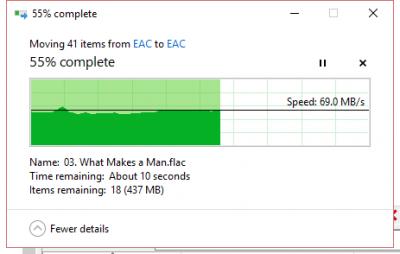
Wifi Adapter properties: 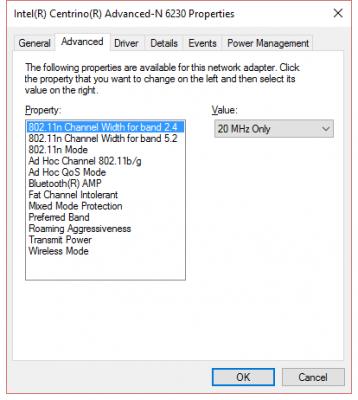
|
|
|
|
|



 Quote
Quote

 0.0376sec
 0.23
0.23
 7 queries
 GZIP Disabled