Welcome Guest ( Log In | Register )

826 Pages « < 816 817 818 819 820 > » Bottom

Outline · [ Standard ] · Linear+

Home Networking ASUS Malaysia Networking User & Technical Support, Managed by ASUS Malaysia Representative

views
     
balsa12
post May 18 2025, 09:34 AM

Getting Started
**
Junior Member
71 posts

Joined: Apr 2006
From: Seri Kembangan :: Adelaide


Hi all,

Need some advise on asus router.

Currently I am using maxis home fibre with Asus RT AC86U and all was good.
Just bought a new Asus RT AX59U for use at another house and connect it to maxis home fibre for testing.

However, after configured AX59U, its cant connect to the internet.
Already upgraded the firmware to version 3.0.0.4.388_33407, but still no internet connection.

I plugged back the original router (AC86U) and somehow its also cant connect to the internet.

I plugged back the maxis original router (KAON AR2140) and somehow its work.

I'm pretty sure PPPOE username and password are correct.

Is there anything i missed out during configuration of the new router?

Kindly help. Thanks
blacktubi
post May 18 2025, 10:44 AM

-
Group Icon
Elite
8,400 posts

Joined: Jul 2008

QUOTE(balsa12 @ May 18 2025, 09:34 AM)
Hi all,

Need some advise on asus router.

Currently I am using maxis home fibre with Asus RT AC86U and all was good.
Just bought a new Asus RT AX59U for use at another house and connect it to maxis home fibre for testing.

However, after configured AX59U, its cant connect to the internet.
Already upgraded the firmware to version 3.0.0.4.388_33407, but still no internet connection.

I plugged back the original router (AC86U) and somehow its also cant connect to the internet.

I plugged back the maxis original router (KAON AR2140) and somehow its work.

I'm pretty sure PPPOE username and password are correct.

Is there anything i missed out during configuration of the new router?

Kindly help. Thanks
*
Did you forget to choose special ISP requirement and choose Maxis-Fiber profile?

Make sure router is connected to LAN2 of the fiber modem as well
balsa12
post May 18 2025, 11:17 AM

Getting Started
**
Junior Member
71 posts

Joined: Apr 2006
From: Seri Kembangan :: Adelaide


QUOTE(blacktubi @ May 18 2025, 10:44 AM)
Did you forget to choose special ISP requirement and choose Maxis-Fiber profile?

Make sure router is connected to LAN2 of the fiber modem as well
*
already chose Maxis-Fiber profile.
router connected to LAN2 fiber modem.

did call maxis customer service, already reset port from their side.
nothing much they can do since no issue with maxis router.

pending testing at another house which is using unifi.
blacktubi
post May 18 2025, 02:12 PM

-
Group Icon
Elite
8,400 posts

Joined: Jul 2008

QUOTE(balsa12 @ May 18 2025, 11:17 AM)
already chose Maxis-Fiber profile.
router connected to LAN2 fiber modem.

did call maxis customer service, already reset port from their side.
nothing much they can do since no issue with maxis router.

pending testing at another house which is using unifi.
*
Login to the web interface and see the connection status, it will tell you why it's not connecting
balsa12
post May 19 2025, 10:25 AM

Getting Started
**
Junior Member
71 posts

Joined: Apr 2006
From: Seri Kembangan :: Adelaide


QUOTE(blacktubi @ May 18 2025, 02:12 PM)
Login to the web interface and see the connection status, it will tell you why it's not connecting
*
'Internet status : Invalid account or password, please modify it' - even though user name and password are correct.

keyed in again user name and password and click apply.

'Internet status : Disconnected '

Same internet status at both ac86u and ax59u.


blacktubi
post May 19 2025, 10:54 AM

-
Group Icon
Elite
8,400 posts

Joined: Jul 2008

QUOTE(balsa12 @ May 19 2025, 10:25 AM)
'Internet status : Invalid account or password, please modify it' - even though user name and password are correct.

keyed in again user name and password and click apply.

'Internet status : Disconnected '

Same internet status at both ac86u and ax59u.
*
Maxis screwed up their PPPOE username password from time to time

If you dont mind, just DM me your username.
neekun
post May 19 2025, 01:09 PM

I'm a Mac
*******
Senior Member
2,570 posts

Joined: Jun 2006


QUOTE(ASUSmy @ May 16 2025, 09:21 AM)
Hi neekun,

Can you show me the speedtest result using the router located at Game Acceleration->Internet Speed.

And is other speedtest server also same?

Thank you
*
@asusmy Is there anything else I can do to troubleshoot?
firdausbhari
post May 19 2025, 03:01 PM

Look at all my stars!!
*******
Senior Member
2,281 posts

Joined: Feb 2012


Hi all. Recently i bought a used AX55 for aimesh purpose. However, 5Ghz indicator were not on but still getting full signal. Tried restore and everything. same result. no 5Ghz lights on.

Is it safe to say that only the indicator broken without affecting performance?
TSASUSmy
post May 20 2025, 09:46 AM

Look at all my stars!!
*******
Senior Member
2,319 posts

Joined: Mar 2010
QUOTE(neekun @ May 19 2025, 01:09 PM)
@asusmy Is there anything else I can do to troubleshoot?
*
Hi neekun,

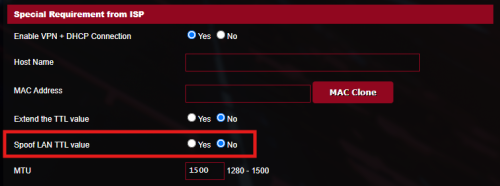
Can you try to enable "Spoof LAN TTL value" at WAN->Special Requirement from ISP?

user posted image

It is strange that only technician laptop able to get the full upload speed. Is there any setting on the laptop to get the full speed?

A. Asus gt-ax11000 as router and dlink as modem, only technician windows laptop can get full 500mbps download speed. All my devices like Apple TV wired to Asus router, iPhone 16 pm, and even technician hand held device wired to my Asus router, all can get max around 150mbps upload speed.

Is the modem just next to the router?

Thank you
TSASUSmy
post May 20 2025, 09:50 AM

Look at all my stars!!
*******
Senior Member
2,319 posts

Joined: Mar 2010
QUOTE(firdausbhari @ May 19 2025, 03:01 PM)
Hi all. Recently i bought a used AX55 for aimesh purpose. However, 5Ghz indicator were not on but still getting full signal. Tried restore and everything. same result. no 5Ghz lights on.

Is it safe to say that only the indicator broken without affecting performance?
*
Hi firdausbhari,

You may try to reboot or reset the router and observe the 5GHz whether there is any LED light or not.

If there is no light at all and the 5GHz is working, then it is most properly is the LED light problem.

Thank you
neekun
post May 20 2025, 10:15 AM

I'm a Mac
*******
Senior Member
2,570 posts

Joined: Jun 2006


QUOTE(ASUSmy @ May 20 2025, 09:46 AM)
Hi neekun,

Can you try to enable "Spoof LAN TTL value" at WAN->Special Requirement from ISP?

user posted image

It is strange that only technician laptop able to get the full upload speed. Is there any setting on the laptop to get the full speed?

A. Asus gt-ax11000 as router and dlink as modem, only technician windows laptop can get full 500mbps download speed. All my devices like Apple TV wired to Asus router, iPhone 16 pm, and even technician hand held device wired to my Asus router, all can get max around 150mbps upload speed.

Is the modem just next to the router?

Thank you
*
Hmmm never noticed the spoof lan ttl before this, will try to check it out tonight and will get update here. The Asus router are located next to the Telekom dlink modem. Yup his windows laptop managed to get full download speed, didn’t check for any specific details though for his laptop.

I’ve submitted feedback to Asus support too under case id A2505032449-0002.


neekun
post May 20 2025, 07:30 PM

I'm a Mac
*******
Senior Member
2,570 posts

Joined: Jun 2006


QUOTE(ASUSmy @ May 20 2025, 09:46 AM)
Hi neekun,

Can you try to enable "Spoof LAN TTL value" at WAN->Special Requirement from ISP?

user posted image

It is strange that only technician laptop able to get the full upload speed. Is there any setting on the laptop to get the full speed?

A. Asus gt-ax11000 as router and dlink as modem, only technician windows laptop can get full 500mbps download speed. All my devices like Apple TV wired to Asus router, iPhone 16 pm, and even technician hand held device wired to my Asus router, all can get max around 150mbps upload speed.

Is the modem just next to the router?

Thank you
*
Tried enable spoof lan ttl and the Speedtest result upload is even worse haha:

Attached Image
blacktubi
post May 20 2025, 07:36 PM

-
Group Icon
Elite
8,400 posts

Joined: Jul 2008

QUOTE(neekun @ May 20 2025, 07:30 PM)
Tried enable spoof lan ttl and the Speedtest result upload is even worse haha:

Attached Image
*
Not ASUS but can you try 1480 MTU and MRU?


neekun
post May 21 2025, 08:48 AM

I'm a Mac
*******
Senior Member
2,570 posts

Joined: Jun 2006


QUOTE(blacktubi @ May 20 2025, 07:36 PM)
Not ASUS but can you try 1480 MTU and MRU?
*
Tried with 1480 and still the same result

Attached Image
blacktubi
post May 21 2025, 10:55 AM

-
Group Icon
Elite
8,400 posts

Joined: Jul 2008

QUOTE(neekun @ May 21 2025, 08:48 AM)
Tried with 1480 and still the same result

Attached Image
*
At this point I think it's an issue with TM equipment when operating on bridge mode specifically at your location
TSASUSmy
post May 21 2025, 02:37 PM

Look at all my stars!!
*******
Senior Member
2,319 posts

Joined: Mar 2010
QUOTE(neekun @ May 20 2025, 07:30 PM)
Tried enable spoof lan ttl and the Speedtest result upload is even worse haha:

Attached Image
*
Hi neekun,

Do you have any neighbor or friends from different location that is using the same Internet package and able to help test the ASUS router?

Thank you
neekun
post May 21 2025, 02:44 PM

I'm a Mac
*******
Senior Member
2,570 posts

Joined: Jun 2006


QUOTE(ASUSmy @ May 21 2025, 02:37 PM)
Hi neekun,

Do you have any neighbor or friends from different location that is using the same Internet package and able to help test the ASUS router?

Thank you
*
My neighbour is not on 1gbps package and they are using combo mode. Asus support just asked me to hard reset, with the wps button and power button. I did that and the speed is still showing 150mbps. Only setting the router in ap mode then only I will get full upload speed 500mbps. Or alternately use dlink given by Telekom as combo, totally remove Asus from the connection then only I can get full upload speed 500mbps.

This post has been edited by neekun: May 21 2025, 06:56 PM
posthumous
post May 26 2025, 03:15 PM

Casual
***
Junior Member
308 posts

Joined: Jan 2003


I was considering to upgrade my AC86U to a BE86U, primarily for the gui VLAN interface. I want to create 3 VLAN networks - main, IoT, and guest; where the main network can communicate/access with the IoT and guest networks, but not the other way around.

Then I saw this video,

https://youtu.be/8A_xCZTdJXo?t=321

From the video, it appears Asus' routers can't do what I want due to a lack of firewall/traffic rules. Has this issue been fixed/addressed or is it still the case?

This post has been edited by posthumous: May 26 2025, 03:16 PM
soohoe84
post May 26 2025, 06:10 PM

Getting Started
**
Junior Member
265 posts

Joined: Jun 2005
From: Penang


QUOTE(ASUSmy @ Mar 12 2025, 04:32 PM)
Hi soohoe84,

1. Yes, as long as the nodes also have the same feature as the main router.
2. No, TUF AX do not support this feature.
3. Unable to access from the Home and Guest since different VLAN.

Thank you
*
No, you can't. I asked the same few months ago and here is the official reply (Item #3).
I have yet to see any new development so far.
neekun
post May 27 2025, 12:59 PM

I'm a Mac
*******
Senior Member
2,570 posts

Joined: Jun 2006


QUOTE(neekun @ May 21 2025, 02:44 PM)
My neighbour is not on 1gbps package and they are using combo mode. Asus support just asked me to hard reset, with the wps button and power button. I did that and the speed is still showing 150mbps.  Only setting the router in ap mode then only I will get full upload speed 500mbps. Or alternately use dlink given by Telekom as combo, totally remove Asus from the connection then only I can get full upload speed 500mbps.
*
I managed to get full 500mbps upload speed fro all my devices both wireless and wired after enable Mac clone based on https://www.asus.com/support/faq/1045126/


Currently I opened a case with tm and demand them to give me an explanation what the heck they did to throttle my speed.

826 Pages « < 816 817 818 819 820 > » Top
 

Change to:
| Lo-Fi Version
0.0278sec    0.91    6 queries    GZIP Disabled
Time is now: 1st December 2025 - 04:48 PM