Welcome Guest ( Log In | Register )

826 Pages « < 817 818 819 820 821 > » Bottom

Outline · [ Standard ] · Linear+

Home Networking ASUS Malaysia Networking User & Technical Support, Managed by ASUS Malaysia Representative

views
     
blacktubi
post May 27 2025, 01:00 PM

-
Group Icon
Elite
8,401 posts

Joined: Jul 2008

QUOTE(neekun @ May 27 2025, 12:59 PM)
I managed to get full 500mbps upload speed fro all my devices both wireless and wired after enable Mac clone based on https://www.asus.com/support/faq/1045126/
Currently I opened a case with tm and demand them to give me an explanation what the heck they did to throttle my speed.
*
Curious: Which MAC address do you clone, is it the TM router or your PC
neekun
post May 27 2025, 05:04 PM

I'm a Mac
*******
Senior Member
2,570 posts

Joined: Jun 2006


QUOTE(blacktubi @ May 27 2025, 01:00 PM)
Curious: Which MAC address do you clone, is it the TM router or your PC
*
I just simply use my office laptop Mac and clone it at Asus wan.

I have a question, without Mac clone, all my previous speed test from various devices such as iPad Pro, Apple TV, Mac Studio will reveal its respective MAC address to Telekom or just the Asus wan port MAC address to Telekom? During previous troubleshooting with elite team, only the technician laptop managed to get full upload speed but all my devices including his hand held speed test device cannot get full upload speed.
hsbb
post May 27 2025, 05:17 PM

Casual
***
Junior Member
447 posts

Joined: Aug 2009


As long as not any 3rd party router's MAC address.

This post has been edited by hsbb: May 27 2025, 05:18 PM
blacktubi
post May 29 2025, 06:14 PM

-
Group Icon
Elite
8,401 posts

Joined: Jul 2008

QUOTE(neekun @ May 27 2025, 05:04 PM)
I just simply use my office laptop Mac and clone it at Asus wan. 

I have a question, without Mac clone, all my previous speed test from various devices such as iPad Pro, Apple TV, Mac Studio will reveal its respective MAC address to Telekom or just the Asus wan port MAC address to Telekom?  During previous troubleshooting with elite team, only the technician laptop managed to get full upload speed but all my devices including his hand held speed test device cannot get full upload speed.
*
This is getting so strange, is the speed still good today after you done the MAC clone

By right only the router MAC is exposed


White2000
post May 30 2025, 01:15 AM

Getting Started
**
Junior Member
272 posts

Joined: Oct 2016
https://arstechnica.com/security/2025/05/th...tent-backdoors/

Quoted from a homenetworking user

QUOTE
Mine had this .(Or very similar) back in September November 24. Noticed strange data spikes from the router itself not from connected devices, internet would drop for a minute or 2 intermittently. Found a rouge ssh process running.


This post has been edited by White2000: May 30 2025, 01:19 AM
neekun
post May 30 2025, 07:33 AM

I'm a Mac
*******
Senior Member
2,570 posts

Joined: Jun 2006


QUOTE(blacktubi @ May 29 2025, 06:14 PM)
This is getting so strange, is the speed still good today after you done the MAC clone

By right only the router MAC is exposed
*
Yes the speed is still good. During troubleshooting I used another Asus zen wifi xt8 as primary router also same slow upload.

Unifi elite team will be coming over again in mid June. This time they wanna bring over tplink router to test. I am guessing tplink router should be ok as so far only both my Asus gt-ax11000 and xt8 MAC address were somehow "blacklisted" by tm network.

Some security concern https://9to5mac.com/2025/05/29/psa-thousand...ised-by-botnet/

This post has been edited by neekun: May 30 2025, 07:46 AM
cchin8888
post May 30 2025, 03:26 PM

Casual
***
Junior Member
362 posts

Joined: Oct 2007
From: Penang
May 30 14:59:51 pppd[2760]: Modem hangup
May 30 14:59:51 pppd[2760]: Connection terminated.
May 30 14:59:51 pppd[2760]: Failed to disconnect PPPoE socket: 114 Operation already in progress
May 30 14:59:55 WAN(0) Connection: Fail to connect with some issues.
May 30 15:00:01 pppd[2760]: Connected to 00:00:5e:00:01:49 via interface br101
May 30 15:00:01 pppd[2760]: Connect: ppp0 <--> br101
May 30 15:00:04 pppd[2760]: PAP authentication succeeded
May 30 15:00:04 pppd[2760]: peer from calling number 00:00:5E:00:01:49 authorized
May 30 15:00:04 pppd[2760]: local IP address 10.116.211.5
May 30 15:00:04 pppd[2760]: remote IP address 10.116.208.1
May 30 15:00:04 pppd[2760]: primary DNS address 58.71.132.10
May 30 15:00:04 pppd[2760]: secondary DNS address 58.71.136.10
May 30 15:00:04 wan: finish adding multi routes
May 30 15:00:04 ntp: start NTP update
May 30 15:00:06 WAN(0) Connection: WAN was restored.
May 30 15:00:06 admin: Server certificate updated.
May 30 15:00:06 miniupnpd[7117]: shutting down MiniUPnPd
May 30 15:00:06 miniupnpd: it is advised to use network interface name instead of 192.168.50.1/255.255.255.0
May 30 15:00:07 miniupnpd[13816]: HTTP listening on port 40757
May 30 15:00:07 miniupnpd[13816]: Listening for NAT-PMP/PCP traffic on port 5351
May 30 15:00:07 httpd: Succeed to init SSL certificate...8443
May 30 15:00:09 BWDPI: force to flush flowcache entries
May 30 15:00:09 kernel: udb_core lock_num = 7
May 30 15:00:09 kernel: *** ERROR: [udb_shell_mod_exit:667] Udb static = 0, dynamic = 16
May 30 15:00:09 BWDPI: rollback fc
May 30 15:00:13 kernel: SHN Release Version: 2.0.6 9d6bb50
May 30 15:00:13 kernel: UDB Core Version: 0.2.20
May 30 15:00:13 kernel: Registered DNS Req parsing
May 30 15:00:13 kernel: sizeof forward pkt param = 192

hi all, My fiber will get disconnected a while then reconnect back intermittently, normally happen once or twice per day. I check router log it show modem hangup, is it modem problem? I call Maxis few times and they keep told me nothing wrong at their side..

This post has been edited by cchin8888: May 30 2025, 03:27 PM
blacktubi
post May 30 2025, 05:27 PM

-
Group Icon
Elite
8,401 posts

Joined: Jul 2008

QUOTE(cchin8888 @ May 30 2025, 03:26 PM)
May 30 14:59:51 pppd[2760]: Modem hangup
May 30 14:59:51 pppd[2760]: Connection terminated.
May 30 14:59:51 pppd[2760]: Failed to disconnect PPPoE socket: 114 Operation already in progress
May 30 14:59:55 WAN(0) Connection: Fail to connect with some issues.
May 30 15:00:01 pppd[2760]: Connected to 00:00:5e:00:01:49 via interface br101
May 30 15:00:01 pppd[2760]: Connect: ppp0 <--> br101
May 30 15:00:04 pppd[2760]: PAP authentication succeeded
May 30 15:00:04 pppd[2760]: peer from calling number 00:00:5E:00:01:49 authorized
May 30 15:00:04 pppd[2760]: local  IP address 10.116.211.5
May 30 15:00:04 pppd[2760]: remote IP address 10.116.208.1
May 30 15:00:04 pppd[2760]: primary  DNS address 58.71.132.10
May 30 15:00:04 pppd[2760]: secondary DNS address 58.71.136.10
May 30 15:00:04 wan: finish adding multi routes
May 30 15:00:04 ntp: start NTP update
May 30 15:00:06 WAN(0) Connection: WAN was restored.
May 30 15:00:06 admin: Server certificate updated.
May 30 15:00:06 miniupnpd[7117]: shutting down MiniUPnPd
May 30 15:00:06 miniupnpd: it is advised to use network interface name instead of 192.168.50.1/255.255.255.0
May 30 15:00:07 miniupnpd[13816]: HTTP listening on port 40757
May 30 15:00:07 miniupnpd[13816]: Listening for NAT-PMP/PCP traffic on port 5351
May 30 15:00:07 httpd: Succeed to init SSL certificate...8443
May 30 15:00:09 BWDPI: force to flush flowcache entries
May 30 15:00:09 kernel: udb_core lock_num = 7
May 30 15:00:09 kernel:  *** ERROR: [udb_shell_mod_exit:667] Udb static = 0, dynamic = 16
May 30 15:00:09 BWDPI: rollback fc
May 30 15:00:13 kernel: SHN Release Version: 2.0.6 9d6bb50
May 30 15:00:13 kernel: UDB Core Version: 0.2.20
May 30 15:00:13 kernel: Registered DNS Req parsing
May 30 15:00:13 kernel: sizeof forward pkt param = 192

hi all, My fiber will get disconnected a while then reconnect back intermittently, normally happen once or twice per day. I check router log it show modem hangup, is it modem problem? I call Maxis few times and they keep told me nothing wrong at their side..
*
What is your modem model?

Sounds like modem overloaded and crash to me


cchin8888
post Jun 2 2025, 09:02 AM

Casual
***
Junior Member
362 posts

Joined: Oct 2007
From: Penang
QUOTE(blacktubi @ May 30 2025, 05:27 PM)
What is your modem model?

Sounds like modem overloaded and crash to me
*
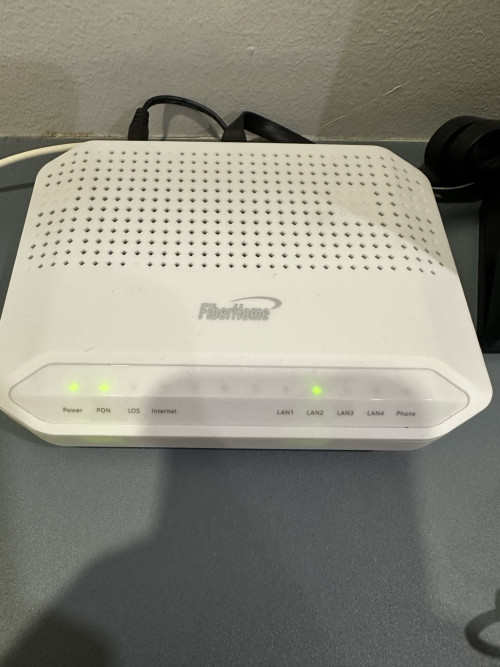
the modem is this model..

user posted image
afif92
post Jun 2 2025, 10:02 AM

Casual
***
Junior Member
374 posts

Joined: Mar 2010
QUOTE(neekun @ May 30 2025, 07:33 AM)
Yes the speed is still good. During troubleshooting I used another Asus zen wifi xt8 as primary router also same slow upload. 

Unifi elite team will be coming over again in mid June. This time they wanna bring over tplink router to test. I am guessing tplink router should be ok as so far only both my Asus gt-ax11000 and xt8 MAC address were somehow "blacklisted" by tm network.

Some security concern https://9to5mac.com/2025/05/29/psa-thousand...ised-by-botnet/
*
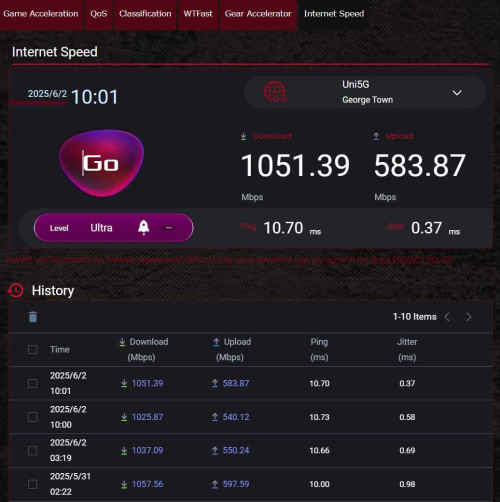
Mine using same setup like you, AX11000 as main and XT8 as node.. Can get full speed upload and download.. Hope your problem will be solved soon.

user posted image
neekun
post Jun 4 2025, 06:39 PM

I'm a Mac
*******
Senior Member
2,570 posts

Joined: Jun 2006


QUOTE(afif92 @ Jun 2 2025, 10:02 AM)
Mine using same setup like you, AX11000 as main and XT8 as node.. Can get full speed upload and download.. Hope your problem will be solved soon.

user posted image
*
Can ask a favor from you? I am thinking to give you my ASUS WAN port MAC and you use that at your WAN Mac clone, and test the upload speed is restricted like mine?


spucil
post Jun 6 2025, 05:59 PM

New Member
*
Junior Member
22 posts

Joined: Aug 2010
From: Selangor


Hi guys,

Seek your expertise on AX57 Go.
Managed to setup the device using WISP mode.
Then I reset the device and now unable to find network (using phone hotspot) when setup WISP. Able to set up using USB tethering.
Did few reset and still not successfully setup WISP using mobile hotspot.

Thank you.

afif92
post Jun 13 2025, 08:14 PM

Casual
***
Junior Member
374 posts

Joined: Mar 2010
QUOTE(neekun @ Jun 4 2025, 06:39 PM)
Can ask a favor from you? I am thinking to give you my ASUS WAN port MAC and you use that at your WAN Mac clone, and test the upload speed is restricted like mine?
*
okay, i can try. you may dm'ed me
thomas1983
post Jun 14 2025, 10:01 PM

Getting Started
**
Junior Member
159 posts

Joined: Jan 2005


Hi Guys , anyone please guide me on how to setup my asus XD6 router to the new unifi 2in1 modem router ….
Isit same method on connect to traditional modem ?

Please help
TSASUSmy
post Jun 16 2025, 05:21 PM

Look at all my stars!!
*******
Senior Member
2,319 posts

Joined: Mar 2010
QUOTE(spucil @ Jun 6 2025, 05:59 PM)
Hi guys,

Seek your expertise on AX57 Go.
Managed to setup the device using WISP mode.
Then I reset the device and now unable to find network (using phone hotspot) when setup WISP. Able to set up using USB tethering.
Did few reset and still not successfully setup WISP using mobile hotspot.

Thank you.
*
Hi spucil,

Have you try to update the firmware to the latest, the current latest firmware is version 3.0.0.6.102_56054.

https://www.asus.com/networking-iot-servers...Name=RT-AX57-Go

Thank you
TSASUSmy
post Jun 16 2025, 05:25 PM

Look at all my stars!!
*******
Senior Member
2,319 posts

Joined: Mar 2010
QUOTE(thomas1983 @ Jun 14 2025, 10:01 PM)
Hi Guys , anyone please guide me on how to setup my asus XD6 router to the new unifi 2in1 modem router ….
Isit same method on connect to traditional modem ?

Please help
*
Hi thomas1983,

You will need to change UNIFI 2 in 1 modem router to modem if you plan to use the ASUS XD6 as main router.

Once change to modem, the setup will be the same.

Thank you
bart the general
post Jun 17 2025, 08:58 AM

New Member
*
Junior Member
9 posts

Joined: Oct 2005
QUOTE(balsa12 @ May 18 2025, 06:25 PM)
'Internet status : Invalid account or password, please modify it' - even though user name and password are correct.

keyed in again user name and password and click apply.

'Internet status : Disconnected '

Same internet status at both ac86u and ax59u.
*
I have the same issue with Asus XT8. On Maxis fiber as well. When Asus router rebooted on schedule it lost connection. Then troubleshoot with Maxis and plugged in Maxis router it wouldn’t work as well. Usually it works.

Left Maxis router plugged in and Maxis had to push reconfiguration settings and it worked. Now my Asus wouldn’t connect to Internet, same message as yours. Called Maxis and they confirmed PPPoE username and password have not changed.

Still searching for an answer…
Krieger22
post Jun 18 2025, 09:34 PM

Getting Started
**
Junior Member
72 posts

Joined: Aug 2013
My Asus AX55 in access point mode appears to be malfunctioning and is now broadcasting the "default" open access network instead of the 5Ghz wifi.

This has persisted despite restarting the router. Will using the Quick Internet Setup to reset it as an access point work, and what options do I have if it does not?
blacktubi
post Jun 18 2025, 09:56 PM

-
Group Icon
Elite
8,401 posts

Joined: Jul 2008

QUOTE(Krieger22 @ Jun 18 2025, 09:34 PM)
My Asus AX55 in access point mode appears to be malfunctioning and is now broadcasting the "default" open access network instead of the 5Ghz wifi.

This has persisted despite restarting the router. Will using the Quick Internet Setup to reset it as an access point work, and what options do I have if it does not?
*
Update to latest firmware, reset and setup again
You probably never updated the firmware
Ah_Huat
post Jun 24 2025, 01:43 PM

Getting Started
**
Junior Member
249 posts

Joined: Jan 2003
From: SG. Jarom


Hi guys,
wanna ask, my friends have 2 TUF-AX4200 , one at living room as wifi router , other one on 1st floor as Mesh , problem now is the wifi CCTV on the front gate seem like the wifi signal is weak ,when using CCTV app to view the cam causing video lag or device not found. my question is : can i just buy a asus RT-AX1800HP router place it between front gate and living room as Mesh to boots wifi signal for the wifi CCTV at the front gate?
also there are two version of RT-AX1800HP version : RT-AX1800HP and RT-AX1800HP V2. what is the difference and which one is better? after some google, seem like RT-AX1800HP is 4 core and RT-AX1800HP V2 is Duo Core?

thanks.

826 Pages « < 817 818 819 820 821 > » Top
 

Change to:
| Lo-Fi Version
0.0265sec    0.22    6 queries    GZIP Disabled
Time is now: 2nd December 2025 - 08:49 AM