Welcome Guest ( Log In | Register )

826 Pages « < 815 816 817 818 819 > » Bottom

Outline · [ Standard ] · Linear+

Home Networking ASUS Malaysia Networking User & Technical Support, Managed by ASUS Malaysia Representative

views
     
danielwoo
post May 4 2025, 11:39 PM

Getting Started
**
Junior Member
227 posts

Joined: Jan 2003
Hi, I would like to have some advise on my Asus Zenwifi XT12 Pro mesh router.

Basically, I turn it off before going to bed and have it turn back on in the morning. Have been doing that for the past two years.

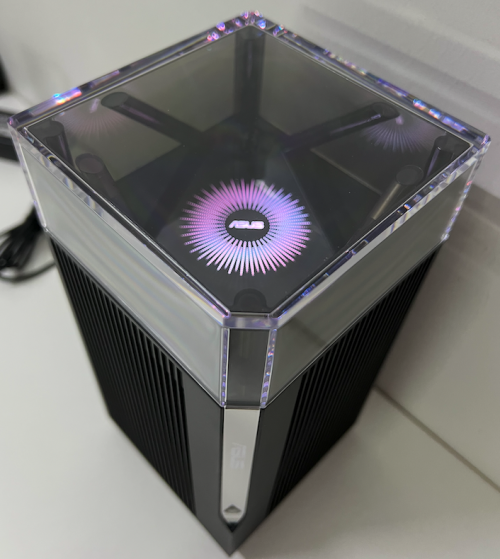
This morning after turning it on, the main router did not boot up instead just stuck at the Asus logo screen (as attached) for hours without further response. Normally the router light changes color as indication of a boot-up process. Tried the reset button and the WPS reset way without any success. I did not mess with the routers configurations or firmware at all. It just decided not to boot up the next morning.

What should I try out next?

user posted image
blacktubi
post May 4 2025, 11:44 PM

-
Group Icon
Elite
8,408 posts

Joined: Jul 2008

QUOTE(danielwoo @ May 4 2025, 11:39 PM)
Hi, I would like to have some advise on my Asus Zenwifi XT12 Pro mesh router.

Basically, I turn it off before going to bed and have it turn back on in the morning. Have been doing that for the past two years.

This morning after turning it on, the main router did not boot up instead just stuck at the Asus logo screen (as attached) for hours without further response. Normally the router light changes color as indication of a boot-up process. Tried the reset button and the WPS reset way without any success. I did not mess with the routers configurations or firmware at all. It just decided not to boot up the next morning.

What should I try out next?

user posted image
*
Sounds like you just so happen to turn it off while it's attempting to do a firmware update. Usually the auto update happends during midnight.

Try to restore the firmware with the rescue tool

https://www.asus.com/my/support/faq/1000814/
danielwoo
post May 4 2025, 11:57 PM

Getting Started
**
Junior Member
227 posts

Joined: Jan 2003
QUOTE(blacktubi @ May 4 2025, 11:44 PM)
Sounds like you just so happen to turn it off while it's attempting to do a firmware update. Usually the auto update happends during midnight.

Try to restore the firmware with the rescue tool

https://www.asus.com/my/support/faq/1000814/
*
I have thought of that possibility even though i have turn off the auto update firmware option since the beginning during setup. Read online some important update still gets push through although the option been turn off.


blacktubi
post May 5 2025, 12:01 AM

-
Group Icon
Elite
8,408 posts

Joined: Jul 2008

QUOTE(danielwoo @ May 4 2025, 11:57 PM)
I have thought of that possibility even though i have turn off the auto update firmware option since the beginning during setup. Read online some important update still gets push through although the option been turn off.
*
Btw if you're concerned just for the WiFi signal at night

There's a new WiFi scheduler feature where it will shutoff the WiFi network at a set time

https://www.asus.com/support/faq/1043425/
laihuhng
post May 5 2025, 05:01 PM

On my way
****
Junior Member
603 posts

Joined: Jun 2005


QUOTE(blacktubi @ May 5 2025, 12:01 AM)
Btw if you're concerned just for the WiFi signal at night

There's a new WiFi scheduler feature where it will shutoff the WiFi network at a set time

https://www.asus.com/support/faq/1043425/
*
Does TUF-AX6000 have this feature?
danielwoo
post May 6 2025, 12:15 AM

Getting Started
**
Junior Member
227 posts

Joined: Jan 2003
QUOTE(blacktubi @ May 4 2025, 11:44 PM)
Sounds like you just so happen to turn it off while it's attempting to do a firmware update. Usually the auto update happends during midnight.

Try to restore the firmware with the rescue tool

https://www.asus.com/my/support/faq/1000814/
*
Has been working on "rescuing" the router the whole day but it just refuse to go into rescue mode. bangwall.gif Followed exactly the steps in the Asus tutorial and countless time trying still no response from router. The light doesn't change, flash or blink. The firmware restoration tool confirmed the router is not in rescue mode and unable to ping the router as well. At this point, I believe the is not some firmware issue rather a hardware malfunction. cry.gif

Not sure what else can be done, two years warranty just over couple months ago. Should I send in for repair at Asus Malaysia? rclxub.gif

The XT12 comes in pairs and only the main router is down while the node is still working fine.
blacktubi
post May 6 2025, 12:31 AM

-
Group Icon
Elite
8,408 posts

Joined: Jul 2008

QUOTE(danielwoo @ May 6 2025, 12:15 AM)
Has been working on "rescuing" the router the whole day but it just refuse to go into rescue mode.  bangwall.gif  Followed exactly the steps in the Asus tutorial and countless time trying still no response from router. The light doesn't change, flash or blink. The firmware restoration tool confirmed the router is not in rescue mode and unable to ping the router as well. At this point, I believe the is not some firmware issue rather a hardware malfunction.  cry.gif

Not sure what else can be done, two years warranty just over couple months ago. Should I send in for repair at Asus Malaysia? rclxub.gif

The XT12 comes in pairs and only the main router is down while the node is still working fine.
*
Warranty is 3 years

danielwoo
post May 6 2025, 05:27 PM

Getting Started
**
Junior Member
227 posts

Joined: Jan 2003
QUOTE(blacktubi @ May 6 2025, 12:31 AM)
Warranty is 3 years
*
Thanks, will go for warranty claim then.
DeepMemory
post May 8 2025, 11:10 AM

Regular
******
Senior Member
1,805 posts

Joined: Oct 2010
Hi Asus Malaysia, any way for me to buy Asus BD4 1-pack? Need one more unit only for my setup.
thomas1983
post May 8 2025, 08:03 PM

Getting Started
**
Junior Member
159 posts

Joined: Jan 2005


Hi Guys , anyone please guide me on how to setup my asus XD6 router to the new unifi 2in1 modem router ….
Isit same method on connect to traditional modem ?
neekun
post May 15 2025, 05:02 PM

I'm a Mac
*******
Senior Member
2,570 posts

Joined: Jun 2006


Asus Support, need your help with my issue of upload speed test on wired connection is only getting around 150mbps instead of 500mbps for my 1gbps package by Unifi. Ruled out it’s wifi interference as I tested on wired connection.

Elite Team came for on site troubleshooting with the following results:

A. Asus gt-ax11000 as router and dlink as modem, only technician windows laptop can get full 500mbps download speed. All my devices like Apple TV wired to Asus router, iPhone 16 pm, and even technician hand held device wired to my Asus router, all can get max around 150mbps upload speed.

B. Reset dlink and install 3.0.6 latest firmware, setup as bridge mode, same result with the above.

C. Reset dlink and setup as combo, Asus gt-ax11000 setup as ap mode, all devices can get full upload speed.

D. Reset dlink and setup as modem, use another Asus router of mine which is xt8 setup as router, same result with A above.

E. Use skyworth setup as modem, and use either 1 of the Asus router, same result with A.

No QOS was enabled for the Asus router. No gameing mode is enabled too. This was working finned since I upgraded to 1gbps in December 2024, but I only discovered on 8th May 2025 that my upload speed is terrible. Router is already with latest firmware 3.0.0.4.388_24403-gd4e3d0c

This post has been edited by neekun: May 15 2025, 05:03 PM
blacktubi
post May 15 2025, 05:58 PM

-
Group Icon
Elite
8,408 posts

Joined: Jul 2008

QUOTE(neekun @ May 15 2025, 05:02 PM)
Asus Support, need your help with my issue of upload speed test on wired connection is only getting around 150mbps instead of 500mbps for my 1gbps package by Unifi.  Ruled out it’s wifi interference as I tested on wired connection.

Elite Team came for on site troubleshooting with the following results:

A. Asus gt-ax11000 as router and dlink as modem, only technician windows laptop can get full 500mbps download speed. All my devices like Apple TV wired to Asus router, iPhone 16 pm, and even technician hand held device wired to my Asus router, all can get max around 150mbps upload speed.

B. Reset dlink and install 3.0.6 latest firmware, setup as bridge mode, same result with the above.

C. Reset dlink and setup as combo, Asus gt-ax11000 setup as ap mode, all devices can get full upload speed.

D. Reset dlink and setup as modem, use another Asus router of mine which is xt8 setup as router, same result with A above.

E. Use skyworth setup as modem, and use either 1 of the Asus router, same result with A.

No QOS was enabled for the Asus router.  No gameing mode is enabled too. This was working finned since I upgraded to 1gbps in December 2024, but I only discovered on 8th May 2025 that my upload speed is terrible.  Router is already with latest firmware 3.0.0.4.388_24403-gd4e3d0c
*
Enable AdaptiveQoS and set maximum upload speed to 500Mbps and download speed to 1000Mbps

Test and report back
neekun
post May 15 2025, 07:13 PM

I'm a Mac
*******
Senior Member
2,570 posts

Joined: Jun 2006


QUOTE(blacktubi @ May 15 2025, 05:58 PM)
Enable AdaptiveQoS and set maximum upload speed to 500Mbps and download speed to 1000Mbps

Test and report back
*
Upload is around 120mbps with qos enabled as per following :

Attached Image
neekun
post May 15 2025, 07:18 PM

I'm a Mac
*******
Senior Member
2,570 posts

Joined: Jun 2006


QUOTE(neekun @ May 15 2025, 07:13 PM)
Upload is around 120mbps with qos enabled as per following :

Attached Image
*
By the way I revert back firmware to the one date November 13 2024 at https://rog.asus.com/my/networking/rog-rapt.../helpdesk_bios/ still same issue. I got my plan upgraded to 1gbps in December 2024 and had been great all the while only in last week I noticed the slow upload and that time already on firmware released on 5 march 2025.
neekun
post May 15 2025, 07:19 PM

I'm a Mac
*******
Senior Member
2,570 posts

Joined: Jun 2006


QUOTE(neekun @ May 15 2025, 07:13 PM)
Upload is around 120mbps with qos enabled as per following :

Attached Image
*
Tested a few more times upload is around 167mbps.
neekun
post May 15 2025, 07:47 PM

I'm a Mac
*******
Senior Member
2,570 posts

Joined: Jun 2006


QUOTE(blacktubi @ May 15 2025, 05:58 PM)
Enable AdaptiveQoS and set maximum upload speed to 500Mbps and download speed to 1000Mbps

Test and report back
*
Btw, I tested on my asus xt8 which was a mesh node but I set it as main router and connect to dlink modem. It’s the same issue also. Only thing is I don’t have a non Asus router to test with Telekom dlink modem.
blacktubi
post May 15 2025, 08:02 PM

-
Group Icon
Elite
8,408 posts

Joined: Jul 2008

QUOTE(neekun @ May 15 2025, 07:47 PM)
Btw, I tested on my asus xt8 which was a mesh node but I set it as main router and connect to dlink modem. It’s the same issue also. Only thing is I don’t have a non Asus router to test with Telekom dlink modem.
*
What is your old fiber modem model?

Is it happening when you use your old fiber modem


neekun
post May 15 2025, 08:19 PM

I'm a Mac
*******
Senior Member
2,570 posts

Joined: Jun 2006


QUOTE(blacktubi @ May 15 2025, 08:02 PM)
What is your old fiber modem model?

Is it happening when you use your old fiber modem
*
Old fiber modem is Huawei gpon terminal hg8240h. This was used during 800mbps time. When upgraded to 1gbps then using the black dlink modem. Now I am on my old Huawei still same issue. Just now did a Speedtest on my Apple TV wired to Asus router, one time got the following:

Attached Image

Then the rest consistently 150 to 200 mbps.

Btw, is there a way to disable flow control at Asus gt-ax11000, I couldn’t find the feature. I am referring to https://www.smallnetbuilder.com/lanwan/lanw...t-a-good-thing/


And this thread seems like same issue with mine https://linustechtips.com/topic/1300515-slo...-asus-rt-ax86u/

https://www.reddit.com/r/Fios/s/9gedOZRHSN

This post has been edited by neekun: May 16 2025, 07:59 AM
TSASUSmy
post May 16 2025, 09:21 AM

Look at all my stars!!
*******
Senior Member
2,319 posts

Joined: Mar 2010
QUOTE(neekun @ May 15 2025, 08:19 PM)
Old fiber modem is Huawei gpon terminal hg8240h.  This was used during 800mbps time. When upgraded to 1gbps then using the black dlink modem. Now I am on my old Huawei still same issue. Just now did a Speedtest on my Apple TV wired to Asus router, one time got the following:

Attached Image

Then the rest consistently 150 to 200 mbps.

Btw, is there a way to disable flow control at Asus gt-ax11000, I couldn’t find the feature.  I am referring to https://www.smallnetbuilder.com/lanwan/lanw...t-a-good-thing/
And this thread seems like same issue with mine https://linustechtips.com/topic/1300515-slo...-asus-rt-ax86u/

https://www.reddit.com/r/Fios/s/9gedOZRHSN
*
Hi neekun,

Can you show me the speedtest result using the router located at Game Acceleration->Internet Speed.

And is other speedtest server also same?

Thank you

neekun
post May 16 2025, 09:46 AM

I'm a Mac
*******
Senior Member
2,570 posts

Joined: Jun 2006


QUOTE(ASUSmy @ May 16 2025, 09:21 AM)
Hi neekun,

Can you show me the speedtest result using the router located at Game Acceleration->Internet Speed.

And is other speedtest server also same?

Thank you
*
During my testing yesterday the Speedtest result inside router with Telekom as server gets 930 mbps down and around 80 to 110mbps upload. Tested other server also same result. When trouble shooting with Telekom they will use https://speedtest.tm.com.my/ and the results also same with router internal speed test result. Just that sometimes with Tm Speedtest page the upload can go up to 120 to 150 mbps up. Overall consistently low upload speed as long as Asus gt-ax11000 or Asus xt8 used as router and Telekom device set as modem.

Test result using router Speedtest:


Attached Image


Tried disconnect all devices from wifi router one by one, left only my iPhone 16 pm. Speed test still showing upload speed of 150mbps plus.


--------------------

This post has been edited by neekun: May 17 2025, 09:30 AM

826 Pages « < 815 816 817 818 819 > » Top
 

Change to:
| Lo-Fi Version
0.0414sec    0.36    6 queries    GZIP Disabled
Time is now: 6th December 2025 - 10:19 AM