Outline ·
[ Standard ] ·
Linear+
Home Networking ASUS Malaysia Networking User & Technical Support, Managed by ASUS Malaysia Representative
|
danielwoo
|
 May 4 2025, 11:39 PM May 4 2025, 11:39 PM
|
Getting Started


|
Hi, I would like to have some advise on my Asus Zenwifi XT12 Pro mesh router. Basically, I turn it off before going to bed and have it turn back on in the morning. Have been doing that for the past two years. This morning after turning it on, the main router did not boot up instead just stuck at the Asus logo screen (as attached) for hours without further response. Normally the router light changes color as indication of a boot-up process. Tried the reset button and the WPS reset way without any success. I did not mess with the routers configurations or firmware at all. It just decided not to boot up the next morning. What should I try out next? 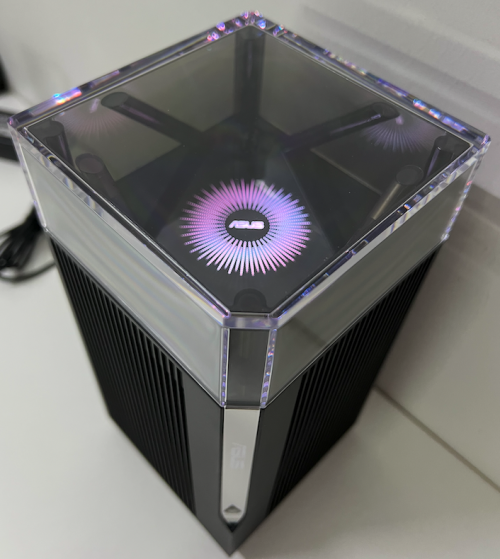 |
|
|
|
|
|
danielwoo
|
May 4 2025, 11:57 PM
|
Getting Started
|
QUOTE(blacktubi @ May 4 2025, 11:44 PM) Sounds like you just so happen to turn it off while it's attempting to do a firmware update. Usually the auto update happends during midnight. Try to restore the firmware with the rescue tool https://www.asus.com/my/support/faq/1000814/I have thought of that possibility even though i have turn off the auto update firmware option since the beginning during setup. Read online some important update still gets push through although the option been turn off. |
|
|
|
|
|
danielwoo
|
May 6 2025, 12:15 AM
|
Getting Started
|
QUOTE(blacktubi @ May 4 2025, 11:44 PM) Sounds like you just so happen to turn it off while it's attempting to do a firmware update. Usually the auto update happends during midnight. Try to restore the firmware with the rescue tool https://www.asus.com/my/support/faq/1000814/Has been working on "rescuing" the router the whole day but it just refuse to go into rescue mode.  Followed exactly the steps in the Asus tutorial and countless time trying still no response from router. The light doesn't change, flash or blink. The firmware restoration tool confirmed the router is not in rescue mode and unable to ping the router as well. At this point, I believe the is not some firmware issue rather a hardware malfunction.  Not sure what else can be done, two years warranty just over couple months ago. Should I send in for repair at Asus Malaysia?  The XT12 comes in pairs and only the main router is down while the node is still working fine. |
|
|
|
|
|
danielwoo
|
May 6 2025, 05:27 PM
|
Getting Started
|
QUOTE(blacktubi @ May 6 2025, 12:31 AM) Thanks, will go for warranty claim then. |
|
|
|
|



 Quote
Quote

 0.0322sec
 0.36
0.36
 7 queries
 GZIP Disabled