Welcome Guest ( Log In | Register )

826 Pages « < 813 814 815 816 817 > » Bottom

Outline · [ Standard ] · Linear+

Home Networking ASUS Malaysia Networking User & Technical Support, Managed by ASUS Malaysia Representative

views
     
sHawTY
post Mar 20 2025, 10:17 PM

Frequent Reporter
********
All Stars
14,909 posts

Joined: Jul 2005

ASUSmy After updating my GT-AC5300 firmware to version 3.0.0.4.386_51582, I am no longer able to access the router's web GUI via ASUSCOMM DDNS or 192.168.50.1.

I have attempted the following troubleshooting steps:
*Tried accessing the GUI using both Chrome and Edge, but neither worked.
*Attempted access from a different PC, but the issue persists.
*Restarted the router three times, waiting 15 minutes each time before attempting access via ASUS DDNS.

At this time, I can only access the router through the mobile app.
Please advise on resolving this issue without performing a factory reset.
blacktubi
post Mar 21 2025, 09:01 AM

-
Group Icon
Elite
8,408 posts

Joined: Jul 2008

QUOTE(sHawTY @ Mar 20 2025, 10:17 PM)
ASUSmy After updating my GT-AC5300 firmware to version 3.0.0.4.386_51582, I am no longer able to access the router's web GUI via ASUSCOMM DDNS or 192.168.50.1.

I have attempted the following troubleshooting steps:
*Tried accessing the GUI using both Chrome and Edge, but neither worked.
*Attempted access from a different PC, but the issue persists.
*Restarted the router three times, waiting 15 minutes each time before attempting access via ASUS DDNS.

At this time, I can only access the router through the mobile app.
Please advise on resolving this issue without performing a factory reset.
*
Face something similar when ASUS changed how their DDNS works. If you enable DDNS function on the app, it now requires an ASUS account. But, the web GUI doesn't need it.

Disable and enabling DDNS on web GUI should fix it, might need to try using a new DDNS address

If cannot fix, then you need to disable DDNS on web GUI and enable DDNS using ASUS Router app

You can use this tool to test as well ⬇️
https://iplookup.asus.com/nslookup.php
sHawTY
post Mar 21 2025, 11:21 AM

Frequent Reporter
********
All Stars
14,909 posts

Joined: Jul 2005

QUOTE(blacktubi @ Mar 21 2025, 09:01 AM)
SNIP
I'm unable to access the web GUI at all. How can I disable DDNS?

I've tried both DDNS and the IP address, but neither works.

Right now, I can only manage the router through the app.
blacktubi
post Mar 21 2025, 05:00 PM

-
Group Icon
Elite
8,408 posts

Joined: Jul 2008

QUOTE(sHawTY @ Mar 21 2025, 11:21 AM)
I'm unable to access the web GUI at all. How can I disable DDNS?

I've tried both DDNS and the IP address, but neither works.

Right now, I can only manage the router through the app.
*
You cant access the web GUI locally? Something must be very wrong for this to happen.
sHawTY
post Mar 21 2025, 09:05 PM

Frequent Reporter
********
All Stars
14,909 posts

Joined: Jul 2005

QUOTE(blacktubi @ Mar 21 2025, 05:00 PM)
You cant access the web GUI locally? Something must be very wrong for this to happen.
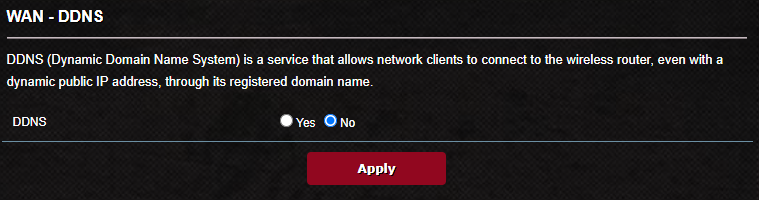
I finally managed to access the web GUI using the URL: https://www.asusrouter.com:8443.

It turns out the issue was caused by the latest firmware update disabling DDNS. shakehead.gif

ASUSmy Please escalate this to your firmware engineering team and ask why the update disabled the previously configured DDNS settings.

user posted image
sHawTY
post Mar 21 2025, 09:16 PM

Frequent Reporter
********
All Stars
14,909 posts

Joined: Jul 2005

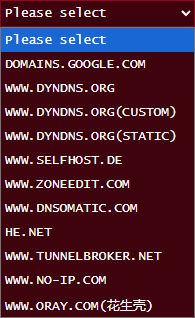
Additional info: ASUS removed www.asus.com from the DDNS list in the latest firmware—no wonder my previously configured DDNS was disabled. doh.gif

ASUSmy Was this an intentional change or a mistake?

user posted image

This post has been edited by sHawTY: Mar 21 2025, 09:28 PM
sgpdsmss
post Mar 24 2025, 08:37 AM

Regular
******
Senior Member
1,704 posts

Joined: Jan 2005

safe to upgrade latest firmware for tuf ax4200?
ASUS TUF-AX4200 Firmware version 3.0.0.4.388_33903

any issue after upgraded?


thanks ..
blacktubi
post Mar 24 2025, 09:55 AM

-
Group Icon
Elite
8,408 posts

Joined: Jul 2008

QUOTE(sHawTY @ Mar 21 2025, 09:16 PM)
Additional info: ASUS removed www.asus.com from the DDNS list in the latest firmware—no wonder my previously configured DDNS was disabled. doh.gif

ASUSmy Was this an intentional change or a mistake?

user posted image
*
Just wondering do you see ASUS DDNS from the ASUS ROUTER app?
TSASUSmy
post Mar 24 2025, 11:53 AM

Look at all my stars!!
*******
Senior Member
2,319 posts

Joined: Mar 2010
QUOTE(sHawTY @ Mar 21 2025, 09:16 PM)
Additional info: ASUS removed www.asus.com from the DDNS list in the latest firmware—no wonder my previously configured DDNS was disabled. doh.gif

ASUSmy Was this an intentional change or a mistake?

user posted image
*
Hi sHawTY,

After checked with HQ, the latest firmware will remove the ASUS DDNS server from the router. And this is not just GT-AC5300, all the China SKU router will be the same.

You may refer to the link below for the notice.

https://xxxxx.asuscomm.cn/

Thank you
sHawTY
post Mar 24 2025, 03:18 PM

Frequent Reporter
********
All Stars
14,909 posts

Joined: Jul 2005

QUOTE(ASUSmy @ Mar 24 2025, 11:53 AM)
all the China SKU router will be the same.
Only China units is affected or global units too?
cool.seabreeze
post Mar 24 2025, 08:09 PM

New Member
*
Junior Member
45 posts

Joined: Dec 2019
Hello ASUSmy

Cpanel also has DDNS, please see here https://xxxx.cpanel.net/cpanel/domains/dynamic-dns/
please replace xxxx with docs in the link.

Can Asus provide Cpanel DDNS update in their router's DDNS configuration page.

Thanks


QUOTE(ASUSmy @ Mar 24 2025, 11:53 AM)
Hi sHawTY,

After checked with HQ, the latest firmware will remove the ASUS DDNS server from the router. And this is not just GT-AC5300, all the China SKU router will be the same.

You may refer to the link below for the notice.

https://xxxxx.asuscomm.cn/

Thank you
*
sHawTY
post Mar 25 2025, 12:24 PM

Frequent Reporter
********
All Stars
14,909 posts

Joined: Jul 2005

QUOTE(blacktubi @ Mar 24 2025, 09:55 AM)
Just wondering do you see ASUS DDNS from the ASUS ROUTER app?
I can’t find the DDNS configuration in the app. Can you guide me on where to locate it?
TSASUSmy
post Mar 27 2025, 10:44 AM

Look at all my stars!!
*******
Senior Member
2,319 posts

Joined: Mar 2010
QUOTE(sHawTY @ Mar 24 2025, 03:18 PM)
Only China units is affected or global units too?
*
Hi sHawTY,

Only China units will be affected.

Thank you
TSASUSmy
post Mar 27 2025, 10:50 AM

Look at all my stars!!
*******
Senior Member
2,319 posts

Joined: Mar 2010
QUOTE(sHawTY @ Mar 25 2025, 12:24 PM)
I can’t find the DDNS configuration in the app. Can you guide me on where to locate it?
*
Hi sHawTY,

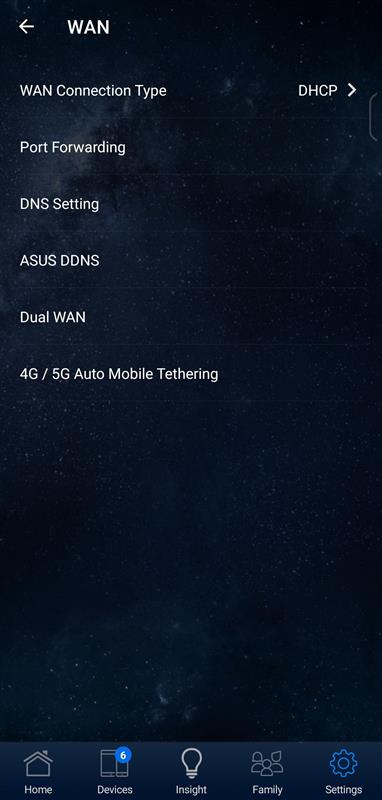
The DDNS setting should be located at Setting->WAN->ASUS DDNS inside the ASUS Router APP.

Thank you
TSASUSmy
post Mar 27 2025, 11:07 AM

Look at all my stars!!
*******
Senior Member
2,319 posts

Joined: Mar 2010
QUOTE(cool.seabreeze @ Mar 24 2025, 08:09 PM)
Hello ASUSmy

Cpanel also has DDNS, please see here  https://xxxx.cpanel.net/cpanel/domains/dynamic-dns/
please replace xxxx with docs in the link.

Can Asus provide Cpanel DDNS update in their router's DDNS configuration page.

Thanks
*
Hi cool.seabreeze,

Thank you for the feedback, will share to our RD to study.

Thank you
sHawTY
post Mar 27 2025, 12:07 PM

Frequent Reporter
********
All Stars
14,909 posts

Joined: Jul 2005

QUOTE(ASUSmy @ Mar 27 2025, 10:50 AM)
The DDNS setting should be located at Setting->WAN->ASUS DDNS inside the ASUS Router APP.
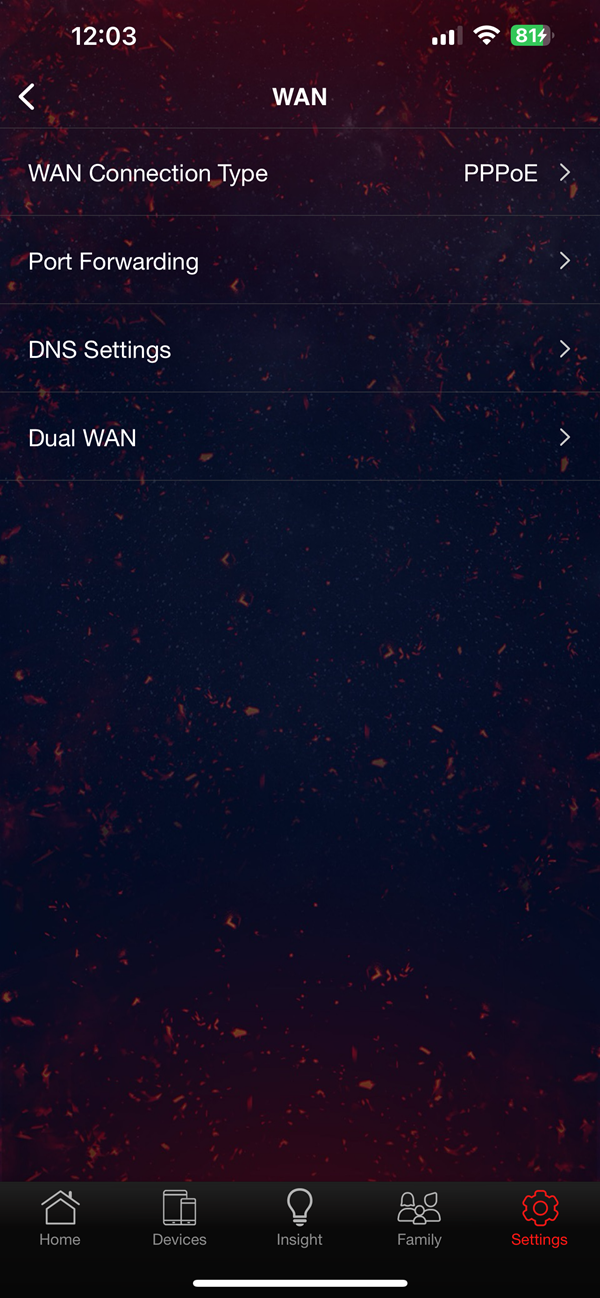
This is all that's available in the WAN setting in the APP

user posted image
TSASUSmy
post Mar 27 2025, 02:56 PM

Look at all my stars!!
*******
Senior Member
2,319 posts

Joined: Mar 2010
QUOTE(sHawTY @ Mar 27 2025, 12:07 PM)
This is all that's available in the WAN setting in the APP

user posted image
*
Hi sHawTY,

Just double checked with RD, the ASUS Router APP only support ASUS DDNS, third party DDNS will need to use web GUI for the setting.

user posted image

Thank you
shinjite
post Apr 6 2025, 08:46 PM

�ŞħĬΩĵΐŦ��
********
All Stars
19,320 posts

Joined: Jan 2003
From: Klang


QUOTE(sgpdsmss @ Mar 24 2025, 08:37 AM)
safe to upgrade latest  firmware for tuf ax4200?
ASUS TUF-AX4200 Firmware version 3.0.0.4.388_33903

any issue after upgraded?
thanks ..
*
I encountered very obvious issues with the Internet connectivity stability and I reverted. Now it's back to normal again. I plan to retest it again later in the future.
sgpdsmss
post Apr 7 2025, 12:50 PM

Regular
******
Senior Member
1,704 posts

Joined: Jan 2005
QUOTE(shinjite @ Apr 6 2025, 08:46 PM)
I encountered very obvious issues with the Internet connectivity stability and I reverted. Now it's back to normal again. I plan to retest it again later in the future.
*
ops....i just did upgrade yesterday morning to 3.0.0.4.388_33903....

how to noticed internet connectivity issue ?
router auto disconnected then reconnect ?
how to read from router log ?

thanks ....
firdausbhari
post Apr 7 2025, 06:49 PM

Look at all my stars!!
*******
Senior Member
2,281 posts

Joined: Feb 2012


QUOTE(sgpdsmss @ Apr 7 2025, 12:50 PM)
ops....i just did upgrade yesterday morning  to 3.0.0.4.388_33903....

how to noticed internet connectivity issue ?
router auto disconnected then reconnect ?
how to read from router log ?

thanks ....
*
from my previous experience, Broadcomm chipset provides more stability IMO. I've encountered several disconnection issue when using AX4200 back then.

This post has been edited by firdausbhari: Apr 7 2025, 06:50 PM

826 Pages « < 813 814 815 816 817 > » Top
 

Change to:
| Lo-Fi Version
0.0297sec    0.66    6 queries    GZIP Disabled
Time is now: 6th December 2025 - 10:35 AM