Welcome Guest ( Log In | Register )

Outline · [ Standard ] · Linear+

Home Networking ASUS Malaysia Networking User & Technical Support, Managed by ASUS Malaysia Representative

views
     
laihuhng
post Oct 1 2018, 10:40 PM

On my way
****
Junior Member
603 posts

Joined: Jun 2005


@ASUSmy, my 1+ month old rt-ac86u defective, strong burnt smell from the inside. Where should I send it for repair, in Penang? Dissapointing ....
laihuhng
post Oct 2 2018, 07:17 AM

On my way
****
Junior Member
603 posts

Joined: Jun 2005


QUOTE(jusbella @ Oct 1 2018, 10:57 PM)
Send back to the same shop u buy, they will help u do warranty. waiting their call when the stock is ready to collect.
*
I can't since I bought it online. It's a Malaysia set though.
laihuhng
post Oct 2 2018, 07:18 AM

On my way
****
Junior Member
603 posts

Joined: Jun 2005


QUOTE(stasio @ Oct 2 2018, 04:29 AM)
Seems a few forumers got problem with AC86U..... hmm.gif
*
Oh really? Luckily I bought a Malaysia set. If bought from Taobao, money burnt in just a month.
laihuhng
post Oct 2 2018, 09:17 AM

On my way
****
Junior Member
603 posts

Joined: Jun 2005


QUOTE(jusbella @ Oct 2 2018, 07:44 AM)
You can contact the online seller they'll guide u.
*
Noted. Thanks. wink.gif

QUOTE(pl95077 @ Oct 2 2018, 07:51 AM)
Try to contact them:
Advancenet Technology Sdn Bhd
Address: 105-08-02, Jalan Guardwara, Taman Windmill, 10300 George Town, Pulau Pinang
Phone: 0154-876 2849
*
Great. I'll give it a try. But, is this Asus Service Centre?

QUOTE(pl95077 @ Oct 2 2018, 07:53 AM)
Because of lightning strike??
*
Nope. No raining, no lighting. Suddenly dead.

QUOTE(stinky @ Oct 2 2018, 08:05 AM)
Taobao also got warranty.
1 to 1 exchange within first year. Not sure a new unit or refurbished la. Shipment to and fro about 80 kua.
*
Not that easy to ship back.

QUOTE(junclj @ Oct 2 2018, 08:16 AM)
Malaysia set also got quality issue, the extra RM879 should worth to pay for warranty. Since China set only sell RM590 include shipping cost. At least China set have to spend RM590 to buy a new set again once broken down.
*
But mine only 1+ month. Can't imagine how many it's going to breakdown in 3 years?

laihuhng
post Oct 2 2018, 10:07 AM

On my way
****
Junior Member
603 posts

Joined: Jun 2005


QUOTE(pl95077 @ Oct 2 2018, 09:44 AM)
Great. I'll give it a try. But, is this Asus Service Centre?
Yes.

Nope. No raining, no lighting. Suddenly dead.
This is funny, burning smell normally should be lighting........otherwise where the burning smell come from?
*
Smell like something burnt inside. But really, there isn't rain / lighting last night. Nothing went wrong with my BTU though. Temporary use back TM's router.
laihuhng
post Oct 2 2018, 10:21 AM

On my way
****
Junior Member
603 posts

Joined: Jun 2005


QUOTE(junclj @ Oct 2 2018, 10:11 AM)
So fragile? blink.gif
I've just on like less than 2 hours. tongue.gif tongue.gif tongue.gif

Just called up Advancenet. Let me send mine to them first. If it's really overheating, I'm speechless.
laihuhng
post Oct 2 2018, 11:58 AM

On my way
****
Junior Member
603 posts

Joined: Jun 2005


QUOTE(Avatar1975 @ Oct 2 2018, 11:05 AM)
I bought my RT-AC5300 in sg year 2016.
Last year first claim exchanged one unit.
Just did the second claim and get a brand new unit.
*
Oh ... WOW! thumbup.gif

How do you send back the defective device?
laihuhng
post Oct 6 2018, 07:02 AM

On my way
****
Junior Member
603 posts

Joined: Jun 2005


QUOTE(Avatar1975 @ Oct 2 2018, 12:02 PM)
Just ask friend pass to service center.
Exchange on the spot.
*
QUOTE(stinky @ Oct 2 2018, 12:47 PM)
From Malaysia to China also got people claim ASUS. I read in another lowyat thread. Just Poslaju only ma
*
Got back my RMA in 2 days time, excellent. Brand new in sealed box.

Attached Image
laihuhng
post Feb 16 2024, 11:23 PM

On my way
****
Junior Member
603 posts

Joined: Jun 2005


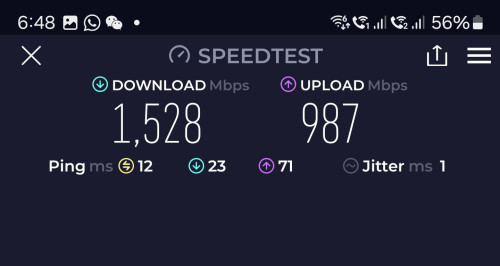
Please help. I've gotten TUF AX6000 to replace my Dlink DPN-FX3060V, which provided by Unifi.

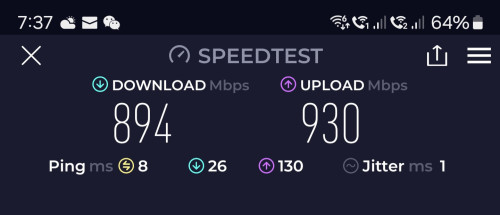
With DPN-FX3060V, I managed to get full upload speed
user posted image

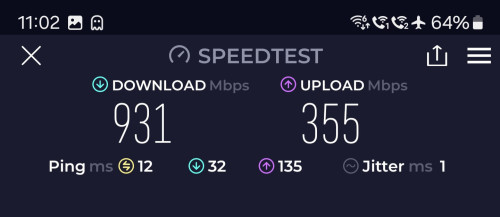
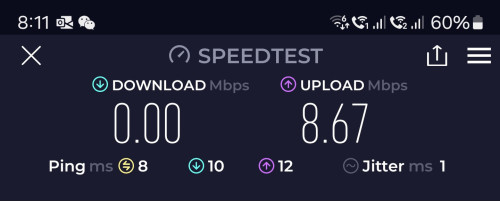
With AX6000, I'm only getting 300 - 400mpbs upload speed.
user posted image

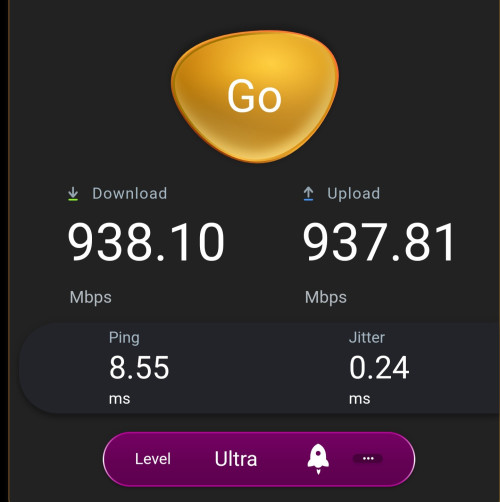
That said, using the Asus in built speed test, somehow I'm able getting full upload speed
user posted image

Please help. Anything that I've done wrongly?
laihuhng
post Feb 18 2024, 11:32 AM

On my way
****
Junior Member
603 posts

Joined: Jun 2005


QUOTE(blacktubi @ Feb 17 2024, 12:20 PM)
Do you happen to use a Samsung device?
*
Yes, most of us are using Samsung. Anything wrong with Samsung?

I've figured what could have gone wrong but it may be firmware bug?

By turning on Guest account, the router won't work altogether.
user posted image

To make it works, I have to enable QoS. But, turning on QoS, the upload speed is stuck at 300 - 400mbps.
user posted image

Turn off Guest account and QoS to gain full upload speed.
user posted image

Asus representative, please assist. Googled online, a lot also having the same slow upload speed issue. Spent close to 900 but getting a none working product.

This post has been edited by laihuhng: Feb 18 2024, 11:34 AM
laihuhng
post Feb 19 2024, 12:39 PM

On my way
****
Junior Member
603 posts

Joined: Jun 2005


QUOTE(blacktubi @ Feb 19 2024, 10:20 AM)
It's a known issue with Samsung devices when used with MU-MIMO enabled Wi-Fi 6 routers.

It will take some time to ramp up the speed, a short 10-15s speedtest is not long enough.

Try disabling MU-MIMO on your router, it might fix this.
*
IC. Ok, I can give it a try.

But, that didn't explain why without QoS, I can get full upload speed with the same 10 - 15sec Speedtest.
laihuhng
post Feb 19 2024, 06:53 PM

On my way
****
Junior Member
603 posts

Joined: Jun 2005


QUOTE(silverbolt143 @ Feb 19 2024, 04:45 PM)
Anybody subscribed to Unifi 1GB or 2GB managed to configure the Dlink ONR on bridge mode to be used with any ASUS router?
I'm currently on Unifi 800Mbps with ZTE ONT running through XT12 mesh and ethernet backhaul to 2 x XT8 nodes..
Thinking of upgrading to Unifi 1GB speed but the ONR limitation i.e. for not able to use my own mesh router is holding me back.
*
Do it at your own risk. Remember to save your Dlink's setting before you proceed. You may require to Reset it if you plan to use it as a router once again.

Once backup the setting (config file). Go into your Dlink Wan setting. Change Wan mode from GPON Router to GPON Bridge. That will do. I got mine working that way.

user posted image
laihuhng
post Feb 20 2024, 06:55 AM

On my way
****
Junior Member
603 posts

Joined: Jun 2005


QUOTE(silverbolt143 @ Feb 19 2024, 11:00 PM)
Thanks bro for the heads up...  notworthy.gif
- do i need to use a specific LAN port on the ONR to connect to the Asus router WAN port?
- that mean i can setup the PPPOE connection as usual on my Asus router?
*
- I'm using LAN1.
- YES


QUOTE(sadlyfalways @ Feb 19 2024, 11:41 PM)
I’m wondering this too, what about voip? Can still use the dlink to connect phone like normal unifi btu?
*
I didn't try but I believe it works. When you select Bridge, all other settings are gone missing except your voip.

laihuhng
post Feb 28 2024, 08:12 PM

On my way
****
Junior Member
603 posts

Joined: Jun 2005


QUOTE(ASUSmy @ Feb 28 2024, 11:51 AM)
Hi laihuhng,

Can you try to update the firmware to the latest and monitor whether the problem still persist or not.

The latest version of the firmware version is 3.0.0.4.388_33144.

https://www.asus.com/networking-iot-servers...F-Gaming-AX6000

Thank you
*
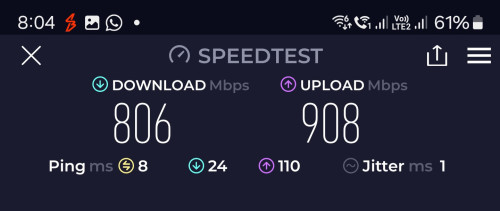
Quick test after updating. With Guest account turned ON, I no longer needs to enable QoS. Moreover, I can get the full.upload speed. Thanks a million. šŸ‘šŸ‘šŸ‘

user posted image
laihuhng
post Mar 5 2024, 08:08 AM

On my way
****
Junior Member
603 posts

Joined: Jun 2005


QUOTE(ASUSmy @ Feb 28 2024, 11:51 AM)
Hi laihuhng,

Can you try to update the firmware to the latest and monitor whether the problem still persist or not.

The latest version of the firmware version is 3.0.0.4.388_33144.

https://www.asus.com/networking-iot-servers...F-Gaming-AX6000

Thank you
*
ASUSmy, while the new firmware fixed the QoS issue when the Guest Network is enabled, now I discovered yet another major issue.

user posted image
My automation which is connected to 2.4G Guest Network is working fine until I turn on the 5G WIFI in the Guest Network. It completely killed the 2.4G Guest WIFI. Turning off the Guest's 5G, the Guest's 2.4G is working again.

Asus was my first choice when came to laptops and routers. No issue in the past but this time around, it gives me a lot of headaches. Please assist. Thanks.


This post has been edited by laihuhng: Mar 5 2024, 08:11 AM
laihuhng
post Mar 6 2024, 08:01 PM

On my way
****
Junior Member
603 posts

Joined: Jun 2005


QUOTE(ASUSmy @ Mar 6 2024, 09:28 AM)
Hi laihuhng,

I have tested the 2.4GHz and 5GHz guest network on the the TUF-AX6000, but I not able to duplicate the problem mention by you.

Can you share me how your guest network are setup?

Are you able to connect to the 2.4GHz guest network with your phone or other WiFi devices?

Thank you
*
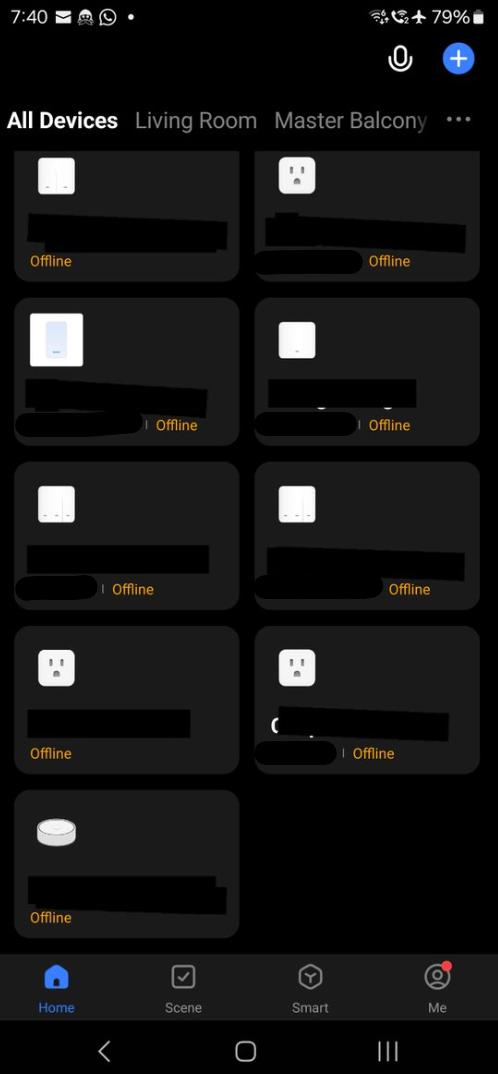
You are correct. WIFI is working both 2.4g and 5g when 5g Guest is turned ON. That said, all of my automation and smart switches which connected to 2.4g Guest, go offline.
user posted image

Turning off 5g Guest, all online again.
user posted image

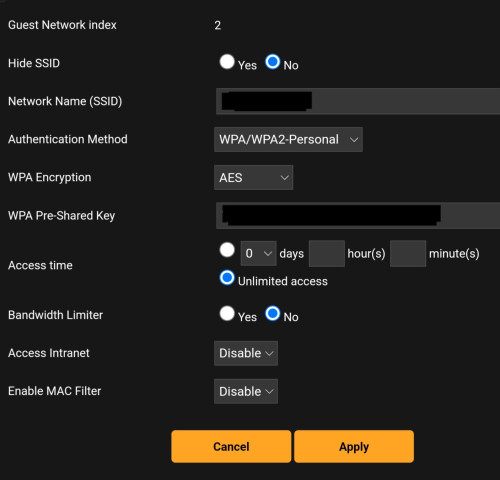
My 2.4g Guest setting
user posted image

Any clue?
laihuhng
post Mar 7 2024, 10:09 PM

On my way
****
Junior Member
603 posts

Joined: Jun 2005


QUOTE(blacktubi @ Mar 6 2024, 08:37 PM)
Try toggling the access intranet feature for your guest network.

Some IoT brands might not work properly with that function enabled as the app can see them in the network but couldn't connect to them.
*
Tried toggling Intranet Access for both 2.4g and 5g, same and not helping.
laihuhng
post Mar 8 2024, 11:18 AM

On my way
****
Junior Member
603 posts

Joined: Jun 2005


QUOTE(ASUSmy @ Mar 8 2024, 10:00 AM)
Hi laihuhng,

May I ask, are you using the first guest network for 2.4GHz and 5GHz?

Can you try second guest network for 2.4GHz and 5GHz and check whether the problem will persist or not?

Thank you
*
I'm using 2nd 2.4g Guest for my automation and 1st 5g Guest for my guests.

Let me try to use both at 2nd guest network tonight.
laihuhng
post Mar 8 2024, 07:47 PM

On my way
****
Junior Member
603 posts

Joined: Jun 2005


QUOTE(ASUSmy @ Mar 8 2024, 10:00 AM)
Hi laihuhng,

May I ask, are you using the first guest network for 2.4GHz and 5GHz?

Can you try second guest network for 2.4GHz and 5GHz and check whether the problem will persist or not?

Thank you
*
Tried 2nd guest network for both, problem goes away. Thanks, but why?

laihuhng
post Mar 9 2024, 09:06 PM

On my way
****
Junior Member
603 posts

Joined: Jun 2005


QUOTE(BTS1501 @ Mar 9 2024, 01:56 PM)
That maybe because you are using fixed IP for your automation....if fixed IP, what did you set it to ?
*
Nope, I didn't fix the IP.

2 Pages  1 2 >Top
 

Change to:
| Lo-Fi Version
0.0410sec    0.24    7 queries    GZIP Disabled
Time is now: 8th December 2025 - 12:40 AM