Outline ·
[ Standard ] ·
Linear+
Home Networking ASUS Malaysia Networking User & Technical Support, Managed by ASUS Malaysia Representative
|
PRSXFENG
|
 Mar 14 2025, 05:43 PM Mar 14 2025, 05:43 PM
|

|
QUOTE(thomas1983 @ Mar 13 2025, 10:49 PM) Hi guys , My AX88U suddenly the 5ghz wifi disappear! The 5ghz light on router also off … I am sure its enable ! The current control channel is 0, MAC address also blank I did hard reset and switch to Merlin but still no luck ;( Or its the hardware issue ? Anyone can help with this issue pls … you have been hit by malware, do the firmware update to resolve it |
|
|
|
|
|
thomas1983
|
Mar 14 2025, 07:30 PM
|
Getting Started

|
QUOTE(PRSXFENG @ Mar 14 2025, 05:43 PM) you have been hit by malware, do the firmware update to resolve it I already have the latest version but still same Then I flash to Merlin also same … |
|
|
|
|
|
kk131
|
Mar 14 2025, 08:41 PM
|
|
|
QUOTE(thomas1983 @ Mar 13 2025, 10:49 PM) Hi guys , My AX88U suddenly the 5ghz wifi disappear! The 5ghz light on router also off … I am sure its enable ! The current control channel is 0, MAC address also blank I did hard reset and switch to Merlin but still no luck ;( Or its the hardware issue ? Anyone can help with this issue pls … Are you running the latest firmware version? Asus AICloud was hacked. |
|
|
|
|
|
thomas1983
|
Mar 14 2025, 10:11 PM
|
Getting Started
|
QUOTE(kk131 @ Mar 14 2025, 08:41 PM) Are you running the latest firmware version? Asus AICloud was hacked. yes latest 3.0.0.4_388_24232 |
|
|
|
|
|
kk131
|
Mar 15 2025, 08:20 AM
|
|
|
QUOTE(thomas1983 @ Mar 14 2025, 10:11 PM) yes latest 3.0.0.4_388_24232 You've tried a factory reset? |
|
|
|
|
|
thomas1983
|
Mar 15 2025, 11:41 AM
|
Getting Started
|
QUOTE(kk131 @ Mar 15 2025, 08:20 AM) You've tried a factory reset? Yes bro … I did by pressing the reset button at the back |
|
|
|
|
|
sgpdsmss
|
Mar 15 2025, 12:15 PM
|
|
|
guys ,
how to setup maxis fiber under unifi infra in tuf ax4200?
modem port 2 connect to router wan port,
PPOE ..maxis username and password ...
but the 2.5g wan still red light ...
any setting need to set ?
pls help ...
update ....managed to get the 2.5g wan led turn white ..and can connected to maxis isp
after select maxis_fiber profile ...
but lan port 3 tag to voip...possible to change voip to internet ? otherwise 1port wasted lan connection since I'm not using home' phone
...
thanks ...
This post has been edited by sgpdsmss: Mar 15 2025, 04:11 PM
|
|
|
|
|
|
yongtjunkit
|
Mar 15 2025, 04:33 PM
|
|
|
QUOTE(sgpdsmss @ Mar 15 2025, 12:15 PM) guys , how to setup maxis fiber under unifi infra in tuf ax4200? modem port 2 connect to router wan port, PPOE ..maxis username and password ... but the 2.5g wan still red light ... any setting need to set ? pls help ... update ....managed to get the 2.5g wan led turn white ..and can connected to maxis isp after select maxis_fiber profile ... but lan port 3 tag to voip...possible to change voip to internet ? otherwise 1port wasted lan connection since I'm not using home' phone ... thanks ... Go to Lan > IPTV and change the profile to custom Enter the following for Unifi/ TM HSBB INFRAInternet: 621 apply the changes and you should be able to use all the lan port of the asus router once the router reboots This post has been edited by yongtjunkit: Mar 15 2025, 04:34 PM |
|
|
|
|
|
sgpdsmss
|
Mar 15 2025, 06:30 PM
|
|
|
QUOTE(yongtjunkit @ Mar 15 2025, 04:33 PM) Go to Lan > IPTV and change the profile to custom Enter the following for Unifi/ TM HSBB INFRAInternet: 621 apply the changes and you should be able to use all the lan port of the asus router once the router reboots beginning i select custom profile .. all vlan i set 621 ...for lan 1 till 4 ..but the 2.5g wan led become red ..cannot connect to isp .. later select profil maxis then only can connect to isp and got internet ... thanks ... |
|
|
|
|
|
kk131
|
Mar 15 2025, 07:10 PM
|
|
|
QUOTE(thomas1983 @ Mar 15 2025, 11:41 AM) Yes bro … I did by pressing the reset button at the back Perhaps this thread will help https://www.snbforums.com/threads/rt-ax86u-...try-code.82312/ |
|
|
|
|
|
yongtjunkit
|
Mar 15 2025, 07:23 PM
|
|
|
QUOTE(sgpdsmss @ Mar 15 2025, 06:30 PM) beginning i select custom profile .. all vlan i set 621 ...for lan 1 till 4 ..but the 2.5g wan led become red ..cannot connect to isp .. later select profil maxis then only can connect to isp and got internet ... thanks ... Key in Internet only Others leave blank Btw which profile specifically are you selecting when it works? - maxis fiber -maxis fiber special - maxis - SACOFA - maxis - TNB/ALLO This post has been edited by yongtjunkit: Mar 15 2025, 07:27 PM |
|
|
|
|
|
sgpdsmss
|
Mar 15 2025, 08:14 PM
|
|
|
QUOTE(yongtjunkit @ Mar 15 2025, 07:23 PM) Key in Internet only Others leave blank Btw which profile specifically are you selecting when it works? - maxis fiber -maxis fiber special - maxis - SACOFA - maxis - TNB/ALLO maxis fiber I'm on unifi infra |
|
|
|
|
|
yongtjunkit
|
Mar 15 2025, 08:32 PM
|
|
|
QUOTE(sgpdsmss @ Mar 15 2025, 08:14 PM) maxis fiber I'm on unifi infra Then entering 621 in the internet vlan should work(lan 3 and 4 leave blank) This post has been edited by yongtjunkit: Mar 15 2025, 08:33 PM |
|
|
|
|
|
sgpdsmss
|
Mar 15 2025, 10:52 PM
|
|
|
QUOTE(yongtjunkit @ Mar 15 2025, 08:32 PM) Then entering 621 in the internet vlan should work(lan 3 and 4 leave blank) Alright ...later try ..update here ...thanks |
|
|
|
|
|
chocobo7779
|
Mar 16 2025, 08:51 AM
|
|
|
QUOTE(thomas1983 @ Mar 14 2025, 07:30 PM) I already have the latest version but still same Then I flash to Merlin also same … Looks like 5GHz radio failed/failing  Is it under warranty? Might want to get that repaired under warranty - if no warranty coverage then you may contact someone like Armand666 to repair it. I had a similar issue as yours and he was able to replace the faulty 5GHz radio and the router is working fine to this day  |
|
|
|
|
|
sgpdsmss
|
Mar 16 2025, 09:06 AM
|
|
|
QUOTE(yongtjunkit @ Mar 15 2025, 08:32 PM) Then entering 621 in the internet vlan should work(lan 3 and 4 leave blank) yes 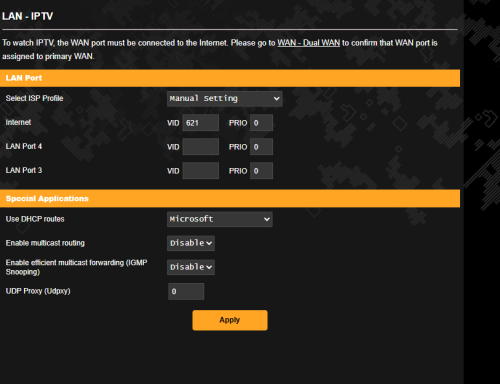 follow your step, lan3 port can internet. and can connect to maxis isp internet thank you very much.. |
|
|
|
|
|
thomas1983
|
Mar 16 2025, 10:54 AM
|
Getting Started
|
QUOTE(kk131 @ Mar 15 2025, 07:10 PM) Thanks man … I will check … |
|
|
|
|
|
thomas1983
|
Mar 16 2025, 10:55 AM
|
Getting Started
|
QUOTE(chocobo7779 @ Mar 16 2025, 08:51 AM) Looks like 5GHz radio failed/failing Is it under warranty? Might want to get that repaired under warranty - if no warranty coverage then you may contact someone like Armand666 to repair it. I had a similar issue as yours and he was able to replace the faulty 5GHz radio and the router is working fine to this day Thanks man for the info … will pm him see how 👍🏻 |
|
|
|
|
|
blacktubi
|
Mar 16 2025, 08:27 PM
|
-

|
QUOTE(thomas1983 @ Mar 16 2025, 10:55 AM) Thanks man for the info … will pm him see how 👍🏻 First question, is it local unit or china unit? Try hard reset https://www.asus.com/my/support/FAQ/1039074 |
|
|
|
|
|
thomas1983
|
Mar 16 2025, 08:37 PM
|
Getting Started
|
QUOTE(blacktubi @ Mar 16 2025, 08:27 PM) First question, is it local unit or china unit? Try hard reset https://www.asus.com/my/support/FAQ/1039074Local unit (Singapore unit) Tried hard reset but still same ;( This post has been edited by thomas1983: Mar 16 2025, 08:45 PM |
|
|
|
|



 Quote
Quote


 0.0278sec
 0.29
0.29
 6 queries
 GZIP Disabled