Welcome Guest ( Log In | Register )

826 Pages « < 698 699 700 701 702 > » Bottom

Outline · [ Standard ] · Linear+

Home Networking ASUS Malaysia Networking User & Technical Support, Managed by ASUS Malaysia Representative

views
     
shankar_dass93
post Oct 21 2021, 04:14 PM

Look at all my stars!!
*******
Senior Member
2,955 posts

Joined: Sep 2009


Hi guys,

I am currently using a ASUS RT-AC8U router and am keen in upgrading my Unifi package to 300mbps.

There wouldn't be any issues with the router right ?
WaNaWe900
post Oct 21 2021, 06:08 PM

చąហ ąచҽ™
******
Senior Member
1,397 posts

Joined: Feb 2012
From: sOuL SoCiETY.. iSKaNDaRPuTeRi.. JB.. JDT


QUOTE(ASUSmy @ Oct 21 2021, 03:21 PM)
Hi WaNaWe900,

Can you try to go USB Application->Server Center->Network Place (Samba) Share / Cloud Disk and check the device name and whether the workgroup is same with your PC or laptop.

Thank you
*
noted... will look into this tonight icon_rolleyes.gif


QUOTE(shankar_dass93 @ Oct 21 2021, 04:14 PM)
Hi guys,

I am currently using a ASUS RT-AC8U router and am keen in upgrading my Unifi package to 300mbps.

There wouldn't be any issues with the router right ?
*
if you means AC86U then shouldn't be a problems... I had it on from 30Mbps VDSL to 300Mbps Fiber, you may need to re-enter different login & password (from internet provider) in the router setting after getting upgrade thou thumbup.gif
thomas1983
post Oct 21 2021, 08:27 PM

Getting Started
**
Junior Member
159 posts

Joined: Jan 2005


QUOTE(ASUSmy @ Oct 20 2021, 03:32 PM)
Hi thomas1983,

Have you try to update the firmware to the latest and test again? Does this problem happen previously when you first setup this router?

Thank you
*
Yes the firmware is the latest one for both Ac88u & ac68u .
When first setup there is no problem at all , this happened is like one or two months back ….

TSASUSmy
post Oct 22 2021, 01:53 PM

Look at all my stars!!
*******
Senior Member
2,319 posts

Joined: Mar 2010
QUOTE(thomas1983 @ Oct 21 2021, 08:27 PM)
Yes the firmware is the latest one for both Ac88u & ac68u .
When first setup there is no problem at all , this happened is like one or two months back ….
*
Hi thomas1983,

Will it happen if you use your iPhone on other WiFi network?

You can found few articles regarding the iPhone 11 Pro slow WiFi when you Google it, maybe you can try the step given to troubleshoot.
https://thecellguide.com/slow-internet-conn...1-pro-max-10201

Thank you
jianwei87
post Oct 23 2021, 11:23 PM

Casual
***
Junior Member
481 posts

Joined: Jan 2007
When asus malaysia will bring in ET8?
cool.seabreeze
post Oct 24 2021, 10:06 AM

New Member
*
Junior Member
45 posts

Joined: Dec 2019
Router RT-AX3000 with firmware 3.0.0.4.386_45898-gfa90458 failed to update DDNS (domain.asuscomm.com)

Recently I have reused my RT-AX3000 and found that it has failed to update the DDNS when the WAN IP changes. Before reusing the RT-AX3000, I have updated the firmware and reset it to factory default. Then reconfigure to use it for internet access.

Any insight on how to solve the DDNS update problems would be apprreciated.

part of the log:

May 5 13:05:26 start_ddns: update WWW.ASUS.COM update@asus.com, wan_unit 0
May 5 13:05:26 inadyn[1745]: In-a-dyn version 2.8.1 -- Dynamic DNS update client.
May 5 13:05:26 inadyn[1745]: Update forced for alias xxxxxxx.asuscomm.com, new IP# 14.192.xxx.xxx
May 5 13:05:28 WAN Connection: WAN was restored.
Oct 21 04:01:33 inadyn[1745]: Failed connecting to ns1.asuscomm.com: Operation now in progress
Oct 21 04:01:33 inadyn[1745]: [send_update, 622]http_init fail. rc=13


Oct 24 04:01:21 start_ddns: update WWW.ASUS.COM update@asus.com, wan_unit 0
Oct 24 04:01:21 inadyn[2430]: In-a-dyn version 2.8.1 -- Dynamic DNS update client.
Oct 24 04:01:21 inadyn[2430]: Update forced for alias xxxxxxx.asuscomm.com, new IP# 14.192.xxx.xxx
Oct 24 04:01:29 inadyn[2430]: [send_update, 622]http_init fail. rc=33


ASUSmy
Jjuggler
post Oct 24 2021, 04:07 PM

Narcissistic Genius
******
Senior Member
1,341 posts

Joined: Dec 2016
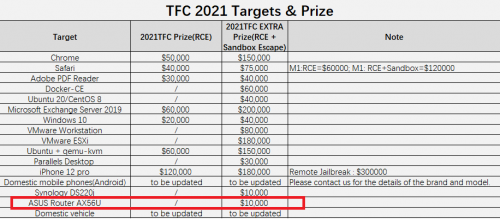
Please provide immediate patch for RT-AX56U asap, ASUSmy.

user posted image

Source: Windows 10, iOS 15, Ubuntu, Chrome fall at China’s Tianfu hacking contest

This post has been edited by Jjuggler: Oct 24 2021, 04:07 PM
ntw
post Oct 24 2021, 10:53 PM

One Each At A Time
******
Senior Member
1,432 posts

Joined: Aug 2010
From: Ipoh mali~~~


where can I buy power adapter for RT-AC67U router?

update: found replacement from shopee

This post has been edited by ntw: Oct 25 2021, 03:11 AM
afif92
post Oct 25 2021, 02:58 AM

Casual
***
Junior Member
374 posts

Joined: Mar 2010
QUOTE(cool.seabreeze @ Oct 24 2021, 10:06 AM)
Router RT-AX3000 with firmware 3.0.0.4.386_45898-gfa90458 failed to update DDNS (domain.asuscomm.com)

Recently I have reused my RT-AX3000  and found that it has failed to update the DDNS when the WAN IP changes.  Before reusing the RT-AX3000, I have updated the firmware and reset it to factory default.  Then reconfigure to use it for internet access.

Any insight on how to solve the DDNS update problems would be apprreciated.

part of the log:

May  5 13:05:26 start_ddns: update WWW.ASUS.COM update@asus.com, wan_unit 0
May  5 13:05:26 inadyn[1745]: In-a-dyn version 2.8.1 -- Dynamic DNS update client.
May  5 13:05:26 inadyn[1745]: Update forced for alias xxxxxxx.asuscomm.com, new IP# 14.192.xxx.xxx
May  5 13:05:28 WAN Connection: WAN was restored.
Oct 21 04:01:33 inadyn[1745]: Failed connecting to ns1.asuscomm.com: Operation now in progress
Oct 21 04:01:33 inadyn[1745]: [send_update, 622]http_init fail. rc=13
Oct 24 04:01:21 start_ddns: update WWW.ASUS.COM update@asus.com, wan_unit 0
Oct 24 04:01:21 inadyn[2430]: In-a-dyn version 2.8.1 -- Dynamic DNS update client.
Oct 24 04:01:21 inadyn[2430]: Update forced for alias xxxxxxx.asuscomm.com, new IP# 14.192.xxx.xxx
Oct 24 04:01:29 inadyn[2430]: [send_update, 622]http_init fail. rc=33
ASUSmy

*
You subscribe Unifi which speed below 100Mbps right?
TSASUSmy
post Oct 25 2021, 11:04 AM

Look at all my stars!!
*******
Senior Member
2,319 posts

Joined: Mar 2010
QUOTE(Jjuggler @ Oct 24 2021, 04:07 PM)
Please provide immediate patch for RT-AX56U asap, ASUSmy.

user posted image

Source: Windows 10, iOS 15, Ubuntu, Chrome fall at China’s Tianfu hacking contest
*
Hi Jjuggler,

Thank you for sharing, will forward it to our RD.

Thank you
TSASUSmy
post Oct 25 2021, 11:09 AM

Look at all my stars!!
*******
Senior Member
2,319 posts

Joined: Mar 2010
QUOTE(cool.seabreeze @ Oct 24 2021, 10:06 AM)
Router RT-AX3000 with firmware 3.0.0.4.386_45898-gfa90458 failed to update DDNS (domain.asuscomm.com)

Recently I have reused my RT-AX3000  and found that it has failed to update the DDNS when the WAN IP changes.  Before reusing the RT-AX3000, I have updated the firmware and reset it to factory default.  Then reconfigure to use it for internet access.

Any insight on how to solve the DDNS update problems would be apprreciated.

part of the log:

May  5 13:05:26 start_ddns: update WWW.ASUS.COM update@asus.com, wan_unit 0
May  5 13:05:26 inadyn[1745]: In-a-dyn version 2.8.1 -- Dynamic DNS update client.
May  5 13:05:26 inadyn[1745]: Update forced for alias xxxxxxx.asuscomm.com, new IP# 14.192.xxx.xxx
May  5 13:05:28 WAN Connection: WAN was restored.
Oct 21 04:01:33 inadyn[1745]: Failed connecting to ns1.asuscomm.com: Operation now in progress
Oct 21 04:01:33 inadyn[1745]: [send_update, 622]http_init fail. rc=13
Oct 24 04:01:21 start_ddns: update WWW.ASUS.COM update@asus.com, wan_unit 0
Oct 24 04:01:21 inadyn[2430]: In-a-dyn version 2.8.1 -- Dynamic DNS update client.
Oct 24 04:01:21 inadyn[2430]: Update forced for alias xxxxxxx.asuscomm.com, new IP# 14.192.xxx.xxx
Oct 24 04:01:29 inadyn[2430]: [send_update, 622]http_init fail. rc=33
ASUSmy
*
Hi cool.seabreeze,

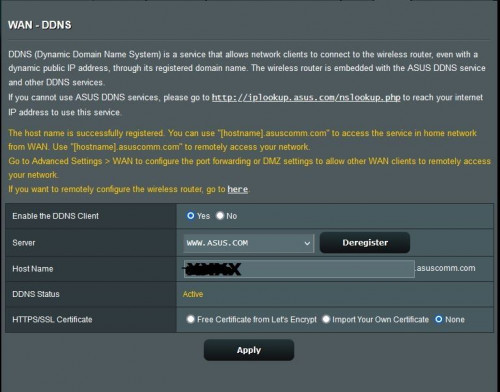
Can you show us the image of the DDNS page? If the DDNS is created successfully, it will mention there. Same if the registration has problem.

Is the DDNS name used on other ASUS router before?

Thank you

This post has been edited by ASUSmy: Oct 25 2021, 11:10 AM
TSASUSmy
post Oct 25 2021, 11:19 AM

Look at all my stars!!
*******
Senior Member
2,319 posts

Joined: Mar 2010
QUOTE(jianwei87 @ Oct 23 2021, 11:23 PM)
When asus malaysia will bring in ET8?
*
Hi jianwei87,

Nope, not until MCMC approved WiFi6E in Malaysia.

Thank you
Jjuggler
post Oct 25 2021, 11:50 AM

Narcissistic Genius
******
Senior Member
1,341 posts

Joined: Dec 2016
QUOTE(ASUSmy @ Oct 25 2021, 11:04 AM)
Hi Jjuggler,

Thank you for sharing, will forward it to our RD.

Thank you
*
You're welcome.
John42
post Oct 25 2021, 12:05 PM

Getting Started
**
Junior Member
256 posts

Joined: Aug 2019
QUOTE(ASUSmy @ Oct 25 2021, 11:19 AM)
Hi jianwei87,

Nope, not until MCMC approved WiFi6E in Malaysia.

Thank you
*
😣😣😣 I hope by 2023 WiFi6E routers will be here. Will be upgrading my devices as well...
cool.seabreeze
post Oct 26 2021, 12:22 PM

New Member
*
Junior Member
45 posts

Joined: Dec 2019
QUOTE(ASUSmy @ Oct 25 2021, 11:09 AM)
Hi cool.seabreeze,

Can you show us the image of the DDNS page? If the DDNS is created successfully, it will mention there. Same if the registration has problem.

Is the DDNS name used on other ASUS router before?

Thank you
*
The DDNS name was not used in other Asus router.

Pic of the DDNS page :

user posted image

ASUSmy
TSASUSmy
post Oct 26 2021, 05:42 PM

Look at all my stars!!
*******
Senior Member
2,319 posts

Joined: Mar 2010
QUOTE(cool.seabreeze @ Oct 26 2021, 12:22 PM)
The DDNS name was not used in other Asus router.

Pic of the DDNS page :

user posted image

ASUSmy
*
Hi cool.seabreeze,

Can you send a feedback using the router GUI at Administrator->Feedback and PM me the email address used once done. Will request RD to check.

Thank you
sHawTY
post Oct 27 2021, 09:02 AM

Frequent Reporter
********
All Stars
14,909 posts

Joined: Jul 2005

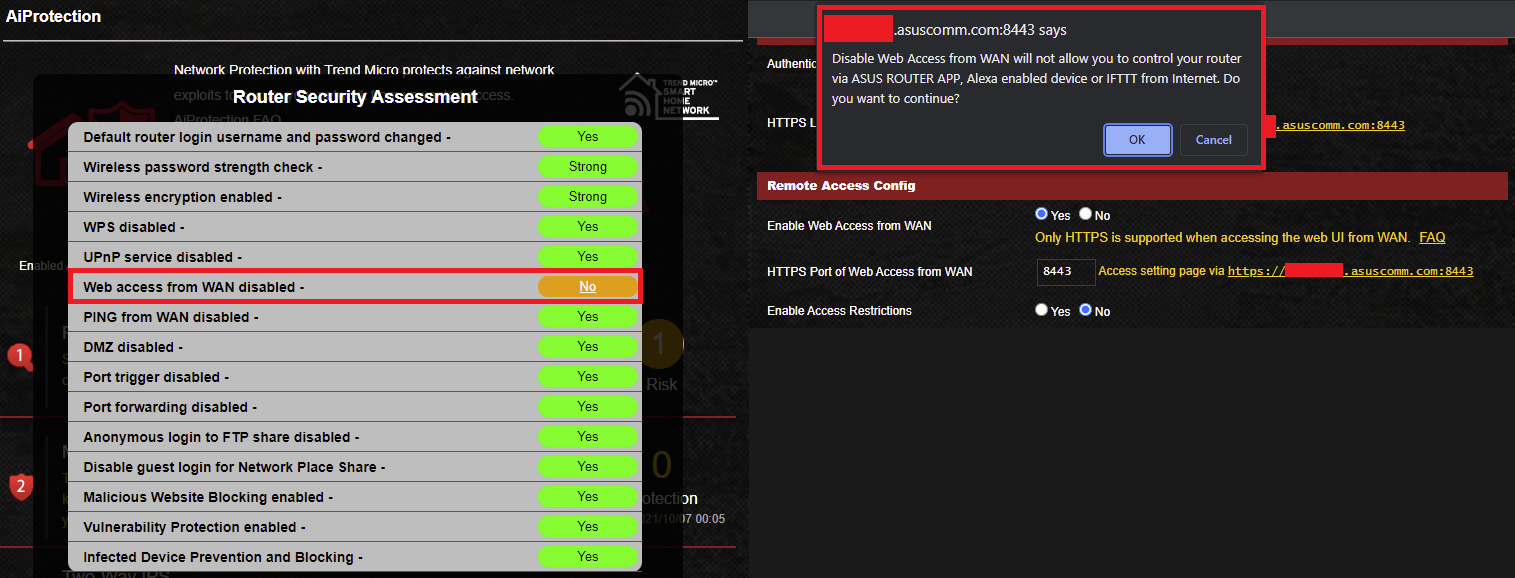
ASUSmy Why am I getting this warning? I enabled HTTPS/SSL and it worked perfectly but when I see the AiProtection status, it asked me to disable Web access from WAN
So I wanted to disable it but now I'm getting a warning saying if I disable Web access from WAN, I can't control the router from the Asus Router App?

Can I or can't I disable web access from WAN without affecting the ASUS Router App functionality?

user posted image

This post has been edited by sHawTY: Oct 27 2021, 09:03 AM
TSASUSmy
post Oct 27 2021, 11:07 AM

Look at all my stars!!
*******
Senior Member
2,319 posts

Joined: Mar 2010
QUOTE(sHawTY @ Oct 27 2021, 09:02 AM)
ASUSmy Why am I getting this warning? I enabled HTTPS/SSL and it worked perfectly but when I see the AiProtection status, it asked me to disable Web access from WAN
So I wanted to disable it but now I'm getting a warning saying if I disable Web access from WAN, I can't control the router from the Asus Router App?

Can I or can't I disable web access from WAN without affecting the ASUS Router App functionality?

user posted image
*
Hi sHawTY,

The AiProtection Router Security Assessment show the potential vulnerabilities and option to enhance it which include "Enable Web Access from WAN".

You can turn off the remote connection on the router APP to increase the security on the router. And yes you won't be able access the router if you are outside of the network. You can only use the ASUS router APP locally.

Thank you
sHawTY
post Oct 27 2021, 11:19 AM

Frequent Reporter
********
All Stars
14,909 posts

Joined: Jul 2005

QUOTE(ASUSmy @ Oct 27 2021, 11:07 AM)
You can turn off the remote connection on the router APP to increase the security on the router. And yes you won't be able access the router if you are outside of the network. You can only use the ASUS router APP locally.
Oh, so the app will still function as long as I'm at home. That's fine then

I thought by disabling web access it will disable the app functionality as well

The HTTPS/SSL will still work if I disable web access right?

This post has been edited by sHawTY: Oct 27 2021, 11:20 AM
TSASUSmy
post Oct 27 2021, 11:55 AM

Look at all my stars!!
*******
Senior Member
2,319 posts

Joined: Mar 2010
QUOTE(sHawTY @ Oct 27 2021, 11:19 AM)
Oh, so the app will still function as long as I'm at home. That's fine then

I thought by disabling web access it will disable the app functionality as well

The HTTPS/SSL will still work if I disable web access right?
*
Hi sHawTY,

Yes, you can select the method here.

Thank you


Attached thumbnail(s)
Attached Image

826 Pages « < 698 699 700 701 702 > » Top
 

Change to:
| Lo-Fi Version
0.0372sec    0.36    6 queries    GZIP Disabled
Time is now: 12th December 2025 - 01:10 AM