

QUOTE(ASUSmy @ Oct 25 2021, 11:19 AM)
Hi jianwei87,
Nope, not until MCMC approved WiFi6E in Malaysia.
Thank you

but why motherboard with wifi6E is allowed in malaysia?Nope, not until MCMC approved WiFi6E in Malaysia.
Thank you
Home Networking ASUS Malaysia Networking User & Technical Support, Managed by ASUS Malaysia Representative
|
|
 Oct 27 2021, 03:49 PM Oct 27 2021, 03:49 PM
|
 
All Stars
10,477 posts Joined: Jan 2003 From: Sarawak 
|
QUOTE(ASUSmy @ Oct 25 2021, 11:19 AM) Hi jianwei87, but why motherboard with wifi6E is allowed in malaysia?Nope, not until MCMC approved WiFi6E in Malaysia. Thank you John42 liked this post
|
|
|
|
|
|
Oct 27 2021, 07:59 PM
Show posts by this member only | IPv6 | Post
#14002
|

All Stars
14,909 posts Joined: Jul 2005 
|
QUOTE(ASUSmy @ Oct 27 2021, 11:55 AM) Yes, you can select the method here. Disabling Web Access from WAN broke the configuration, I can no longer access the router through DDNS address even when I'm at home, had to login using https://router.asus.com:8443/But loading the router setting using that link is really slow and it's no longer secure  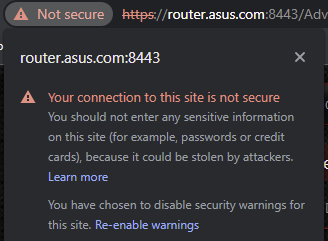 This post has been edited by sHawTY: Oct 27 2021, 07:59 PM |
|
|
Oct 28 2021, 07:58 PM
|
 
Elite
8,418 posts Joined: Jul 2008
|
QUOTE(sHawTY @ Oct 27 2021, 07:59 PM) Disabling Web Access from WAN broke the configuration, I can no longer access the router through DDNS address even when I'm at home, had to login using https://router.asus.com:8443/ Disabling web access from WAN will remove the port forward profile which means NAT loop back will stop working and you can’t access the setting page with the DDNS address.But loading the router setting using that link is really slow and it's no longer secure A secure work around is to add a port forward entry that point port 8443 to the router and set your device to be the source IP. |
|
|
Oct 28 2021, 09:44 PM
Show posts by this member only | IPv6 | Post
#14004
|

Junior Member
246 posts Joined: Jan 2005
|
Does the "HTTPS/SSL Certificate - Import Your Own Certificate" option only supports certificates issued by a well known external CA?
I am trying to upload a certificate and key combination generated by my own internal CA, but it seems like everytime after saving, it gets replaced with the "router.asus.com" default certificate. I have tried many different certs, i.e. signed by internal CA, standalone certs, and none worked. There are no errors in the logs other than these lines when the cert is uploaded: CODE Oct 28 21:34:10 rc_service: httpds 21216:notify_rc restart_ddns;restart_httpd;restart_webdav Oct 28 21:34:10 start_ddns: update WWW.DNSOMATIC.COM default@dnsomatic.com, wan_unit 0 Oct 28 21:34:10 inadyn[2377]: In-a-dyn version 2.8.1 -- Dynamic DNS update client. Oct 28 21:34:10 RT-AX56U: start https:8443 Oct 28 21:34:10 RT-AX56U: start httpd:80 Oct 28 21:34:10 httpd: Save SSL certificate...8443 Oct 28 21:34:10 httpd: mssl_cert_key_match : PASS Oct 28 21:34:10 WEBDAV Server: daemon is stoped However, if I tried to upload a Let's Encrypt cert generated for my other servers (with a different domain altogether), the cert is uploaded successfully and the router is able to use the cert to serve the Web UI over HTTPS. I am using RT-AX56U with official firmware version:3.0.0.4.386_45898. Anyone had any experience in successfully uploading a self-signed cert? Thanks in advance  |
|
|
Oct 29 2021, 09:42 AM
Show posts by this member only | IPv6 | Post
#14005
|

Senior Member
2,516 posts Joined: Mar 2016
|
Hi ASUSmy, if I were to enable smart connect on my AX92U, will all the wifi 6 features(eg. OFDMA,etc) be available?
This post has been edited by yongtjunkit: Oct 29 2021, 02:26 PM |
|
|
Oct 29 2021, 01:46 PM
Show posts by this member only | IPv6 | Post
#14006
|

Junior Member
236 posts Joined: Sep 2008
|
how much for Asus XT8 dual note?
i search shopee, price from 1.3k to 1.8k, why so huge different? |
|
|
|
|
|
Oct 29 2021, 02:16 PM
|
|
All Stars
10,477 posts Joined: Jan 2003 From: Sarawak
|
Which is better?
Twin RT-AX55 or ZenWifi Mini XD4? Either of these will be connected downstream to my existing router. Stability is upmost important. I'm currently leaning towards the AX55 because of the additional LAN ports. Anything else I should know?  This post has been edited by Skylinestar: Oct 29 2021, 02:22 PM |
|
|
Oct 29 2021, 08:32 PM
Show posts by this member only | IPv6 | Post
#14008
|
|
Elite
8,418 posts Joined: Jul 2008
|
QUOTE(yongtjunkit @ Oct 29 2021, 09:42 AM) Hi ASUSmy, if I were to enable smart connect on my AX92U, will all the wifi 6 features(eg. OFDMA,etc) be available? No. Smart connect doesn’t change the physical hardware. QUOTE(cloudwan0 @ Oct 29 2021, 01:46 PM) how much for Asus XT8 dual note? I believe the 1.3K one is the ZenWiFi XD6. i search shopee, price from 1.3k to 1.8k, why so huge different? QUOTE(Skylinestar @ Oct 29 2021, 02:16 PM) Which is better? I will vote for ZenWiFi XD4 but the LAN port situation is a huge downside compared to running dual AX55Twin RT-AX55 or ZenWifi Mini XD4? Either of these will be connected downstream to my existing router. Stability is upmost important. I'm currently leaning towards the AX55 because of the additional LAN ports. Anything else I should know? Mesh roaming on the ZenWiFi is better. I guess the firmware is more optimized for that. yongtjunkit liked this post
|
|
|
Oct 29 2021, 08:49 PM
Show posts by this member only | IPv6 | Post
#14009
|
|
Senior Member
2,516 posts Joined: Mar 2016
|
QUOTE(blacktubi @ Oct 29 2021, 08:32 PM) No. Smart connect doesn’t change the physical hardware. I see, so things like OFDMA, device target wake time would still work? With smart connect disabled the settings to toggle for OFDMA, Device target wait time is there but when smart connect is enabled, both OFDMA, Device target wake time toggle disappeared from the web UI |
|
|
Oct 30 2021, 10:48 AM
|

Junior Member
290 posts Joined: Jan 2009 
|
For those using aiMesh, does the LAN port usable similar to the TP Link Decos?
For example, the Deco M4 comes with 2 LAN Ports, and it is able to use the LAN port for wired connection. Modem > Wired > main M4 > Wireless > node M4 > Wired > TV Does the aiMesh able to do this too? |
|
|
Oct 30 2021, 02:42 PM
|
|
Elite
8,418 posts Joined: Jul 2008
|
QUOTE(yongtjunkit @ Oct 29 2021, 08:49 PM) I see, so things like OFDMA, device target wake time would still work? With smart connect disabled the settings to toggle for OFDMA, Device target wait time is there but when smart connect is enabled, both OFDMA, Device target wake time toggle disappeared from the web UI No, the 2.4Ghz and 5Ghz-1 of the RT-AX92U does not support any WiFi 6 features at all no matter what settings you change. The hardware does not support it.The 2.4Ghz is just Wireless N and the 5Ghz-1 is just wireless AC. This is why I love the RT-AX92U so much as it is super reliable and stable. QUOTE(JohnnyBeGud @ Oct 30 2021, 10:48 AM) For those using aiMesh, does the LAN port usable similar to the TP Link Decos? Yes you can do that on AiMesh as well. All LAN ports work on the mesh node like any normal LAN port.For example, the Deco M4 comes with 2 LAN Ports, and it is able to use the LAN port for wired connection. Modem > Wired > main M4 > Wireless > node M4 > Wired > TV Does the aiMesh able to do this too? yongtjunkit liked this post
|
|
|
Oct 31 2021, 12:46 AM
Show posts by this member only | IPv6 | Post
#14012
|
|
Junior Member
236 posts Joined: Sep 2008
|
QUOTE(blacktubi @ Oct 29 2021, 08:32 PM) I believe the 1.3K one is the ZenWiFi XD6. okay thanks for the feedback, seem like some seller trying to cheat.is XD6 a lower spec of XT8? |
|
|
Oct 31 2021, 03:34 PM
|
|
Elite
8,418 posts Joined: Jul 2008
|
QUOTE(cloudwan0 @ Oct 31 2021, 12:46 AM) okay thanks for the feedback, seem like some seller trying to cheat. Dual-Band and Tri-Band will result in huge difference in mesh node performance.is XD6 a lower spec of XT8? But, if you got the luxury of Ethernet backhaul, save some bucks and get the ZenWiFi XD6. |
|
|
|
|
|
Nov 1 2021, 09:04 AM
Show posts by this member only | IPv6 | Post
#14014
|
|
Junior Member
236 posts Joined: Sep 2008
|
QUOTE(blacktubi @ Oct 31 2021, 03:34 PM) Dual-Band and Tri-Band will result in huge difference in mesh node performance. it will be too troublesome to setup the ethernet backhaul, seem like i need to spend extra for the XT8But, if you got the luxury of Ethernet backhaul, save some bucks and get the ZenWiFi XD6. |
|
|
Nov 1 2021, 09:09 AM
|

Senior Member
1,258 posts Joined: Jan 2003
|
QUOTE(cloudwan0 @ Nov 1 2021, 09:04 AM) it will be too troublesome to setup the ethernet backhaul, seem like i need to spend extra for the XT8 Hopefully some good discounts on 11.11. I got mine at about rm150 less recently for 10.10. |
|
|
Nov 1 2021, 09:20 AM
Show posts by this member only | IPv6 | Post
#14016
|
|
Junior Member
236 posts Joined: Sep 2008
|
QUOTE(kkm @ Nov 1 2021, 09:09 AM) Hopefully some good discounts on 11.11. I got mine at about rm150 less recently for 10.10. yeah, going to hunt in 11.11 sales |
|
|
Nov 1 2021, 11:04 AM
|

Junior Member
245 posts Joined: Feb 2010
|
QUOTE(JohnnyBeGud @ Oct 30 2021, 11:48 AM) For those using aiMesh, does the LAN port usable similar to the TP Link Decos? In my opinion, TP-Link Deco = ASUS ZenWiFi (of course ZenWiFi is running on AiMesh too)For example, the Deco M4 comes with 2 LAN Ports, and it is able to use the LAN port for wired connection. Modem > Wired > main M4 > Wireless > node M4 > Wired > TV Does the aiMesh able to do this too? AiMesh is a technology give you the flexibility to use different AiMesh compatible router to create Mesh network, at the same time you can enjoy the all the features. AiMesh. As all know, 99% of the router is come with 4 LAN port + 1 WAN port, if you need more LAN ports, you definitely can benefit from AiMesh compatible router. This is an example: Using ethernet backhaul + 6 nodes Main router: RT-AX86U + nodes (RT-AX56U and RT-AX55) 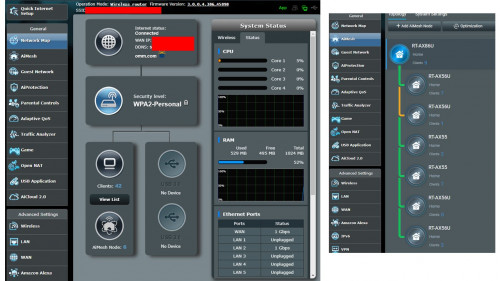 |
 |
Nov 2 2021, 10:30 AM
Show posts by this member only | IPv6 | Post
#14018
|

Senior Member
2,319 posts Joined: Mar 2010
|
QUOTE(siaush @ Oct 28 2021, 09:44 PM) Does the "HTTPS/SSL Certificate - Import Your Own Certificate" option only supports certificates issued by a well known external CA? Hi siaush,I am trying to upload a certificate and key combination generated by my own internal CA, but it seems like everytime after saving, it gets replaced with the "router.asus.com" default certificate. I have tried many different certs, i.e. signed by internal CA, standalone certs, and none worked. There are no errors in the logs other than these lines when the cert is uploaded: CODE Oct 28 21:34:10 rc_service: httpds 21216:notify_rc restart_ddns;restart_httpd;restart_webdav Oct 28 21:34:10 start_ddns: update WWW.DNSOMATIC.COM default@dnsomatic.com, wan_unit 0 Oct 28 21:34:10 inadyn[2377]: In-a-dyn version 2.8.1 -- Dynamic DNS update client. Oct 28 21:34:10 RT-AX56U: start https:8443 Oct 28 21:34:10 RT-AX56U: start httpd:80 Oct 28 21:34:10 httpd: Save SSL certificate...8443 Oct 28 21:34:10 httpd: mssl_cert_key_match : PASS Oct 28 21:34:10 WEBDAV Server: daemon is stoped However, if I tried to upload a Let's Encrypt cert generated for my other servers (with a different domain altogether), the cert is uploaded successfully and the router is able to use the cert to serve the Web UI over HTTPS. I am using RT-AX56U with official firmware version:3.0.0.4.386_45898. Anyone had any experience in successfully uploading a self-signed cert? Thanks in advance Our RD tested ok with other certificate, maybe you can have a look at our script in the router at this location /usr/sbin/gencert.sh Thank you Attached thumbnail(s) 
|
|
|
Nov 2 2021, 11:12 PM
Show posts by this member only | IPv6 | Post
#14019
|
|
Junior Member
246 posts Joined: Jan 2005
|
QUOTE(ASUSmy @ Nov 2 2021, 10:30 AM) Hi siaush, Hi ASUSmy, thank you for your reply.Our RD tested ok with other certificate, maybe you can have a look at our script in the router at this location /usr/sbin/gencert.sh Thank you I have looked into the script that you have provided, which gave me the idea to tinker around further. In conclusion, it seems like the router is not accepting a cert-key pair with Elliptic Curve key. My certs that were not working on the router, are having EC-secp384r1 key type. After resigning the certs with RSA-2048 key, they are now accepted by the router. Is it expected? I have attached the certs I used for testing here: Not working pairs: » Click to show Spoiler - click again to hide... « Working pairs: » Click to show Spoiler - click again to hide... « On the other hand, I also noticed that the router seems to strip out CA's certs from a fullchain certificate file. My router's cert is having the following signing chains: Root CA - Intermediate CA - Router Cert, since I only have the Root CA installed on my PC, and the router is only identifying itself using the Router's cert, it is showing as untrusted on my browser. Is this the expected behaviour too? or there are some ways for the router to identify itself with the fullchain certificate. I have tried using the fullchain certificate on my local NGINX web server, and my browser is able to identify and trust the Router's cert in that manner. Thanks and cheers! This post has been edited by siaush: Nov 3 2021, 12:05 PM |
|
|
Nov 3 2021, 12:55 AM
|
|
Junior Member
591 posts Joined: Dec 2009
|
Please advise, need a good recommendation for 3 floor house, i have three TPlink aimesh, does it works well (compatibility) with ASUS router?
|
| Change to: |  0.0424sec 0.0424sec
 0.61 0.61
 6 queries 6 queries
 GZIP Disabled GZIP Disabled
Time is now: 16th December 2025 - 06:16 AM |
 Quote
Quote
